
The Microsoft Ads MCP server that turns search intent into action
Give Claude, ChatGPT, or any AI agent a working connection to Microsoft Ads. Analyze Search and Performance Max, manage keywords and budgets, build campaigns, and approve every account change before it runs.


10,000+ marketers scaling with AI.
Trusted by marketing teams at












What you can do with Microsoft Ads MCP
Search intent moves quickly. Markifact gives your AI the reports, campaign controls, keyword tools, creative operations, and approval gates needed to turn fresh demand into accountable action.
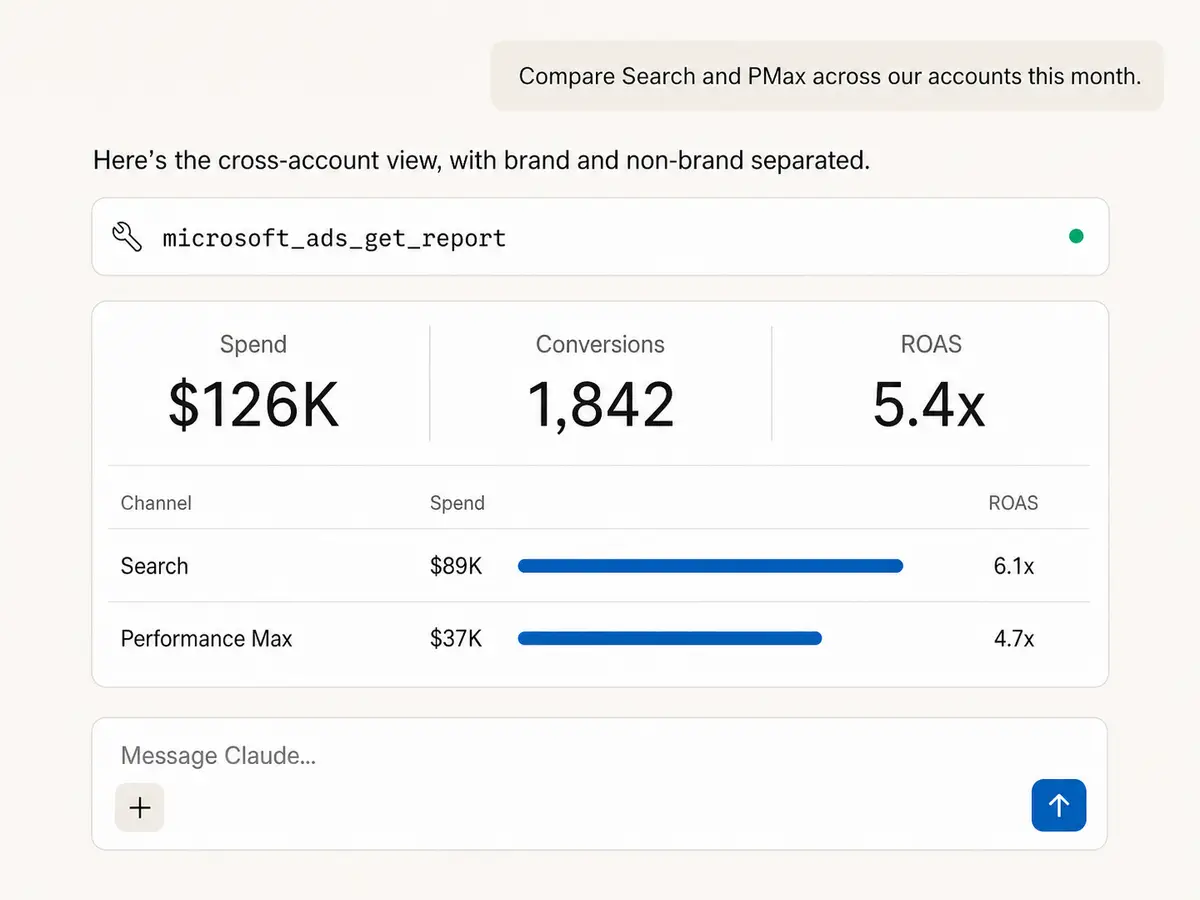
Interrogate every level of performance
Pull account, campaign, ad group, ad, keyword, and search-term results with selectable metrics, dimensions, filters, sorting, and date comparisons across Microsoft Ads accounts.
Audit what changed, not just what happened
Pair performance analysis with account history to trace edits, spot operational drift, and explain why a campaign moved before proposing the next action.
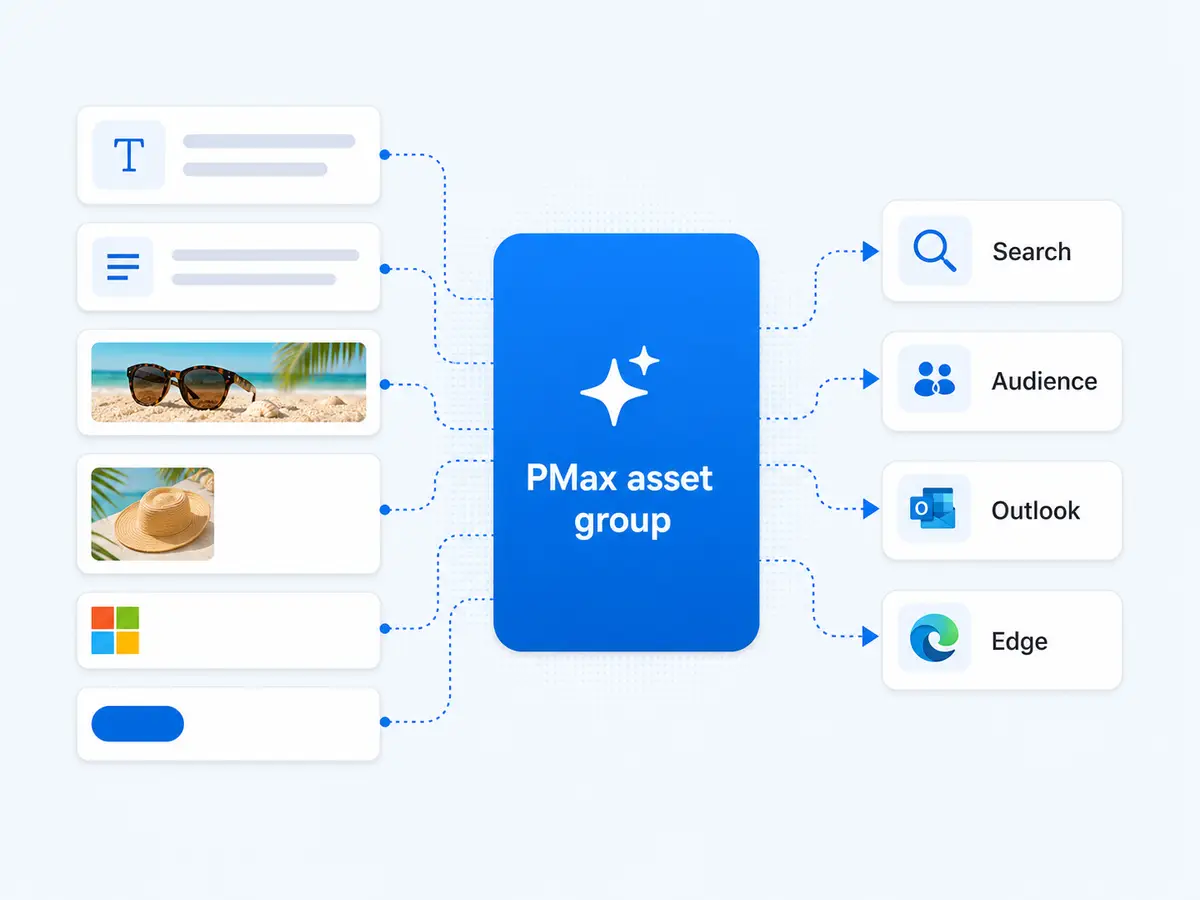
Build Search and Performance Max
Create campaigns, ad groups, and Performance Max asset groups with locations, budgets, bidding, conversion goals, schedules, and the assets needed to launch responsibly.
Ship complete search creative
Create responsive search ads plus sitelinks, callouts, structured snippets, and image extensions, then update the approved versions without rebuilding the campaign by hand.
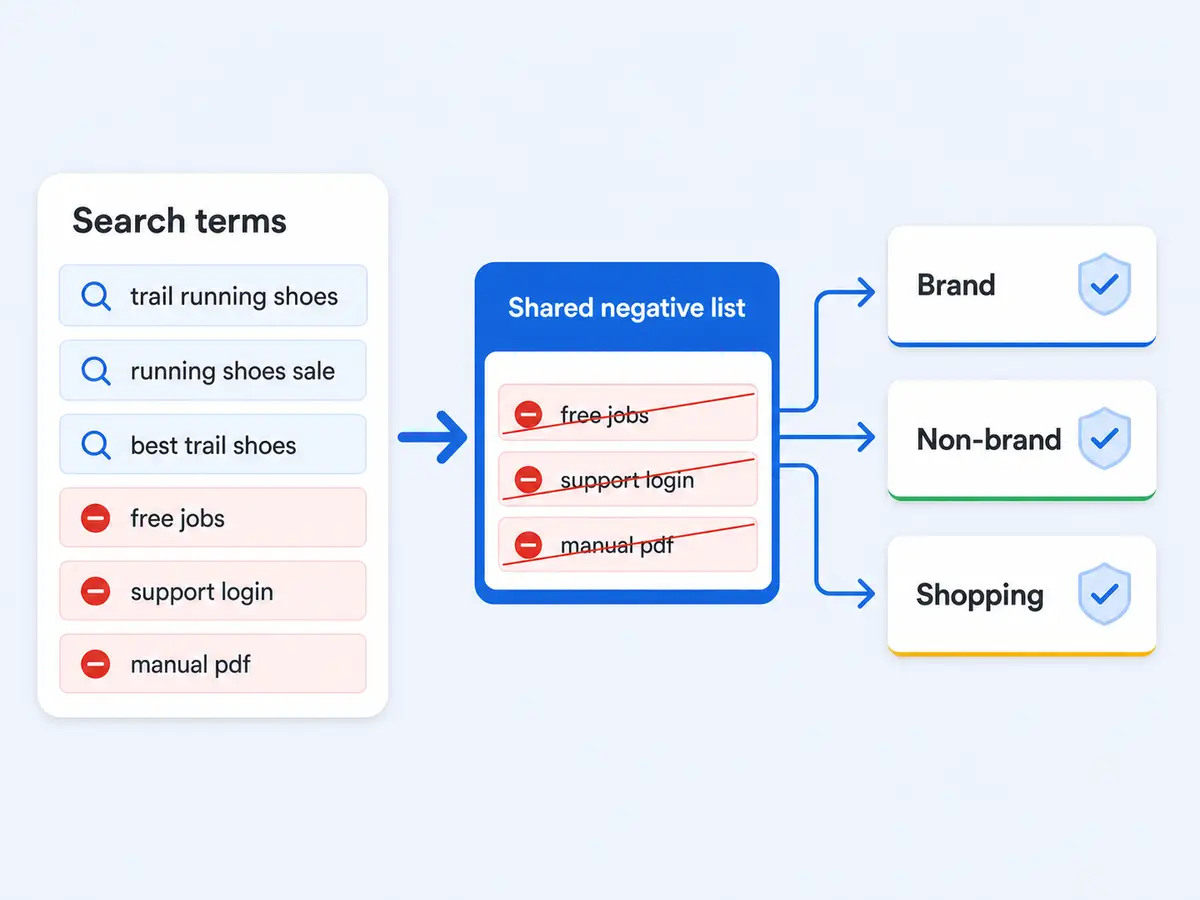
Control queries, bids, and exclusions
Add keywords, tune keyword and ad group bids, pause weak terms, and manage campaign, ad group, or shared negative keyword lists from the same conversation.
Apply guardrails across accounts
Reuse negative keyword and website exclusion lists, standardize campaign names, and adjust budgets or statuses only after Markifact presents the exact change for approval.
Use Microsoft Ads in your favorite AI.
Plus your whole marketing stack
One MCP connection brings Microsoft Ads, your wider marketing stack, and your preferred AI assistant into the same workflow.





























Set up in minutes
Connect Microsoft Advertising, add Markifact to your AI client, and move from performance questions to reviewed account actions in a few minutes.
Connect Microsoft Ads
Sign in to Markifact and authorize the Microsoft Advertising accounts you manage. Markifact handles the secure connection and keeps your account selection ready for future sessions.
Markifact is available in the Claude connector directory:
Connect in Claude Open the listing and click Connect to add Markifact to Claude.
Connect your AI assistant
Pick Claude, ChatGPT, Cursor, or any MCP-compatible assistant and copy the setup. One URL or command and you're connected to Markifact.
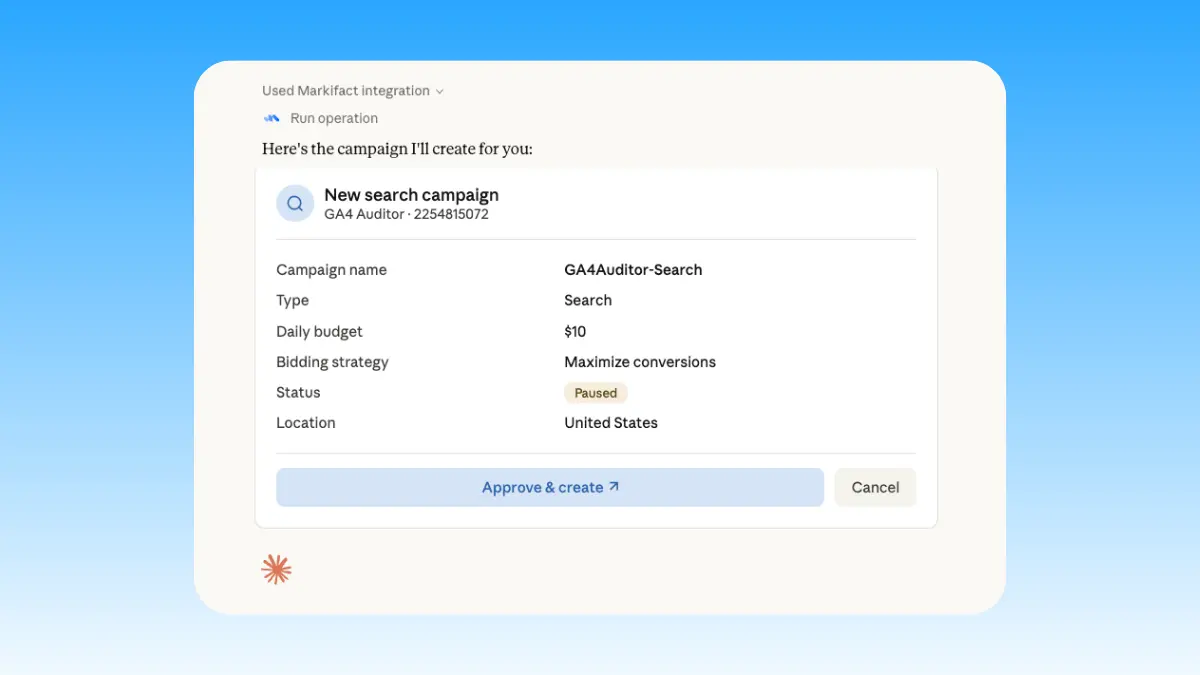
Start managing ads
Ask for a cross-account report, prepare a Search or Performance Max campaign, clean wasteful queries, or adjust a budget. Markifact pauses every write for your decision.
Microsoft Ads MCP prompt examples
Start with a live account question. These prompts show how Markifact can research demand, prepare campaigns, explain performance, and queue controlled optimizations.
Prepare Search and Performance Max campaigns for approval.
Create a paused Search campaign for emergency plumbing in these locations with a $300 daily budget.
Build three ad groups from this keyword map and add the keywords with conservative starting bids.
Create two responsive search ads per ad group with these approved headlines and descriptions.
Create a paused Performance Max campaign and an asset group using these images, headlines, and conversion goals.
What a session actually looks like
A single request can move from search-term diagnosis to a prepared account change without hiding the decision. Here, Claude finds wasted spend, builds a negative keyword action, and stops at approval.
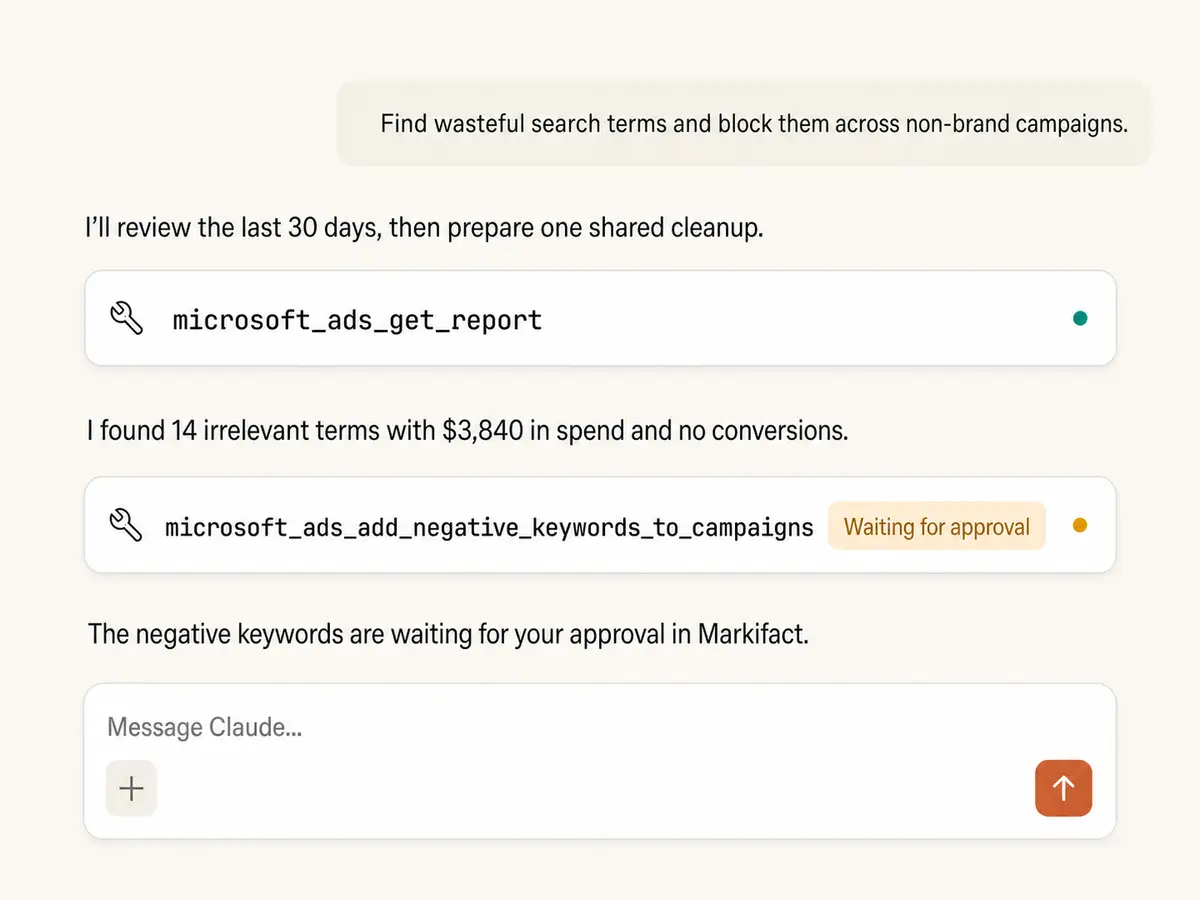
Example session. Claude uses Markifact's real Microsoft Ads operations (microsoft_ads_get_report, microsoft_ads_add_negative_keywords_to_campaigns); the keyword change stops before execution and waits for your approval.
Which Microsoft Ads MCP option is right for you?
Microsoft announced its official Advertising MCP server on June 17, 2026, with an open pilot focused on read-only reporting and audits. Community servers are also available. Markifact adds a managed, writable layer where every account change waits for approval.
Official Microsoft Ads MCP
First-party and read-only in open pilot
Choose it if
- You want Microsoft's governed connection for reporting and audits
- You can wait for pilot access and do not need campaign writes yet
Open-source MCPs
Self-hosted code with variable coverage
Choose it if
- You want to inspect or modify servers such as mcp-bing-ads
- You can own credentials, hosting, safeguards, and API maintenance
Markifact
Managed reporting and approval-based execution
Choose it if
- You need Search and PMax changes, not reporting alone
- You manage several accounts and want every write reviewed
- You want Microsoft Ads beside the rest of your marketing stack
| Capability | Markifact | Official Microsoft Ads MCP | Open-source MCPs |
|---|---|---|---|
| Setup | Hosted OAuth connection with no local server | Open-pilot access and MCP configuration guidance | Local install, Microsoft app credentials, and API setup |
| Availability | Available now through Markifact | Announced June 17, 2026; expanding to an open pilot | Community packages are installable today |
| Best fit | Marketers and agencies that need reporting plus execution | Teams invited to the first-party read-only pilot | Technical teams comfortable running their own connector |
| Reporting | Custom account, campaign, ad group, ad, keyword, and query reports | Read-only campaign data, metrics, filters, and audits at launch | Varies from core performance reports to broader coverage |
| Multiple accounts | Reusable account selection for cross-account analysis | Pilot examples include audits across large account portfolios | Depends on the server's authentication design |
| Write actions | Search, PMax, ads, assets, keywords, bids, budgets, and statuses | Read-only in the June 2026 open-pilot announcement | Writable coverage varies by project |
| Approval controls | Every mutation waits for explicit approval | Not applicable to the announced read-only pilot | Dry runs or safeguards vary and require evaluation |
| Performance Max | Create campaigns and asset groups, list and update asset groups | PMax reporting and audit examples are highlighted | Support is inconsistent across community servers |
| Search controls | Keywords, bids, negatives, shared lists, and search creative assets | Query and audit support at launch, not account changes | Common in fuller Bing Ads MCP projects |
| Beyond Microsoft Ads | Google Ads, Meta Ads, LinkedIn Ads, TikTok Ads, GA4, and more | Microsoft Advertising only, designed to coexist with other MCPs | Usually Microsoft Ads only |
| Maintenance | Hosting, auth, schema changes, and errors handled for you | Handled by Microsoft during the pilot and future release | Your team owns deployment, credentials, and upgrades |
More MCP servers
All MCP serversGoogle Ads MCP
Use Google Ads inside Claude, ChatGPT, and other MCP clients for audits, reporting, optimization, and campaign actions.
LinkedIn Ads MCP
Use LinkedIn Ads inside MCP clients for B2B reporting, campaign creation, lead-focused creative, targeting, and approval-based optimization.
Meta Ads MCP
Use Meta Ads and Facebook Ads workflows inside MCP clients for ad sets, creatives, reporting, and Advantage+ workflows.
TikTok Ads MCP
Use TikTok Ads inside MCP clients for reporting, Spark Ads from organic posts, Smart+ campaigns, and Ads Library research.
Frequently Asked Questions
Have a different question? Reach out to Markifact support team.
Turn Microsoft Ads insights into approved action
Connect your accounts, investigate Search and Performance Max, and prepare campaign changes from Claude, ChatGPT, or any MCP-compatible client.