
The Pinterest Ads MCP server that goes beyond read-only
Connect Pinterest Ads to Claude, ChatGPT, or any AI agent. Report on campaigns and saves, create Pin ads, manage budgets, and approve every change before it touches your account.


10,000+ marketers scaling with AI.
Trusted by marketing teams at












What you can do with Pinterest Ads MCP
Pinterest is a planning platform with its own economics: saves compound, seasons start early, and visuals carry the sale. Markifact puts all of it in your AI client.
Report across advertisers
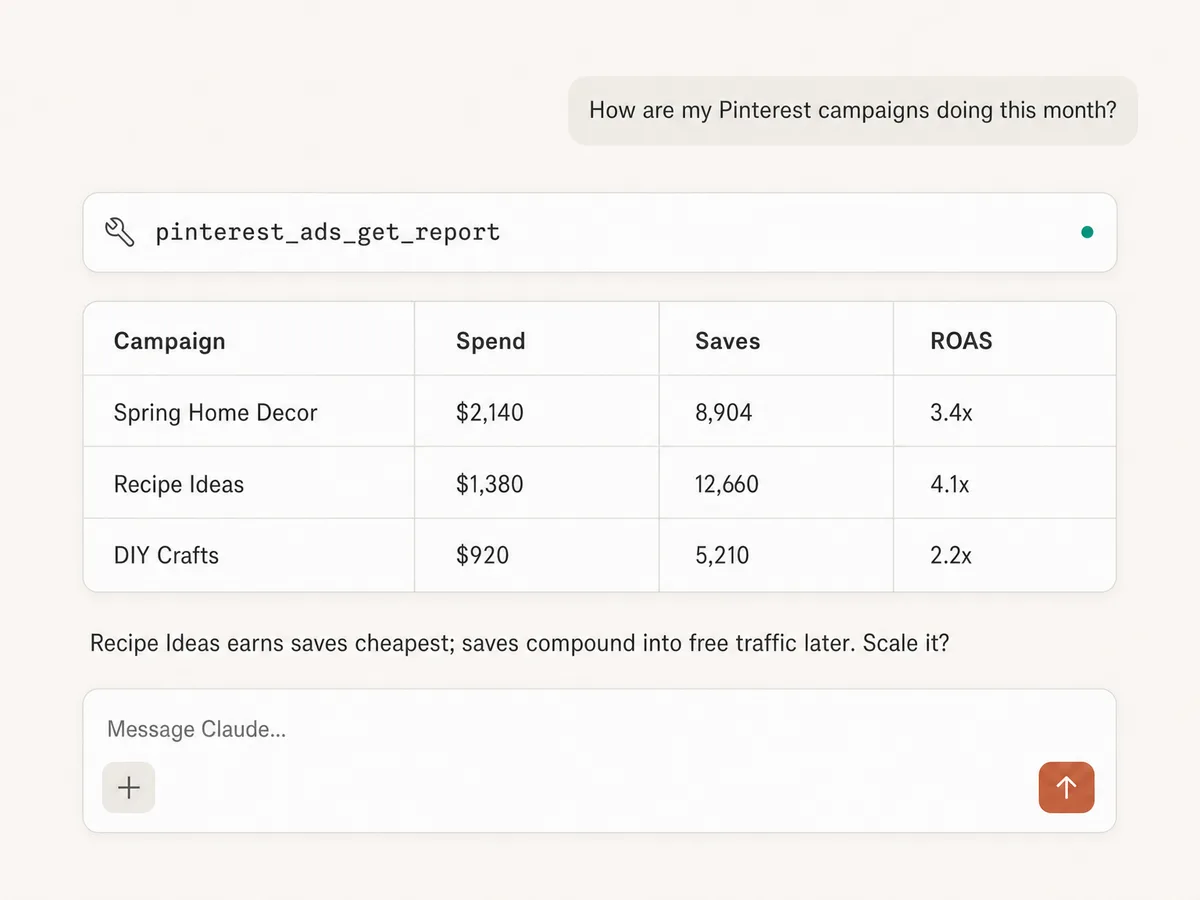
Pull campaign, ad group, and ad performance with the metrics that matter on Pinterest: spend, impressions, saves, Pin clicks, and ROAS, filtered and grouped how you ask.
Query the exact schema
List the report fields Pinterest supports before querying, so the AI asks for data the Ads API can actually return.
Create Pin ads
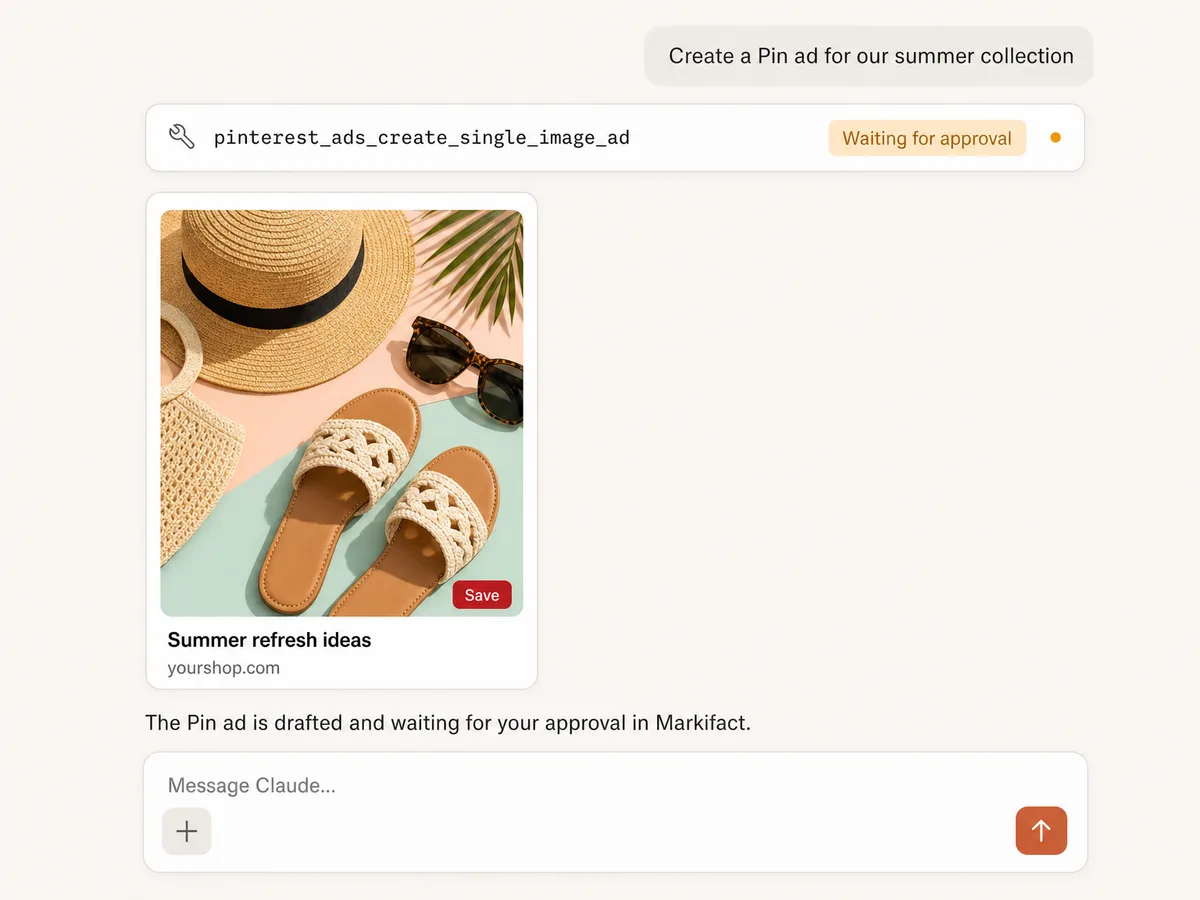
Draft single image Pin ads with creative, titles, and destination links from your AI client. Every ad waits for your approval before it exists in your account.
Manage campaigns and budgets
Adjust campaigns, ad groups, and budgets through approval-gated write operations, so scaling a winner is a sentence, not a dashboard session.
Plan seasons months ahead
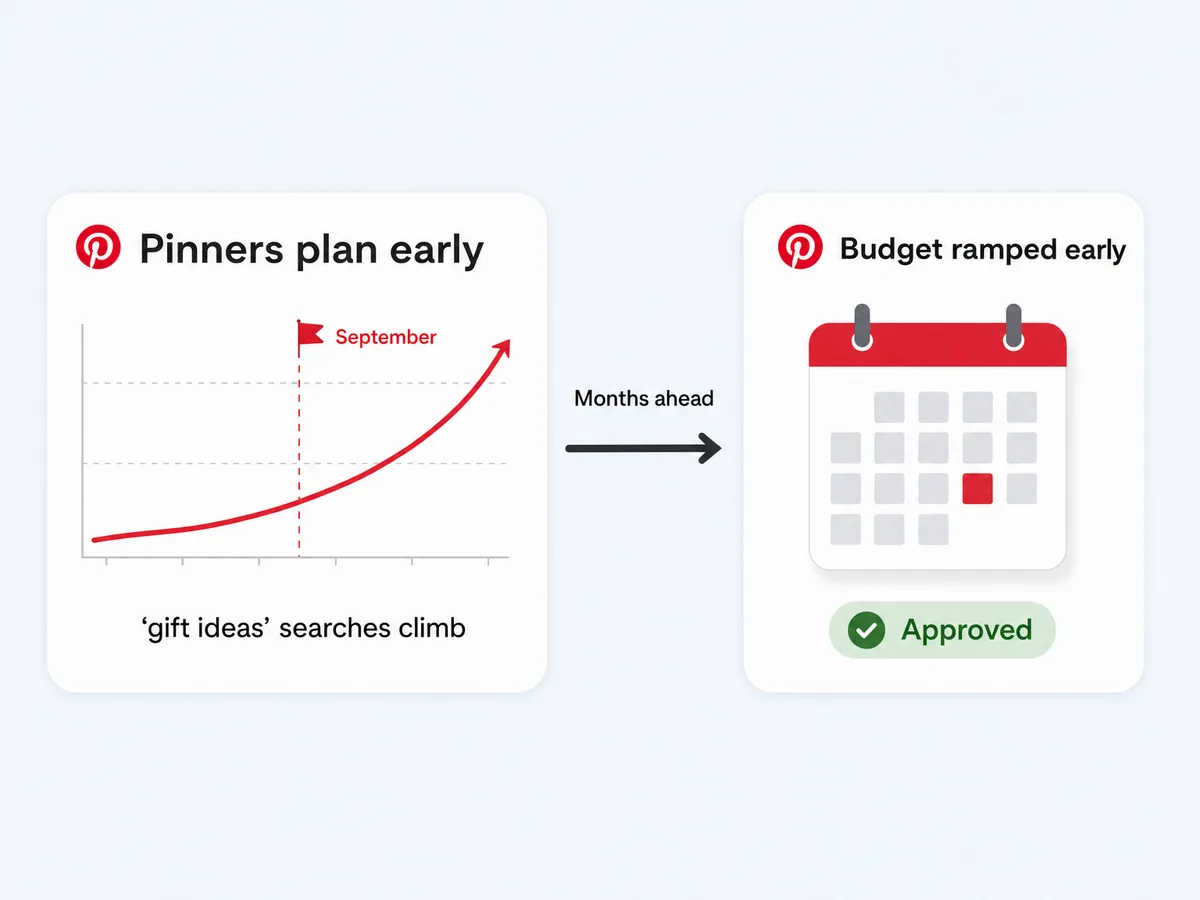
Pinners plan earlier than any other platform's users: holiday searches start climbing in September. Spot the ramp in your report data and prepare campaigns before competitors wake up.
Work across accounts
Connect several Pinterest Ads accounts and switch between them mid-conversation, built for agencies and multi-brand teams.
Use Pinterest Ads in your favorite AI.
Plus your whole marketing stack
One MCP server. Pinterest Ads, the rest of your stack, and the AI assistant you already use.





























Set up in minutes
No developer app, no API review, no server hosting. Three steps and you're managing Pinterest Ads from your AI assistant.
Connect Pinterest Ads
Sign up for Markifact and connect your Pinterest advertiser account with one-click OAuth. No developer app, no API application.
Markifact is available in the Claude connector directory:
Connect in Claude Open the listing and click Connect to add Markifact to Claude.
Connect your AI assistant
Pick Claude, ChatGPT, Cursor, or any MCP-compatible assistant and copy the setup. One URL or command and you're connected to Markifact.
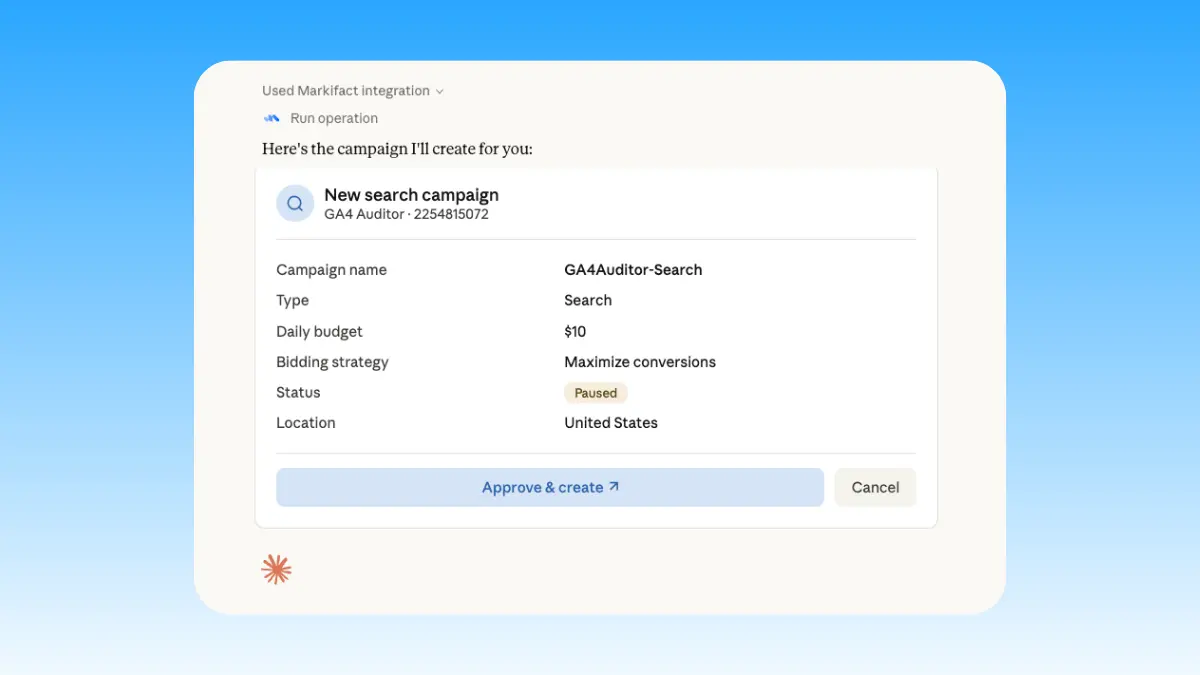
Start managing ads
Pull reports, draft Pin ads, and move budgets in plain English. Every write waits for your approval.
Pinterest Ads MCP prompt examples
Use Markifact MCP to research, launch, report, and optimize Pinterest Ads from Claude, ChatGPT, Cursor, or any MCP-compatible client.
Draft Pin ads and campaigns, then approve them.
Create a Pin ad for this product with a seasonal title and our landing page.
Draft a fresh variant of my best performing Pin.
Set up the holiday campaign now so it ramps in September.
Create Pin ads for our three best sellers, paused for my review.
What a session actually looks like
Scaling a winning Pin in Claude: the report finds it, a fresh variant gets drafted, and the ad waits for your sign-off.
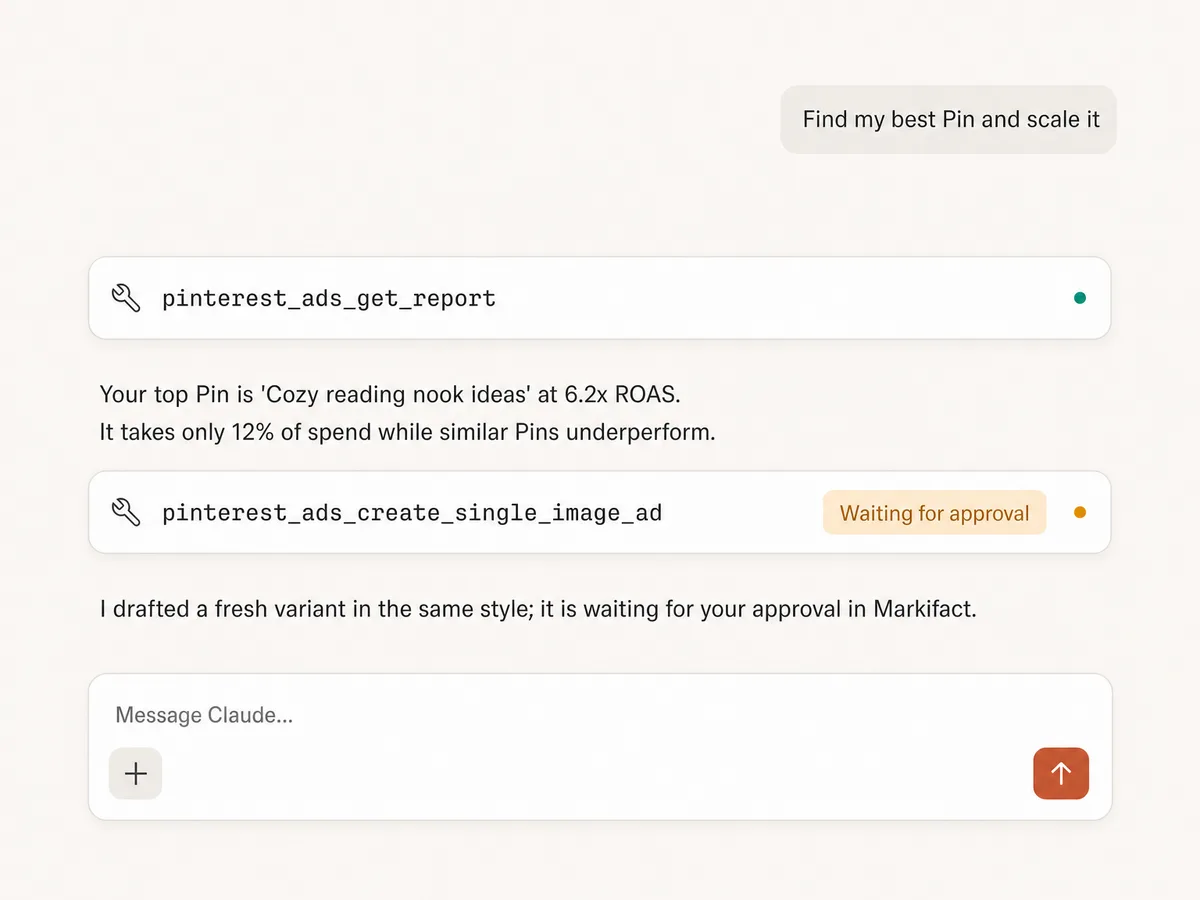
Example session. Claude uses Markifact's real Pinterest Ads tools (pinterest_ads_get_report, pinterest_ads_create_single_image_ad); write operations always stop for your approval.
Which Pinterest Ads MCP option is right for you?
Pinterest shipped its official MCP server in June 2026, read-only at launch; open-source projects exist, and Markifact is the managed MCP layer built for marketers and agencies. Here's how to pick.
Official Pinterest MCP
First-party, free, read-only
Choose it if
- You want first-party campaign reporting and Pinterest's Taste Graph signals
- You're fine reading data in AI while every change stays manual
Open-source MCPs
Free, self-hosted, full control
Choose it if
- You're technical and can manage Pinterest API credentials
- You want to own the hosting, the code, and the maintenance
Markifact
Managed, multi-platform, approval-based
Choose it if
- You want to create Pin ads and move budgets, not just read reports
- You run multiple accounts or clients
- You want Pinterest next to Google, Meta, and TikTok in the same chat, with approval before changes
| Capability | Markifact | Official Pinterest MCP | Open-source MCPs |
|---|---|---|---|
| Setup | Managed setup with OAuth, live today | First-party access, launched June 17, 2026 | Requires hosting and Pinterest API credentials |
| Availability | Generally available to any advertiser | New; evolving with alpha partners like PMG, Dentsu, and Pacvue | Varies by project; many are unmaintained |
| Best for | Marketers, agencies, and teams managing real ad work | Advertisers who want first-party reporting and Taste Graph signals | Developers who want full control |
| Pinterest Ads reporting | Campaign, ad group, and ad level with custom metrics, dimensions, and filters | Campaign performance, analytics, and keyword insights | Usually a few preset report shapes |
| Write actions | Create Pin ads and manage campaigns and budgets | Read-only at launch; changes stay manual | Almost always read-only |
| Approval controls | Every write action waits for your approval | Not applicable while read-only | You need to build this yourself |
| Creative | Single image Pin ads with titles and destination links | None at launch | Rarely supported |
| Multiple ad accounts | Built for multi-account and agency workflows | Tied to your Pinterest login | One account per configuration |
| Beyond Pinterest Ads | Google Ads, Meta Ads, TikTok Ads, GA4, Sheets, Slack, and more | Pinterest only | Pinterest only |
| Maintenance | Handled by Markifact | Handled by Pinterest | You maintain hosting, auth, API changes, and errors |
| Who should choose it | Teams who want reporting plus execution now | Teams betting on Pinterest's first-party roadmap | Technical teams who want to build and maintain their own server |
Frequently Asked Questions
Have a different question? Reach out to Markifact support team.
More MCP servers
All MCP servers
Pinterest MCP
Manage organic Pinterest boards and Pins, publish image, carousel, and video content, and report on saves, clicks, and audience performance.
TikTok Ads MCP
Use TikTok Ads inside MCP clients for reporting, Spark Ads from organic posts, Smart+ campaigns, and Ads Library research.

Reddit Ads MCP
Use Reddit Ads inside MCP clients to report on performance and create or manage campaigns, ad groups, posts, ads, audiences, budgets, targeting, and delivery with approvals.
Meta Ads MCP
Use Meta Ads and Facebook Ads workflows inside MCP clients for ad sets, creatives, reporting, and Advantage+ workflows.
Start using Pinterest Ads in Claude today
Connect your Pinterest advertiser account and start reporting, drafting Pin ads, and managing budgets from Claude, ChatGPT, or any MCP client.