
The Snapchat Ads MCP that reads and writes
Connect Snapchat Ads to Claude, ChatGPT, or any AI agent. Report on performance, create complete campaign structures and every major Snap creative format, then approve each write before it runs.


10,000+ marketers scaling with AI.
Trusted by marketing teams at












What you can do with Snapchat Ads MCP
Move from reporting to execution in the same conversation: inspect performance, build campaigns and ad squads, create Snap-native ads, and approve the exact changes you want to run.
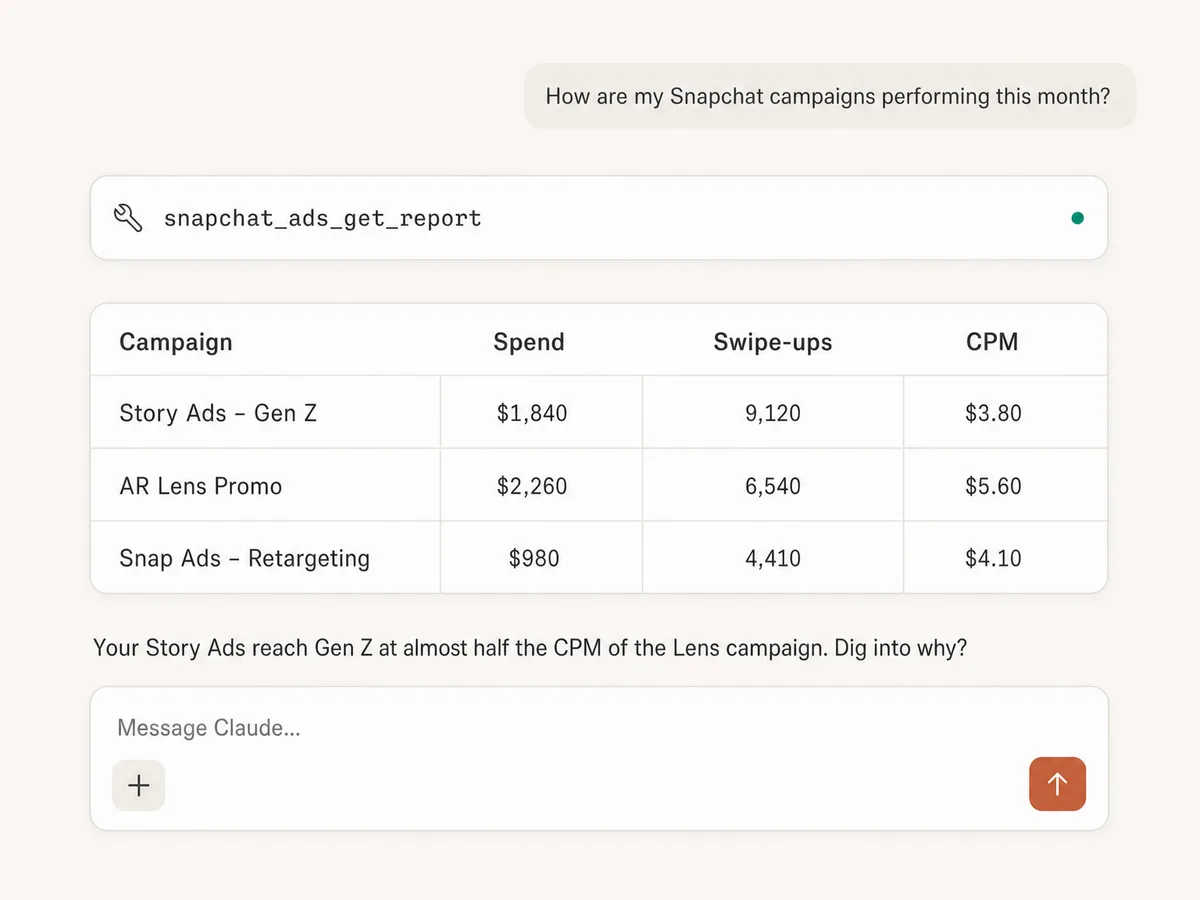
Report across ad accounts
Pull campaign, ad squad, and ad performance with the metrics Snap advertisers live on: spend, impressions, swipe-ups, CPM, and conversions, filtered and grouped how you ask.
Query the exact schema
List the report fields Snapchat supports before querying, so the AI asks for data the Marketing API can actually return.
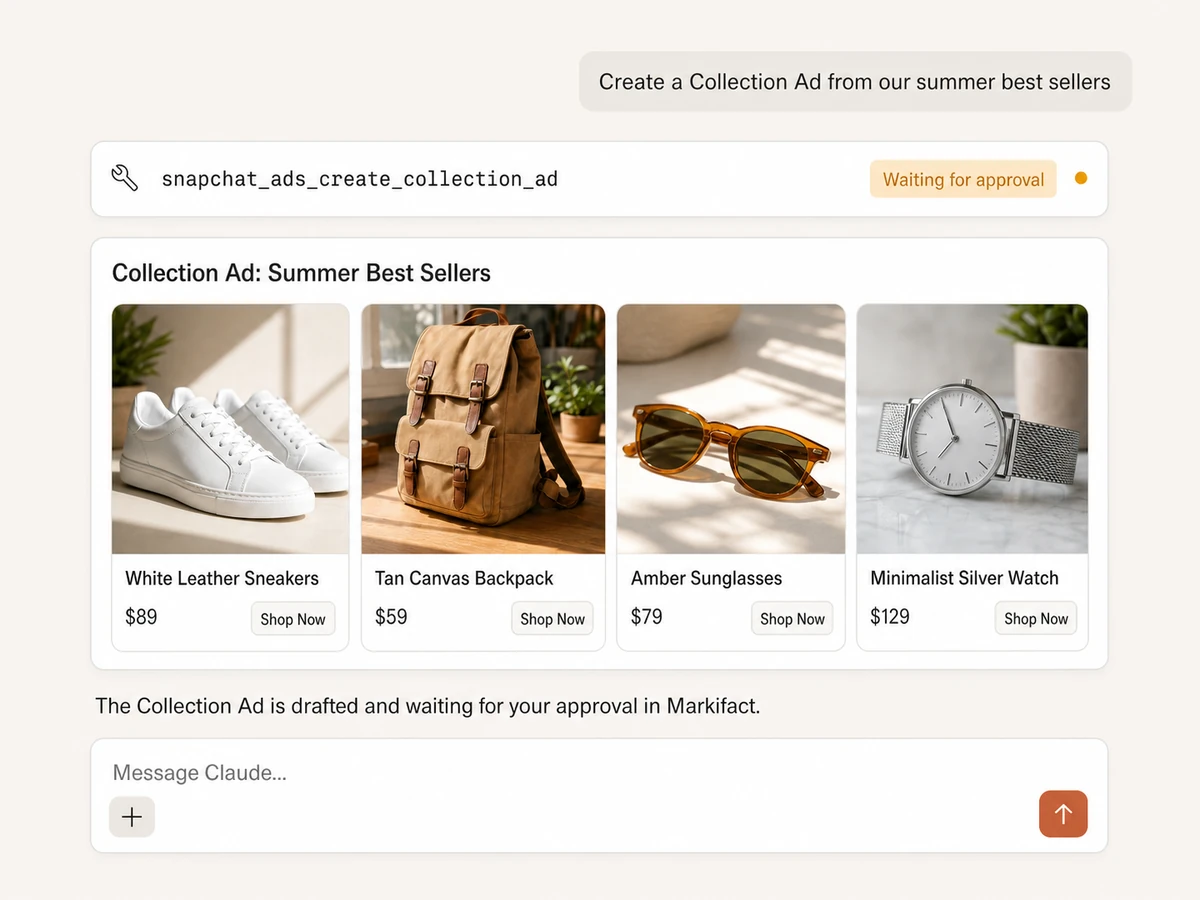
Create campaigns and ad squads
Build complete campaign structures with objectives, budgets, optimization goals, targeting, placements, schedules, and Smart Budgets. Keep new work paused until you approve it.
Manage delivery and budgets
Rename, pause, activate, delete, or update campaigns, ad squads, and ads. Change budgets and advanced settings individually or in bulk, with every write waiting for approval.
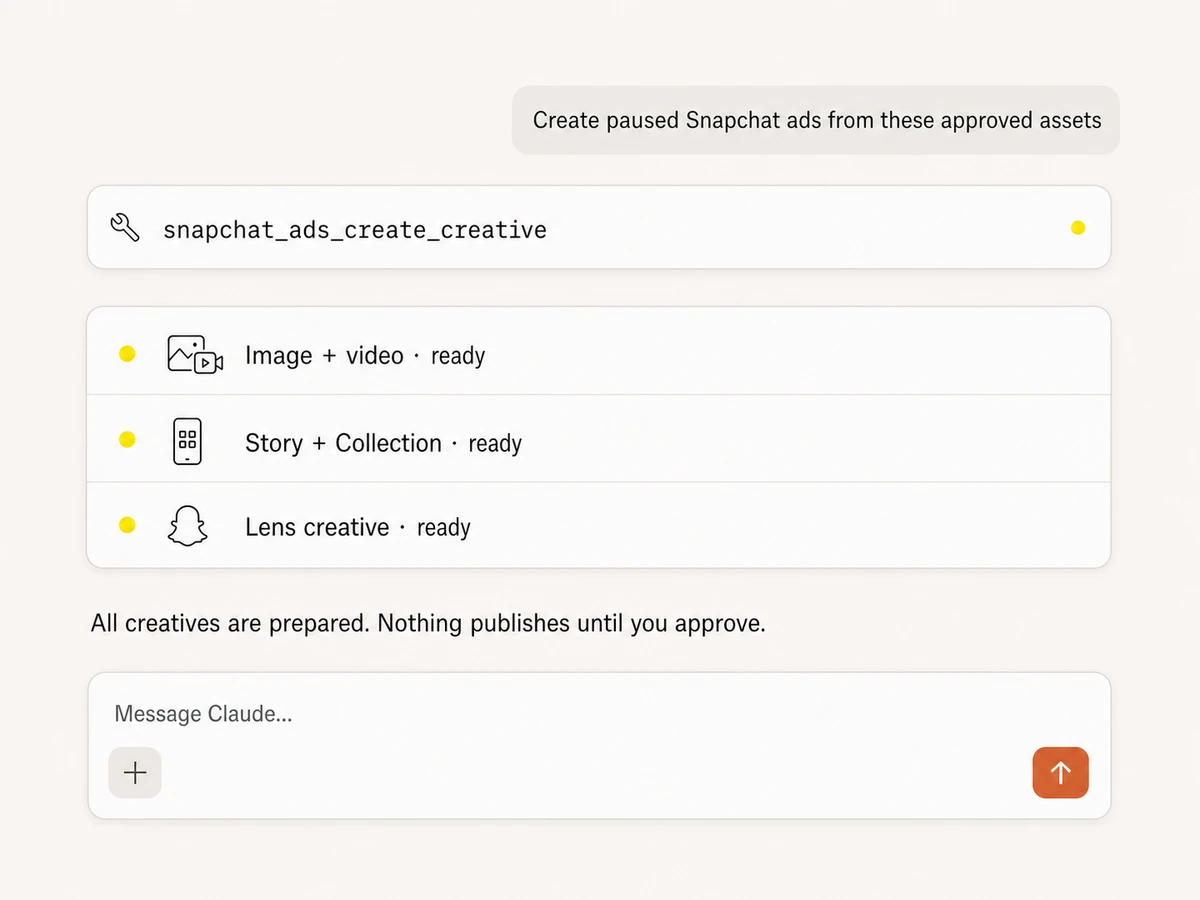
Create every major Snap ad format
Create single-image, video, Story, and Collection ads with dedicated tools. Build Lens, Call, Message, Lead Generation, Reminder, and other advanced creative payloads too.
Upload media and approve safely
Upload image and video assets, reuse existing creatives, or attach a creative to a new ad. Nothing changes in Snapchat until you review and approve the exact write in Markifact.
Use Snapchat Ads in your favorite AI.
Plus your whole marketing stack
One MCP server. Snapchat Ads, the rest of your stack, and the AI assistant you already use.





























Set up in minutes
No developer app, no API credentials, no server hosting. Three steps and you're creating, managing, and reporting on Snapchat Ads from your AI assistant.
Connect Snapchat Ads
Sign up for Markifact and connect your Snapchat ad account with one-click OAuth. No developer app, no Marketing API registration.
Markifact is available in the Claude connector directory:
Connect in Claude Open the listing and click Connect to add Markifact to Claude.
Connect your AI assistant
Pick Claude, ChatGPT, Cursor, or any MCP-compatible assistant and copy the setup. One URL or command and you're connected to Markifact.
Report, create, and approve
Query performance, build campaigns and creatives, and update budgets or delivery in plain English. Every Snapchat write waits for your approval.
Snapchat Ads MCP prompt examples
Use Markifact MCP to report, build, create, and optimize Snapchat Ads from Claude, ChatGPT, Cursor, or any MCP-compatible client.
Campaigns and ad squads, structured from a prompt.
Create a paused website-conversions campaign with a $250 daily budget.
Create an ad squad targeting US adults 18-34 with automatic placements.
Build a Smart Budget campaign with daily minimum and maximum constraints.
Create three ad squads for prospecting, retargeting, and lookalikes.
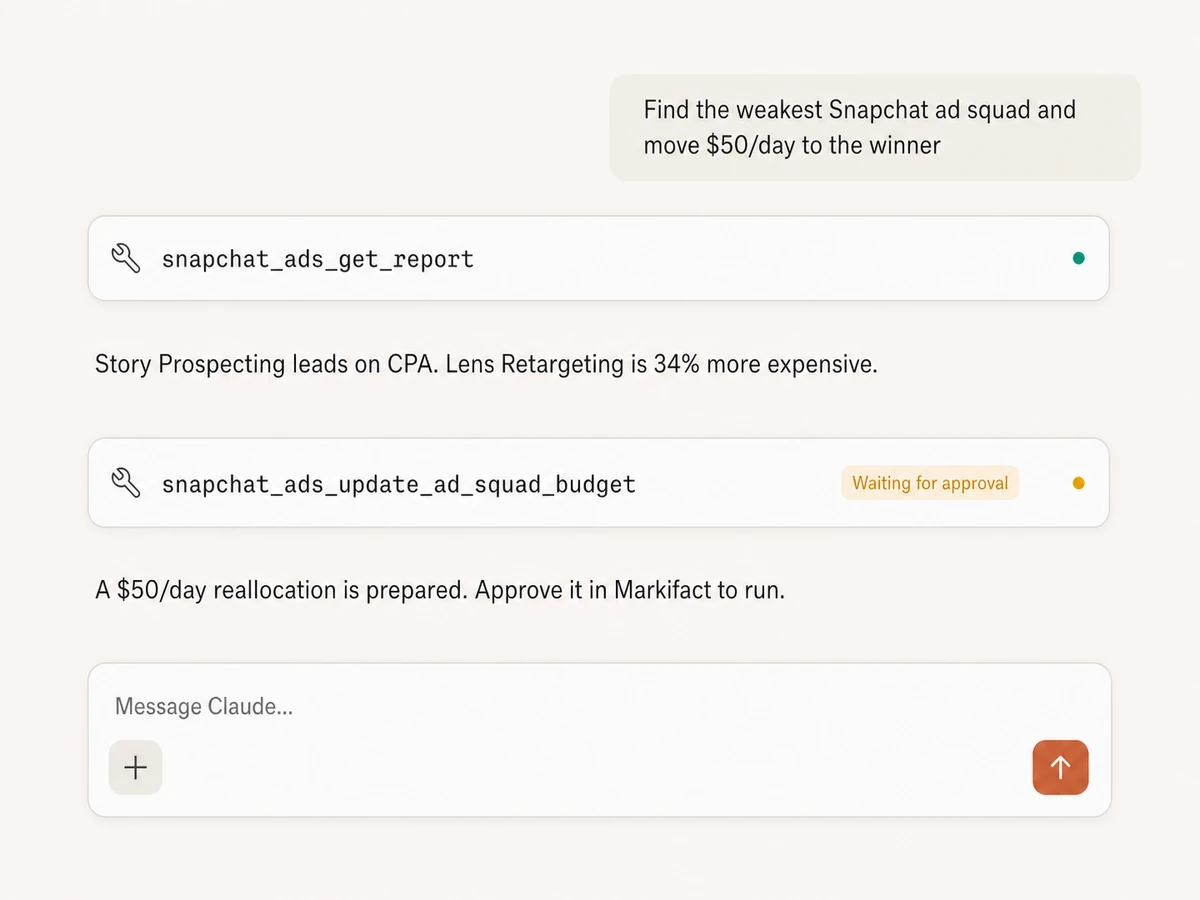
What a session actually looks like
Claude finds the performance gap, prepares the exact Snapchat budget change, and stops before execution so you can review it.
Example session. Claude uses Markifact's real Snapchat reporting and budget tools; the write remains pending until you approve it.
Which Snapchat Ads MCP option is right for you?
Snap announced its official MCP server in June 2026 as part of its agentic ads suite, open-source connectors exist, and Markifact is the managed MCP layer built for marketers and agencies. Here's how to pick.
Official Snap MCP
First-party, announced June 2026
Choose it if
- You want first-party access and can wait for the rollout to mature
- You're betting on Snap's agentic ads suite for campaign automation
Open-source MCPs
Free, self-hosted, full control
Choose it if
- You're technical and can manage Snapchat Marketing API credentials
- You want to own the hosting, the code, and the maintenance
Markifact
Managed read/write, multi-platform, one OAuth
Choose it if
- You want to create and manage full Snapchat campaign structures from AI
- You need image, video, Story, Collection, and Lens workflows
- You want every write to stop for human approval
- You want Snapchat compared against TikTok, Meta, and Google in the same chat
| Capability | Markifact | Official Snap MCP | Open-source MCPs |
|---|---|---|---|
| Setup | Managed setup with OAuth, live today | Announced June 18, 2026 as part of Snap's agentic ads suite | Requires hosting and Snapchat Marketing API credentials |
| Availability | Full read and write access, live today | Rolling out; details still emerging | Varies by project; several are read-only connectors |
| Best for | Marketers and agencies creating, managing, and reporting on real ad work | Advertisers betting on Snap's first-party agentic roadmap | Developers who want full control |
| Snapchat Ads reporting | Campaign, ad squad, and ad level with custom metrics, dimensions, and filters | First-party campaign data access for AI agents | Usually a few preset report shapes |
| Campaign and ad squad creation | Objectives, budgets, targeting, placements, optimization, schedules, and Smart Budgets | Campaign creation is part of the stated roadmap | Mixed; depends on connector coverage |
| Ad formats | Single image, video, Story, Collection, Lens, and advanced creative types | Details still emerging | Often limited to reporting or basic ad types |
| Write actions | Create, rename, update, pause, activate, delete, and manage budgets with approval | Campaign creation and optimization is the stated goal | Mixed; some manage campaigns, most only read |
| Write safety | Every write is approval-gated; new work can be created paused and advanced updates support dry runs | Depends on the final product workflow | Depends on your implementation |
| Cross-channel comparison | Snapchat next to TikTok, Meta, and Google Ads in one conversation | Snapchat only | Snapchat only |
| Multiple ad accounts | Built for multi-account and agency workflows | Tied to your Snapchat login | One account per configuration |
| Beyond Snapchat Ads | Google Ads, Meta Ads, TikTok Ads, GA4, Sheets, Slack, and more | Snapchat only | Snapchat only |
| Maintenance | Handled by Markifact | Handled by Snap | You maintain hosting, auth, API changes, and errors |
| Who should choose it | Teams who want to create, manage, and report on Snap next to the rest of their stack | Teams waiting on Snap's first-party agentic tools | Technical teams who want to build and maintain their own server |
Frequently Asked Questions
Have a different question? Reach out to Markifact support team.
More MCP servers
All MCP serversTikTok Ads MCP
Use TikTok Ads inside MCP clients for reporting, Spark Ads from organic posts, Smart+ campaigns, and Ads Library research.
Meta Ads MCP
Use Meta Ads and Facebook Ads workflows inside MCP clients for ad sets, creatives, reporting, and Advantage+ workflows.

Spotify Ads MCP
Use Spotify Ads inside MCP clients for reporting, campaigns, ad sets, listener targeting, budgets, and audio, video, display, or carousel ads with approval-gated writes.
Google Ads MCP
Use Google Ads inside Claude, ChatGPT, and other MCP clients for audits, reporting, optimization, and campaign actions.
Build and optimize Snapchat Ads in Claude
Connect Snapchat Ads for full reporting, campaign creation, Snap-native creative workflows, and approval-gated management from any MCP client.