
Google Trends MCP for search demand
Compare search interest, find seasonality and regional demand, discover rising queries, and turn demand signals into a marketing plan.


10,000+ marketers scaling with AI.

Trusted by marketing teams at












What you can do with Google Trends MCP
Turn relative search interest into clearer decisions about timing, markets, messages, and content without manually reading every chart.
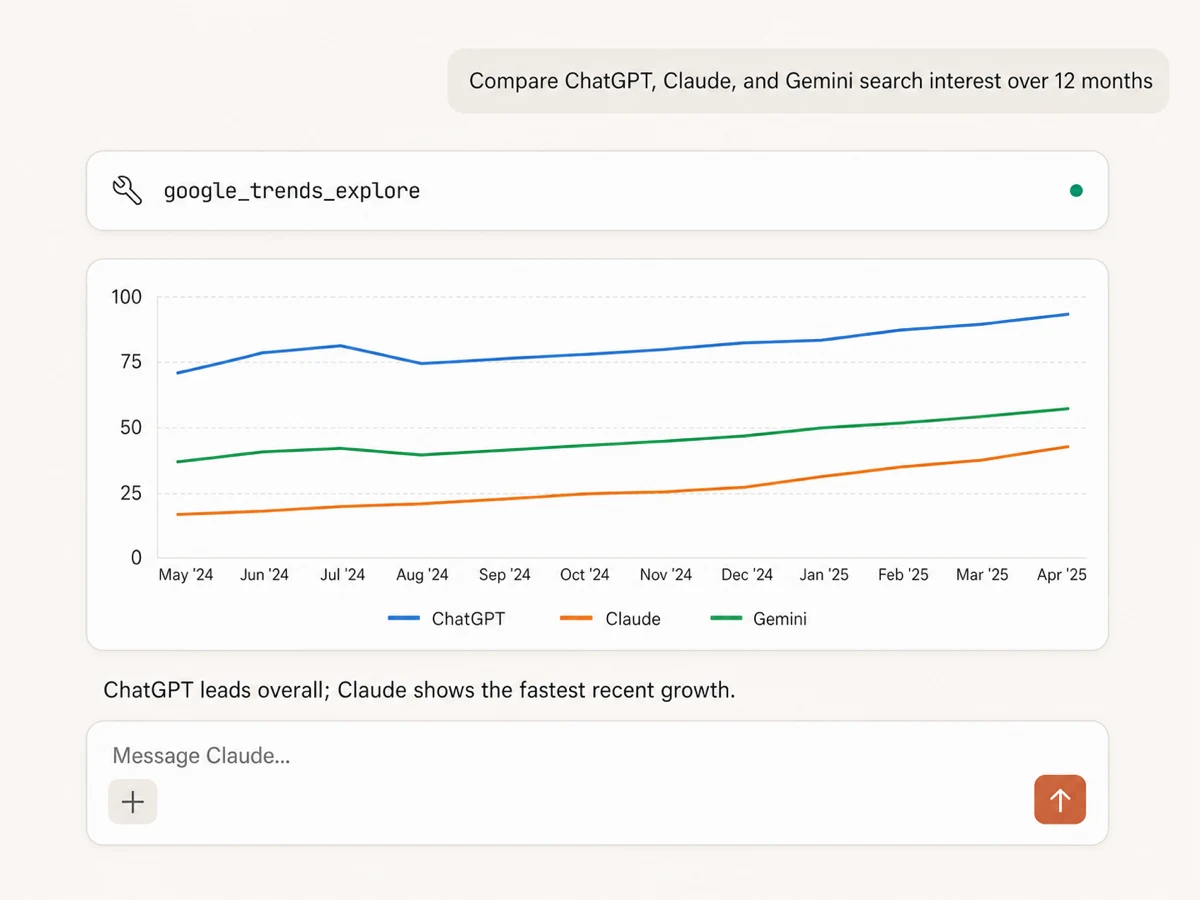
Compare demand over time
Compare up to five terms in one request and see how their relative search interest changes across an hour, a year, five years, all available history, or a custom date range.
Find seasonality and momentum
Ask the AI to flag recurring peaks, recent acceleration, demand declines, and the moments when one term starts gaining on another.
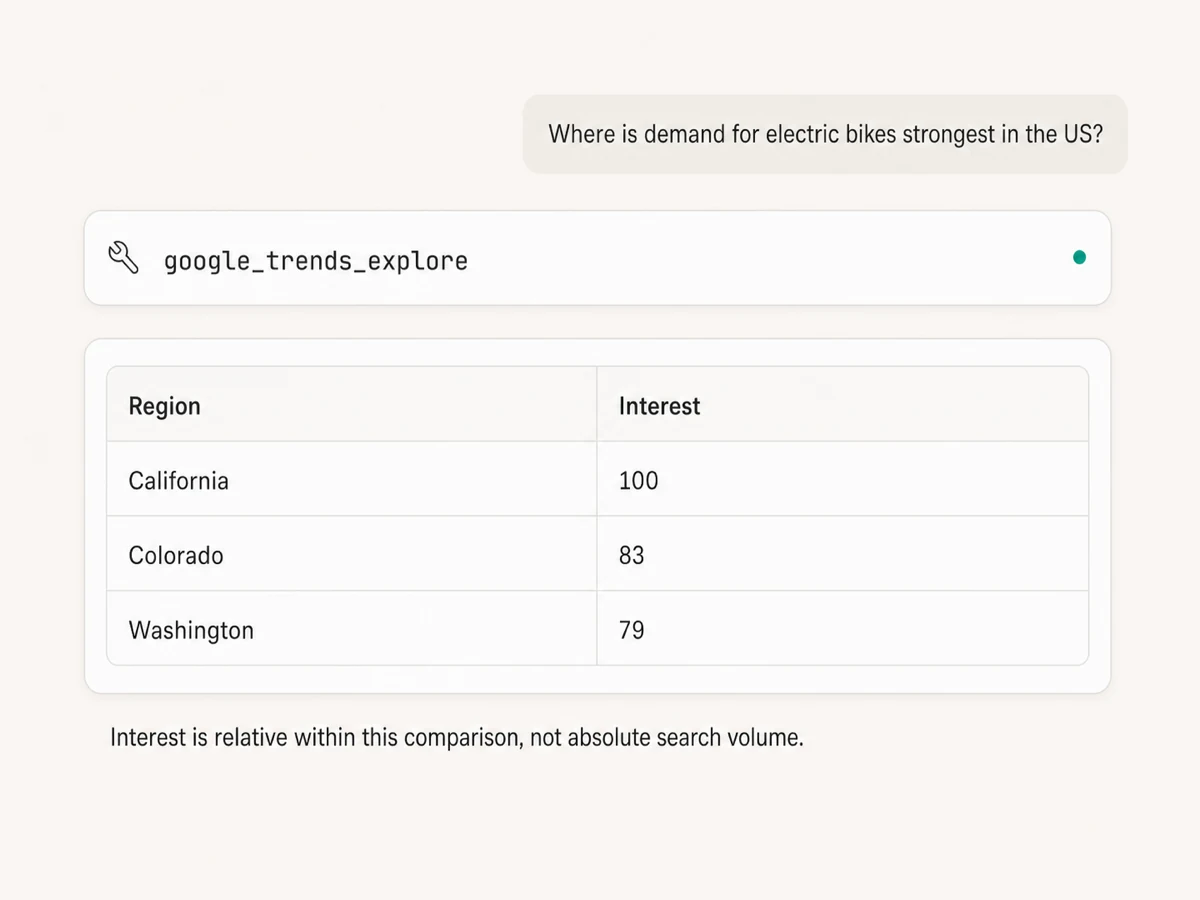
See where demand is strongest
Break interest down by country, region, metro, or city to find the markets where a product, category, or brand has the strongest relative demand.
Choose the right search surface
Study Web, Image, News, Shopping, or YouTube search interest, then filter by location, category, and time range for a focused comparison.
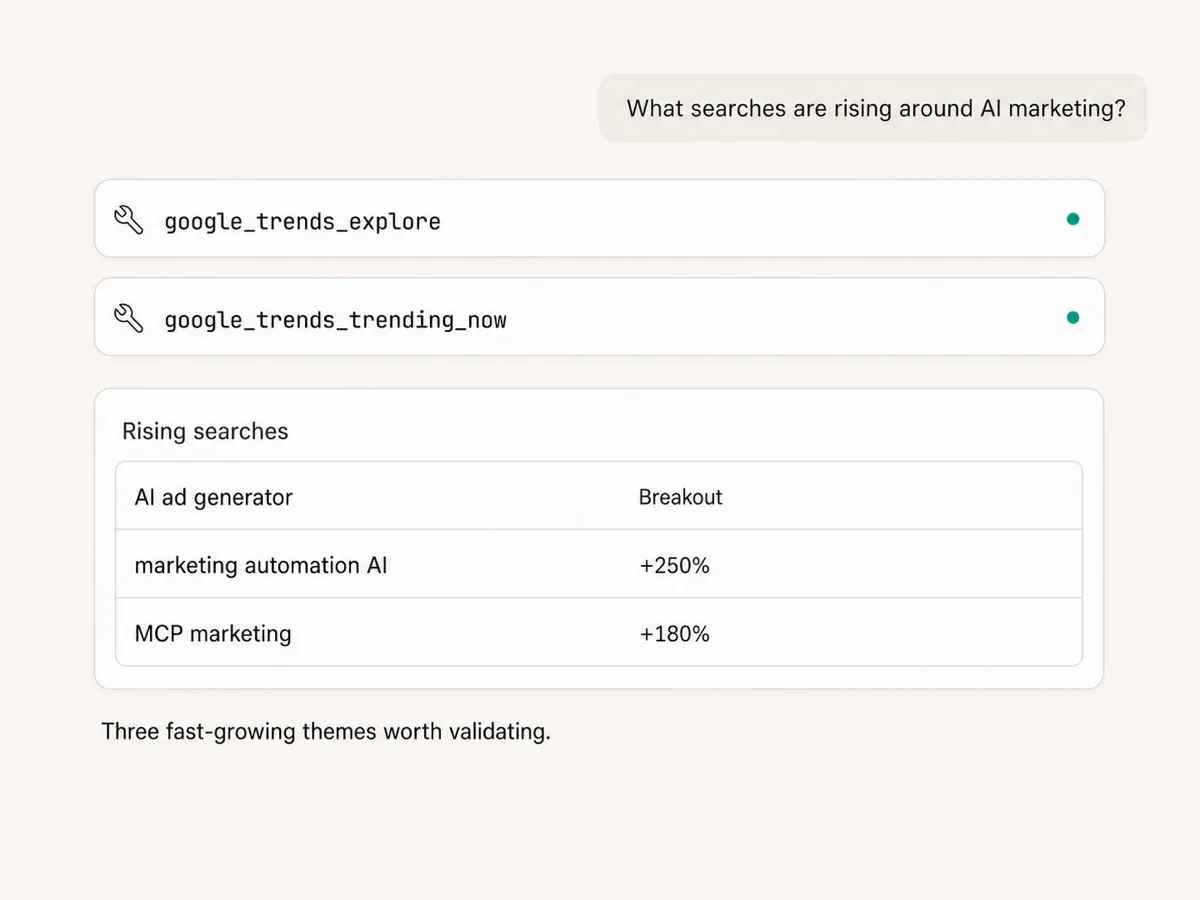
Discover related and rising searches
Retrieve top and rising queries or topics for one search term, then group them into audience needs, campaign angles, content ideas, and product signals.
Check what is trending now
Pull current trending searches by country for the past 4 hours, 24 hours, 48 hours, or 7 days and separate useful signals from short-lived noise.
Use Google Trends in your favorite AI.
Plus your whole marketing stack
One MCP connection brings search demand, ad platforms, analytics, reporting tools, and your preferred AI assistant into the same workflow.





























Set up in minutes
Google Trends uses public search-interest data, so there is no Google account or Trends connection to configure.
Markifact is available in the Claude connector directory:
Connect in Claude Open the listing and click Connect to add Markifact to Claude.
Connect your AI assistant
Pick Claude, ChatGPT, Cursor, or another MCP-compatible assistant and copy the setup. One endpoint connects it to Markifact.
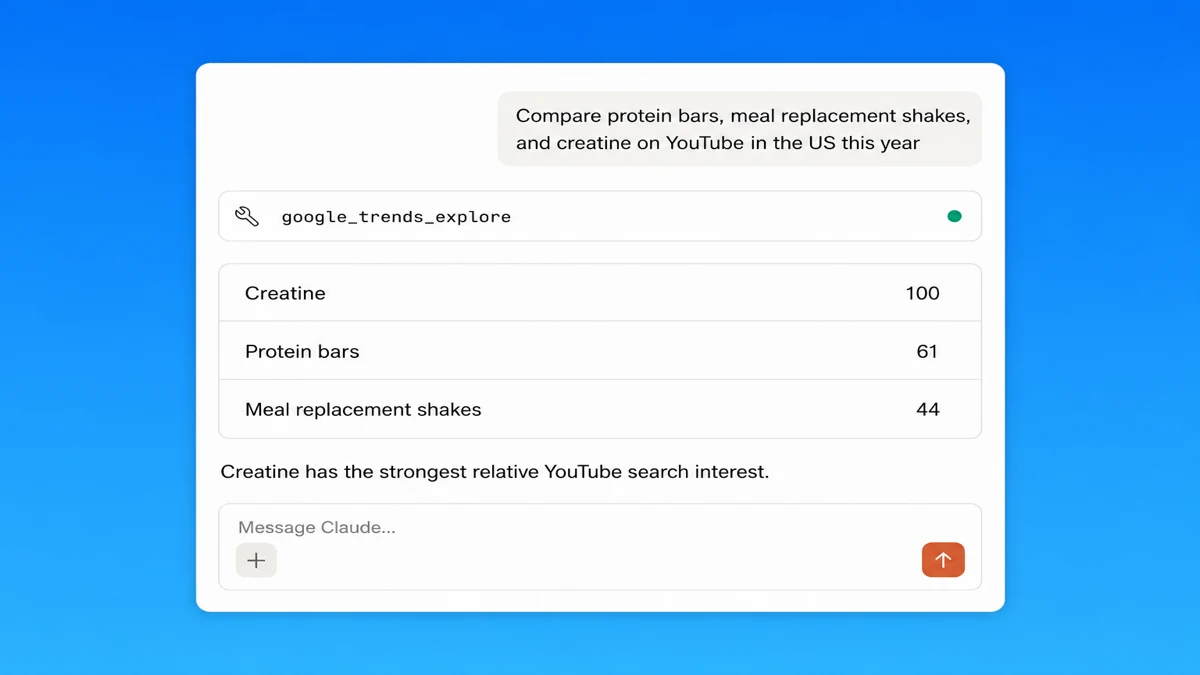
Ask about demand
Name the terms, location, time range, and search surface. The AI retrieves the Trends data and explains the useful patterns in context.
Google Trends MCP prompt examples
Start with a comparison, market, or discovery question, then turn the strongest signal into the next piece of work.
Measure relative demand and momentum across search terms.
- >
Compare ChatGPT, Claude, and Gemini search interest worldwide over the last 12 months.
- >
Show five years of US interest for standing desks and walking pads, then flag seasonality.
- >
Which of these three product categories has gained the most search interest this quarter?
- >
Compare our brand with four competitors and summarize the biggest changes.
What a session actually looks like
One request can check historical demand, scan what is trending now, and prepare a campaign brief from the useful signals.
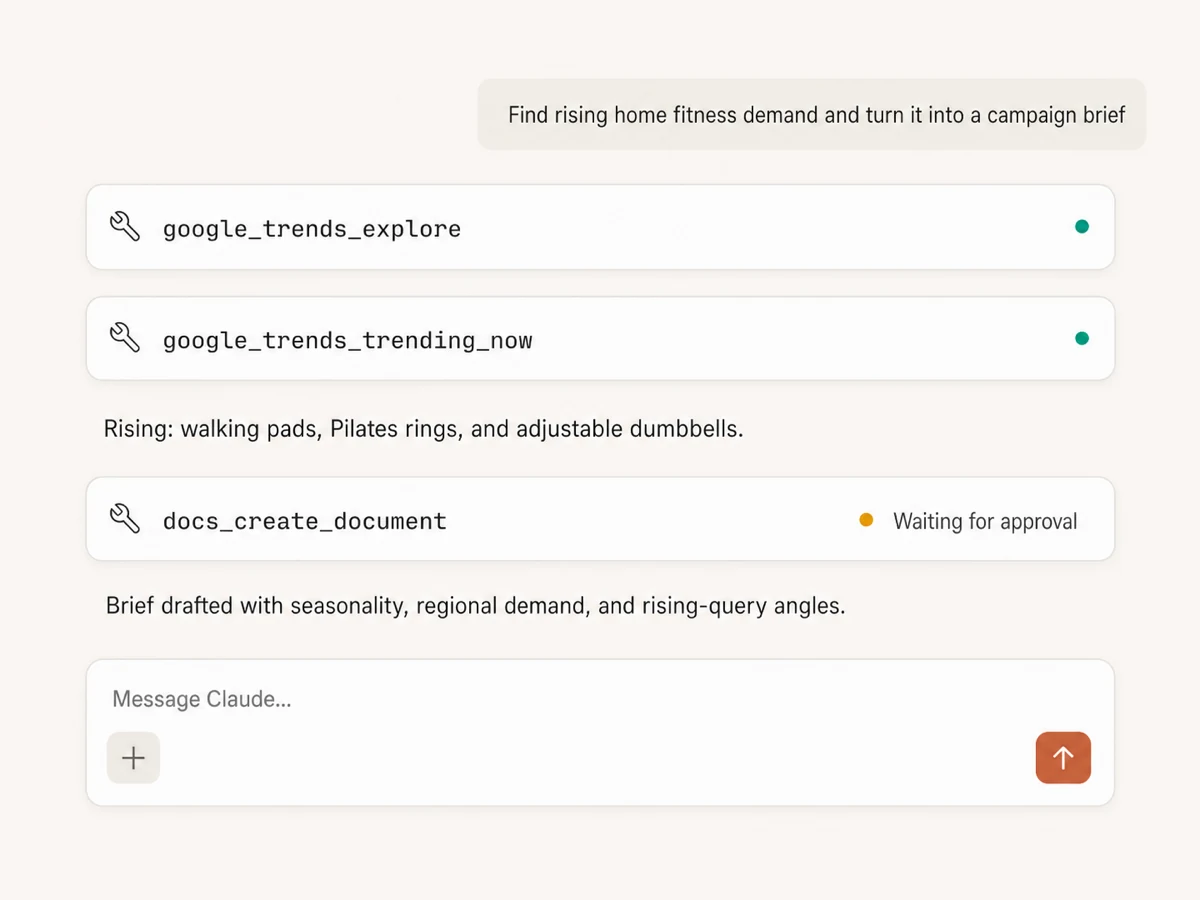
Example session using google_trends_explore, google_trends_trending_now, and docs_create_document. Trends reads run immediately; the document write waits for approval.
Which Google Trends workflow is right for you?
Google Trends is excellent for manual exploration, keyword tools add volume estimates, and Markifact turns relative demand signals into analysis and action inside your AI client.
Google Trends website
Official, free, manual
Choose it if
- You need an occasional visual comparison
- You want to explore Google's interface directly
Keyword tools
Volume estimates and SEO databases
Choose it if
- You need absolute keyword-volume estimates
- You want a broader SEO research suite
Markifact
Demand research inside your AI client
Choose it if
- You want the AI to summarize patterns instead of reading charts
- You want Trends beside Ads and Search Console data
- You want the brief, sheet, or team update created in the same session
| Capability | Markifact | Google Trends website | Keyword tools |
|---|---|---|---|
| Setup | Hosted MCP tools with no Google Trends account connection required | Free Google Trends website | Separate paid or free keyword-research product |
| How you work | Ask in plain English inside Claude, ChatGPT, or another MCP client | Configure and interpret charts manually | Search and export from a separate interface |
| Term comparison | Compare up to five terms in one request | Compare terms in the Explore interface | Varies by provider |
| Interest over time | Historical indexed trend data with preset or custom ranges | Interactive Trends chart | Often monthly estimates or proprietary trend metrics |
| Regional interest | Country, region, metro, or city depending on the selected geography | Interactive map and regional tables | Location depth varies |
| Search surfaces | Web, Images, News, Shopping, and YouTube | Supported Google search types | Usually focused on web search |
| Related discovery | Top and rising queries and topics for one term | Related topics and queries | Keyword suggestions and proprietary databases |
| Trending now | Country trends for 4 hours, 24 hours, 48 hours, or 7 days | Live Trending Now interface | Varies by provider |
| Absolute search volume | Not provided by Google Trends; values represent normalized relative interest | Not an absolute volume report | Often provides estimates |
| From insight to action | Combine Trends with Ads, Search Console, Docs, Sheets, and Slack in one workflow | Export or copy findings into other tools | Export, then switch products |
More MCP servers
All MCP serversGoogle Search Console MCP
Use Search Console inside MCP clients for performance reporting, URL inspection, sitemap status, and approval-gated sitemap submission, reprocessing, or removal.

Google Search MCP
Retrieve live organic SERPs, compare markets and devices, query Google AI Mode with references, and turn search research into briefs.
Google Ads MCP
Use Google Ads inside Claude, ChatGPT, and other MCP clients for audits, reporting, optimization, and campaign actions.
Google Analytics MCP
Query GA4 from MCP clients with custom reports, property audits, and traffic diagnosis, then configure the property and act on findings in your ad platforms with approval-gated writes.
Frequently Asked Questions
Have a different question? Reach out to Markifact support team.
Start researching search demand in Claude
Compare demand, find regional and seasonal patterns, discover rising searches, and turn the strongest signals into your next marketing plan.