
Bing Webmaster MCP for full site management
Analyze Bing search performance, diagnose crawl and index problems, submit URLs in batches, manage sitemaps and site controls, and approve every write before it runs.


10,000+ marketers scaling with AI.

Trusted by marketing teams at












What you can do with Bing Webmaster MCP
Move from a Bing traffic question to the exact crawl, indexing, URL, sitemap, or site-management action—without leaving the conversation.
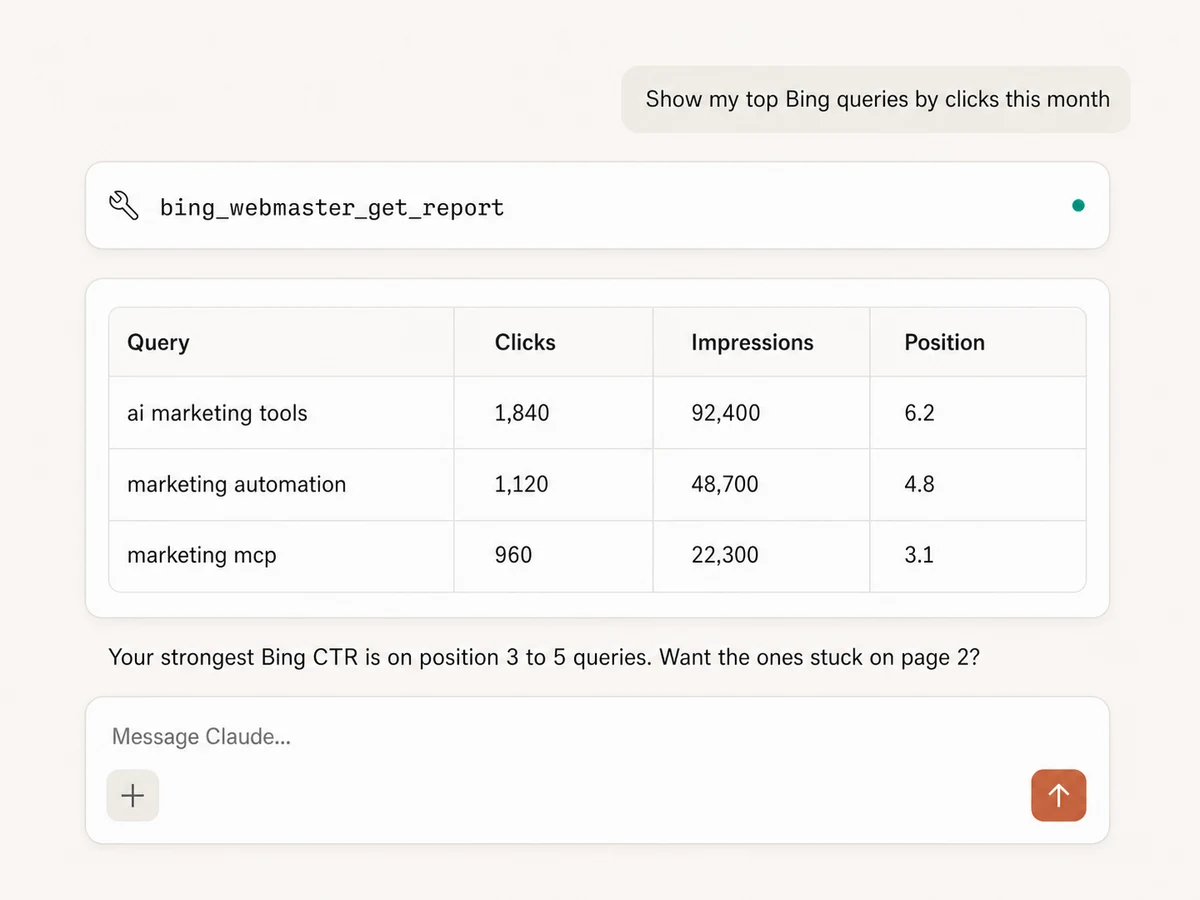
Report on Bing search performance
Analyze clicks, impressions, CTR, average click position, and average impression position by query, page, date, week, month, year, or site—with filters, comparisons, and sorting in plain English.
Research keywords and SEO opportunities
Find top queries, page-two opportunities, related keywords, and keyword history by market or language, then compare Bing demand with Search Console, Google Ads, or your content plan.
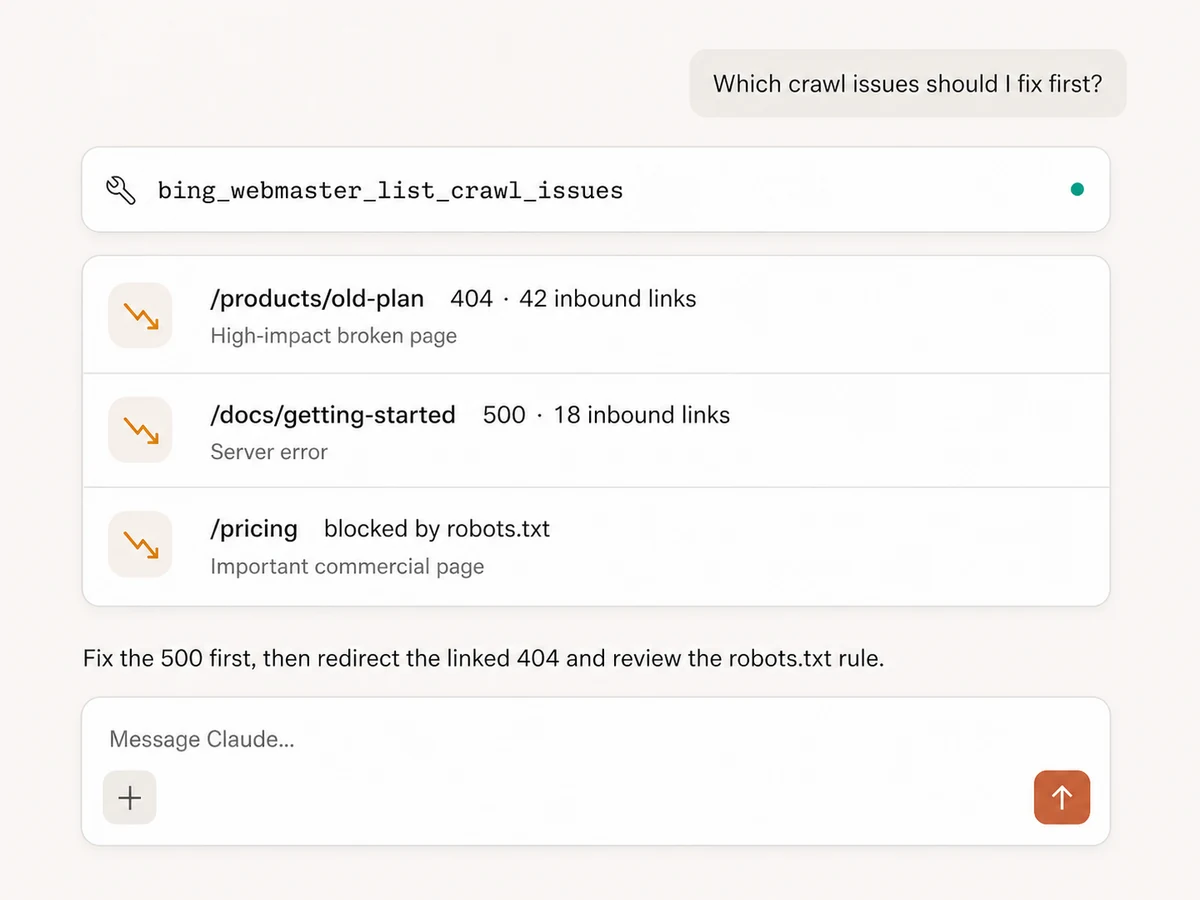
Inspect crawl and index health
Track crawled pages, pages in the index, robots.txt blocks, 2xx, redirects, 4xx and 5xx errors, timeouts, DNS failures, malware flags, and other Bingbot crawl signals over time.
Investigate URLs, links, blocks, and sitemaps
Look up a URL's crawl and discovery dates, HTTP status, traffic, document size, and anchor count; inspect inbound links and anchor text; and review sitemap status, crawl issues, or blocked URLs.
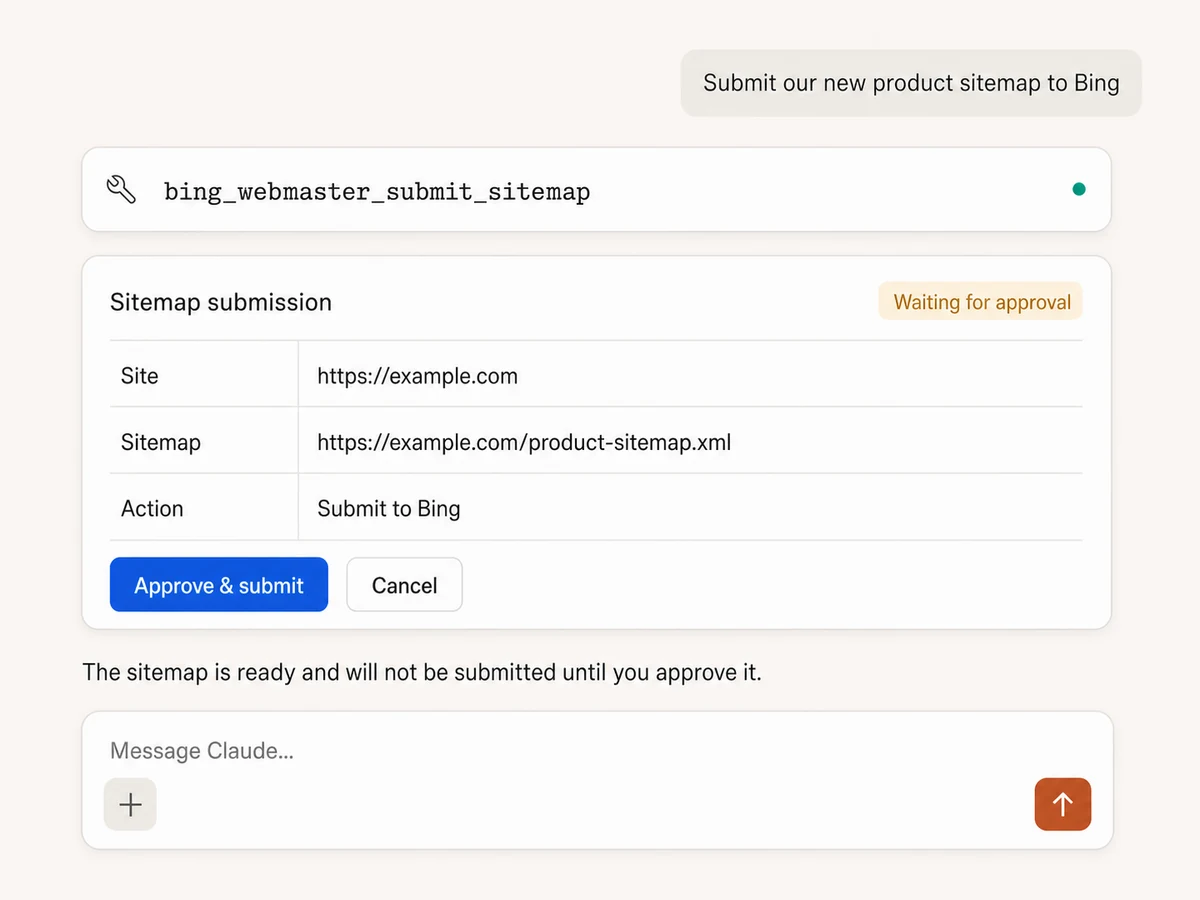
Submit URLs individually or in batches
Send new or updated pages to Bing one at a time or in batches of up to 500 URLs, after checking the site's remaining submission quota. Every submission waits for your approval.
Manage sitemaps and site controls
Submit or remove sitemap, RSS, Atom, or text feeds; manage blocked URLs and directories, crawl settings, verified sites, and other supported webmaster controls with an explicit approval step before each write.
Find the issue. Prepare the fix. Approve the action.
Connects to every marketing platform
Bring Bing Webmaster into the same MCP connection as Search Console, analytics, paid media, reporting, and your team tools.





























Set up in minutes
No API credentials, no local server, no integration to maintain. Three steps and you're managing Bing Webmaster from your AI assistant.
Connect Bing Webmaster
Sign up for Markifact and authorize Bing Webmaster with OAuth. Your verified sites become available to reporting and management tools.
Markifact is available in the Claude connector directory:
Connect in Claude Open the listing and click Connect to add Markifact to Claude.
Connect your AI assistant
Pick Claude, ChatGPT, Cursor, or any MCP-compatible assistant and copy the setup. One URL or command connects your AI to Markifact.
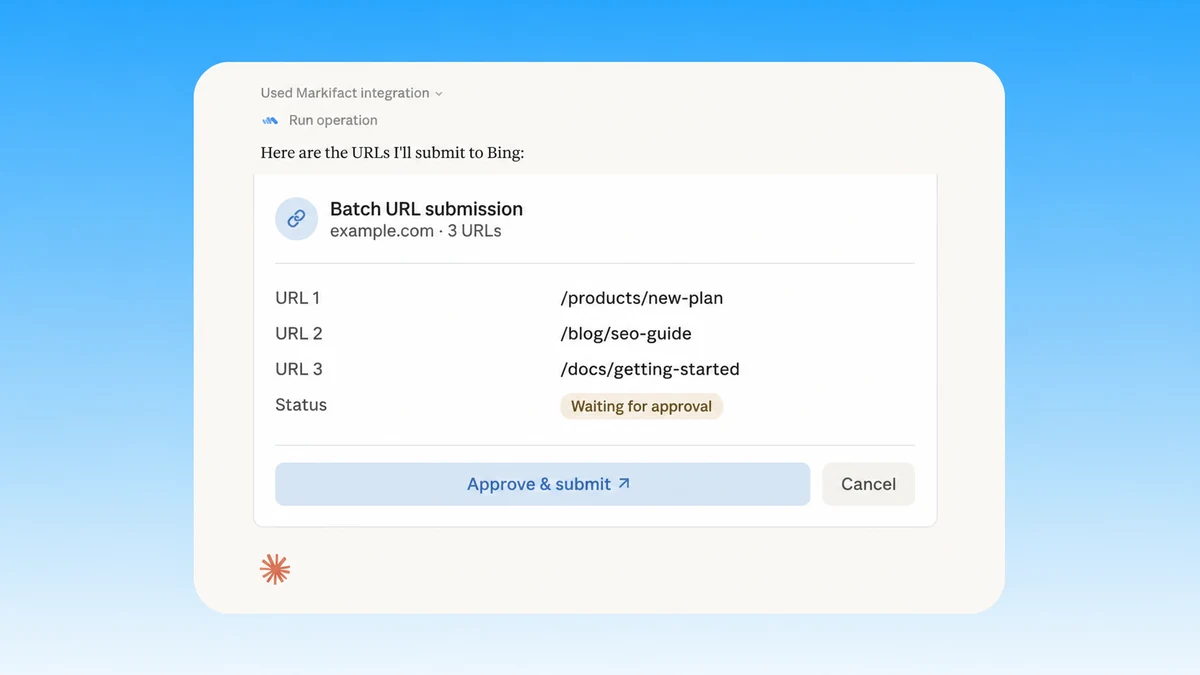
Start managing your sites
Report, diagnose, submit URLs, manage sitemaps, and control Bing site settings in plain English. Every write waits for approval.
Bing Webmaster MCP prompts
Start with the SEO outcome. The AI can inspect the evidence, prepare the exact Bing action, and pause before every write.
Prepare a controlled URL submission
Inspect the pages, check quota, and pause before sending anything to Bing.
Find product and documentation pages updated in the last seven days that Bing has not crawled since publication. Prepare them as one batch URL submission, show me the exact list, and wait for approval.
What a Bing Webmaster MCP session looks like
The AI checks URL crawl details first, prepares only the pages that need resubmission, and stops before sending the batch.
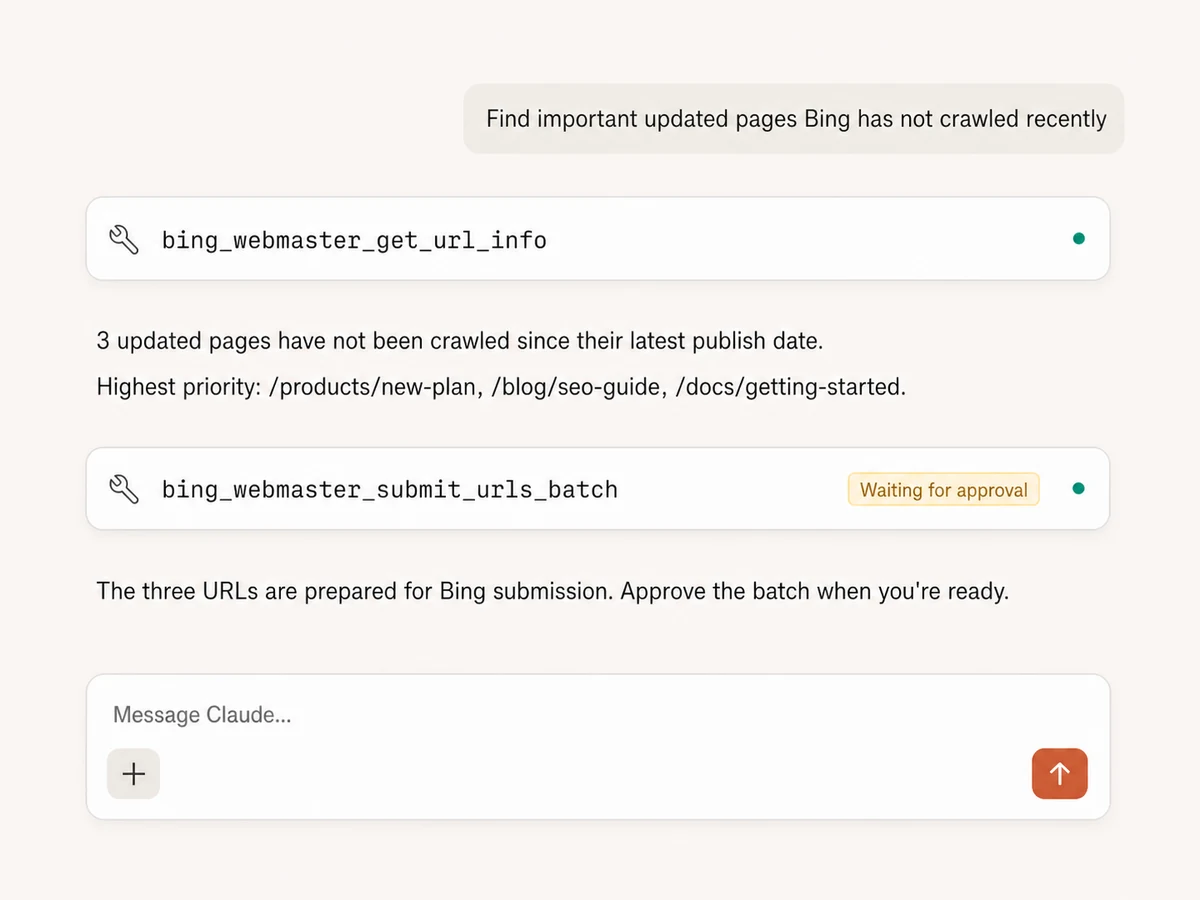
Example session using Bing URL inspection followed by a batch submission. Nothing is sent until approved.
Markifact vs Bing Webmaster Tools vs API
Choose Markifact for managed AI workflows with approvals, Bing Webmaster Tools for manual work, or the API when your engineers are building custom SEO software.
Markifact
Full Bing Webmaster MCP management
Choose it if
- You want analysis and approved actions in the same AI conversation
- You manage several sites or client properties
- You want Bing data beside the rest of your SEO and marketing stack
Bing Webmaster Tools
Official manual interface
Choose it if
- You prefer inspecting and changing each site manually
- You only need occasional Bing-specific work
Bing Webmaster API
Maximum control for custom software
Choose it if
- You are building your own SEO product
- Your team can own OAuth, schemas, safeguards, and maintenance
| Capability | Markifact | Bing Webmaster Tools | Bing Webmaster API |
|---|---|---|---|
| Setup | Hosted Bing OAuth and one MCP endpoint | Sign in and work manually in Bing Webmaster Tools | Build OAuth, requests, schemas, and tools |
| Search reporting | Custom query and page reports in plain English | Configure and inspect reports manually | Call stats endpoints and normalize results |
| Crawl health | Crawl trends, errors, index counts, blocks, and URL details in one conversation | Move between separate interface reports | Coordinate several API methods |
| Keyword research | Keyword history and related terms by country or language | Use Bing's manual keyword tools | Build and parse keyword requests |
| URL submission | Single or batch submissions with quota checks and approval | Paste URLs into the interface | Implement quota and submission methods |
| Sitemap management | List, submit, inspect, and remove feeds with approval | Manage feeds manually | Call feed methods and build safeguards |
| Cross-platform SEO | Bing beside Search Console, GA4, Ads, PageSpeed, Sheets, Docs, and Slack | Bing only | Every platform is another integration |
| Approval controls | Every submission or settings change stops for review | The signed-in user changes it directly | Your application must implement controls |
| Maintenance | Hosting, OAuth, tool schemas, and API maintenance handled | Microsoft maintains the interface | Your engineering team owns it |
Every Bing write stays behind approval
Reports, crawl diagnostics, link inspection, keyword research, and other reads can run immediately. URL submissions, sitemap changes, blocked-URL controls, site settings, and other mutations show the exact operation and wait for your approval.
Frequently Asked Questions
Have a different question? Reach out to Markifact support team.
More MCP servers
All MCP serversGoogle Search Console MCP
Use Search Console inside MCP clients for performance reporting, URL inspection, sitemap status, and approval-gated sitemap submission, reprocessing, or removal.

PageSpeed Insights MCP
Run mobile and desktop Lighthouse audits, compare lab metrics with CrUX field data, and prioritize performance, SEO, accessibility, and best-practice findings.

Google Search MCP
Retrieve live organic SERPs, compare markets and devices, query Google AI Mode with references, and turn search research into briefs.

Google Trends MCP
Compare search interest, find seasonality and regional demand, discover related and trending searches, and turn demand signals into marketing plans.
Manage Bing Webmaster from your AI client
Report on Bing traffic, fix crawl and indexing issues, submit URLs, manage sitemaps, and approve every write from one hosted MCP connection.