To connect TikTok Ads to ChatGPT and Codex, connect TikTok Ads inside Markifact, install the approved Markifact app in ChatGPT, select it in the conversation or Codex prompt, and run a read-only advertiser report. This gives both OpenAI surfaces access to the TikTok advertiser accounts authorized through your Markifact workspace without developer mode, a TikTok developer app, or a local server. You can then analyze performance, research creatives and targeting, create campaigns or Spark Ads, and prepare account changes that wait for approval.
The TikTok OAuth connection stays inside Markifact, while ChatGPT and Codex each control how the Markifact app can be used.
The quick version
For ChatGPT:
- Connect TikTok Ads inside Markifact.
- Open the public Markifact app listing in ChatGPT and select Connect.
- Authorize the workspace containing the TikTok Ads connection.
- Start a new conversation and add Markifact from the plus menu, then More.
- Select the exact advertiser and run a read-only report.
- Review and approve any later campaign, ad-group, creative, status, or budget change.
For Codex:
- Open Codex from the ChatGPT desktop app.
- Browse apps or connectors and select Markifact where available.
- Authenticate Markifact if Codex asks, even when ChatGPT already has access.
- Review Codex-specific permission controls.
- Run the same advertiser check and read-only report before requesting a write.
Connecting the Markifact app does not create the TikTok Ads OAuth connection. Complete that inside Markifact first.
TikTok's official MCP is another valid route
TikTok launched Agentic Hub and TikTok for Business MCP on June 30, 2026. Agentic Hub is a marketplace for first-party and partner AI Skills, while TikTok's MCP is the connection layer that lets agents interact with TikTok Ads.
TikTok says the official MCP supports campaign management, performance reporting, creative management, audiences, catalogs, and custom workflows. Advertisers can use a prebuilt Skill, build their own Skill, or connect an agent directly.
This guide focuses on Markifact because it exposes TikTok Ads through the same approved app used for other marketing platforms and adds explicit approval before every write. Use the official TikTok option when you want a first-party TikTok-only route. Use Markifact when you want TikTok inside a broader marketing workflow with multi-account support and controlled execution.
The two authorization layers
The setup has two separate connections:
TikTok Ads → Markifact
TikTok for Business OAuth authorizes the advertiser accounts available to the connected identity.
Markifact → ChatGPT or Codex
The selected OpenAI surface receives permission to call the operations exposed by your Markifact workspace.
The full path is:
ChatGPT or Codex → Markifact → authorized TikTok advertiser
The TikTok Ads MCP page lists the managed capabilities.
Before you start
You need:
- A Markifact workspace
- A TikTok for Business identity with access to the intended advertiser
- Access to the public Markifact app in ChatGPT
- The ChatGPT desktop app if you want to use Codex there
- Permission to use apps or connectors if your OpenAI workspace is managed
Know the advertiser name, ID, currency, and timezone. Also know the conversion or result the account is optimizing. TikTok reports can contain conversions, results, website purchases, CPA, cost per result, and ROAS, and they do not always answer the same business question.
1. Connect TikTok Ads inside Markifact
Open Connections in Markifact, choose TikTok Ads, and click Connect.
Complete authorization with the TikTok for Business identity that can access the intended advertisers and Business Centers. Return to Markifact and confirm the connection appears.
If your agency uses several identities, name each connection clearly. The managed route does not require a TikTok developer app, your own Marketing API approval, a stored developer token, or a local server.
2. Connect the approved Markifact app in ChatGPT
Open the public Markifact listing in ChatGPT and select Connect.
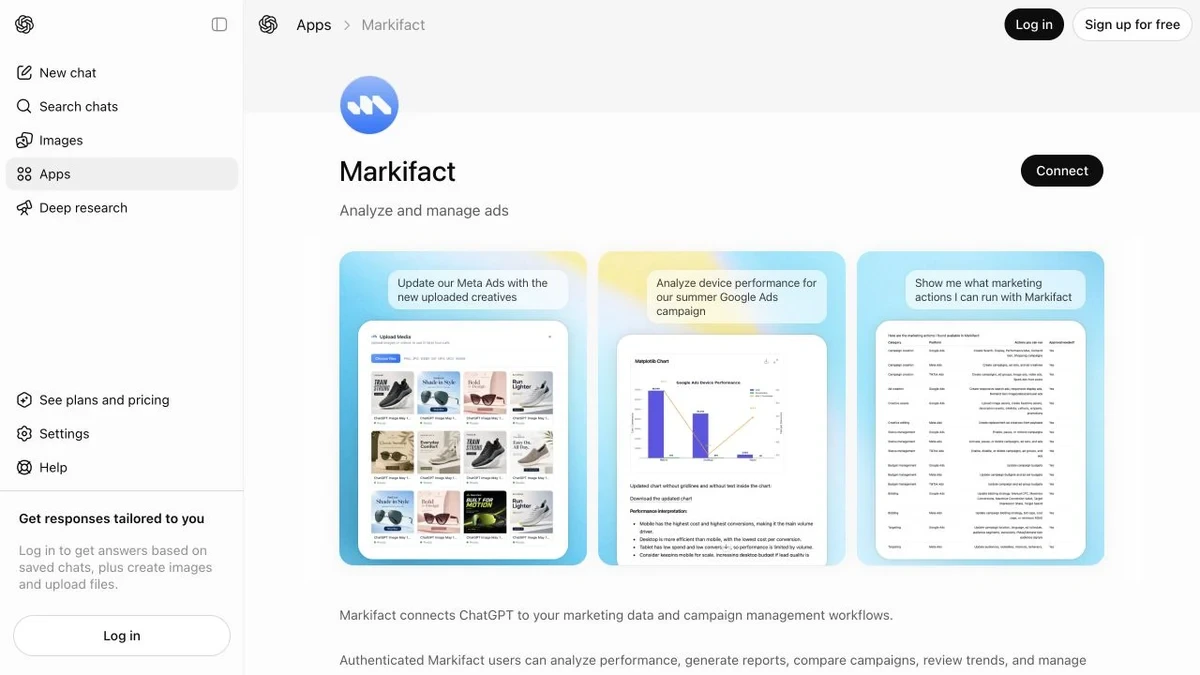
Authorize the Markifact workspace containing the TikTok connection from step one. If you select the wrong workspace, disconnect the app and authenticate again before requesting data.
This approved-app route does not require ChatGPT developer mode and does not require you to paste https://api.markifact.com/mcp into ChatGPT.
3. Add Markifact to a conversation
Start a new ChatGPT conversation. Click the plus button beside the composer, choose More, and select Markifact.
OpenAI documents this step as the way to add a connected app to the conversation context.
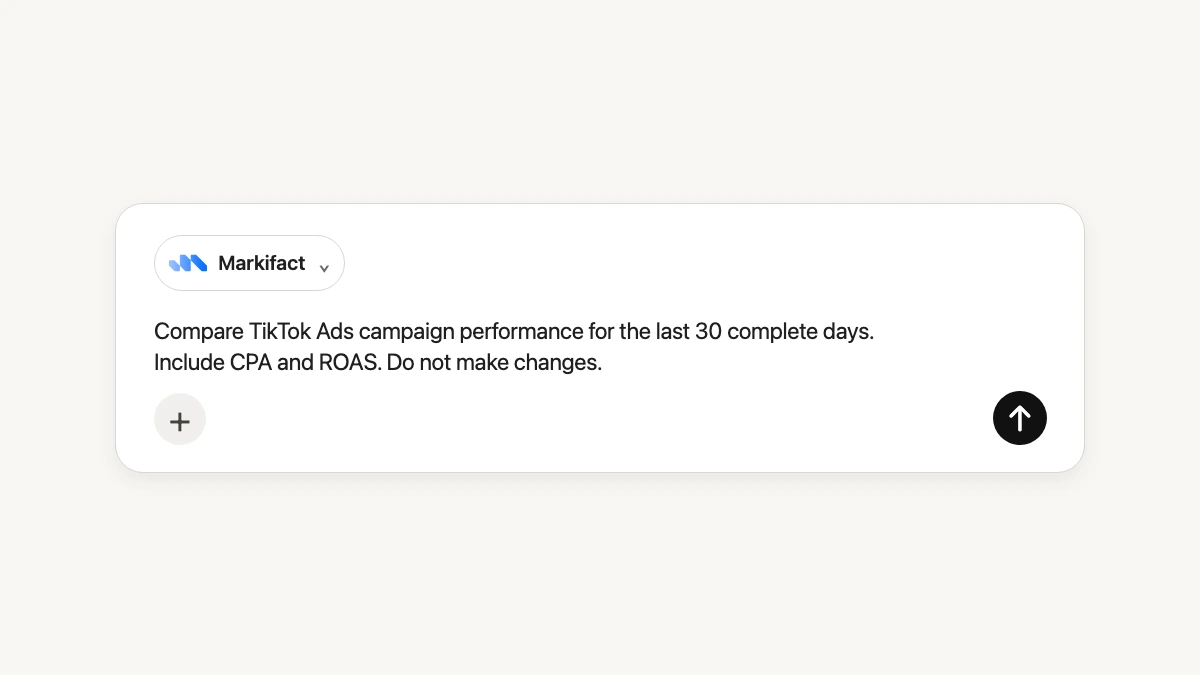
Identify the available advertisers first:
Use Markifact to list the TikTok Ads advertiser accounts available to this workspace.
Return advertiser name, advertiser ID, currency, timezone, and status.
Do not run a performance report and do not make changes.
Markifact can use the read-only tiktok_ads_select_accounts operation. Select the advertiser by name and ID.
4. Run a read-only report
Use a precise first prompt:
Use Markifact and TikTok advertiser [ADVERTISER_ID].

Compare the last 30 complete days with the previous 30 complete days.
Break down performance by campaign.
Include cost, impressions, clicks, CTR, conversions,
cost per conversion, conversion value, and ROAS where available.

Before the table, confirm advertiser name, advertiser ID,
currency, timezone, and exact date ranges.
If a field is unavailable, say so instead of substituting it.
Do not make any changes.
Markifact can use tiktok_ads_get_report. The operation supports multiple advertisers, comparisons, metrics, dimensions, filters, sorting, and limits.
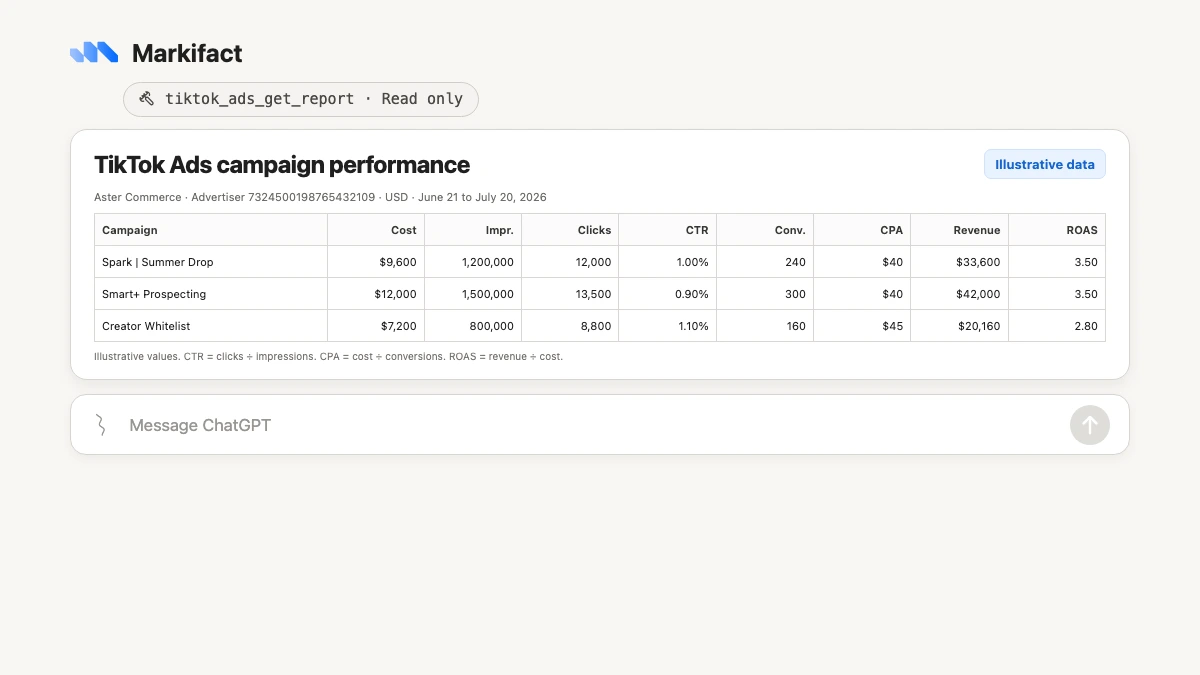
The image values are illustrative. Your report uses the selected advertiser, dates, and available TikTok fields.
Verify advertiser ID, currency, timezone, campaign IDs, conversion definition, and the CTR, CPA, and ROAS calculations before trusting the diagnosis.
Common metric examples include cost, impressions, clicks, ctr, cpc, reach, conversions, costPerConversion, conversionRate, result, costPerResult, onWebPurchase, and roas. If a field is uncertain, use tiktok_ads_list_report_fields rather than guessing.
5. Prepare a budget change and stop for approval
After verifying the report, prepare one narrow change:
For TikTok advertiser [ADVERTISER_ID], inspect campaign [CAMPAIGN_ID].
Show its current budget, existing budget type, status,
last-30-day cost, conversions, CPA, and ROAS.

Prepare a change from the current budget to [NEW_BUDGET]
in the advertiser's currency.
Do not execute it until I approve the advertiser, campaign,
current budget, proposed budget, and budget type.
Markifact can use tiktok_ads_update_campaign_budget. It supports single and bulk updates, uses actual account-currency values, and preserves the campaign's current daily or lifetime budget type.
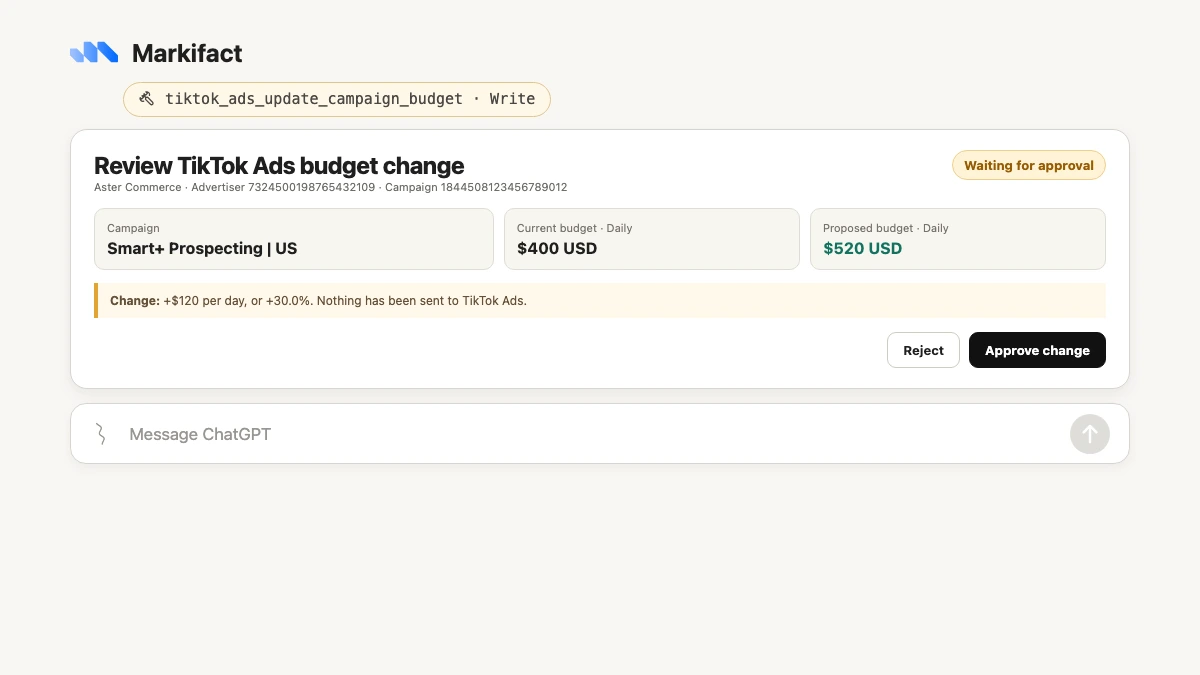
The figures are illustrative. The operation name and approval state are real. Nothing should be sent to TikTok before approval.
Other write examples include campaign and ad-group creation, image and video Spark Ads, post-based Spark Ads, status changes, renames, and lower-level ad-group or ad updates. They all wait for approval. These are examples, not the full TikTok Ads operation catalog.
6. Use the same workspace from Codex
OpenAI added Codex to the ChatGPT desktop app on macOS and Windows. Open the desktop app and switch to Codex.
Browse apps or connectors and select Markifact where it is available. In the Codex CLI, the current `/apps` command opens the app browser and lets you attach an available app.
Codex may require separate Markifact authentication. The TikTok OAuth connection still remains inside Markifact, so you do not reconnect each advertiser.
ChatGPT app permissions do not automatically carry into Codex. Review the Codex-specific permission mode, select the advertiser again, and begin with the same read-only report.
Real TikTok Ads operation examples
Read examples include:
tiktok_ads_select_accountsandtiktok_ads_get_reporttiktok_ads_list_report_fields- Campaign, ad-group, ad, identity, post, page, pixel, audience, Business Center, and catalog listing
tiktok_ads_search_targetingandtiktok_ads_search_musictiktok_ads_generate_ad_previewtiktok_ads_library
Write examples include:
tiktok_ads_create_campaignandtiktok_ads_create_ad_grouptiktok_ads_create_image_ad,tiktok_ads_create_video_ad, andtiktok_ads_create_ad_from_posttiktok_ads_update_campaign_budgetandtiktok_ads_update_ad_group_budget- Campaign, ad-group, and ad status changes and renames
tiktok_ads_update_ad_groupandtiktok_ads_update_ad
The names are examples, not an exhaustive list. Every write requires approval.
Copy-paste prompts for ChatGPT and Codex
Creative fatigue
For TikTok advertiser [ADVERTISER_ID], analyze active ads by week
for the last 8 complete weeks.
Include cost, impressions, reach, clicks, CTR, conversions, CPA, and ROAS.
Flag ads with falling CTR and rising CPA for three consecutive weeks.
Return ad name and ID. Do not pause or edit anything.
Smart+ versus manual campaigns
Compare Upgraded Smart+ and manual campaigns for advertiser [ADVERTISER_ID]
over the last 30 complete days.
Show cost, conversions, CPA, conversion rate, and ROAS.
Separate campaign-type differences from creative and audience hypotheses.
Do not make changes.
Spark Ad candidates
List identities for advertiser [ADVERTISER_ID].
For identity [IDENTITY_ID], list eligible organic posts from the last 30 days.
Return item ID, caption, publish date, engagement signals, and status.
Rank candidates for a Spark Ad test, but do not create ads.
Targeting research
Search valid TikTok targeting options for [COUNTRIES], [LANGUAGES],
[INTERESTS], [PURCHASE_INTENT], and [BEHAVIORS].
Return exact labels and identifiers.
Do not create or edit an ad group.
TikTok Ads Library research
Search the TikTok Ads Library for [BRAND_OR_KEYWORD]
in [COUNTRY] during [DATE_RANGE].
Group ads by hook, format, offer, proof, and call to action.
Separate observations from interpretation.
Do not create campaigns or creatives.
See the TikTok Ads Library MCP page for the dedicated research workflow.
Multi-account report
Compare TikTok advertisers [A], [B], and [C] for the last 30 complete days.
Return cost, impressions, clicks, CTR, conversions, CPA, and ROAS by advertiser.
Label every row with advertiser name and ID.
Do not combine currencies and do not make changes.
Understand the permission layers
There are three separate controls:
- TikTok access: determines which advertisers and assets the connected identity can use.
- ChatGPT or Codex app permission: determines how the OpenAI surface can use Markifact.
- Markifact approval: stops each TikTok Ads write until the exact change is approved.
OpenAI documents ChatGPT app permission choices including Always ask, Ask before making changes, and Ask only before important changes. Apps authenticated in Codex use separate controls.
Before approving a write, verify advertiser ID, resource ID, current value, proposed value, currency, budget type, and status. TikTok still applies its own account rules and ad review after execution.
If you prefer Claude's remote-connector flow, see How to Connect TikTok Ads to Claude.
Troubleshooting
Markifact does not appear in ChatGPT
Open the public listing linked above. Managed workspaces may require administrator approval.
Markifact appears in ChatGPT but not Codex
App availability can differ by surface and workspace policy. Browse apps from Codex and confirm Markifact is discoverable.
The advertiser is missing
Confirm that the TikTok identity connected inside Markifact can access it. Then verify the Markifact workspace authorized on the current OpenAI surface.
The report is empty
Check advertiser ID, dates, filters, and delivery. Start with cost and impressions by campaign before adding conversions or creative dimensions.
A field is invalid
Use tiktok_ads_list_report_fields. Do not invent a similar metric or dimension.
A Spark Ad post is missing
Verify the selected identity, post status, authorization metadata, and Spark Ads eligibility. List identities before listing posts.
The approval does not appear
Confirm that Markifact is the selected app and the request is actually a write. Read-only reporting and listing should not produce a write approval.
A practical first workflow
- Select the advertiser by name and ID.
- Pull a 30-day campaign report with a previous-period comparison.
- Verify cost, conversion definitions, currency, and timezone.
- Narrow one issue by ad group, ad, audience, or week.
- Inspect identities and posts when Spark Ads are relevant.
- Prepare one recommendation with exact resource IDs.
- Review the approval request before applying anything.
The same sequence works in ChatGPT and Codex. It keeps evidence, diagnosis, and execution separate.
Frequently asked questions
Can ChatGPT connect to TikTok Ads?
Yes. Connect TikTok Ads inside Markifact, connect the approved Markifact app in ChatGPT, add it to a conversation, and select the advertiser.
Does TikTok have an official MCP server?
Yes. TikTok launched TikTok for Business MCP and Agentic Hub on June 30, 2026. Markifact is a separate managed multi-platform route with explicit write approvals.
Do I need ChatGPT developer mode?
No. This guide uses the public Markifact app. You do not need developer mode, a pasted MCP URL, or a local server.
Do I need a separate TikTok connection for Codex?
No. The TikTok OAuth connection stays inside Markifact. Codex may require separate Markifact authentication and permissions.
Can ChatGPT create TikTok campaigns and Spark Ads?
Yes. Markifact supports manual, Search, and Upgraded Smart+ campaigns plus image, video, and post-based Spark Ads. Every write waits for approval.
Can ChatGPT manage multiple TikTok advertisers?
Yes. Markifact supports multiple authorized advertisers and cross-account reports. Label results with advertiser name and ID and do not combine currencies.
Is the operation list in this guide complete?
No. The named operations are examples. Markifact supports a broader TikTok Ads surface covering reporting, campaigns, ad groups, ads, identities, posts, targeting, pixels, audiences, catalogs, music, previews, and lower-level updates.
Why can ChatGPT report but not change a campaign?
The TikTok identity may lack access, the OpenAI app permission may block the write, or the Markifact approval may still be pending.