
To connect TikTok Ads to Claude, connect TikTok Ads in Markifact, install the approved Markifact connector, and sign in to your workspace. This gives Claude access to the TikTok advertiser accounts authorized through your Markifact workspace without requiring you to build a developer app or maintain an API integration. You can then analyze performance, research competitors and targeting, create campaigns or Spark Ads, and prepare changes that wait for your approval.
This guide covers the full setup, the new official TikTok MCP option, and a practical first workflow.
The quick version
- In Markifact, open Connections and connect TikTok Ads with your authorized account.
- Open the approved Markifact connector in Claude and click Connect.
- Sign in to the same Markifact workspace and review the connection access.
- Enable Markifact in the Claude conversation.
- Ask Claude to confirm the exact account or property, then run a read-only report before requesting changes.
The first report proves that account selection and reporting work. Do not begin by creating or editing campaigns.
TikTok now has an official MCP too
TikTok launched Agentic Hub and TikTok for Business MCP on June 30, 2026. The official MCP is real, first-party, and designed to support campaign management, reporting, creative work, audiences, catalogs, and custom AI workflows.
Agentic Hub is TikTok's marketplace for first-party and third-party AI Skills. Advertisers can use a prebuilt Skill, build a custom Skill, or connect an AI agent directly to TikTok for Business MCP.
This article covers the Markifact route because it puts TikTok Ads beside Google Ads, Meta Ads, LinkedIn Ads, analytics, documents, and messaging tools in one managed connection. It also exposes a broad TikTok operation catalog and stops every write for explicit approval.
The choice is practical:
- Use TikTok's official MCP when you want a first-party TikTok-only route or an Agentic Hub Skill.
- Use Markifact when you want TikTok inside a broader marketing workflow, multi-account reporting, and an explicit approval stop before writes.
You do not need to pretend one option does not exist to explain the value of the other.
What you are connecting through Markifact
Claude does not receive your TikTok password or access token. It sends structured requests to Markifact's remote MCP server, and Markifact uses the TikTok for Business OAuth connection you authorized.
The path is:
Claude → Markifact MCP → your authorized TikTok advertiser account
The remote endpoint is:
https://api.markifact.com/mcp
Your TikTok identity determines which advertiser accounts are available. Your Markifact workspace and MCP server scope determine which saved connections Claude can use. Markifact's TikTok Ads MCP page lists the current managed capabilities.
Before you start
You need:
- A Markifact workspace
- A TikTok for Business identity with access to the intended advertiser account
- A Claude account with permission to use the Markifact connector
- Permission to add or use connectors if your Claude workspace is managed
Know the advertiser name, advertiser ID, account currency, and timezone before interpreting performance. If you manage several brands or regions, similar campaign names are not enough to identify the right account.
Also know what the account treats as a conversion or result. TikTok reports can contain conversions, results, website purchases, CPA, cost per result, and ROAS. The correct metric depends on the optimization and measurement setup.
Claude connector availability follows your account and organization settings. Use the approved Markifact directory listing; in a managed workspace, ask an administrator to allow it if necessary.
1. Connect TikTok Ads in Markifact
Open Connections in Markifact, choose TikTok Ads, and click Connect.

Complete the TikTok for Business authorization flow. Use the identity that can access the intended advertiser accounts and Business Centers.
After authorization, return to Markifact and confirm the TikTok Ads connection appears. If your agency uses several TikTok identities, name the connection clearly enough that another teammate can choose the correct one.
The managed route does not require you to create a TikTok developer app, request your own Marketing API access, store a developer token, or host a server.
2. Check workspace access and optional server scope
The directory install is the default route. The settings below are useful if your workspace uses a dedicated MCP server to limit connection or tool access; creating a new server is not a prerequisite for every reader.
Open MCP in Markifact. Create a server for Claude or choose an existing server that exposes the correct TikTok Ads connection.
A useful naming pattern is:
Claude - TikTok Ads - Brand or Region
Scope the server to the intended connections where possible. This is especially useful for agencies because the same conversation should not search unrelated advertiser accounts.
Markifact supports far more than one fixed report. Real read examples include:
tiktok_ads_select_accountstiktok_ads_get_reporttiktok_ads_list_report_fields- Campaign, ad-group, ad, identity, post, page, pixel, audience, Business Center, and catalog listing
tiktok_ads_search_targetingtiktok_ads_search_musictiktok_ads_generate_ad_previewtiktok_ads_library
These are examples, not an exhaustive list of the TikTok Ads operation catalog.
3. Install Markifact from the Claude directory
Markifact is approved in Claude's connector directory. Open the Markifact listing and click Connect. Complete the Markifact sign-in, choose the intended workspace, and review the requested access. If prompted to choose an MCP server, select the one with the connections you want to use.
In a Claude conversation, open + > Connectors and enable Markifact. You do not need to add a custom connector or paste a server URL for this setup. If your organization manages connector access, an administrator may need to allow Markifact first.
4. Enable Markifact and select the advertiser
Start a new Claude conversation, open the plus menu, choose Connectors, and enable Markifact.
Before requesting performance, identify the advertiser accounts:
Use Markifact to list the TikTok Ads advertiser accounts available to this connection.
Return advertiser name, advertiser ID, currency, timezone, and status.
Do not run a performance report and do not make any changes.
Claude can use tiktok_ads_select_accounts. Select the advertiser by name and ID before continuing.
5. Run a safe first TikTok Ads report
Use complete dates and a campaign-level view that is easy to reproduce in TikTok Ads Manager:
Use TikTok advertiser [ADVERTISER_ID].

Compare the last 30 complete days with the previous 30 complete days.
Break down performance by campaign.
Include cost, impressions, clicks, CTR, conversions,
cost per conversion, conversion value, and ROAS where available.

Before the table, confirm the advertiser name, advertiser ID,
currency, timezone, and exact date ranges.
If a field is unavailable, say so instead of substituting it.
Do not make any changes.
Claude can use tiktok_ads_get_report. The operation supports one or multiple advertiser accounts, date comparisons, metrics, dimensions, filters, sorting, and limits.
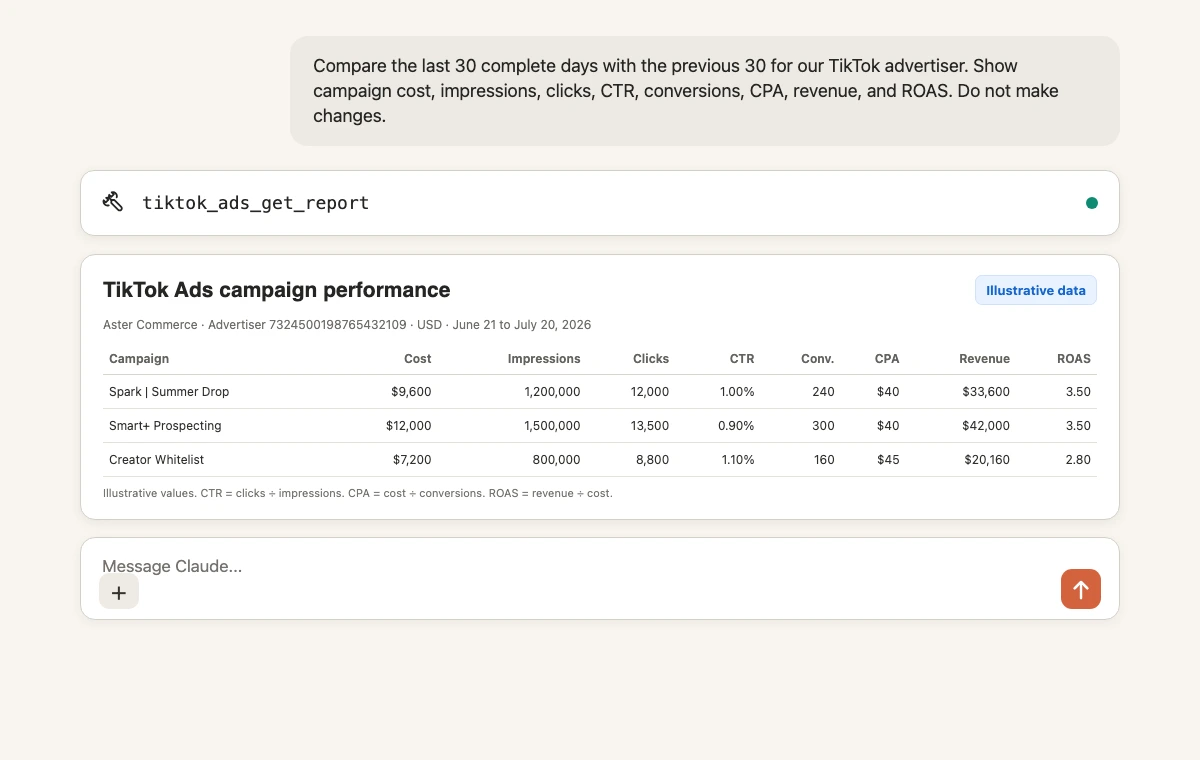
The values in the image are illustrative. Your result comes from the selected advertiser, dates, and TikTok reporting fields.
Verify:
- Advertiser ID, currency, and timezone.
- Complete date ranges.
- The campaign IDs behind similarly named rows.
- The conversion or result definition.
- CTR, CPA, and ROAS calculations.
Common metric examples include cost, impressions, clicks, ctr, cpc, reach, conversions, costPerConversion, conversionRate, result, costPerResult, onWebPurchase, and roas. Use tiktok_ads_list_report_fields when a field is uncertain.
6. Prepare a budget change for approval
Once the report is verified, prepare one narrow change:
For TikTok advertiser [ADVERTISER_ID], inspect campaign [CAMPAIGN_ID].
Show its current budget, existing budget type, status,
last-30-day cost, conversions, CPA, and ROAS.

Prepare a change from the current budget to [NEW_BUDGET]
in the advertiser's currency.
Do not execute it until I approve the advertiser, campaign,
current budget, proposed budget, and budget type.
Markifact can use tiktok_ads_update_campaign_budget. It supports single or bulk updates, uses actual currency values, and preserves the campaign's existing daily or lifetime budget type.
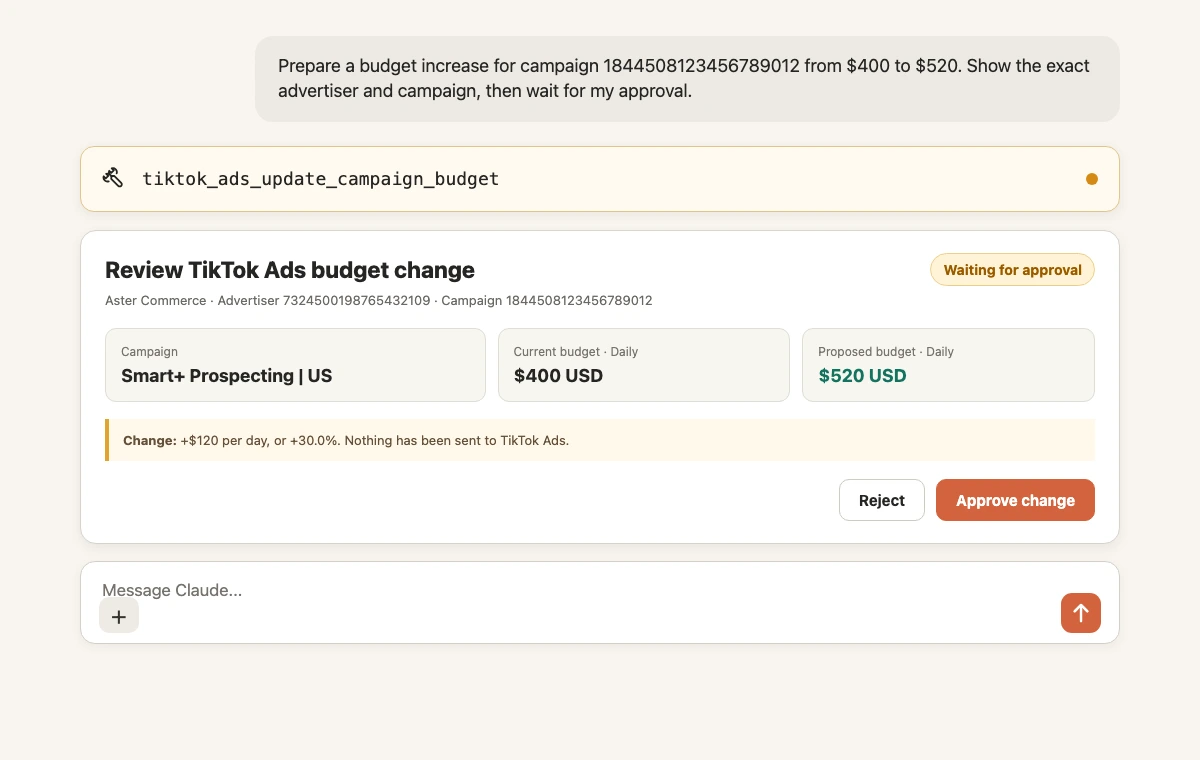
The example values are illustrative. Nothing should be sent to TikTok until the exact change is approved.
Other write examples include campaign and ad-group creation, image and video Spark Ads, post-based Spark Ads, budget and status updates, renames, and lower-level ad-group or ad edits. These operation names are examples, not the complete catalog, and every write waits for approval.
Copy-paste prompts for TikTok Ads
Find creative fatigue
For advertiser [ADVERTISER_ID], analyze active ads by week
for the last 8 complete weeks.
Include cost, impressions, reach, clicks, CTR, conversions, CPA, and ROAS.
Flag ads with falling CTR and rising CPA for three consecutive weeks.
Return ad name and ad ID. Do not pause or edit anything.
Compare Smart+ and manual campaigns
Compare Upgraded Smart+ campaigns with manual campaigns
for advertiser [ADVERTISER_ID] over the last 30 complete days.
Show cost, conversions, CPA, conversion rate, and ROAS.
Separate campaign-type differences from creative or audience hypotheses.
Do not make changes.
Find Spark Ad candidates
List the TikTok identities available to advertiser [ADVERTISER_ID].
For identity [IDENTITY_ID], list eligible organic posts from the last 30 days.
Return item ID, caption, publish date, engagement signals, and status.
Rank candidates for a Spark Ad test, but do not create ads.
Markifact can use operations such as tiktok_ads_list_identities and tiktok_ads_list_posts. A later tiktok_ads_create_ad_from_post request is a write and waits for approval.
Research targeting
Search valid TikTok targeting options for [COUNTRIES], [LANGUAGES],
[INTERESTS], [PURCHASE_INTENT], and [BEHAVIORS].
Return exact labels and identifiers.
Do not create or edit an ad group.
Research competitors
Search the TikTok Ads Library for [BRAND_OR_KEYWORD]
in [COUNTRY] during [DATE_RANGE].
Group the ads by hook, format, offer, proof, and call to action.
Separate observed patterns from interpretation.
Do not create campaigns or creatives.
For more library-specific prompts, see the TikTok Ads Library MCP page.
Multi-account agency report
Compare TikTok advertisers [A], [B], and [C] for the last 30 complete days.
Return cost, impressions, clicks, CTR, conversions, CPA, and ROAS by advertiser.
Label every row with advertiser name and ID.
Do not combine currencies and do not make changes.
Approval and access boundaries
Three controls matter:
- TikTok access: the connected identity determines which advertisers and business assets are available.
- Markifact scope: the selected workspace and MCP server determine which connections and operations Claude can use.
- Approval: every TikTok Ads write waits for a person to approve the exact request.
Review the advertiser ID, resource ID, current value, proposed value, currency, budget type, and status before approving a change. TikTok still applies its own account rules and ad-review process afterward.
For the broader market, see The State of Advertising MCPs in 2026.
Troubleshooting
The advertiser is missing
Confirm that the TikTok for Business identity connected in Markifact can access the advertiser. Then verify the Markifact workspace and MCP server scope.
Claude does not show Markifact
Open Customize, then Connectors, and confirm Markifact is connected. Enable it for the current conversation. Managed organizations may require owner setup.
Authentication keeps reopening
Confirm the intended Markifact workspace and TikTok identity. If necessary, reconnect Markifact through its Claude directory listing, and complete authorization without switching accounts midway.
The report is empty
Verify advertiser ID, dates, filters, and delivery. Start with cost and impressions by campaign before adding conversion or creative fields.
A metric or dimension is invalid
Ask Claude to use tiktok_ads_list_report_fields. Do not invent a similar field name.
A Spark Ad post is missing
Verify the selected identity, authorization metadata, post status, and Spark Ads eligibility. List identities first, then list posts for the exact identity.
The budget update is rejected
Check advertiser ID, campaign ID, current campaign budget type, currency, and account permissions. Then create a fresh approval request with corrected values.
A practical first workflow
- Select the advertiser by name and ID.
- Pull a 30-day campaign report with a previous-period comparison.
- Verify cost, conversion definitions, currency, and timezone.
- Narrow one issue by ad group, ad, audience, or week.
- Inspect identities and posts when Spark Ads are relevant.
- Prepare one recommendation with exact resource IDs.
- Review one approval request before scaling the workflow.
This sequence separates evidence, interpretation, and execution. It also gives you a repeatable weekly workflow instead of a one-off chat.
Frequently asked questions
Can Claude connect to TikTok Ads?
Yes. Connect TikTok Ads in Markifact, install the approved Markifact connector, authenticate, enable Markifact, and select the advertiser.
Does TikTok have an official MCP server?
Yes. TikTok launched TikTok for Business MCP and Agentic Hub on June 30, 2026. The official route supports TikTok advertising workflows, while Markifact provides a managed multi-platform route with explicit write approvals.
Do I need a TikTok developer app?
No. The managed Markifact route uses OAuth and does not require you to create a developer app, request your own Marketing API access, store a developer token, or host a server.
Can Claude create TikTok campaigns and Spark Ads?
Yes. Markifact supports manual, Search, and Upgraded Smart+ campaign types plus image, video, and post-based Spark Ads. Every creation or update waits for approval.
Can Claude manage several TikTok advertisers?
Yes. Markifact supports multi-account selection and reporting. Label every result with advertiser name and ID and do not combine currencies.
Can Claude search the TikTok Ads Library?
Yes. tiktok_ads_library is a read-only operation for searching public ads by keyword or advertiser and analyzing hooks, formats, and offers.
Does Markifact support only the operations named here?
No. The named operations are examples. Markifact supports a broader TikTok Ads catalog covering reporting, campaigns, ad groups, ads, identities, posts, targeting, pixels, audiences, catalogs, music, previews, and lower-level updates.
Why can Claude report but not change a campaign?
The TikTok identity may lack access, the MCP server may not expose the write, or the Markifact approval may still be pending. Check all three boundaries.