Yes, ChatGPT and Codex can post to TikTok through the Markifact plugin and an authorized organic TikTok account. ChatGPT can prepare a direct video or photo post, or send media to the creator's TikTok inbox as a draft; Codex can run the same scoped operations from a task. In both clients, tiktok_publish_post remains an approval-gated external write.
The quick setup
- Connect the organic TikTok account in Markifact.
- Open the Markifact listing in ChatGPT.
- Connect the Markifact workspace that contains the TikTok authorization.
- Enable Markifact for the ChatGPT conversation or Codex task.
- Run
tiktok_get_creator_infobefore preparing a direct post. - Choose direct publishing or a TikTok inbox draft.
- Review the account, media, caption, privacy, interactions, and disclosure.
- Approve
tiktok_publish_postonly when the payload is exact. - Use
tiktok_list_postsandtiktok_get_reportto review the result.
The TikTok MCP page is the capability reference for organic publishing and reporting. Paid campaigns remain in the separate TikTok Ads MCP.
What the TikTok connection supports
| Workflow | Current support | Approval boundary |
|---|---|---|
| Direct video post | One reachable video URL | Approval required |
| Direct photo post | 1 to 35 image URLs | Approval required |
| TikTok inbox draft | Video or photo media | Approval required before upload |
| Creator settings check | Privacy, interaction limits, duration | Read-only |
| Post listing and analytics | Posts, account, video, audience, retention | Read-only |
| Native publish scheduling | No publish_at field |
Use a separate scheduled workflow |
| Edit or delete a published post | Not exposed by the current TikTok API surface | Handle in TikTok |
These operations cover organic TikTok. They do not create TikTok Ads campaigns or Spark Ads.
Understand the two authorization layers
There are two separate connections:
- TikTok authorizes Markifact to access the selected organic account.
- You authorize ChatGPT or Codex to use the selected Markifact workspace.
Connecting the Markifact plugin does not expose every TikTok account you manage. The available creator depends on the TikTok connection inside that workspace.
For an agency, name the TikTok connection clearly:
TikTok Organic - Northstar Kitchen - Main
Do not reuse the TikTok Ads connection name. Organic publishing and paid campaign management are separate systems.
Connect Markifact in ChatGPT
Open the direct Markifact listing, or browse the current plugin directory and search for Markifact. Select Connect, complete authentication, and choose the intended workspace.
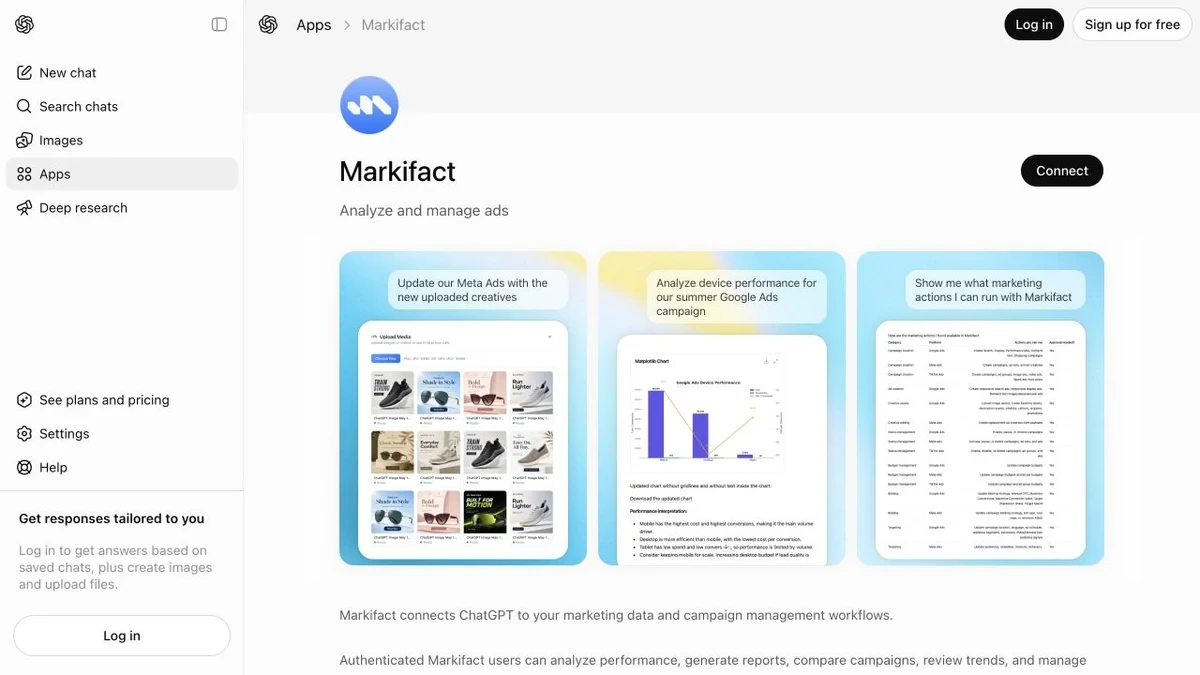
OpenAI's current product language groups apps and reusable capabilities under plugins. The app remains the connection to external data and actions; availability can depend on plan, region, workspace settings, role, and the enabled app permissions.
Attach Markifact to a fresh conversation, then perform a read-only check:
Use Markifact to retrieve the connected TikTok creator information.
Return the username, nickname, privacy options, maximum video duration,
and whether comments, Duet, or Stitch are disabled.
Do not publish or upload anything.
The tool should be tiktok_get_creator_info. TikTok requires this current creator information before a direct post, as described in its official Content Posting API guide.
Publish the first video from ChatGPT
Separate creative drafting from the write. First ask ChatGPT to work on the caption without preparing a tool call:
Draft four TikTok captions for a 22-second bakery-process video.
The audience is home bakers. The goal is saves and useful comments.
Keep each under 300 characters and use no more than three relevant hashtags.
One option should be instructional, one founder-led, one curiosity-led,
and one question-led. Do not call any publishing tool.
After choosing the final caption, prepare the post:
Use the connected Northstar Kitchen TikTok creator.
Run tiktok_get_creator_info again.

Prepare a direct video post using [PUBLIC VIDEO URL].
Use caption option 2 exactly as approved.
Choose PUBLIC_TO_EVERYONE only if the creator allows it.
Keep comments and Duet enabled, disable Stitch,
and use the frame at 1,800 milliseconds as the cover.
This promotes our own business and is not a paid partnership.

Show the complete payload and wait for approval.
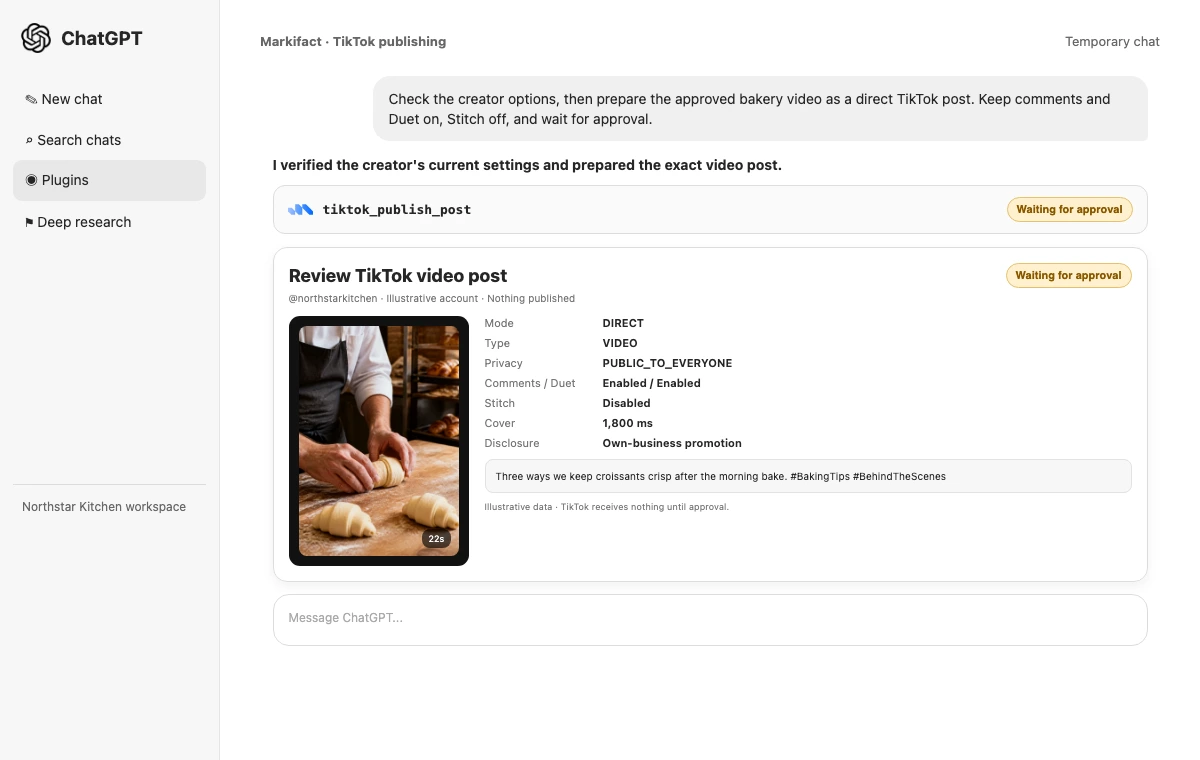
Before approving, verify the creator, mode, media, caption, privacy, interaction settings, cover timestamp, and both commercial-disclosure values. Reject the request if any field is ambiguous.
Use Markifact from Codex
Codex is useful when the content brief, media manifest, approved caption, and campaign notes live in a project. Enable the Markifact plugin for the task, then start with a narrow read:
Use @Markifact to check the connected TikTok creator and list the 20 newest posts.
Return the creator name, account restrictions, post URLs, captions, and publish times.
Do not publish or change anything.
For a controlled write, point Codex to a reviewed local brief:
Read content/tiktok/week-38-video.md and media/week-38-manifest.md.
Use @Markifact to check the TikTok creator settings.
Prepare the exact approved video post from those files.
Show the resolved video URL, caption, privacy, interaction settings,
cover timestamp, and disclosure flags.
Wait for approval before tiktok_publish_post.
Editing project files is not the same as publishing to TikTok. Codex may update a local brief with your authorization, but the external TikTok write remains a separate Markifact operation and still requires approval.
Choose direct post or TikTok inbox draft
The best mode depends on who owns the final creative check.
Use direct mode when
- The video or photo order is final
- Caption and hashtags are approved
- Privacy and interaction settings are known
- Commercial disclosures are confirmed
- The post should go live without native TikTok editing
Use draft mode when
- A creator wants to add native edits in TikTok
- The final sound, stickers, or visual treatment needs hands-on work
- Someone wants to inspect the post inside the mobile TikTok flow
- Media should be transferred now but published later manually
Draft prompt:
Use Markifact to send [VIDEO URL] to the connected TikTok creator's inbox as a draft.
Do not publish directly. Confirm the creator and media first,
prepare post_mode draft, and wait for approval before upload.
TikTok explains the direct-versus-upload distinction on its official Content Posting API page.
Publish a TikTok photo post
Photo mode accepts 1 to 35 image URLs. Multiple images become a swipeable post. The current Markifact input supports a title of up to 90 characters and a caption of up to 2,200 characters.
Prepare a TikTok photo post using these six images in this exact order:
[URL 1]
[URL 2]
[URL 3]
[URL 4]
[URL 5]
[URL 6]

Title: Six steps behind the morning bake
Caption: Swipe from dough to the pastry counter. Which step should we explain next?
#BakingProcess #BehindTheScenes

Publish directly only after checking the creator's privacy options.
Keep comments enabled, allow TikTok to add recommended music,
and mark the post as promotional content for our own business.
Show the ordered payload and wait for approval.
TikTok's official photo-post reference confirms that photo media can be published directly or sent through TikTok's editing flow. Inspect the first image, last image, and every URL before approval.
Reusable prompt: paid partnership disclosure
TikTok distinguishes a creator's own-business promotion from a paid partnership. Make the relationship explicit:
This post is a paid partnership with [BRAND].
It is not a promotion for the creator's own business.
Prepare the post with paid-partnership disclosure enabled
and own-business promotional disclosure disabled.
Do not use SELF_ONLY privacy. Show both disclosure values before approval.
The current validation does not permit branded partnership content on a private SELF_ONLY post.
Reusable prompt: private publishing test
Check whether SELF_ONLY is available for this TikTok creator.
If it is, prepare a direct video post using [TEST VIDEO URL]
with the caption "Private publishing workflow test".
Disable comments, Duet, and Stitch.
Show the complete payload and wait for approval.
Do not substitute another privacy level.
Run a private test before the first public brand post. It verifies account selection, media transfer, the approval step, and TikTok processing.
Scheduling without inventing a TikTok field
The current tiktok_publish_post input has no publish_at field. If a post must run later, schedule a Markifact workflow with an exact date, time, and timezone. The workflow should re-check creator settings before the publishing action.
Schedule a Markifact workflow for September 25, 2026 at 7:00 PM Asia/Dubai.
At execution, run tiktok_get_creator_info and prepare the approved post in
content/tiktok/week-38-video.md. Keep the media, caption, privacy,
interactions, and disclosure exactly as approved.
Preserve approval for the external publish action.
This is workflow scheduling. It should not be described as a native scheduling option inside the TikTok publishing operation.
Review performance in Codex
After the post is live, use read-only operations to locate and assess it:
Use @Markifact to list the 30 newest TikTok posts and locate the video
whose caption begins "Three ways we keep croissants crisp".
Then report its views, reach, likes, comments, shares, favorites,
average watch time, full-video-watched rate, and available traffic sources.
Compare it with the median video from the previous 30 days.
Save a concise Markdown review to reports/tiktok/week-38.md.
Do not publish or change anything on TikTok.

This is where Codex adds value: the report can sit beside the creative brief and feed the next iteration. Saving the local report is a project-file action. TikTok remains untouched because all platform operations in this prompt are reads.
What ChatGPT and Codex cannot do here
The current operation surface does not expose published-post editing or deletion. It also does not make TikTok's final policy or media checks disappear.
Do not ask either client to:
- Edit the caption on an already published TikTok through the API
- Delete a live TikTok post through the current connector
- Invent a privacy setting that
tiktok_get_creator_infodid not return - Treat a TikTok inbox draft as already published
- Use the organic connection to manage paid campaigns
- Claim that a scheduled workflow is a native
publish_atfield
If a live post needs correction or removal, handle it inside TikTok.
FAQ
Can ChatGPT post directly to TikTok?
Yes. Through the connected Markifact plugin, ChatGPT can prepare a direct video or photo post and request approval for tiktok_publish_post.
Can ChatGPT send a TikTok draft?
Yes. Draft mode sends the approved media to the connected creator's TikTok inbox, where the creator finishes the post in TikTok.
Can Codex post to TikTok?
Yes. With Markifact enabled for the task, Codex can prepare the same approval-gated TikTok publishing operation while working from reviewed local briefs and media manifests.
Can ChatGPT create TikTok photo posts?
Yes. The current operation supports one to 35 images, an optional photo title, a caption, privacy, comments, music selection, and commercial disclosures.
Can ChatGPT schedule TikTok posts?
It can create a scheduled Markifact workflow that prepares or runs the post later. The TikTok publishing operation itself does not expose a native scheduling field.
Can ChatGPT edit or delete a TikTok post?
Not through the current TikTok operations exposed by Markifact. Existing posts can be listed and analyzed, but editing and deletion must happen in TikTok.
Is the TikTok connection read-only?
No. Creator checks, reports, audience analysis, and post listings are read-only. tiktok_publish_post is a write and waits for explicit approval.
Is this TikTok Ads?
No. This is organic publishing and performance. Use TikTok Ads MCP for paid campaign management and Spark Ads.
Build the first repeatable workflow
Start with a private video test, confirm the resulting post in TikTok, then use a real content brief for the first public post. Keep the direct-versus-draft decision, account identity, caption, privacy, interactions, cover, and disclosure visible in every approval request. That review surface is what turns a conversational publishing shortcut into a controlled operating process.
For the Claude version of the workflow, read How to Post to TikTok with Claude. For Instagram publishing from the same OpenAI clients, see How to Post to Instagram with ChatGPT & Codex.