You can post to a Facebook Page with ChatGPT or Codex by connecting the Markifact app, choosing a Page you manage, and preparing an approval-gated publishing operation. The same connection can publish or schedule text, link, photo, video, and Reel posts, publish Stories immediately, manage the scheduled queue, update copy, delete posts, and analyze results. This guide shows both client setup paths and one shared operating model.
The workflow is for organic Facebook Page management, not personal profiles or Groups, and remains separate from paid campaign management in Meta Ads.
The quick answer
Use Apps in ChatGPT or Plugins in Codex to connect Markifact. Then connect Facebook inside Markifact, list the Pages you manage, draft the content, and approve the exact Page write.
These are examples of the production operations behind the workflow:
facebook_select_pagesfinds available Pages.facebook_publish_postpublishes now or schedules eligible content.facebook_list_postsreads recent content or the scheduled queue.facebook_update_postedits text or changes scheduled timing.facebook_delete_postdeletes a published post or cancels a scheduled one.facebook_page_insightsretrieves Page or post reporting after field discovery.
Create, update, and delete operations require approval. The listing and reporting operations are read-only.
Connect Facebook Pages to ChatGPT
Open the Markifact app listing in ChatGPT and select Connect. You can also reach it from ChatGPT:
- Open Apps.
- Search for Markifact.
- Select the Markifact app.
- Choose Connect and finish authentication.
- Connect Facebook in Markifact and authorize the Pages you want to manage.
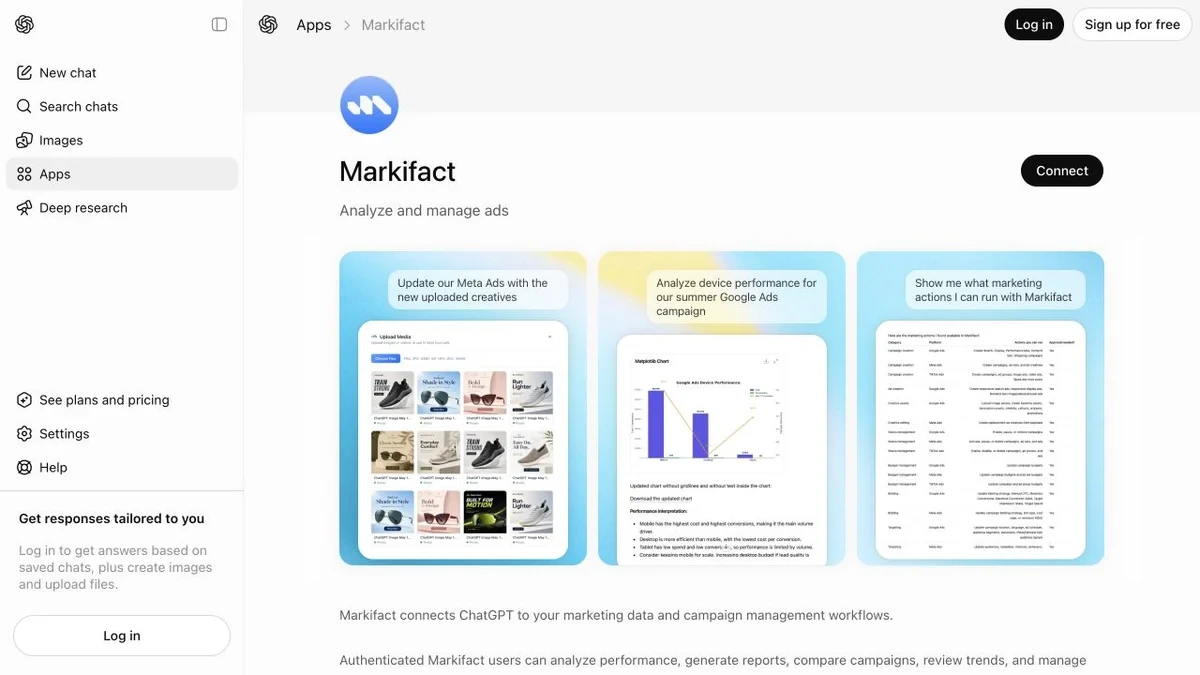
The ChatGPT listing uses broad Markifact language because the same app covers many marketing platforms. Confirm the Facebook connection separately in Markifact before asking ChatGPT to publish.
Test the connection with a read-only prompt:
Use the Markifact app to list the Facebook Pages available to this workspace. Return only Page name and Page ID. Do not publish, schedule, update, or delete anything.
ChatGPT should call facebook_select_pages. If several Pages appear, name the exact Page in every later instruction.
Connect Facebook Pages to Codex
In the current Codex desktop interface, Markifact appears under Plugins. Install or enable the Markifact plugin, authenticate, and open the project where you keep content briefs, media references, or publishing logs.
Official OpenAI documentation describes Plugins as a way to extend ChatGPT and Codex with skills, MCP servers, and optional UI. In practical terms, the Markifact plugin gives Codex access to the same governed Facebook Page operations used in ChatGPT.
Start with:
Use @Markifact to list the Facebook Pages I can manage. Save a short Page name and Page ID reference in this project. Do not make any external changes.
Codex is useful when the content work also lives in project files. It can inspect the approved copy, media manifest, campaign brief, and publication log before preparing the Page action. That extra context does not weaken the write boundary. The Facebook action still waits for approval.
Prepare the Facebook connection correctly
You need Facebook access to the target Page. The operation does not post to a personal timeline or a Facebook Group.
Meta's Page content management uses Page permissions such as `pages_manage_posts`. Markifact handles the hosted connection, so the marketer does not need to maintain a custom Graph API integration.
Media also needs to be reachable by Facebook. Use public image or video URLs, or Google Drive links shared with anyone who has the link. A local file path from your computer is not enough unless you upload the media first and obtain a reachable URL.
Run one controlled publishing workflow
The most reliable flow has two approvals in practice: editorial approval of the content, then operational approval of the Facebook write.
Step 1: draft without tools
Write three Facebook Page post options for Northstar Studio's autumn studio collection.

Audience: design-conscious homeware buyers
Goal: introduce the collection and earn product-page visits
Tone: calm and useful
Length: 70 to 110 words
CTA: Explore the collection

Do not use Markifact yet. Do not publish anything.
Choose one option and edit it as needed.
Step 2: prepare the exact write
Use Markifact to prepare a Facebook Page photo post.

Page: Northstar Studio
Message: [paste approved message]
Images in order: [paste one to ten public URLs]
Publish mode: now

Show the exact Page, message, image count, and operation. Wait for approval before publishing.
The write operation is facebook_publish_post. ChatGPT should present the payload for review rather than silently executing it.
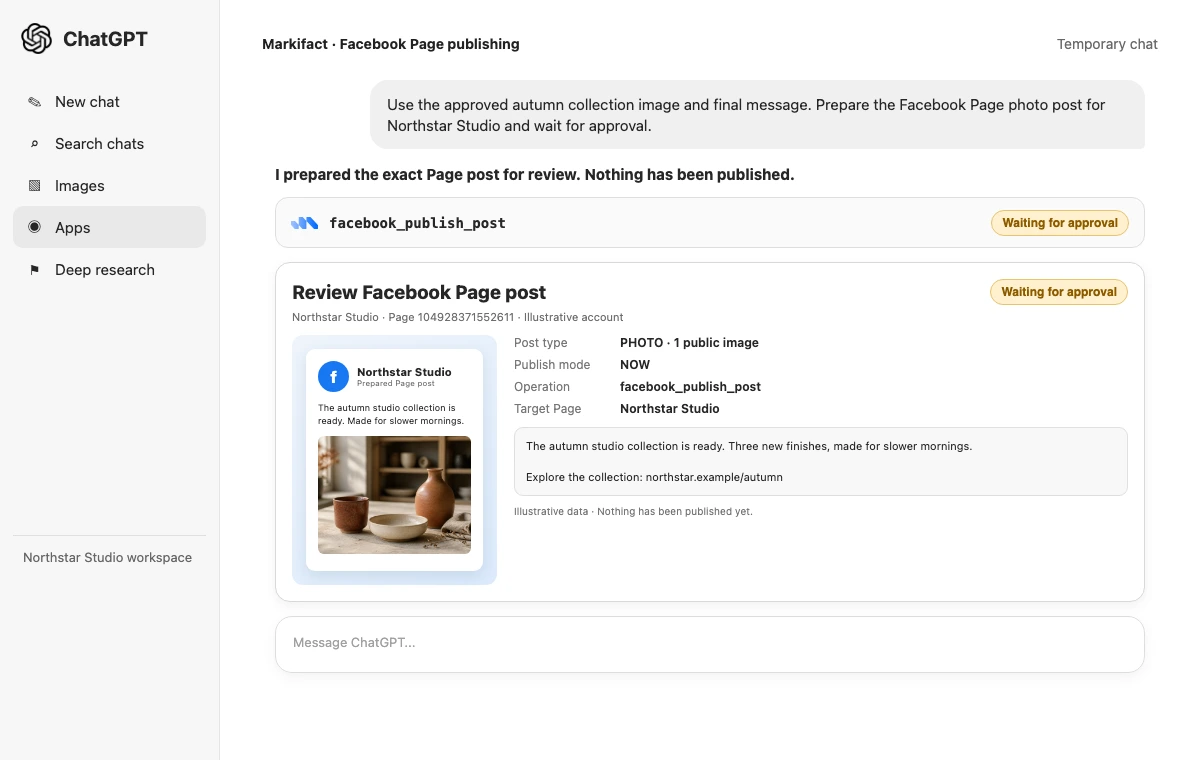
Check the target Page first. Then check the message, link or media, post type, and timing. Reject the action if any of those are wrong.
Step 3: verify the result
After approval, ask for the returned post ID and URL. Then run a read:
List the five most recent published posts on Northstar Studio. Confirm whether the new post appears and return its post ID, permalink, message, media type, reactions, comments, and shares. Do not modify anything.
Verification matters for video and Reel uploads because Facebook can keep processing media after it accepts the operation.
Supported post formats
| Format | Required input | Can be scheduled? | Important limit |
|---|---|---|---|
| Text | Message | Yes | Message required |
| Link | Message and HTTP(S) URL | Yes | Facebook builds the link preview |
| Photo | 1 to 10 image URLs, optional message | Yes | Preserve the intended image order |
| Video | Public video URL, optional description and title | Yes | Processing can continue after upload |
| Reel | Public 9:16 video URL and optional description | Yes | At least 540 by 960, roughly 3 to 90 seconds |
| Story | One image or one video | No | No message; remains visible for 24 hours |
Meta announced that Facebook video publishing would gradually move toward a unified Reels experience. Markifact still exposes both video and reel inputs because the underlying publishing paths and validation remain distinct during that transition. Meta's announcement explains the interface direction.
Schedule posts from ChatGPT or Codex
Facebook supports native scheduling for every listed format except Stories. The scheduled time must be at least ten minutes in the future.
Use Markifact to prepare this scheduled Facebook Page link post:

Page: Northstar Studio
Message: [approved message]
Link: https://northstar.example/collections/autumn-studio
Publish mode: scheduled
Scheduled time: 2026-09-18T09:00:00+04:00

Repeat the exact time and timezone. Wait for approval and do not publish now.
Use explicit timestamps. “Next Friday morning” becomes risky when the workspace, marketer, and Page audience use different timezones.
List the queue after approval:
Use facebook_list_posts to list the next 25 scheduled posts for Northstar Studio. Return post ID, message, media type, and scheduled publish time. Do not change the queue.
Manage scheduled and published posts
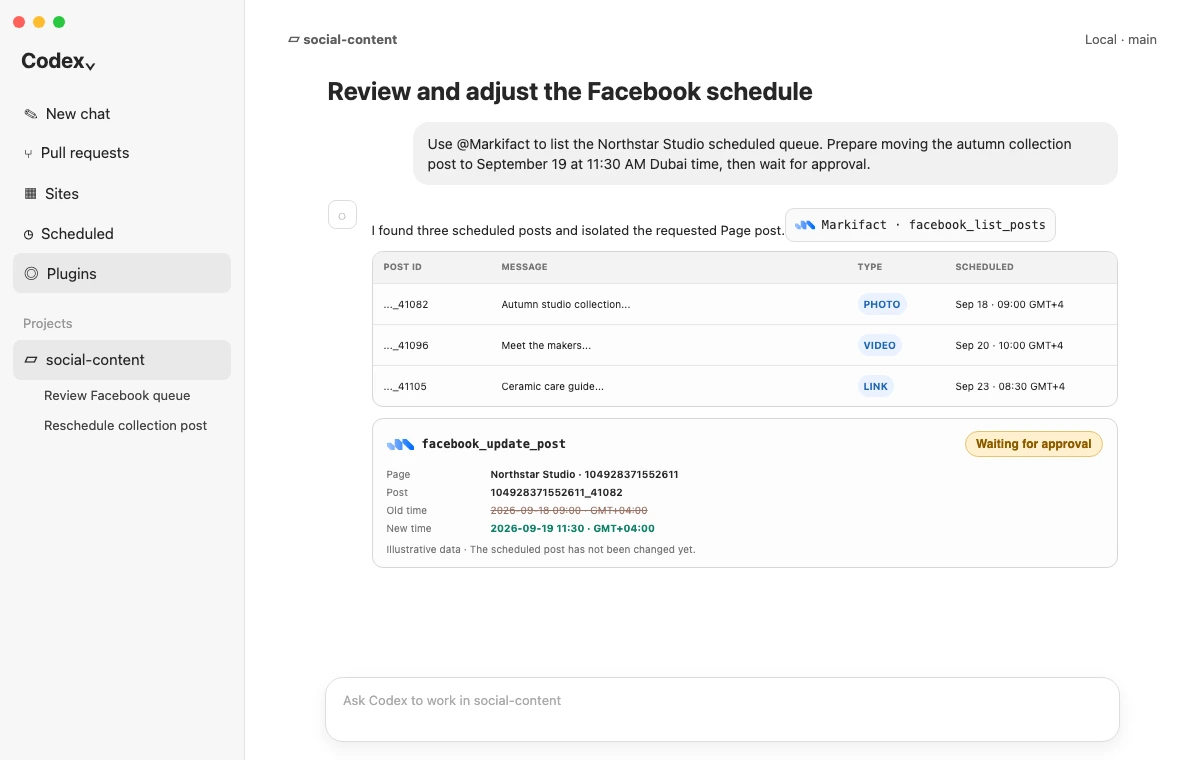
The management flow starts with a list, not a write. Retrieve the exact post ID before asking for an edit or deletion.
Edit text
Prepare a Facebook update for post [pageid_postid] on Northstar Studio. Replace only its message with the approved text below. Keep its existing schedule. Wait for approval.

[approved text]
facebook_update_post can change the message. It cannot replace attached media.
Reschedule a queued post
Prepare a reschedule for Facebook post [pageid_postid] on Northstar Studio. New time: 2026-09-19T11:30:00+04:00. Do not publish it now. Wait for approval.
Publish a scheduled post immediately
Prepare to publish scheduled Facebook post [pageid_postid] on Northstar Studio immediately. Show the post and explain that the scheduled time will be bypassed. Wait for approval.
Delete or cancel
Prepare permanent deletion of Facebook post [pageid_postid] on Northstar Studio. If it is scheduled, explain that deletion cancels it before publication. Wait for approval.
Deletion is permanent. Keep broad phrases such as “remove weak posts” out of write prompts. Ask the model to produce a read-only candidate list first, then approve one exact post ID.
Use ChatGPT for conversation and Codex for repeatable operations
Both clients can reach the same Facebook operations, but they fit different working styles.
Use ChatGPT when the work is conversational: brainstorm copy, compare recent posts, prepare a one-off publish, and review the approval card in the same chat.
Use Codex when the operation belongs to a project: read an approved content calendar, verify filenames and public URLs, prepare several scheduled payloads, and record returned IDs or permalinks in a log. Codex can also turn repeated steps into a reusable project workflow.
Do not use either client as an unattended deletion bot. External writes remain approval-gated regardless of how much project context the model has.
Analyze organic Facebook performance
For a fast review, facebook_list_posts returns recent published content with engagement counts. It can include reactions, comments, shares, media type, permalink, attachments, and the post image URL.
For deeper reporting, use facebook_list_report_fields before facebook_page_insights. Meta changes Page Insights fields over time, so field discovery is more reliable than hard-coding an old metric name.
Use Markifact to discover the current Facebook post-level fields for reach, impressions, engagement, video viewing, post identity, and created time. Then report the last 30 complete days for Northstar Studio and identify the five posts that earned the strongest meaningful engagement. Explain the evidence. Do not publish or edit anything.
Keep organic and paid work distinct. The Facebook Pages MCP handles Page content and organic insights. Meta Ads MCP handles ad campaigns, ad sets, creatives, audiences, budgets, and paid performance.
A practical approval checklist
Before approving a Facebook write, verify:
- The Page name and Page ID match the intended brand.
- The operation is publish, update, or delete as expected.
- The post type matches the media.
- The message is the final approved version.
- Links use the intended destination and tracking parameters.
- Photo order is correct.
- Video or Reel media is public and uses the intended format.
- Scheduled time includes the correct timezone.
- A Story is set to publish now, not scheduled.
- A deletion prompt names one exact post ID.
If any value is unclear, reject the operation and prepare it again.
Prompt pack
Publish a link post
Prepare a Facebook Page link post for [Page]. Message: [approved message]. Link: [URL]. Publish now. Show the exact payload and wait for approval.
Schedule a multi-photo post
Prepare a scheduled Facebook photo post for [Page] with these public image URLs in this exact order: [URLs]. Message: [approved message]. Time: [ISO 8601 with timezone]. Wait for approval.
Publish a Page Story
Prepare a Facebook Page Story for [Page] from this one public media URL: [URL]. Use no message and publish now because Stories cannot be scheduled. Wait for approval.
Audit the queue
List all scheduled Facebook posts for [Page]. Flag duplicated messages, timing conflicts, missing links, and repeated media. Return recommendations only. Do not update or delete anything.
Compare recent formats
List the last 50 published posts for [Page]. Compare text, link, photo, video, and Reel performance using the engagement counts returned. Label the analysis illustrative when the sample is small. Do not make changes.
Frequently asked questions
Can ChatGPT post to a Facebook Page?
Yes. ChatGPT can use the connected Markifact app to prepare and publish a Facebook Page post. The write waits for approval before Markifact changes Facebook.
Can Codex post to Facebook?
Yes. Codex can use the Markifact plugin to prepare the same Facebook Page operations, including publishing, scheduling, updating, deleting, listing, and reporting.
Can ChatGPT schedule Facebook posts?
Yes. Text, link, photo, video, and Reel posts can be scheduled at least ten minutes in the future. Stories cannot be scheduled through this operation.
Can ChatGPT edit or delete an existing Facebook post?
Yes. Markifact can update post text, reschedule a scheduled post, publish a scheduled post now, or permanently delete a post. Media cannot be replaced with the update operation.
Does this work with a personal Facebook profile?
No. This workflow targets Facebook Pages the connected user manages, not personal profiles or Groups.
Can ChatGPT publish Facebook Reels and Stories?
Yes. Reels use a public vertical video URL. Stories use one image or one video, have no message, last for 24 hours, and must publish immediately.
Is the Facebook connector only for reporting?
No. The production Markifact catalog includes Page selection, publishing, native scheduling, listing, updating, deleting, and Page or post reporting.
Is Facebook Page management the same as Meta Ads management?
No. Facebook Page management is for organic content. Meta Ads MCP is for paid campaign management and advertising reports.
Can I use Claude instead?
Yes. See How to Post to Facebook with Claude for the Claude Directory setup and Claude-specific prompts. The Instagram guide for ChatGPT and Codex covers the corresponding Instagram workflow and its different scheduling rules.