You can post to a Facebook Page with Claude by connecting Markifact, selecting a Page you manage, and asking Claude to prepare a text, link, photo, video, Reel, or Story post. Claude can also schedule eligible posts, inspect the queue, edit post text, reschedule content, delete posts, and analyze Page results. Every publish, update, and deletion waits for your approval before Markifact changes Facebook.
This guide is for marketers and operators managing organic Facebook Pages, not personal profiles or Groups, and shows the current connector setup, real operation names, and prompts I would use for a controlled publishing workflow.
What Claude can manage on a Facebook Page
The Facebook Pages MCP connection now covers both reporting and organic Page management. Once connected, Claude can use examples from this production catalog:
| Task | Markifact operation | Read or write |
|---|---|---|
| Find Pages you manage | facebook_select_pages |
Read |
| Publish or schedule content | facebook_publish_post |
Write, approval required |
| List published posts or the scheduled queue | facebook_list_posts |
Read |
| Edit text, reschedule, or publish a scheduled post now | facebook_update_post |
Write, approval required |
| Delete a published or scheduled post | facebook_delete_post |
Write, approval required |
| Discover current report fields | facebook_list_report_fields |
Read |
| Analyze Page and post performance | facebook_page_insights |
Read |
That separation matters. Claude can research and draft freely, but the external action remains visible and reviewable.
What you need before connecting
You need a Facebook login with access to the Page you want to manage. This workflow publishes to Facebook Pages, not a personal timeline and not a Facebook Group.
Connect that Facebook login inside Markifact and authorize the Pages you want available. Meta's Pages API uses Page access and permissions such as `pages_manage_posts` for Page content management. You do not need to build or maintain your own Meta app when you use Markifact's managed connection.
Prepare public media URLs before asking Claude to publish. Markifact accepts direct image or video URLs and Google Drive share links when the file is available to anyone with the link. Facebook downloads the media from that URL, so a private laptop path will not work.
Add Markifact from the Claude Directory
Open the Markifact listing in the Claude Directory, or find it inside Claude:
- Open Settings.
- Select Connectors.
- Search for Markifact.
- Add the connector and complete authentication.
- Confirm that the Facebook connection and intended Pages are available in Markifact.
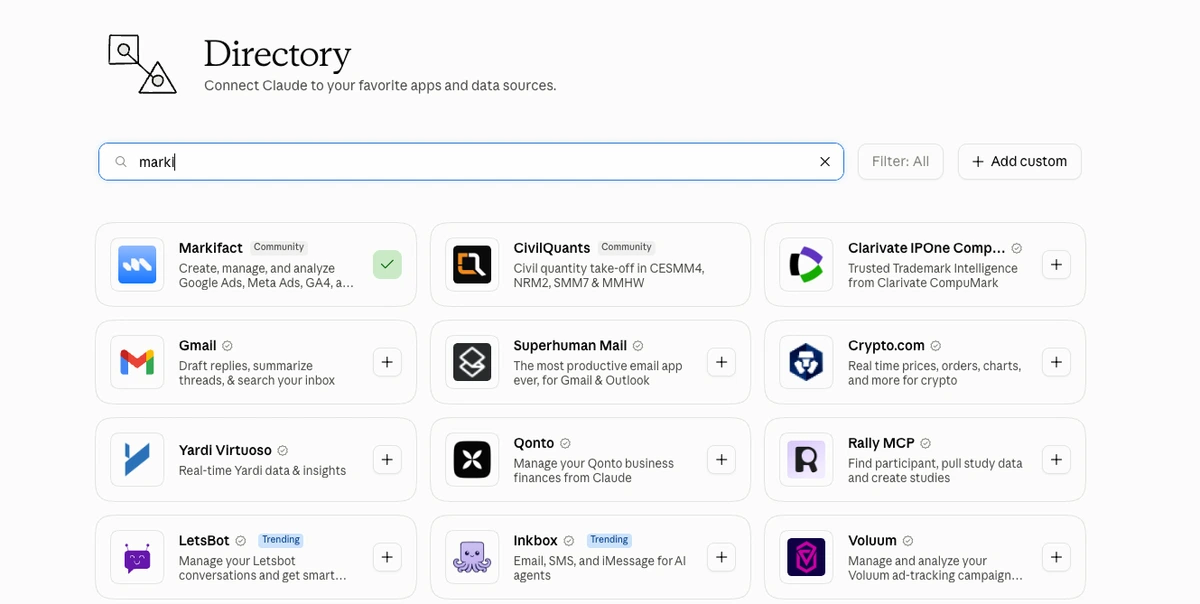
Claude calls this a connector in the interface. Under the hood, Markifact is a remote MCP server that exposes the Facebook operations Claude is allowed to use. If you want the wider setup context, see the Claude connectors guide for marketers.
Verify the Page before you publish
Start with a read-only request. This catches the most common mistake, which is preparing content for the wrong Page in a workspace that manages several brands.
Use Markifact to list the Facebook Pages available to me. Return Page name and Page ID only. Do not publish, update, schedule, or delete anything.
Claude should use facebook_select_pages. Pick the intended Page from the returned list, then repeat its name in every write prompt.
For agency work, I also include a short guardrail:
For this conversation, the only approved Facebook target is Northstar Studio. If a request names another Page, stop and ask me to confirm the target.
This instruction does not replace the approval gate, but it reduces ambiguity before the approval card appears.
Publish a Facebook post with Claude
The strongest workflow separates copy approval from platform approval. First ask Claude for draft options without calling a write operation:
Draft three Facebook Page captions for Northstar Studio's coral studio cup launch.

Audience: design-conscious homeware buyers
Goal: introduce the restock and drive product-page visits
Tone: calm, specific, no hype
Length: 60 to 100 words
CTA: View the collection

Do not publish anything. Return the three options for editorial review.
After choosing the copy and media, ask Claude to prepare the exact post:
Use Markifact to prepare this Facebook Page post for Northstar Studio:

Post type: photo
Message: [paste the approved message]
Images: [paste one to ten public image URLs]
Publish mode: now

Show me the Page, post type, full message, media count, and operation name. Wait for my approval before publishing.
Claude maps this to facebook_publish_post. Markifact should show the target Page and payload before the write is allowed.
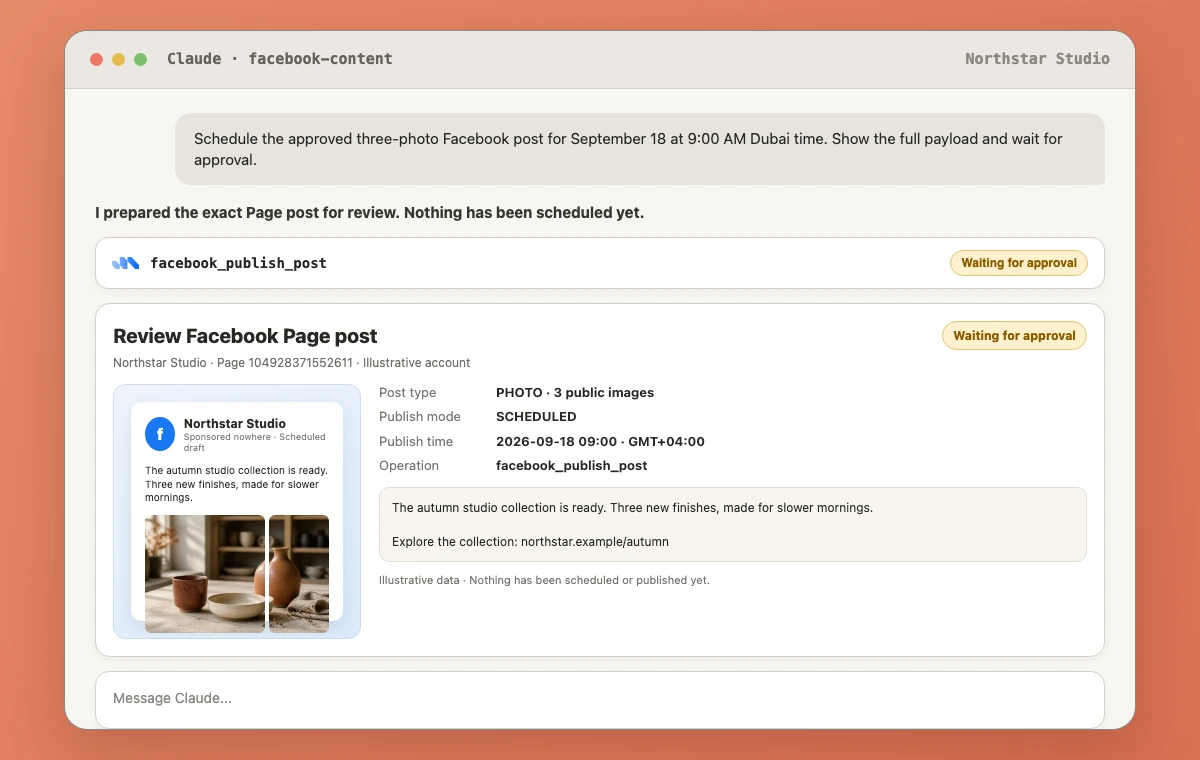
Approve only when the Page, copy, media, and timing are correct. If anything is wrong, reject the action and ask Claude to prepare a new payload.
Choose the right Facebook post type
The publishing operation supports six formats:
Text posts
Use post_type: text with a message. This is useful for short announcements, questions, and updates that do not need an attachment.
Link posts
Use post_type: link, provide the message, and include an HTTP or HTTPS URL. Facebook renders the link preview from the destination.
Photo posts
Use post_type: photo with one to ten public image URLs. The message becomes the photo caption. Put the images in the intended order before approving.
Video posts and Reels
Use a public video URL. For a Reel, the production schema expects vertical 9:16 video, at least 540 by 960 pixels, and roughly 3 to 90 seconds. Meta has been moving Facebook video publishing toward a unified Reels experience, so an uploaded video may appear within the newer Reels-led interface as that rollout continues. Meta explains that product transition here.
Video and Reel processing happens in the background. A successful operation means Facebook accepted the upload, not necessarily that the finished video will appear instantly.
Facebook Page Stories
Stories accept one image or one video and remain visible for 24 hours. They do not accept a message through this operation and cannot be scheduled. A Story write must use publish_mode: now.
Schedule Facebook posts from Claude
Unlike the Instagram publishing workflow, Facebook Page posts have native scheduling through the operation. Text, link, photo, video, and Reel posts can be scheduled at least ten minutes into the future.
Use Markifact to prepare a scheduled Facebook Page post for Northstar Studio.

Post type: link
Message: [approved message]
Link: https://northstar.example/collections/studio-cups
Publish mode: scheduled
Scheduled time: 2026-09-15T09:30:00+04:00

Repeat the Page, message, link, and exact time with timezone. Wait for approval. Do not publish immediately.
Use an ISO 8601 timestamp with a timezone offset when the audience works across regions. It is much safer than asking Claude to interpret “tomorrow morning.”
To inspect the queue without changing it:
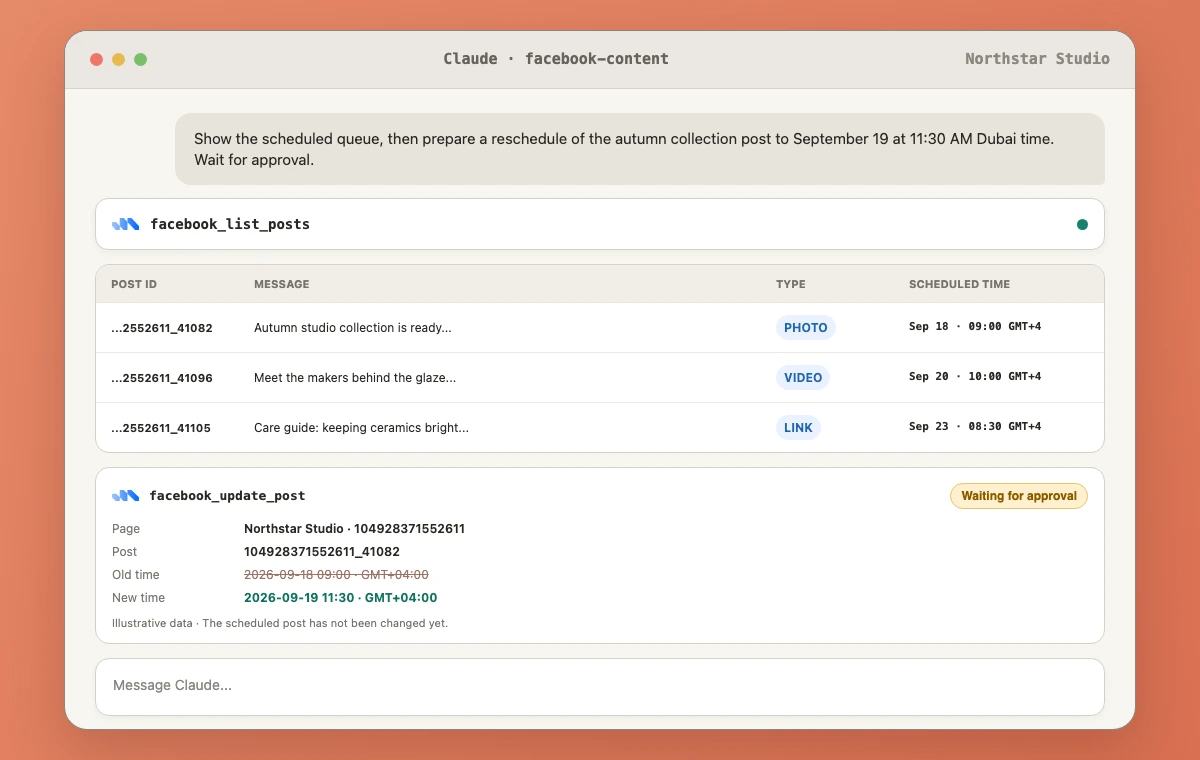
List the next 25 scheduled posts for Northstar Studio using facebook_list_posts. Show post ID, message, scheduled publish time, and media type. Do not modify the queue.
Edit, reschedule, or cancel a post
Use facebook_list_posts first to retrieve the correct pageid_postid value. Then choose the appropriate write operation.
To change copy:
Prepare an update to Facebook post [post ID] on Northstar Studio. Replace only the message with the approved copy below. Do not change the schedule. Show the full change and wait for approval.

[approved copy]
facebook_update_post can edit the message, reschedule a scheduled post, or publish a scheduled post immediately. It cannot replace the attached media. If the media is wrong, delete or cancel the post and prepare a new one.
To reschedule:
Prepare a reschedule for Facebook post [post ID] on Northstar Studio to 2026-09-16T11:00:00+04:00. Show the old and new times if available, then wait for approval.
To cancel a scheduled post:
Prepare deletion of scheduled Facebook post [post ID] on Northstar Studio. Explain that this cancels the scheduled post permanently. Wait for approval.
Deletion uses facebook_delete_post and is permanent. I would never approve a deletion from a vague instruction such as “clean up old posts.” Make Claude list the exact candidates first.
Measure what happened after publishing
There are two useful reporting paths.
Use facebook_list_posts for a fast post inventory with reactions, comments, shares, permalink, media type, and published time. This is the easiest way to compare a small group of recent posts.
Use facebook_list_report_fields followed by facebook_page_insights for a proper Page or post report. Field discovery matters because Meta changes and deprecates Page Insights fields over time.
Use Markifact to discover the current Facebook post-level fields for reach, impressions, engagement, video views, and post identity. Then report the last 30 complete days for Northstar Studio, sort by the strongest engagement signal available, and explain which three posts deserve a follow-up. Do not make any changes.
Keep paid-media analysis separate. Organic Page content belongs in the Facebook Pages MCP workflow. Campaigns, ad sets, creatives, audiences, budgets, and paid reporting belong in Meta Ads MCP.
A safe operating pattern for a content team
The pattern I recommend is short:
- Read: select the Page and inspect recent or scheduled posts.
- Draft: create copy options without invoking a write.
- Prepare: send the exact approved copy, media, post type, and timing.
- Review: inspect the approval card line by line.
- Execute: approve the external write.
- Verify: list the post or queue and capture the returned ID and permalink.
- Measure: run a complete-period report after enough data has accumulated.
This is more reliable than treating Claude as an unattended scheduler. The model helps with context, drafting, and coordination; the approval boundary keeps account control with the operator.
Copy-paste Facebook prompts for Claude
Create a photo post
Prepare a Facebook Page photo post for [Page]. Use these public image URLs in this order: [URLs]. Use this approved message: [message]. Publish now. Show the final payload and wait for approval.
Schedule a Reel
Prepare a Facebook Page Reel for [Page] from this public 9:16 video URL: [URL]. Description: [approved text]. Schedule it for [ISO 8601 time with timezone]. Wait for approval.
Publish a Story
Prepare a Facebook Page Story for [Page] using this one public image URL: [URL]. Publish mode must be now because Stories cannot be scheduled. Wait for approval.
Review the scheduled queue
List scheduled Facebook posts for [Page]. Show post ID, message, media type, and scheduled time. Flag conflicts or duplicates, but do not update or delete anything.
Find reusable winners
List the last 50 published Facebook posts for [Page] with reactions, comments, shares, media type, and permalink. Identify the strongest three patterns. Use illustrative recommendations only and do not publish anything.
Frequently asked questions
Can Claude post directly to Facebook?
Claude can publish to a Facebook Page through a connected tool such as Markifact. Markifact exposes the Page operation and requires approval before the external write.
Can Claude schedule Facebook posts?
Yes. Markifact's facebook_publish_post operation can schedule text, link, photo, video, and Reel posts at least ten minutes in the future. Facebook Page Stories cannot be scheduled through this operation.
Can Claude edit or delete Facebook posts?
Yes. Claude can prepare text edits, reschedule scheduled posts, publish scheduled content immediately, or permanently delete a post through approval-gated Markifact operations. Attached media cannot be replaced with the update operation.
Does this work with personal Facebook profiles or Groups?
No. This workflow is for Facebook Pages that the connected user is authorized to manage.
Can Claude publish multiple photos in one Facebook post?
Yes. A Facebook photo post can contain one to ten public image URLs through facebook_publish_post.
Can Claude analyze Facebook Page performance?
Yes. Claude can list recent posts with engagement counts and can use field discovery plus facebook_page_insights for Page- or post-level reporting.
Is Facebook Pages management the same as Meta Ads management?
No. Facebook Pages management covers organic Page content and Page insights. Meta Ads MCP covers paid campaigns, ad sets, ads, creatives, audiences, budgets, and advertising reports.
Can I use the same workflow in ChatGPT or Codex?
Yes. Use the companion guide, How to Post to Facebook with ChatGPT & Codex, for those client-specific setup paths.
If your team already manages Instagram from Claude, the sibling Instagram publishing guide shows the important differences, especially native scheduling and Story rules.