To connect Instagram to Claude, install the approved Markifact connector and authorize your Instagram professional account in Markifact. Claude can then draft captions, prepare posts, and publish after you approve the request. This guide covers connection requirements, your first post, carousels, Reels, Stories, scheduling, and reporting.
Jump to: Connect Instagram · First post · Carousels · Reels · Scheduling
What you need before Claude can publish
You need four things:
- An Instagram professional account. Meta calls these Business or Creator accounts. Personal accounts are not available through the publishing API used here.
- A Facebook Page linked to that Instagram professional account. This is required by the Facebook Login connection used by Markifact.
- A Markifact workspace with Instagram connected.
- The Markifact connector enabled in Claude.
Meta's professional-account guide explains the difference between Business and Creator accounts. The current Instagram API documentation also confirms an important boundary: standard content publishing works for professional accounts, but API publishing for Stories is limited to Business accounts.
| Instagram account | Images, carousels and Reels | Stories | Facebook Page required here |
|---|---|---|---|
| Business | Yes | Yes | Yes |
| Creator | Yes | No | Yes |
| Personal | No | No | Not supported |
Connect Instagram to Claude
Add Markifact from Claude's connector directory
Markifact is listed in Claude's connector directory, so start with the directory route instead of pasting a custom server URL. You can open the Markifact listing in the Claude Directory directly, or find it from Claude:
- In Claude, open Customize, then Connectors.
- Click the + button and browse the connector directory.
- Search for Markifact.
- Open the Markifact card and click Connect or Install.
- Complete the Markifact sign-in and choose the intended workspace.
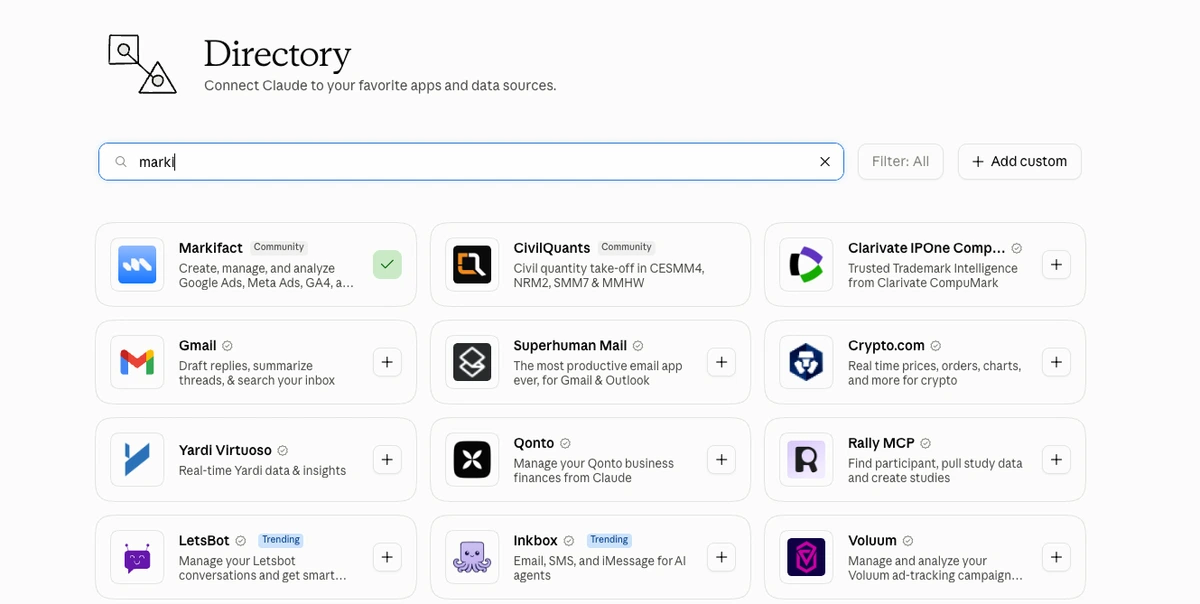
Anthropic documents the current connector flow in its connector setup guide. Connector availability and organization controls can differ on Team and Enterprise accounts, so an owner may need to approve the connector first.
If you want the plain-English explanation of what a connector is, read Claude Connectors for Marketers. In short, the connector is Claude's interface to an MCP server, and the MCP server exposes narrowly defined operations rather than handing Claude your Instagram password.
Connect the correct Instagram account
In Markifact, open Connections, choose Instagram, and complete Meta's authorization flow. Then ask Claude to list the Instagram accounts available through the connection:
Use Markifact to list the Instagram professional accounts available to this connection.
Return the account name and account ID only. Do not publish anything.
Select by both name and ID. That extra check matters when an agency workspace contains several brands with similar handles.
The Instagram MCP page is the reference point for the managed connection and its current capabilities.
Connect Instagram through Markifact, then use the first-post prompt below to confirm your publishing workflow.
Publish your first Instagram post with Claude
Start with one approved JPEG and a caption you can verify. The file must be available through a public HTTP(S) URL that Instagram can download. Markifact can also resolve a Google Drive share link when it is set to Anyone with the link.
Paste a prompt like this:
Use Instagram account [ACCOUNT NAME] ([ACCOUNT ID]).

Prepare a single-image Instagram post using this media URL:
[PUBLIC IMAGE URL]

Caption:
Small rituals, better mornings. Our hand-finished studio cup is back in coral.

#NorthstarStudio #CeramicDesign #SlowMornings

Show me the exact account, post type, media, and full caption.
Do not publish until I approve the final request.
Claude can prepare the write using instagram_publish_post. This is one example from the broader Instagram tool surface, not an exhaustive list of everything Markifact can do.
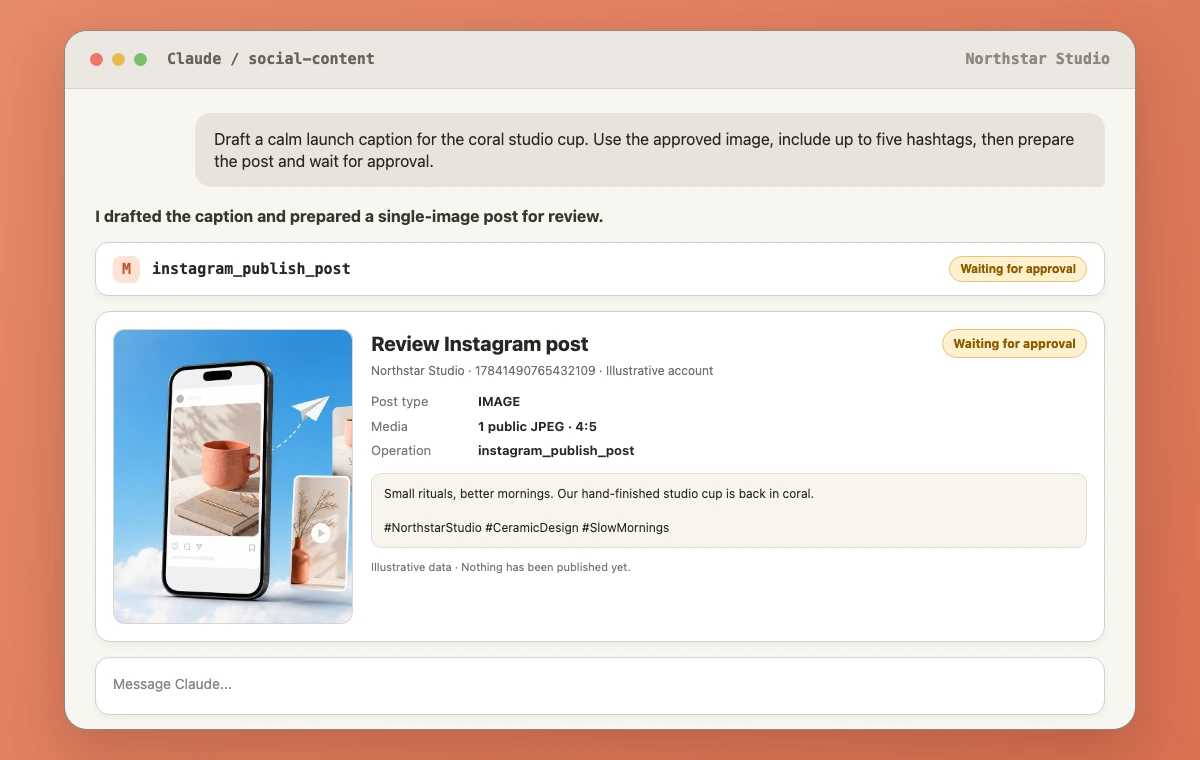
The approval screen is the important part. Check the account ID, post type, media preview, full caption, and any Reel-specific settings. If anything is wrong, reject the request and revise it in the conversation. Nothing should post silently.
Once you approve, Markifact creates the Instagram media container, waits for Instagram to finish processing it, and publishes it. A successful response includes the media ID and permalink. Instagram still applies its own processing, policy, and account checks.
Post a single image
A single-image post accepts exactly one image URL and an optional caption of up to 2,200 characters. For the safest feed result, use a JPEG under 8 MB with an aspect ratio between 4:5 and 1.91:1.
Prepare a single-image post for [ACCOUNT ID] using [IMAGE URL].
Write three caption options in our calm, practical brand voice.
Each option should open with a different hook and end with one clear question.
Keep hashtags inside the caption. Let me choose the caption before you prepare the publish action.
This separates creative work from execution. Claude can explore several angles without creating several approval requests.
Post an Instagram carousel
An Instagram carousel through Markifact accepts 2 to 10 media URLs. Images and videos can be mixed, and Markifact detects each item's media type before building the carousel container.
Prepare a five-slide Instagram carousel for [ACCOUNT ID].
Use these media URLs in this exact order:
1. [URL]
2. [URL]
3. [URL]
4. [URL]
5. [URL]

Draft a caption that introduces the lesson without repeating every slide.
Include a short save-this-post call to action.
Show the ordered media list and full caption, then wait for approval.
Order is part of the publishing payload. Review it carefully, especially when the first card is the hook and the last card contains the call to action.
Post or schedule an Instagram Reel
Instagram feed video publishing uses the Reel post type. A Reel requires one public video URL. You can also provide a cover image and choose whether the Reel should be shared to the main feed.
Vertical 9:16 video is the practical default. The current Markifact input guidance recommends roughly 3 seconds to 15 minutes for a Reel.
Prepare a Reel for [ACCOUNT ID] using [VIDEO URL].
Use [COVER IMAGE URL] as the cover and share it to the main feed.

Draft two caption options:
- one direct and useful
- one more conversational

Keep both under 600 characters, include no more than five relevant hashtags,
and wait for my caption choice before preparing the publish request.
There is no native publish_at field in instagram_publish_post. If you want to schedule a Reel, use a scheduled Markifact workflow as described below. That is workflow scheduling, not Instagram-native scheduling.
Post or schedule an Instagram Story
A Story accepts exactly one image or one video and remains visible for 24 hours under Instagram's normal Story behavior. API publishing for Stories is available only to Instagram Business accounts, not Creator accounts.
The current operation does not accept a Story caption. Put essential text, disclaimers, and calls to action into the Story creative itself before publishing.
Prepare one Instagram Story for business account [ACCOUNT ID].
Use [IMAGE OR VIDEO URL].
Confirm the media type and account before preparing the publish request.
Do not invent a caption or overlay. Wait for approval.
For video Stories, vertical 9:16 is recommended and a roughly 60-second clip is the practical upper target for one Story item.
Let Claude draft captions and hashtags
The useful difference between this workflow and a traditional scheduling calendar is that the same assistant can inspect the brief, produce variants, apply feedback, and then prepare the approved version for publishing. You do not need to copy the final caption into another tool.
Turn a campaign brief into caption options
You are drafting Instagram copy for [BRAND].

Audience: [AUDIENCE]
Content goal: [GOAL]
Asset summary: [WHAT THE IMAGE OR VIDEO SHOWS]
Offer or message: [MESSAGE]
Voice rules: [VOICE]
Words to avoid: [LIST]

Write four caption options:
1. concise and direct
2. story-led
3. educational
4. community-led

For each, include a hook, body, one action, and up to five relevant hashtags.
Do not publish anything.
Tighten a caption without flattening the voice
Edit this Instagram caption for clarity and rhythm.
Keep the founder's first-person voice and every factual claim.
Remove repeated ideas, generic enthusiasm, and unnecessary adjectives.
Return one final caption plus a short note explaining the three biggest edits.
Do not publish anything.

[PASTE CAPTION]
Draft a first comment, with one manual step
The publishing operation does not currently support a first-comment field. Claude can draft a first comment, but it cannot publish that comment through this Instagram operation. Copy it into Instagram manually after the post is live.
Draft a first comment for this Instagram post.
Use it for supporting context, not repeated caption text.
Keep it under 300 characters and include no more than three hashtags.
Return text only. Do not call a publishing operation.

[PASTE FINAL CAPTION]
That boundary is less convenient than a dedicated social scheduler, but it is better than pretending the action exists.
How to schedule Instagram posts from Claude
Instagram publishing through Markifact does not provide native scheduling. To schedule Instagram posts, build a Markifact workflow and set the workflow to run at the required date, time, and timezone. The scheduled workflow then invokes the publishing node.
A practical workflow looks like this:
- Store the approved media URL, caption, account ID, and post type in the workflow.
- Add the Instagram Publish Post node.
- Set the workflow schedule and timezone.
- Test with a draft asset or a controlled account.
- Review the approval request when the write runs.
Because the external publish is approval-gated, do not assume a scheduled workflow will post unattended. Plan for a person to review the request at execution time. If you need a queue with drag-and-drop rescheduling, evergreen recycling, team calendar approvals, or automatic first comments, Buffer, Later, Hootsuite, and similar social schedulers are purpose-built for those jobs.
Markifact is a better fit when the workflow needs Claude to reason over a brief or connected marketing data, prepare the content, publish after approval, and later analyze the result in the same conversation.
Measure the post in the same Claude conversation
After publishing, ask for performance by post. instagram_get_posts_performance is a read-only reporting example that can return fields such as post ID, media type, permalink, views, reach, shares, likes, comments, total views, and reposts.
Use instagram_get_posts_performance for [ACCOUNT ID].
Find the post with permalink [POST URL] and report its performance for the first seven complete days.
Include views, reach, likes, comments, shares, and reposts where available.
Show the raw values first, then give me three observations.
Do not change or publish anything.
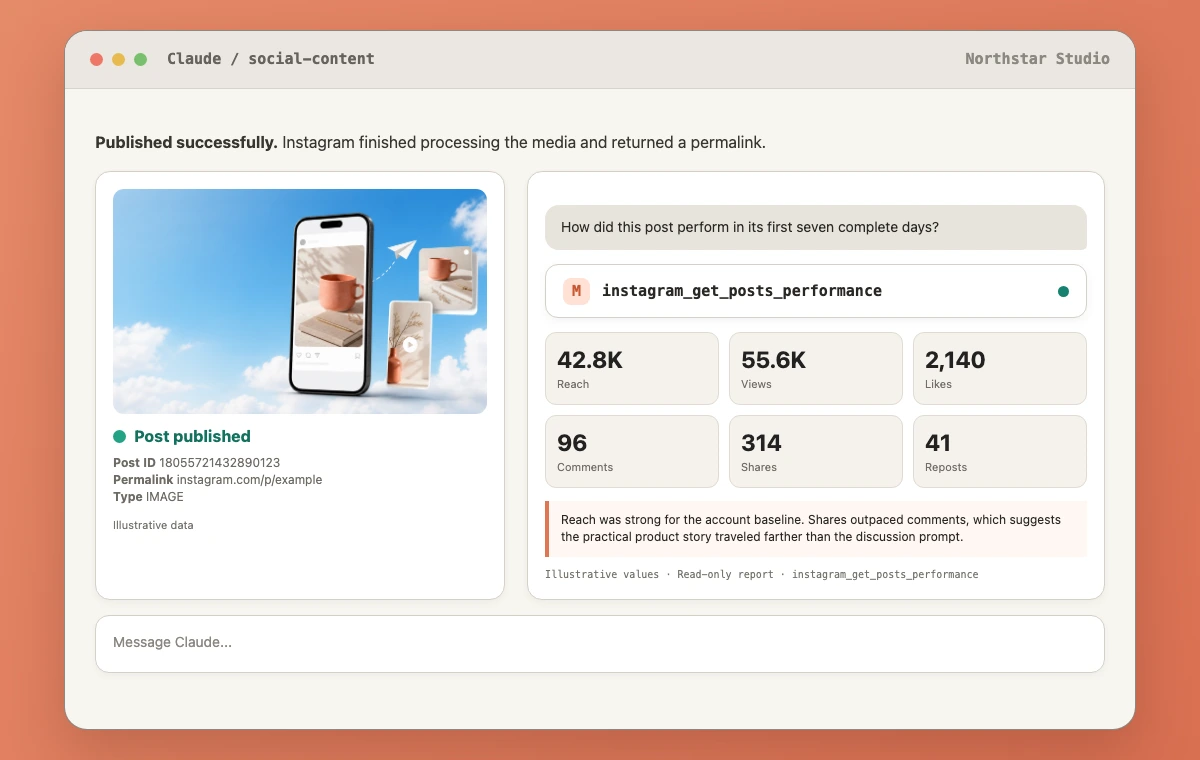
For a broader view, instagram_get_account_performance can report account-level metrics and dimensions. That is useful when you want to compare the content you published with the account's baseline rather than judging one post in isolation.
Keep the interpretation honest. A post with strong reach and weak comments may still be doing its job if the objective was awareness. A Reel with many views but little profile activity may need a clearer next step. Claude can organize the evidence, but it should not invent attribution or revenue that Instagram did not return.
If you also run paid promotion, connect this organic workflow to the Meta Ads MCP or follow the Meta Ads and Claude setup guide. Organic post engagement and paid campaign results are related context, but they remain different datasets.
Current limits to know before you automate
This is the part I would check before moving a real content calendar into Claude:
- Professional accounts only. The current connection supports Instagram Business and Creator accounts linked to a Facebook Page. It does not support personal accounts.
- Stories require a Business account. Creator accounts can publish other supported content, but not Stories through this API path.
- Four post types. The current publisher supports image, carousel, Reel, and Story. A feed video is treated as a Reel.
- No native scheduling. A schedule belongs to the Markifact workflow, not the Instagram publishing input.
- Approval remains required. The publish action waits for review. Scheduled preparation should not be described as unattended publishing.
- No first-comment publishing. Claude can draft it, but the current operation cannot post it.
- No location or tagging fields. The current input has no location, people tag, collaborator tag, product tag, or alt-text field.
- No edit or delete operations. Markifact's current Instagram surface publishes new media and reports performance. It does not expose post editing or deletion.
- Publicly reachable media is required. Instagram must be able to download the image or video from the submitted URL.
- Caption length is capped. Images, carousels, and Reels accept up to 2,200 characters. Stories do not accept a caption through this operation.
- Carousel size is capped. Use 2 to 10 media items.
- API publishing is rate-limited. The current operation reports a maximum of 50 API-published posts per account in a rolling 24-hour window.
These limits will not matter for every team. They matter a great deal if you rely on creator tagging, product tags, first comments, complex approval calendars, or unattended queues. Choose the workflow for the job you actually have.
A safe publishing routine for a social team
For a first month, I would keep the process simple:
- Select one Instagram account by name and ID.
- Prepare one piece of content at a time.
- Ask Claude for caption options before asking it to publish.
- Review the media order and full caption in the approval request.
- Save the returned permalink.
- Review performance after a complete seven-day window.
- Turn repeated work into a scheduled workflow only after the manual version is reliable.
That creates a clear trail from brief to approval to live post to result. It also gives a new team enough time to learn where a dedicated scheduler still belongs in the stack.
Frequently asked questions
Can Claude post to Instagram?
Yes. Claude can post to an authorized Instagram professional account through an MCP connector such as Markifact. The current publishing operation supports a single image, a 2 to 10 item carousel, a Reel, or a Story, and the write waits for approval.
Can Claude schedule Instagram posts?
Claude can prepare content for a Markifact workflow that runs on a schedule, but the Instagram publishing operation does not have a native scheduling field. The external write remains approval-gated, so do not assume scheduled posts publish unattended.
Can Claude post Instagram Reels and Stories?
Yes. Reels accept one video URL with an optional cover and feed-sharing setting. Stories accept one image or video, but API Story publishing is limited to Instagram Business accounts and the current operation does not support Story captions.
Do I need an Instagram business account?
You need a professional account, which can be Business or Creator, linked to a Facebook Page for the current Markifact connection. Use a Business account if you need Story publishing.
Can I connect a personal Instagram account to Claude?
Not through this publishing connection. Convert it to a Business or Creator account and link a Facebook Page before connecting it in Markifact. Choose Business if you need API publishing for Stories.
Can Claude edit or delete an Instagram post?
Not through Markifact's current Instagram operations. Claude can publish new content and report on performance, but Instagram edit and delete operations are not currently exposed.
Is there an Instagram MCP server?
Yes. Markifact provides a managed Instagram MCP connection for Claude and other MCP-compatible clients. It combines professional-account reporting with approval-gated publishing rather than requiring you to build and host your own Instagram integration.