The Facebook Ad Library active ads count appears above the search results after you select an advertiser, country, ad category, and Active ads filter. Meta may show the total as an approximation such as ~1,200 results or a threshold such as >50,000 results, so treat it as a directional count rather than an audited exact figure. This guide shows the manual method first, then a repeatable Claude and Markifact workflow for checking several brands every week.
People still search for the Facebook Ad Library, although Meta now calls the product Meta Ad Library. The instructions below refer to the same public database.
How to check a brand's Facebook Ad Library active ads count
You do not need an API, a paid tool, or a Facebook login for the basic check.
- Open Meta Ad Library.
- Select the country where you want to inspect delivery.
- Choose All ads unless you specifically need the political and social-issues archive.
- Search for the brand, then select the advertiser's Page from the suggestions. Do not leave the search as a broad keyword if you want a brand-level count.
- Open Filters and set Active status to Active ads.
- Apply a Platform filter only if you need Facebook, Instagram, Messenger, Audience Network, or Threads separately.
- Read the result total above the ad cards and record the country, platform, query, and check time beside it.
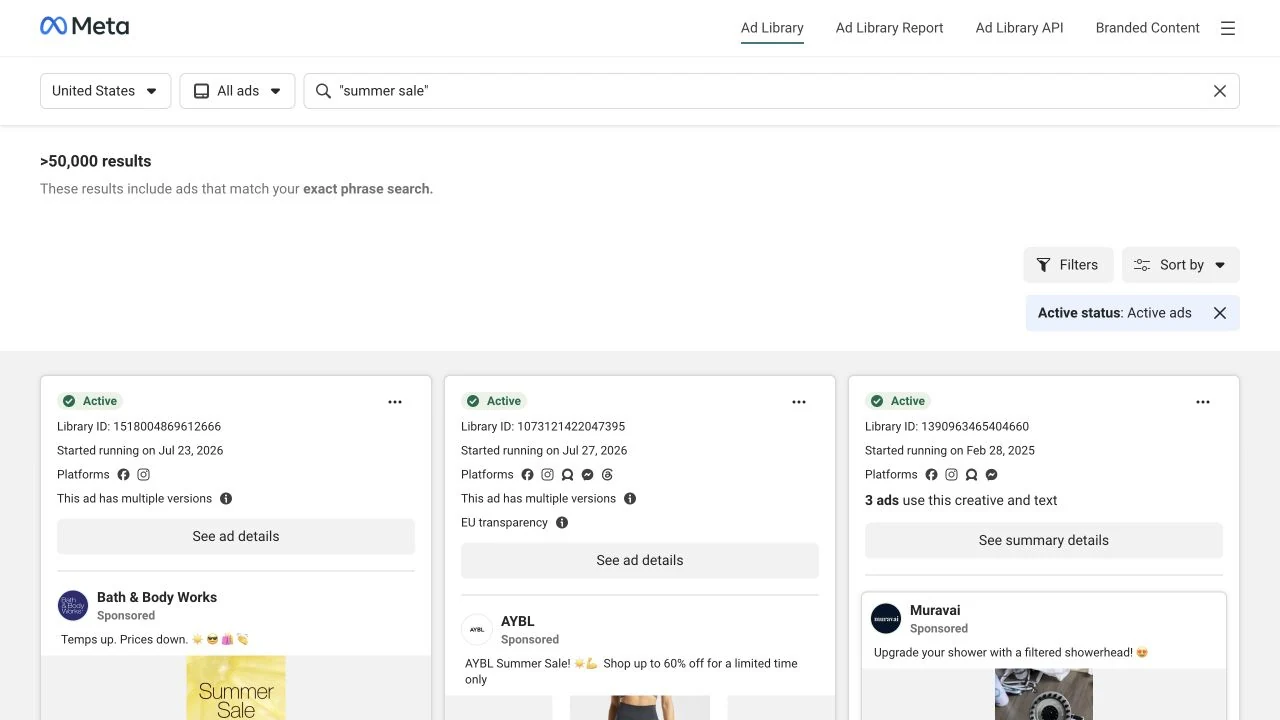
A real Meta Ad Library result count is tied to the selected country, category, query mode, and filters. Save those details with the number.
The advertiser selection is the step most people miss. A keyword search answers “How many active ads mention this term?” An advertiser search answers “How many ads from this Page match my filters?” Those are different questions.
If the brand has several regional Pages, repeat the check for each relevant Page. Do not combine the numbers until you have confirmed that the Pages represent separate advertiser identities and that every search uses the same scope.
Facebook Ad Library active US ads count
To get a Facebook Ad Library active US ads count, choose United States before selecting the advertiser and apply Active ads. The number is scoped to ads visible in that country. It is not the brand's worldwide active-ad total.
Keep the country explicit in any comparison. An advertiser may run 120 ads in the United States and 18 in Canada, while another may split activity across many local Pages. A count without its country is not reproducible.
For a Facebook-only count, add Platform → Facebook. For an Instagram-only count, choose Instagram. The unfiltered total can include ads across Meta products. Do not assume that adding each platform total produces a clean overall number because one ad can run on more than one placement.
Facebook Ad Library active ads count with an exact phrase
Wrap a phrase in quotation marks to run an exact-phrase search. For example:
"summer sale"
Meta currently labels quoted queries as an exact phrase search. The visible total answers how many matching ads are in the selected country and filter scope. It does not become advertiser-specific unless you also select an advertiser.
Exact phrase mode is useful for checking the adoption of a promotion, offer, product name, or claim. Save the quotation marks in your tracker so a future reviewer can reproduce the query.
Another route: Page Transparency
If search suggestions are ambiguous, start from the brand's Facebook Page:
- Open the Page.
- Find Page transparency and select See all.
- Open Ads From This Page.
- Select Go to Ad Library.
Meta's Page Transparency instructions say this route opens ads currently running in the selected country, with an option to change countries. On Instagram, About This Account → Active Ads opens the account's active ads across Meta products.
This route reduces the chance of choosing a similarly named advertiser. You should still verify the Page name and identifier before logging the result.
Why the active ads count can change
An active ads count is a snapshot, not a stable account total. Several things can move it:
- Country: Ad delivery and eligibility vary by location.
- Platform: Facebook-only and Instagram-only views use narrower scopes.
- Advertiser selection: A keyword result can include many Pages. A Page result does not.
- Search mode: Broad keywords and quoted exact phrases return different sets.
- Status: Active and inactive ads should never be mixed in a live-volume comparison.
- Creative variants: Meta may expose multiple versions or placements related to one campaign concept.
- Timing: Meta says ads generally appear within 24 hours of receiving their first impression, and changes may also take up to 24 hours to appear.
Meta may prefix the total with ~ or show a threshold such as >50,000. Preserve that qualifier in your notes. Writing 43,000 when the interface showed ~43,000 invents precision that the source did not provide.
EU transparency can add ad-level delivery information such as estimated reach and demographic breakdowns. An integer shown there is still labeled as estimated by Meta, and it is not a replacement for the advertiser's active-result count.
What the number tells you, and what it does not
The count is a useful signal of creative volume. Tracked consistently, it can reveal launches, seasonal pushes, market expansion, or a sharp reduction in active variants.
It does not reveal spend, conversions, profitability, budget allocation, or whether the ads are working. A brand with 200 active ads may be testing many variants with modest spend. Another with 12 ads may be investing heavily in a small set of winners.
Use the count to decide where to investigate, not to declare a winner. For creative patterns, formats, hooks, and offers, read our analysis of 40 competitor ads in the Meta Ad Library.
Automate active-ad counts with Claude and Markifact
The manual method is best for a one-off check. When you want the same scoped comparison every Monday, connect Claude to Markifact's Meta Ads Library MCP.
The example meta_ads_library operation can retrieve ads for a Page ID or a full Meta Ad Library URL, with filters such as country, status, platform, media type, date range, and similar-ad grouping. Claude should run the operation separately for each advertiser, then count the returned rows.
This is not the same number as Meta's separate approximate heading. It is a count of the records retrieved within your requested limit. The current Markifact interface accepts a limit of up to 1,000. If 1,000 rows return from a 1,000-row request, report at least 1,000, not an exact total.
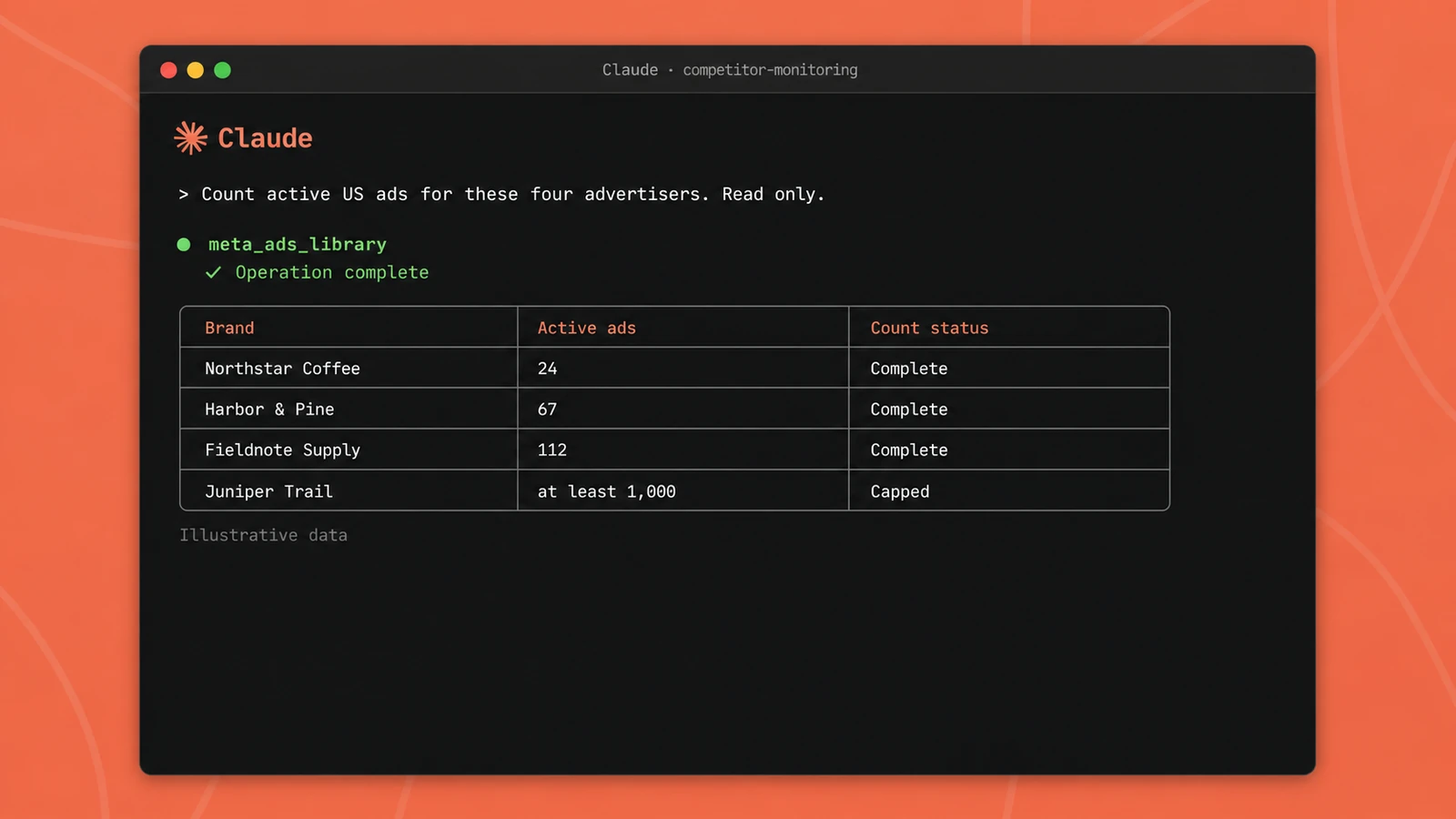
Illustrative data. Each advertiser is queried separately so its Page ID, country, platform, result limit, and count status stay visible.
Prompt: compare four brands
Replace the fictional Page URLs or IDs before running this prompt:
Use the Meta Ads Library connector to check these advertisers separately:

- Northstar Coffee: [Meta Ad Library URL or Page ID]
- Harbor & Pine: [Meta Ad Library URL or Page ID]
- Fieldnote Supply: [Meta Ad Library URL or Page ID]
- Juniper Trail: [Meta Ad Library URL or Page ID]

For each advertiser, use meta_ads_library with:
- country: US
- active_status: active
- ad_type: all
- no platform filter
- group_similar_ads: false
- limit: 1000

Count the returned ad rows. If the returned count equals the limit,
write "at least 1,000" and mark the count as capped. Return a table with
Brand, Page ID, Country, Platform scope, Active ads returned, Count status,
and Source URL. Do not infer spend or performance.
The operation name is an example from a growing catalog. Claude can discover the current tool and input names from the connected service.
Prompt: count ads containing an exact phrase
For Northstar Coffee [Page ID], retrieve active ads in the United States
that contain the exact phrase "summer sale". Use meta_ads_library with a
1,000-row limit and do not group similar ads. Count the returned rows.

State the advertiser, country, active status, exact phrase, platform scope,
checked-at time in UTC, returned count, and whether the limit was reached.
Do not call the result exact if the limit was reached.
Quoted search behavior should be verified against the current interface when the wording matters. Product UIs and search behavior can change.
Individual ads or creative groups?
Keep group_similar_ads set to false when your metric is active ad records. Turn it on only when your real question is the number of distinct creative groups.
Once grouping changes, you have a different metric. Label it active creative groups and do not compare it with an earlier ungrouped active-ad count.
If you have not connected the service yet, follow the Meta Ads to Claude setup guide. Markifact also provides a broader Meta Ads MCP for first-party reporting and approval-gated campaign management in accounts you control.
Build a weekly Google Sheets tracker
Use one row per advertiser, country, platform scope, and query. A small scorecard is more defensible than a screenshot folder because it preserves the comparison rules.
Recommended columns:
| Column | What to store |
|---|---|
| Checked at | UTC timestamp |
| Brand | Advertiser label |
| Page ID | Stable advertiser identifier |
| Country | US, GB, CA, or another selected market |
| Platform | All Meta products, Facebook, Instagram, or another single filter |
| Query | Blank for all ads, or the exact quoted phrase |
| Active ads returned | Integer or at least 1,000 |
| Count status | Complete within limit, capped, or failed |
| Source URL | Reproducible Ad Library URL |
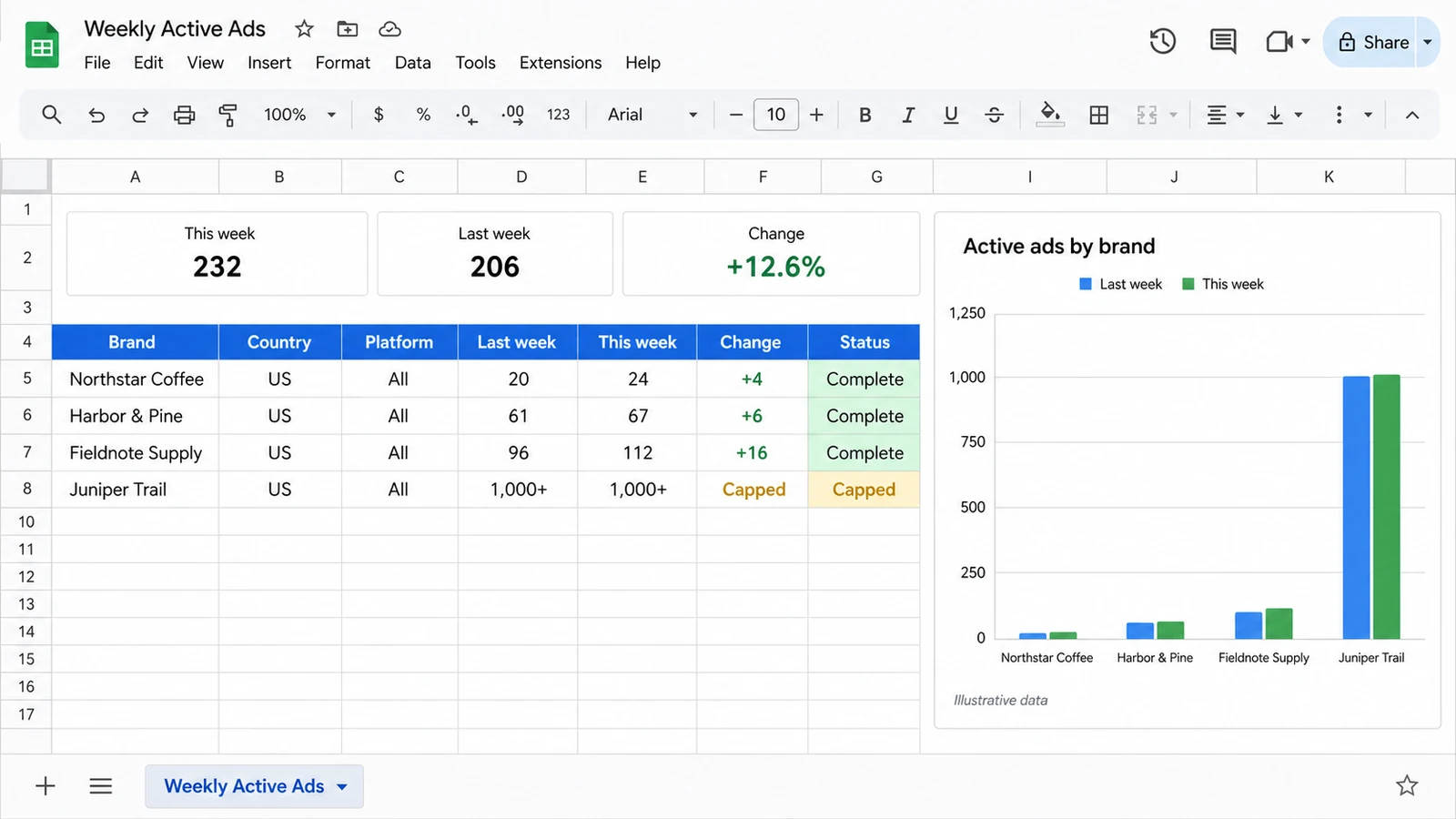
Illustrative data. The tracker keeps scope and count status beside every number so week-over-week changes remain interpretable.
Then ask Claude to prepare the rows and request confirmation before writing:
Run the four advertiser checks using the same filters as last week.
Show me the proposed rows first. After I approve, use sheets_write_data
to append them to the "Weekly active ads" sheet.

Never overwrite prior rows. Preserve UTC time, Page ID, country, platform,
query, returned count, count status, and source URL. Add week-over-week
absolute and percentage changes only when both weeks used the same scope
and neither count was capped.
This approval step keeps an external write visible and reviewable. A failed lookup should create a failed status rather than a zero, because zero active ads and no data are not the same result.
A practical weekly review
Once the tracker is stable, review four things:
- Largest increases: Open the new ads and identify the products, offers, formats, and hooks behind the rise.
- Largest decreases: Check whether a promotion ended, a market went quiet, or the Page changed.
- New exact phrases: Track recurring promotional language without assuming it reflects campaign results.
- Scope breaks: Investigate changed Page IDs, capped results, failed calls, or different country and platform filters before comparing numbers.
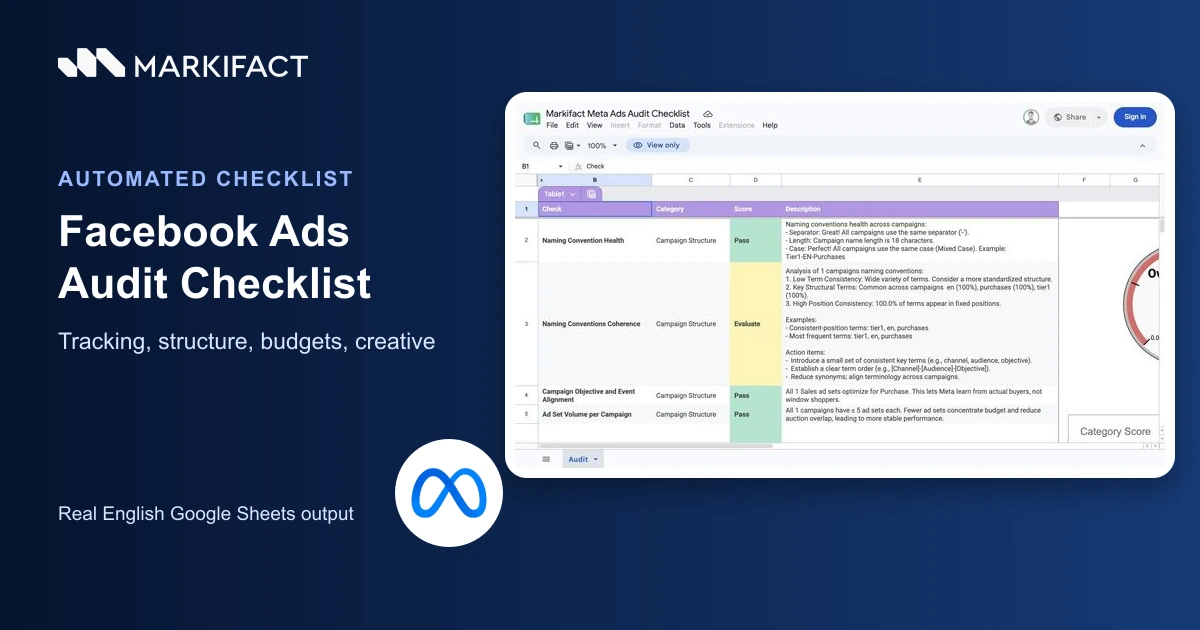
For a wider account review that covers structure, tracking, budgets, and creative alongside public-ad research, use the Facebook Ads audit checklist.
FAQ
How do I see how many active ads a Facebook Page has?
Open Meta Ad Library, select the country and All ads, choose the advertiser's Page, set Active status to Active ads, and read the result total above the cards. You can also reach the advertiser through Facebook Page Transparency.
Is the Facebook Ad Library active ads count exact?
Not always. Meta may show an approximate total with ~ or a threshold such as >50,000. Record the qualifier exactly as displayed, along with the country, platform, query mode, advertiser, and check time.
How do I check the Facebook Ad Library active US ads count?
Choose United States, select the advertiser, set the category to All ads, and apply Active ads. Add Platform → Facebook only if you want a Facebook-only view rather than all selected Meta products.
Can I search the Facebook Ad Library active ads count by exact phrase?
Yes. Put quotation marks around the phrase. Meta currently labels a quoted query as an exact-phrase search. Select an advertiser as well if you want the phrase count for one brand rather than every matching advertiser.
Can Claude count active Meta ads for several brands?
Yes. With Markifact's Meta Ads Library connector, Claude can run an example meta_ads_library retrieval separately for each advertiser, apply consistent filters, count returned records, and format a comparison. If the request reaches its limit, Claude should label the result as capped.
Is there an API or MCP for Meta Ad Library counts?
Meta provides an Ad Library API for eligible transparency use cases. Markifact provides a Meta Ads Library MCP operation for retrieving public advertiser or keyword results in Claude and other supported clients. Coverage, access, and limits differ, so document which source produced each number.