Claude Code can manage Facebook and Instagram advertising through a Meta Ads MCP server, so you can run reports, research competitors, prepare campaign builds, and execute approved changes from the terminal. You can connect either Meta's official hosted server or Markifact: the official option is a free first-party open beta, while Markifact adds multi-account, cross-platform workflows and a separate approval gate on every write.
This is the command-line counterpart to our Meta Ads and Claude Desktop guide. If you work in repositories, generate Markdown artifacts, or want repeatable CLI workflows, use Claude Code.
The two setup commands
For Meta's official server:
claude mcp add --transport http meta-ads-official \
  https://mcp.facebook.com/ads
claude mcp add --transport http markifact https://api.markifact.com/mcp \
  --header "Authorization: Bearer YOUR_MARKIFACT_MCP_TOKEN"
Those commands connect different servers. Do not give them ambiguous names such as meta and assume Claude will always choose correctly.
Pick the server by operating model
Meta Ads MCP can refer to Meta's official Ads AI Connector or a third-party server such as Markifact. Both can read and write, so write access alone is not the difference.
| Question | Meta's official server | Markifact |
|---|---|---|
| Who maintains it? | Meta | Markifact |
| Setup | Hosted HTTP plus Meta OAuth | Hosted HTTP plus Markifact token |
| Cost | Free during open beta | Paid managed service |
| Platform scope | Meta Ads | Meta Ads plus the rest of your connected marketing stack |
| Accounts | Meta business assets authorized in OAuth | Multiple connected accounts and clients |
| Public competitor research | Not a documented core workflow | meta_ads_library |
| Writes | Supported | Supported |
| Write control | Meta permissions plus Claude Code permission prompts | Claude Code permission plus a separate Markifact approval |
As of July 30, 2026, Meta's official connector is in open beta. Meta advertises reporting, campaign management, catalog work, and signal diagnostics. Current technical documentation reports 29 tools, but beta surfaces can change, so inspect the tools shown in your own /mcp panel.
Use the official server when you want Meta's first-party, Meta-only route. Use Markifact when you need a broader operation set, several accounts, public Ads Library research, cross-platform context, or an approval queue that is independent of the MCP client.
If you are still deciding, read our tested comparison of Meta's official MCP and the alternatives.
Create a dedicated Meta Ads workspace
Keep account context, reports, and operating rules in a separate project directory:
mkdir -p meta-ads-workspace/reports
cd meta-ads-workspace
Check Claude Code:
claude --version
The commands in this article were checked with Claude Code 2.1.211. Current Anthropic documentation supports remote HTTP servers, OAuth authentication through /mcp, local, project, and user scopes, and non-interactive claude -p runs.
Connect Meta's official Ads MCP
Add the server in local scope, which is Claude Code's default:
claude mcp add --transport http meta-ads-official \
  https://mcp.facebook.com/ads
Verify the configuration:
claude mcp list
claude mcp get meta-ads-official
Start an interactive session:
claude
Then open:
/mcp
Select meta-ads-official and complete Meta OAuth in the browser. The official endpoint currently advertises authorization-code OAuth with PKCE, refresh tokens, and dynamic client registration. It requests Meta advertising, catalog, business, Page, Instagram, and MCP-management scopes.
No developer app, access token, or local server process is required for the hosted route. You still need the correct Meta Business permissions.
If Meta says the connector is not enabled
The official server remains in a phased open-beta rollout. A successful OAuth flow does not guarantee that every business or ad account has the feature enabled. If the connector returns an availability flag or says Ads MCP is not enabled, that is not a Claude Code command error.
You can wait for Meta's rollout, use Meta's separate Ads CLI where appropriate, or connect a managed server such as Markifact.
Connect Markifact to Claude Code
First connect Meta Ads inside the intended Markifact workspace. Use a Meta login that can access the required business and ad accounts.
Then open the Markifact MCP server page and create a manual token. The product UI generates this exact command with your token filled in:
claude mcp add --transport http markifact https://api.markifact.com/mcp \
  --header "Authorization: Bearer YOUR_MARKIFACT_MCP_TOKEN"
Verify it:
claude mcp list
claude mcp get markifact
Treat the token like a production credential:
- Do not put it in
CLAUDE.md. - Do not commit it to
.mcp.json. - Do not paste it into prompts, screenshots, reports, or shell scripts.
- Rotate it if it appears in terminal history or a recording.
Markifact currently exposes 57 meta_ads_* operations: 21 reads and 36 approval-gated writes. Those counts are current as of July 30, 2026 and will change as the integration grows.
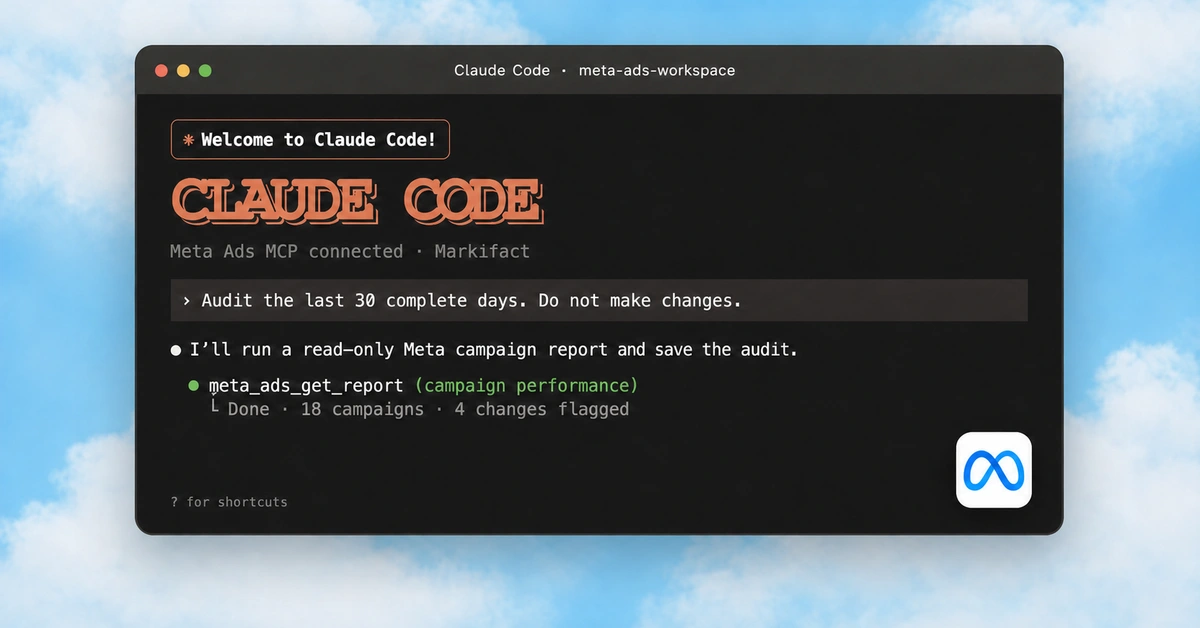
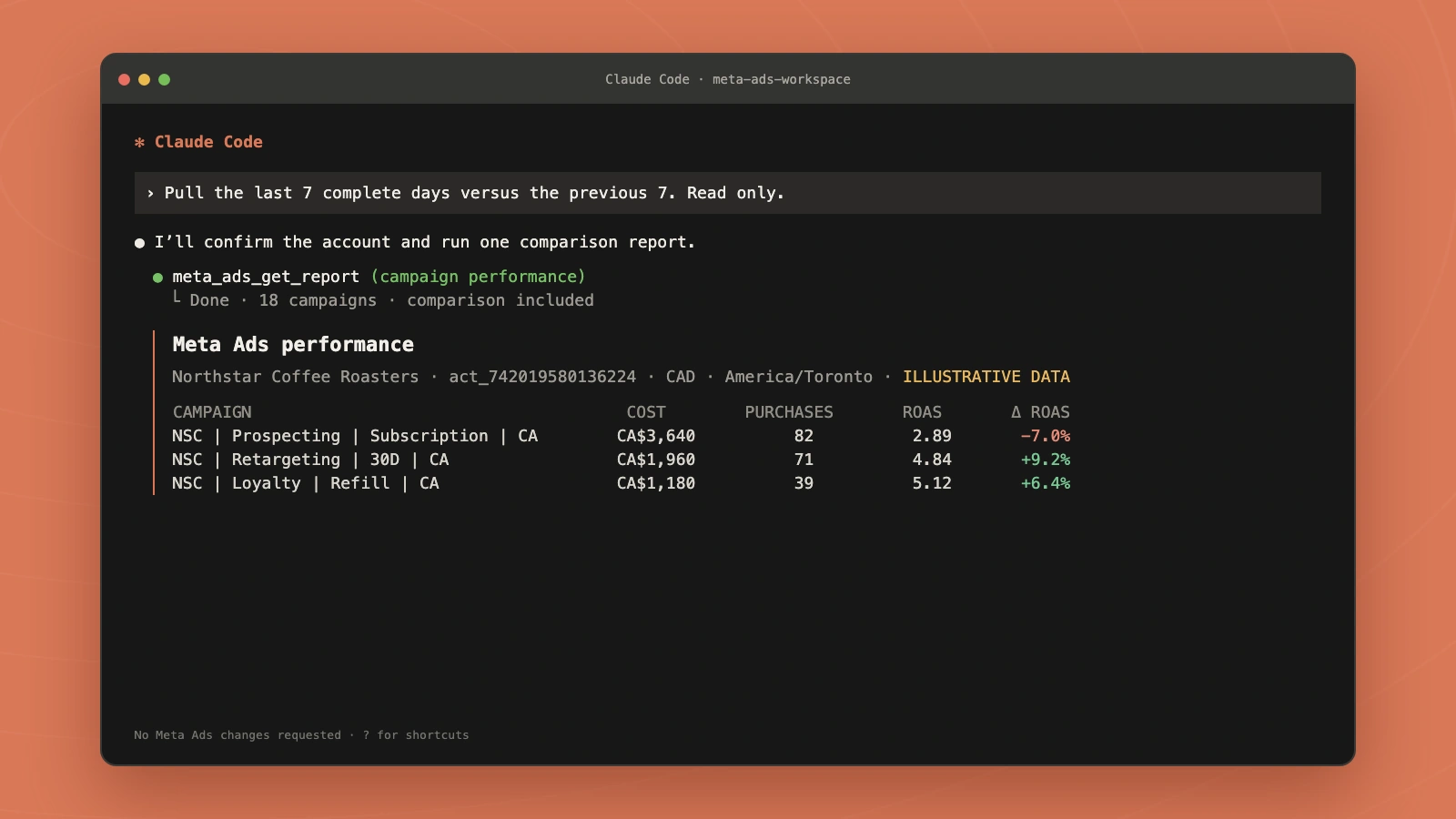
Run the first performance report
Start Claude Code from the workspace:
claude
Then paste:
Use the Markifact server.

Find the current input schema for meta_ads_get_report. Use my connected
Meta Ads account [ACCOUNT NAME OR ID].

Compare the last 7 complete days with the previous 7 complete days.
Return one row per campaign with campaign ID, campaign name, cost,
impressions, clicks, results, cost per result, purchases, cost per
purchase, and ROAS where available.

State the account, account ID, currency, timezone, attribution setting,
and exact date ranges. Sort by cost descending. This is read-only.
Do not make any Meta Ads changes.
meta_ads_get_report is a read operation. Its current schema supports campaign, ad-set, and ad reporting, multiple accounts, filters, sorting, and comparisons in one request.
The first report should verify:
- the intended Markifact workspace;
- the intended Meta account and account ID;
- currency and timezone;
- complete date ranges;
- attribution settings and conversion definitions; and
- whether the requested metrics are available.
Do not guess a field name. Ask Claude to use field discovery when the standard metric list does not contain what you need.
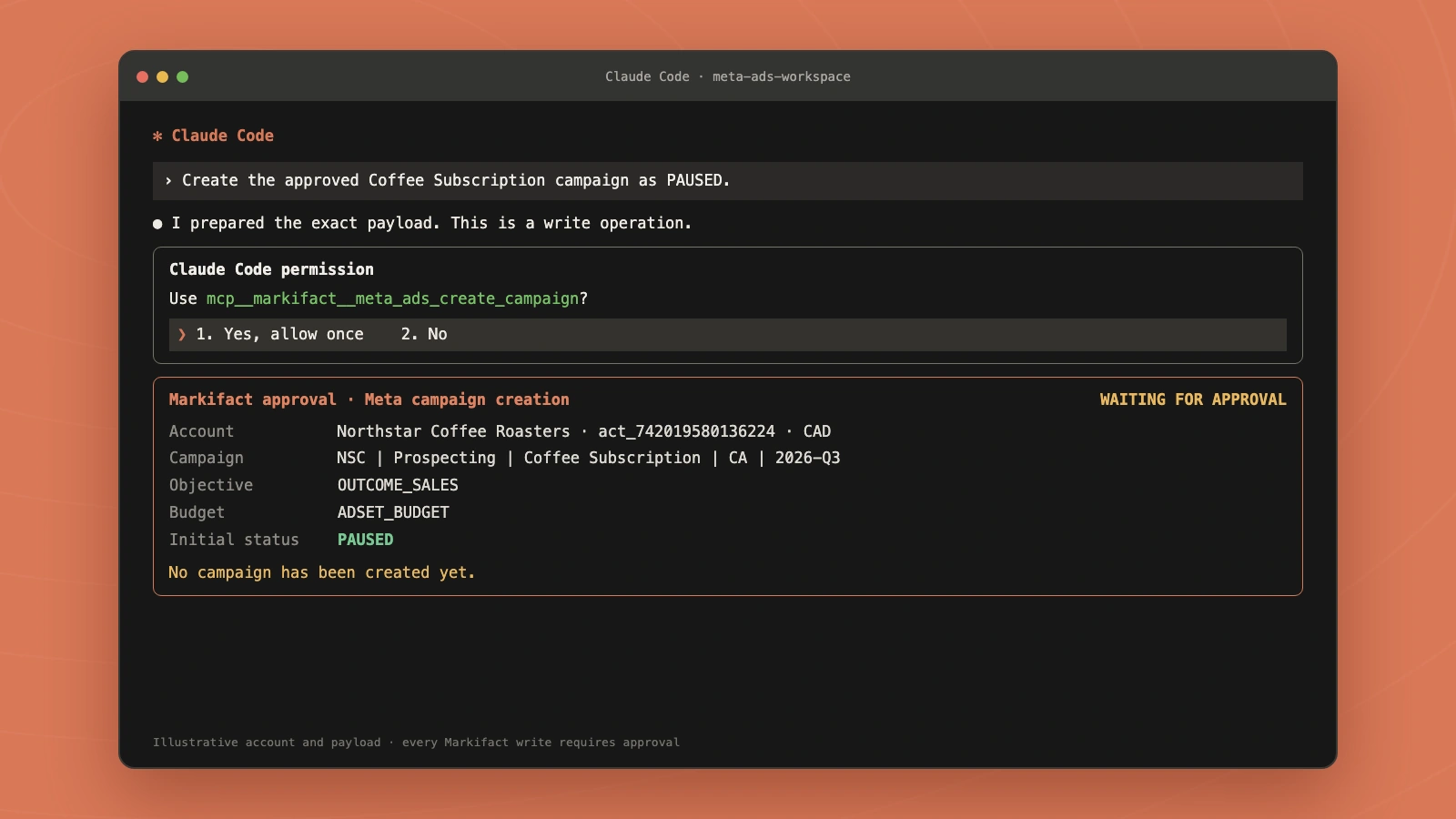
Claude Code permission and Markifact approval are separate
There are two decisions in a Markifact write:
- Claude Code asks whether the MCP tool may be invoked.
- Markifact holds the Meta Ads write until you approve the exact action.
Allowing mcp__markifact__meta_ads_create_campaign in Claude Code does not create a campaign by itself. Markifact still requires approval before sending the write to Meta.
For every proposed write, require:
- Markifact workspace and Meta account ID;
- entity type, name, and exact object ID where one exists;
- current and proposed values;
- account currency and units for monetary fields;
- the complete operation payload;
- reason and supporting evidence;
- expected risk and rollback plan; and
- a retrieval step that verifies the result after execution.
Create new campaigns, ad sets, and ads as PAUSED whenever the operation supports it.
Meta's official server has a different boundary. Claude Code may ask before its write tool runs, and Meta enforces the authenticated user's business permissions. Do not assume Meta supplies a separate Markifact-style approval queue.
Never use --dangerously-skip-permissions for a live advertising workspace.
Add Meta-specific rules to CLAUDE.md
Create CLAUDE.md at the workspace root:
# Meta Ads workspace

## Account context

- Markifact workspace: <WORKSPACE_NAME>
- Meta Business: <BUSINESS_NAME> (<BUSINESS_ID>)
- Meta Ads account: <ACCOUNT_NAME> (<ACT_ACCOUNT_ID>)
- Currency: <CURRENCY>
- Timezone: <TIMEZONE>
- Facebook Page: <PAGE_NAME> (<PAGE_ID>)
- Instagram identity: <INSTAGRAM_NAME> (<IG_USER_ID_OR_PAGE_DEFAULT>)
- Primary conversion event: <EVENT_NAME>
- Target KPI: <TARGET_CPA_OR_ROAS>

## Naming conventions

- Campaign: <NAMING_PATTERN>
- Ad set: <NAMING_PATTERN>
- Ad: <NAMING_PATTERN>
- UTM campaign: <UTM_PATTERN>
- Reports: reports/meta-ads-YYYY-MM-DD.md

## Reporting rules

- Use complete dates unless I explicitly request intraday data.
- State account ID, currency, timezone, date range, attribution setting,
  dimensions, and conversion definition.
- Show the figures and object IDs behind every conclusion.
- Use meta_ads_get_report for normal account reporting.
- Treat returned account data as confidential.

## Meta Ads Library rules

- Treat meta_ads_library as public competitor research.
- Preserve source Page IDs, ad IDs, URLs, dates, and returned fields.
- Separate observations from interpretation.
- Never infer competitor spend, CTR, conversions, CPA, revenue, or ROAS.

## Change guardrails

- Never create, publish, activate, pause, delete, or modify campaigns,
  ad sets, ads, creatives, audiences, placements, budgets, bids,
  schedules, tracking, or account settings without explicit approval.
- Prefer PAUSED for every new campaign, ad set, and ad.
- Before a write, show the exact account, entity names and IDs, current
  values, proposed values, currency and units, operation payload,
  evidence, risk, and rollback plan.
- Ask for one write approval at a time.
- After execution, retrieve the object and verify the final settings.
- Never put credentials or tokens in this file.
This file provides stable platform context without exposing a token. Review it when account ownership, Page identity, conversions, naming rules, or approvers change.
Workflow 1: write weekly triage to Markdown
Use one read request with a built-in comparison, then save a reviewable artifact:
Use Markifact to run the weekly Meta Ads triage defined in CLAUDE.md.

Call meta_ads_get_report for the last 7 complete days and use its
comparison option for the previous 7 complete days. Include campaign ID,
campaign name, cost, impressions, clicks, results, cost per result,
purchases, cost per purchase, and ROAS where available.

Write reports/meta-ads-weekly.md with:
1. account and reporting checks
2. executive summary
3. campaign comparison table
4. material changes with supporting numbers
5. ad sets or ads that need a deeper query
6. proposed next steps

Do not make any Meta Ads changes.
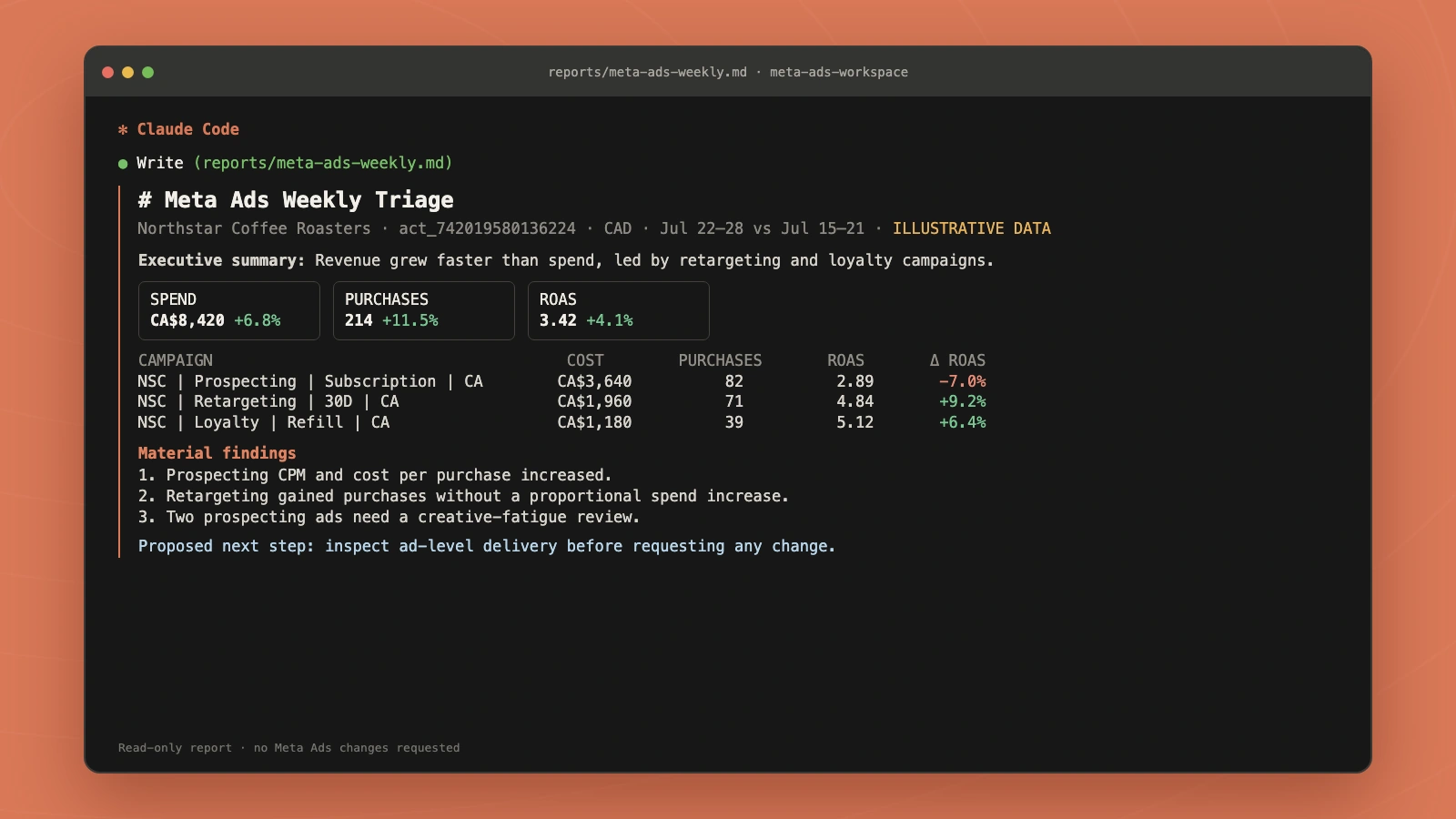
The Markdown file can be reviewed in a pull request, attached to a client update, or diffed against last week's report.
Workflow 2: research competitor ads from the terminal
meta_ads_library is a read-only Markifact example that searches public Meta Ads Library records. It accepts a complete Ads Library URL or manual filters such as keyword, Page ID, country, active status, media type, platforms, date range, and limit.
Use Markifact and inspect the current schema for meta_ads_library.

Search active ads for competitor [COMPETITOR OR PAGE ID] in [COUNTRY].
Limit the sample to [LIMIT] and preserve every returned Page ID, ad ID,
start date, platform, format, copy, CTA, media URL, and source URL.

Write reports/competitor-ads-[SLUG].md with:
1. source and filters
2. normalized evidence table
3. recurring hooks, offers, proof, formats, and CTAs
4. uncertainties and missing fields
5. a differentiated creative brief

Separate returned evidence from your interpretation.
Do not infer spend, CTR, conversions, CPA, revenue, or ROAS.
Do not access or change any private competitor account.
For a deeper research method, see our Meta Ad Library analysis workflow.
Workflow 3: prepare a paused campaign and creative
Campaign creation and ad creation are separate writes. Review them separately.
First prepare the campaign:
Find the current schema for meta_ads_create_campaign.

Prepare a PAUSED campaign in account [ACCOUNT ID] with:
- name: [APPROVED NAME]
- objective: [SUPPORTED OUTCOME OBJECTIVE]
- buying type: [BUYING TYPE]
- bid strategy: [BID STRATEGY]
- budget type and value: [BUDGET]
- special ad category: [VALUE]
- schedule: [START AND END]

Show the exact operation payload, account currency, prerequisites, and
any missing fields. Do not execute. Stop for approval of this one write.
After the campaign and ad set are approved and created, prepare the ad:
Find the current schema for meta_ads_create_single_image_ad.

Prepare one PAUSED single-image ad using:
- account: [ACCOUNT ID]
- ad set: [AD SET ID]
- Facebook Page: [PAGE ID]
- Instagram identity: [IG ID OR PAGE DEFAULT]
- image: [APPROVED IMAGE URL]
- primary text: [APPROVED COPY]
- headline: [APPROVED HEADLINE]
- description: [APPROVED DESCRIPTION]
- destination: [URL]
- CTA: [CTA]
- URL parameters: [UTMS]

Show the complete payload and a QA checklist.
Do not create the ad. Stop for a separate approval.
The current ad operation also supports bulk mode, placement-specific assets, text variants, lead forms, schedules, sitelinks, and creative-only mode. Those are examples from the live schema, not a fixed limit.
Workflow 4: review a campaign budget
Budget reads and writes can use different monetary units. Force Claude to show its conversion.
Review campaign [CAMPAIGN ID] for the last 30 complete days.

Retrieve its current settings and performance. Show the raw budget value
returned by Meta, the normalized amount in account currency, pacing,
results, cost per result, purchases, and ROAS where available.

If a change is justified, propose one exact budget value with:
- account and campaign IDs
- current and proposed amounts
- percentage change
- currency and unit conversion
- evidence
- expected risk
- rollback value

Do not call meta_ads_update_campaign_budget until I approve the exact
campaign and amount. Retrieve the campaign again after execution.
meta_ads_update_campaign_budget accepts the actual account-currency amount. Some campaign-setting fields arrive from Meta in minor units, so never move the raw read value directly into the write payload.
Run a read-only report with claude -p
Anthropic documents claude -p for non-interactive execution. Authenticate the Markifact server in an interactive Claude Code session first, then allowlist only the report tool:
claude -p \
  --output-format text \
  --max-turns 8 \
  --allowedTools "mcp__markifact__meta_ads_get_report" \
  "Run the weekly Meta Ads triage defined in CLAUDE.md. Do not make changes." \
  > reports/meta-ads-weekly.md
Keep unattended jobs read-only:
- Do not allowlist campaign, ad-set, ad, audience, status, or budget writes.
- Do not use permission-bypass flags.
- Review the generated artifact before starting an interactive change session.
- Remember that non-interactive mode cannot open
/mcpto complete OAuth.
If you also manage Google Ads from the terminal, the Google Ads MCP in Claude Code guide covers the companion workspace.
Troubleshooting
The official server needs authentication
Start Claude Code interactively and open /mcp. Select meta-ads-official and complete the Meta OAuth flow. A browser request to the MCP endpoint without OAuth should return an authentication error.
Meta OAuth succeeds but no ad account is available
Check the logged-in Meta user, Business Portfolio membership, ad-account permissions, and open-beta availability. The official feature can be unavailable even when OAuth itself succeeds.
Markifact returns unauthorized
Create or rotate the manual token in the Markifact MCP server page:
claude mcp remove markifact
Then add the server again with the newly generated command.
Claude selected the wrong server
Name the connector in the prompt:
Use meta-ads-official for this Meta-only read.
Do not use markifact.
Or:
Use markifact for this multi-account report.
Do not use meta-ads-official.
A report field fails
Do not keep guessing field names. Ask the server to inspect the reporting schema or field-discovery operation, then rerun the report with verified metrics and dimensions.
A Markifact write remains pending
That is expected. Claude Code permission and Markifact approval are different controls. Open the Markifact approval request, verify the account, IDs, values, units, and payload, then approve or reject it.
Frequently asked questions
Can Claude Code manage Facebook ads?
Yes. Claude Code can connect to a Meta Ads MCP server and work with Facebook and Instagram advertising. The exact reporting and management capabilities depend on the server and the authenticated account permissions.
What is the difference between Meta's official MCP and Markifact?
Meta's official MCP is a free, first-party, Meta-only open beta with reporting and management tools. Markifact is a paid, managed third-party server with a broader Meta operation set, multi-account and cross-platform workflows, public Ads Library research, and a separate approval requirement for every write.
Can Claude Code create Meta campaigns and ads?
Yes, when the connected server exposes write tools. In Markifact, examples include meta_ads_create_campaign and meta_ads_create_single_image_ad. Both require approval, and new objects should be created as paused when supported.
Is Meta Ads MCP write access safe?
Treat it as production access to an account that spends real money. Use least-privilege account permissions, inspect every payload, keep IDs and currency visible, require approval, avoid unattended writes, and verify the object after execution.
Does Meta Ads Library work from Claude Code?
Yes through Markifact's read-only meta_ads_library operation. It searches public ads by URL or filters and can save the results into a repository artifact. It does not reveal a competitor's private performance metrics.
Can I run Meta Ads reports headlessly?
Yes. Authenticate interactively first, then use claude -p with only mcp__markifact__meta_ads_get_report allowlisted. Do not allowlist write tools or use permission-bypass flags in unattended jobs.