Claude connectors are integrations that let Claude securely use external apps, data, and actions inside a conversation. This guide explains the feature in plain English, then shows marketers how to connect ad platforms, SEO research, organic social publishing, analytics, commerce tools, and documents without turning Claude into an uncontrolled account operator. By the end, you will know what a connector is, how MCP fits underneath it, how to add one, and which marketing connectors are useful today.
What are Claude connectors?
Claude connectors are integrations that let Claude access approved tools and data from external services. After you connect and authenticate a service, Claude can call the connector's available tools when a request needs them, subject to your source permissions and any required approvals.
That is the practical meaning. A connector can let Claude search files, read campaign performance, create a task, draft an email, query a database, or prepare an account change. The exact capabilities depend on the service behind the connector.
A connector does not give Claude universal access to an app. It exposes a defined list of tools. Your identity, account role, OAuth scopes, organization policy, and the connector's own controls still determine what Claude can see or do.
Is a Claude connector the same as an MCP server?
In everyday use, yes, they refer to the same connection from two different angles.
Connector is Claude's product word for the integration you discover, add, and enable in the interface. MCP server is the technical service underneath that publishes the available tools and returns structured results through the Model Context Protocol.
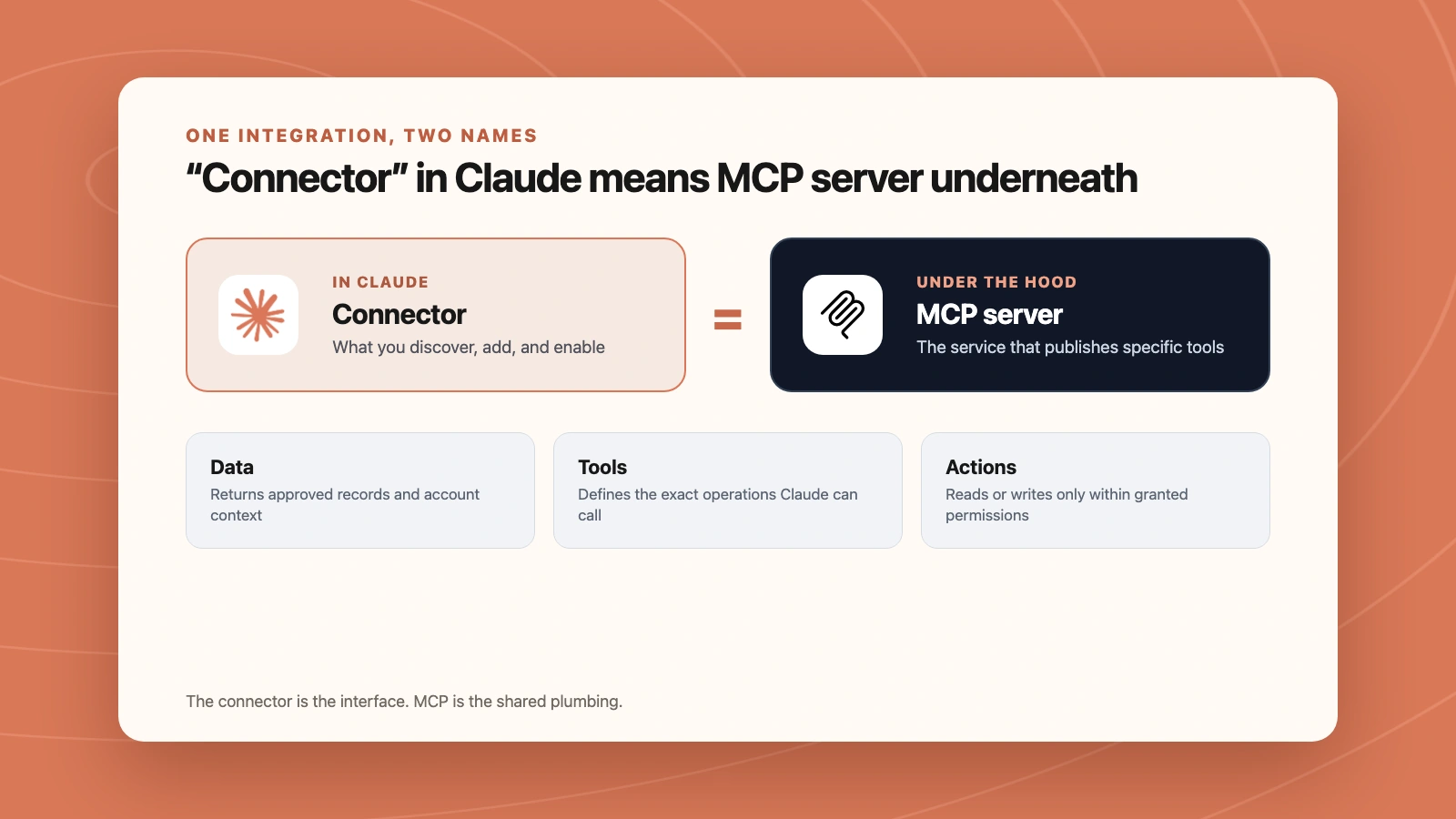
Claude presents a connector in the interface. Underneath, an MCP server exposes specific tools for approved data and actions.
This distinction is useful when documentation uses different terms. If a vendor says it has a "Claude connector," it usually means you can connect its MCP server to Claude. If a developer gives you a remote MCP URL, Claude presents that server as a custom connector after you add it.
Not every MCP server appears in Anthropic's Connectors Directory. A server can be:
- Listed in the directory after review.
- Added as a custom remote connector using a public URL.
- Installed locally as a desktop extension.
- Configured directly in a technical client such as Claude Code.
The protocol is the common plumbing. The connector is the user-facing installation and permission experience.
Where connectors live in Claude
In the current Claude interface, open Settings, then go to Customize → Connectors. You can also reach the same area from a chat:
- Click the + button beside the prompt.
- Open Connectors.
- Select Manage connectors.
- Click the + beside Connectors.
From there, Claude gives you two routes:
- Browse connectors opens Anthropic's directory of reviewed integrations.
- Add custom connector lets you enter the URL of a trusted remote MCP server.
After a connector is installed, you authenticate with the service. Claude then discovers the tools that service exposes. You can enable or disable connected services for an individual conversation from the + → Connectors menu, so every chat does not need access to every tool.
What happens when you enable a connector?
Enabling a connector makes its tools available to that conversation. It does not mean Claude calls every tool or reads an entire account automatically.
When your request needs outside data, Claude can choose a relevant tool, show that it is using the connector, pass the required inputs, and use the returned result in its answer. If the tool changes external data, Claude or the connector may require approval before execution.
For example, with a reporting connector enabled, this prompt can trigger a read operation:
Compare campaign spend and ROAS for the last 7 complete days
against the previous 7. Read only. Explain the material changes.
Claude can retrieve only the data required for that report. A separate campaign-update tool would be needed to change a budget or status.
Remote connectors versus local connectors
Most marketers should start with a remote connector.
| Connector type | Best for | Where it works | Important requirement |
|---|---|---|---|
| Remote connector | Cloud services such as ad platforms, analytics, CRM, and SaaS tools | Claude web, Desktop, mobile, Cowork, and Claude Code | The MCP server must be reachable from the internet |
| Desktop extension | Local files, desktop apps, localhost databases, and OS-level tools | Claude Desktop and Claude Code | It runs on your computer |
Remote connectors are configured through your Claude account. Even when you use Claude Desktop, the connection to a remote server originates from Anthropic's cloud infrastructure.
Local desktop extensions are different. They are appropriate when the tool itself lives on your machine and should not be exposed as a public remote service. They do not become available on Claude web or mobile.
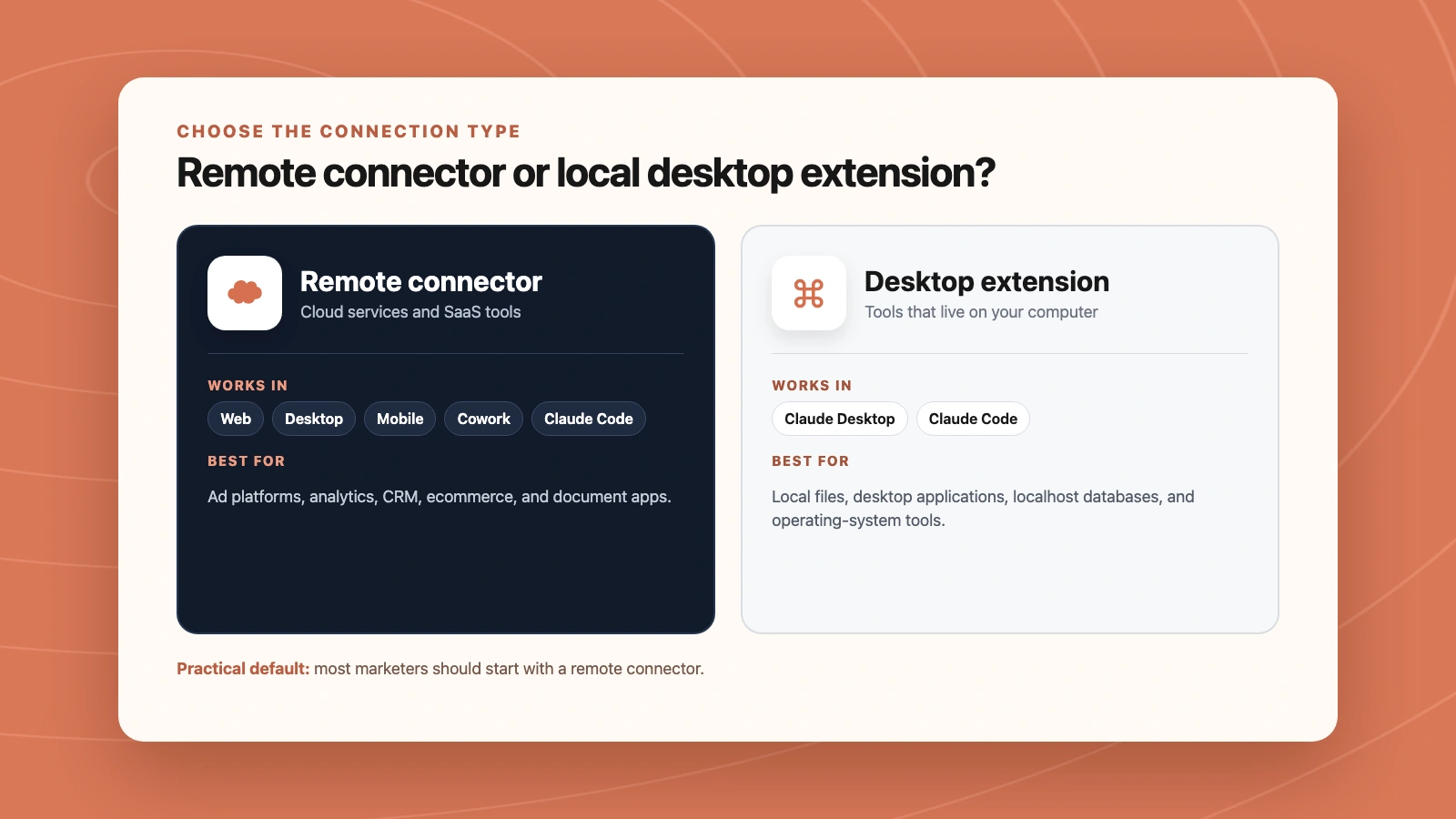
Remote connectors cover Claude's cloud clients. Desktop extensions stay with tools that run locally.
How to add a Claude connector
Use the directory when the service is listed. Use a custom connector when a trusted provider gives you a remote MCP URL.
Add a connector from the directory
- Open Settings → Customize → Connectors.
- Click the + beside Connectors.
- Choose Browse connectors.
- Search for the service.
- Review its description, capabilities, provider, and permissions.
- Click Connect or Install.
- Complete the service's authentication flow.
- In a new chat, open + → Connectors and enable it.
Markifact is approved in the directory. Install Markifact in Claude, complete sign-in, then connect the marketing platforms you need inside the same workspace.
Add a custom remote connector
- Open Settings → Customize → Connectors.
- Click the + beside Connectors.
- Choose Add custom connector.
- Enter a clear name.
- Paste the provider's remote MCP URL.
- Use Advanced settings only when the provider requires an OAuth client ID and secret.
- Click Add, then authenticate with the provider.
- Enable the connector in the conversation where you need it.
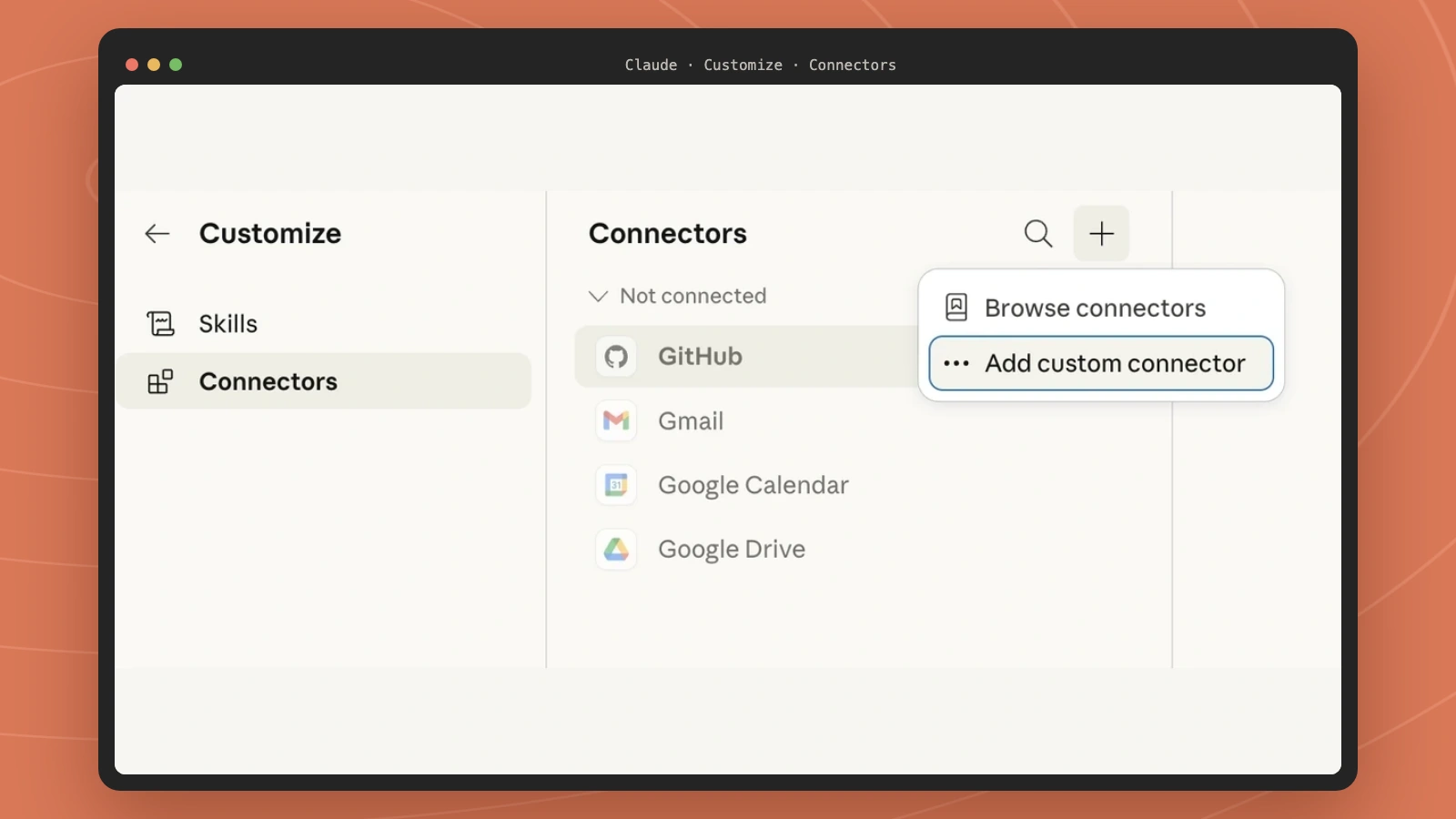
Claude's current Connectors panel separates the reviewed directory from the custom remote MCP flow.
Only add custom connectors from organizations you trust. A custom connector can expose tools that read or change external data, and Anthropic does not control how a third-party provider designs those tools.
Plan and device coverage
Web connectors are available across Claude plans. Custom remote connectors are available on Free, Pro, Max, Team, and Enterprise plans, with Free currently limited to one custom connector. Mobile installation is still in beta, so web or Desktop remains the better place to configure a custom connection.
On Team and Enterprise plans, an Owner or Primary Owner must first make a connector available to the organization. Individual users still authenticate their own service accounts unless the organization uses enterprise-managed authentication.
Claude connectors for ads and marketing
Marketing connectors become useful when they join data, diagnosis, and controlled action in one conversation. An ad connector can pull campaign performance. An analytics connector can explain what happened after the click. A commerce connector can add product or revenue context. A document connector can turn the result into a client-ready report.
The important question is not simply whether a platform has an MCP server. Check who operates it, whether it is public, whether it is read-only or read/write, how it authenticates, and what happens before a write reaches a live account.
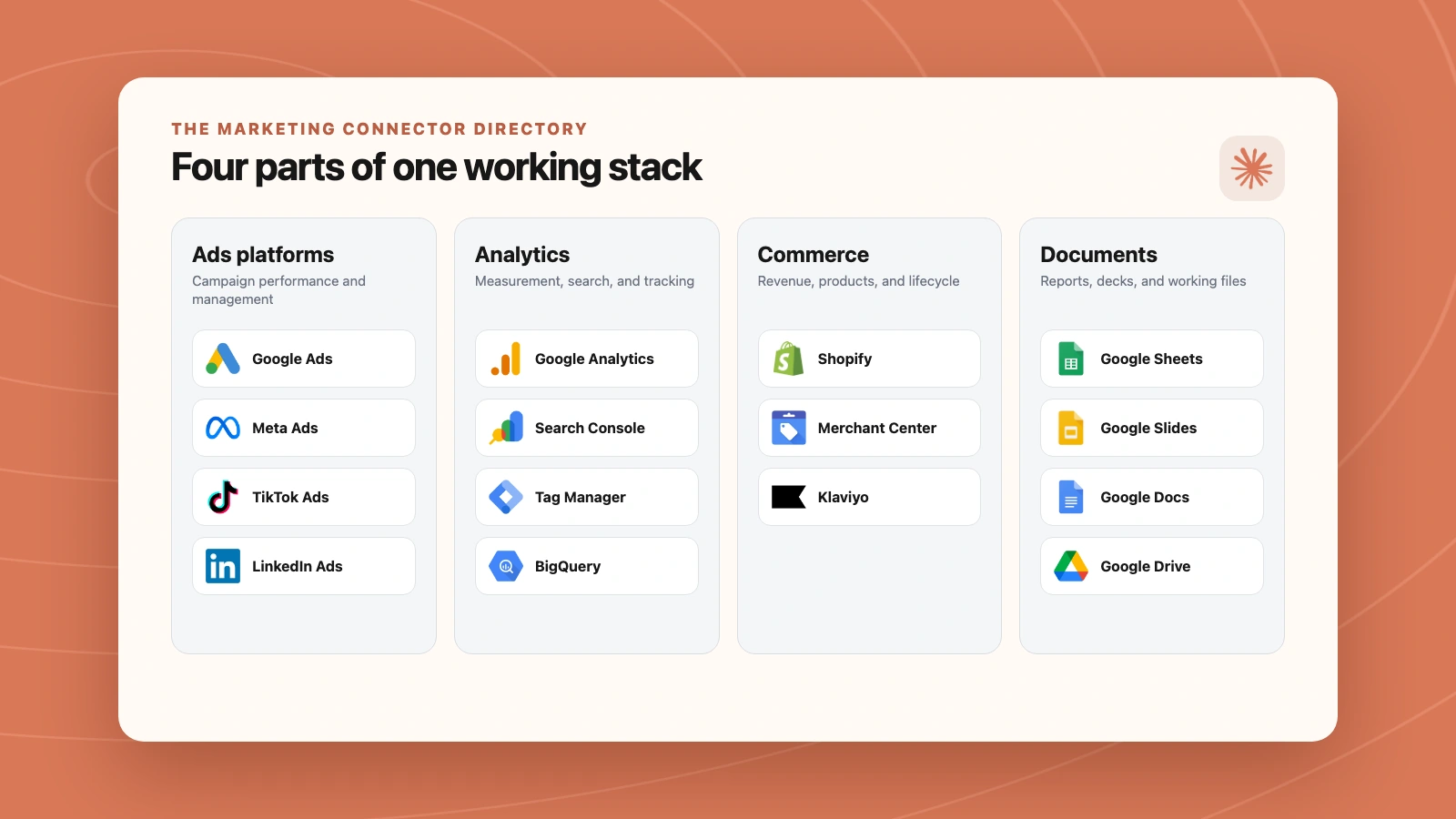
A practical marketing stack combines source platforms, measurement, commerce context, and reporting tools.
The State of Advertising MCPs tracks the official platform landscape in more depth. The directory below focuses on what a marketer can connect to Claude and where a cross-platform connector fits.
Ads platform connectors
Markifact is a third-party cross-platform MCP, not an official server from any ad platform. Its marketing MCP hub exposes platform operations through one remote connector, with approval gates on writes. Operation names below are examples, not an exhaustive catalog.
| Platform | Official platform connector | What Markifact covers |
|---|---|---|
| Google Ads | Google's official open-source MCP is available and currently read-only. It can discover customers, run GAQL searches, and retrieve resource metadata. | Reporting, audits, campaign creation, budgets, bids, targeting, ads, assets, exclusions, and other approval-gated writes. |
| Meta Ads | Meta's hosted Ads AI connector is in open beta and supports reporting plus campaign-management workflows. | Facebook and Instagram reporting, campaigns, ad sets, audiences, creatives, budgets, statuses, and approval-gated actions. |
| TikTok Ads | TikTok for Business MCP supports campaign management, reporting, audiences, and creative operations. | Reporting, campaigns, Smart+, Spark Ads, budgets, creative, audience work, Ads Library research, and approvals. |
| LinkedIn Ads | No platform-owned LinkedIn Ads MCP was found in the latest review. LinkedIn's Marketing APIs remain the underlying official interface. | B2B reporting, campaigns, targeting, creative, lead-oriented analysis, and approval-based changes. |
| Microsoft Ads | Microsoft's official Advertising MCP is in an open pilot and launched read-only. | Reporting, Search and Performance Max campaigns, keywords, creative assets, and approval-gated account changes. |
| Pinterest Ads | Pinterest has an official alpha partner program with initially read-oriented use cases. | Reporting, saves and ROAS analysis, Pin ads, budgets, seasonal planning, and approval-gated writes. |
| Reddit Ads | No platform-owned Reddit Ads MCP was found in the latest review. | Reporting plus campaigns, ad groups, posts, ads, audiences, budgets, targeting, and approved delivery changes. |
| Snapchat Ads | Snap announced MCP access for third-party agents, but broad self-serve setup was not published in the latest review. | Reporting, campaigns, ad squads, image, video, Story, Collection, and Lens ads with approvals. |
| Display & Video 360 | No dedicated platform-owned DV360 MCP was identified in the latest review. | Reporting, campaigns, insertion orders, line items, creatives, targeting, budgets, and approval-based writes. |
| OpenAI Ads | No official OpenAI Ads MCP was found in the latest review. Ads Manager and its APIs are separate products. | ChatGPT Ads reporting, campaigns, context hints, bids, budgets, and approval-based changes. |
| Apple Ads | Apple provides an official Ads API, but no platform-owned Ads MCP was found. | Campaign and keyword reporting, install-cost analysis, and cross-channel acquisition comparison. |
| Amazon Ads | Amazon's official Ads MCP is an open beta for qualifying partners and supports meaningful reads and writes. | Spend, sales, and ACOS reporting, spike diagnosis, and cross-channel comparison. |
If you need a step-by-step connection flow, use the dedicated guides for Google Ads, Meta Ads, TikTok Ads, and LinkedIn Ads.
Analytics and measurement connectors
| Platform | Connector route for marketers |
|---|---|
| Google Analytics 4 | Google's official GA4 MCP is read-only. Markifact adds custom GA4 reporting, property audits, traffic diagnosis, and cross-platform follow-up workflows. |
| Google Search Console | No official product-specific GSC MCP was found in the landscape review. Markifact covers query, page, country, device, and date reporting plus SEO opportunity analysis. |
| Google Tag Manager | Markifact covers containers, workspaces, tags, triggers, variables, preview, versions, publishing, and recovery with approval-gated writes. |
| BigQuery | Explore schemas, run SQL, create datasets and tables, and approve writes from the same Claude workflow. |
| Adjust | Add mobile acquisition, cohort, revenue, ROAS, SKAdNetwork, subscription, and fraud reporting context. |
Use the GA4 connector guide, Search Console connector guide, or GTM connector guide for the individual setup flows.
SEO research connectors
Use Google Search Console to find the queries and pages that earned impressions and clicks on your own site. Add Ahrefs for competitor keywords, ranking pages, backlinks, and referring domains. Use PageSpeed Insights to inspect a specific page's performance diagnostics.
These sources answer different questions. Search Console shows your Google search performance. Ahrefs estimates search visibility and maps competitors and links. PageSpeed Insights helps investigate page performance; it does not tell you which topic to publish next.
Start with the Search Console setup guide or the 15 Search Console prompts. Ahrefs requires a saved Ahrefs API connection in Markifact. A Claude connector installation alone does not supply an Ahrefs subscription or API allowance.
Organic social publishing connectors
| Platform | A useful first task | Setup and workflow |
|---|---|---|
| Prepare a carousel for an authorized professional account, review the media order and caption, then publish after approval | Connect Instagram and publish with Claude | |
| Facebook Pages | Draft a Page update with an image and link, confirm the Page, then approve publication | Facebook publishing guide |
| TikTok | Prepare a video or photo post and review creator settings before choosing direct publishing or an inbox draft | TikTok publishing guide |
| Create a Pin with the correct board, destination link, and creative | Pinterest publishing guide |
Organic publishing uses the social account or Page connection. Meta Ads reporting and campaign management use a separate advertising connection. Follow each platform guide for supported formats and scheduling limits.
What data does each connection need?
| Job | Connect in Markifact | Access needed |
|---|---|---|
| Google Ads or Meta Ads analysis | The relevant advertising platform | Authorized access to the selected ad account |
| Search Console analysis | Google Search Console | Google identity with access to the property; reporting is read-only |
| Competitor SEO research | Ahrefs | Ahrefs API key and sufficient API access and units |
| Page performance diagnosis | PageSpeed Insights | The page URL to analyze; this does not grant website editing access |
| Organic social publishing | Instagram, Facebook Pages, TikTok, or Pinterest | Supported account type and publishing authorization; review the write before execution |
| Reporting documents | Sheets, Docs, or Slides | Authorized access to the intended destination; creating or editing a document is a separate action |
Ecommerce and lifecycle connectors
| Platform | Connector route for marketers |
|---|---|
| Google Merchant Center | Google's official MCP is an experimental alpha focused on reads and limited low-risk writes. Markifact covers product reporting, diagnostics, data sources, catalog updates, inventory, promotions, and approval-based changes. |
| Shopify | Bring product, order, customer, and store context into campaign analysis and marketing workflows. |
| Klaviyo | Klaviyo offers an official listed Claude connector and hosted MCP with reads, writes, and an optional read-only mode. Markifact adds a shared cross-channel workflow with ads and commerce data. |
Documents and reporting connectors
Claude also has prebuilt Google Workspace connectors for services such as Drive, Gmail, and Calendar. For marketing production work, the useful next layer is writing the result:
- Google Sheets MCP for ranges, rows, tabs, charts, and approval-gated writes.
- Google Slides MCP for client decks and linked charts.
- Google Docs MCP for recurring briefs, reports, and append-only documentation.
This is where a connector stack becomes more than chat. Claude can retrieve evidence from an ad platform, add analytics context, and create a durable report in the same workflow.
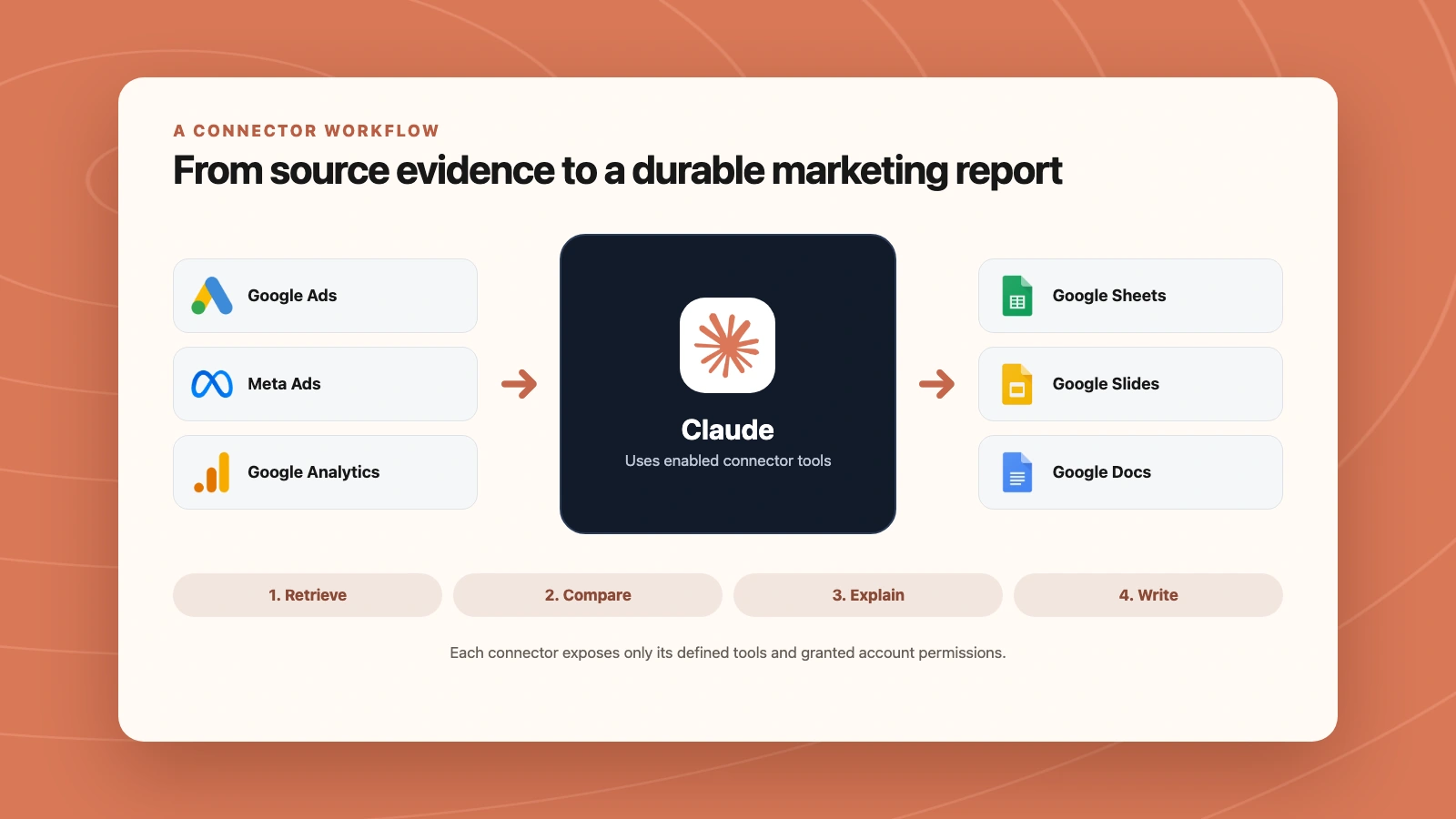
Connectors can carry evidence from source platforms through Claude into a durable Sheet, deck, or document.
What marketers can do after connecting
The first useful workflow should be read-only. Ask Claude to prove that it can select the correct account, date range, currency, and metrics before you expose any write path.
For a cross-channel check:
Use the Google Ads and Meta Ads connectors.

For Northstar Coffee Roasters, compare the last 7 complete days
with the previous 7.

Report spend, purchases or conversions, cost per result, and ROAS
by campaign. Flag only material changes.

Use read operations only. Do not make account changes.
Behind the scenes, a managed connector may use operations such as gads_get_report and meta_ads_get_report.
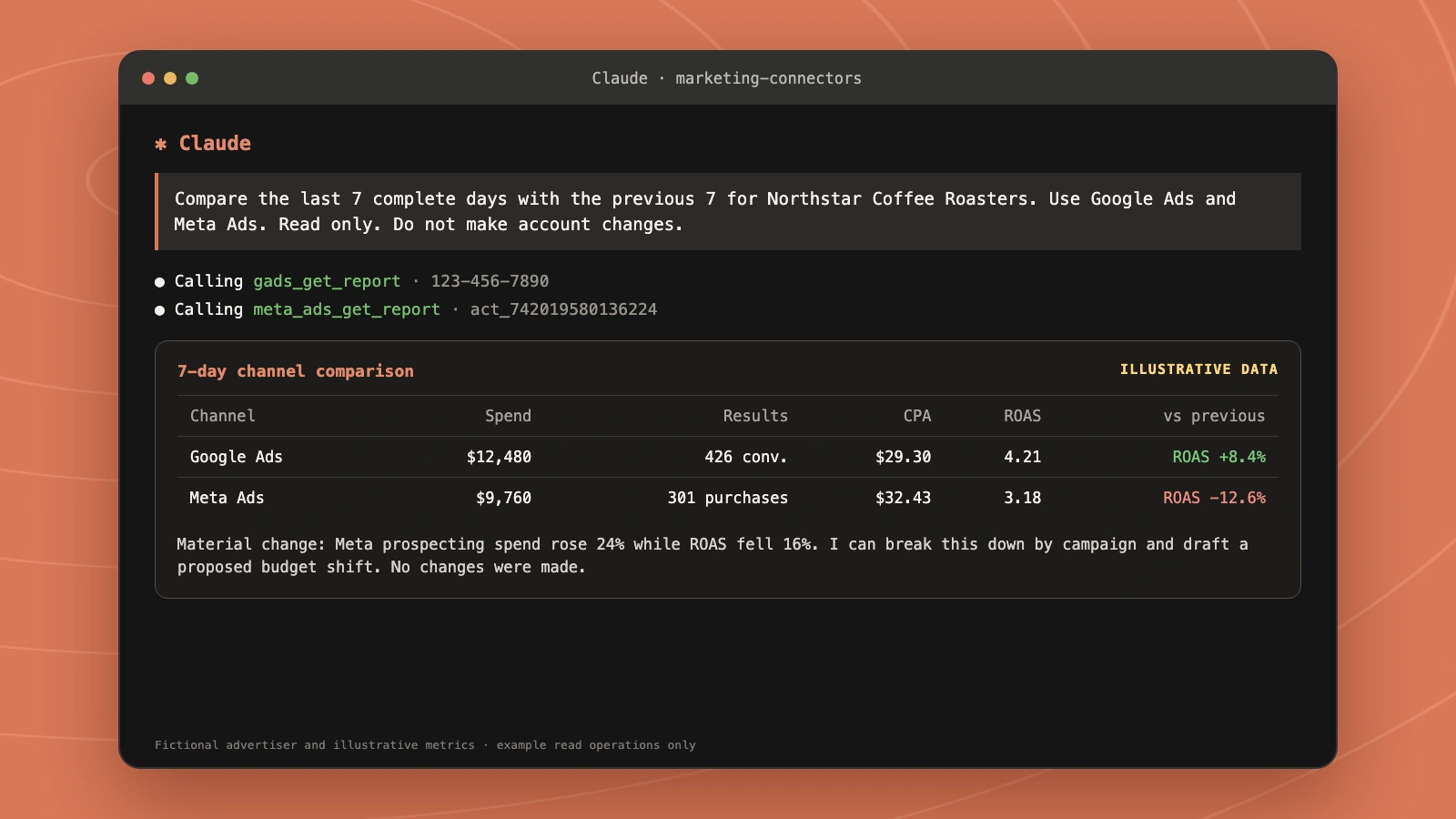
Illustrative Claude session using real example operation names and a fictional advertiser.
The output can become a weekly review, a Google Sheet, or a client deck. The 15-minute Google Ads audit workflow is a practical example of what people do immediately after connecting.
When the read path is reliable, separate diagnosis from execution:
Find campaigns where spend rose by more than 20% while ROAS
fell by more than 10%.

Explain the evidence and draft a proposed budget change.
Do not execute it. Wait for my approval.
That wording matters. It asks Claude to retrieve, assess, and propose before touching a live budget.
Turn a Search Console decline into a specific content brief
Connect Search Console and Ahrefs in the same Markifact workspace, then use this prompt:
For [SEARCH CONSOLE PROPERTY], compare the last 28 complete days with the previous 28.
Find the five pages with the largest loss of clicks. For each, show the queries driving the loss.
Use Ahrefs to investigate the ranking competitors for those queries in [COUNTRY].
Read our page and the relevant competing pages using available browsing tools.
If a page cannot be read, say so instead of guessing its content.
Return: our URL, query, evidence of the gap, exact heading or section to change,
proposed replacement text, and one useful internal link. Distinguish measured data from inference.
Do not edit the site or publish anything.
This produces an edit brief tied to pages and queries. A lower click count alone does not prove the content is weak; compare impressions, positions, demand, and the actual search intent before deciding what to change.
Are Claude connectors safe for ad accounts?
A connector can be safe enough for operational marketing work when its permissions and approval model match the risk of the task. The protocol does not remove the need for account governance.
OAuth limits the connection to an identity
Most remote connectors authenticate through OAuth. You sign in with the source service and grant defined permissions. The connector should not ask you to paste an ad-platform password into a chat.
Claude inherits the permissions of the connected user. If that person cannot access an ad account, campaign, file, or property in the source service, the connector should not gain that access.
Tool access should match the job
A reporting chat does not need campaign-creation tools. A campaign-build workflow does not need unconditional access to delete resources.
On supported organization plans, connector tools can be set to:
- Always allow
- Needs approval
- Blocked
Start with read tools. Expose writes only when the workflow needs them.
Approval-gated writes protect consequential actions
For a managed marketing connector, a write should stop before it changes spend, delivery, targeting, status, creative, or tracking. The user should see the intended account, resource, and values before approving it.
Markifact adds its own approval boundary to write operations. Claude can prepare a change, but the connector waits for explicit approval before execution. That is separate from Claude's own tool permission prompt, which means a team can have more than one control layer.
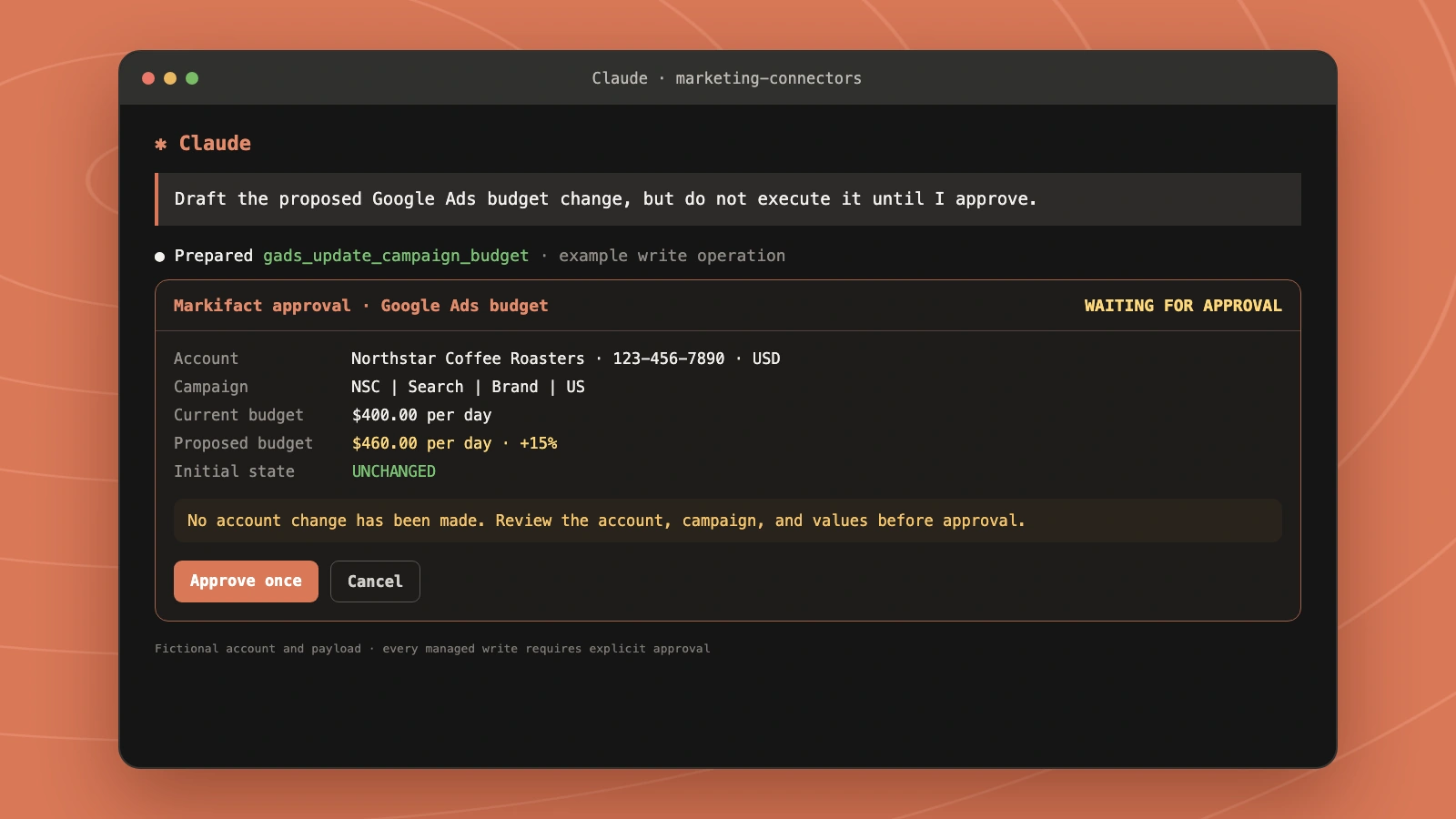
A consequential write should expose the exact account, resource, and new value before anything changes.
Review the provider, not just the protocol
MCP standardizes how tools are discovered and called. It does not guarantee that every server is trustworthy.
Before adding a custom connector:
- Confirm the provider and exact URL.
- Read the requested OAuth permissions.
- Check whether writes require approval.
- Test with one account and read-only prompts.
- Review tool calls and returned data.
- Disconnect the service if it is no longer needed.
Choosing the right Claude connector
Use an official platform connector when its availability, authentication, and tool surface fit the job. Google Ads' official read-only server is a strong choice for technical teams that want platform-owned reporting access. Meta and TikTok deserve credit for offering broader official campaign-management paths.
Use a cross-platform connector when the job spans several services or needs a consistent approval model. A marketer comparing Google Ads, Meta Ads, GA4, Merchant Center, and Sheets does not benefit from five incompatible account-selection patterns.
The best connector is not automatically the one with the most tools. It is the one that exposes the right tools, to the right accounts, with a clear boundary between analysis and execution.
Frequently asked questions
Are Claude connectors the same as MCP servers?
Claude connectors are the user-facing integrations you add and enable in Claude. Most are powered by MCP servers underneath. "Connector" describes the product experience; "MCP server" describes the technical service that exposes tools and data.
Is there a Claude connector for Google Ads?
Yes. Google provides an official read-only Google Ads MCP server for reporting and resource discovery. Markifact provides a third-party Google Ads connector with reporting plus approval-gated campaign-management operations. The Google Ads to Claude guide covers setup.
Is there a Claude connector for Meta Ads?
Yes. Meta provides an official hosted Ads AI connector in open beta with reporting and campaign-management capabilities. Markifact also provides a third-party Meta Ads MCP with Facebook and Instagram reporting plus approval-gated management workflows.
Is there a Claude connector for TikTok Ads?
Yes. TikTok for Business operates an official MCP with campaign, reporting, audience, and creative capabilities. Markifact's TikTok Ads MCP adds TikTok to a cross-platform connector with reporting, campaign work, Spark Ads, Ads Library research, and approvals.
Is there a Claude connector for Google Analytics (GA4)?
Yes. Google publishes an official read-only Google Analytics MCP server. Markifact's Google Analytics MCP provides custom reports, property audits, traffic diagnosis, and workflows that combine GA4 evidence with other marketing platforms.
Are Claude connectors free?
Connector support is available across Claude plans, and Free users can currently add one custom connector. A connector provider may require its own paid account, API access, or subscription. Always check both Claude's current plan limits and the provider's pricing before connecting.