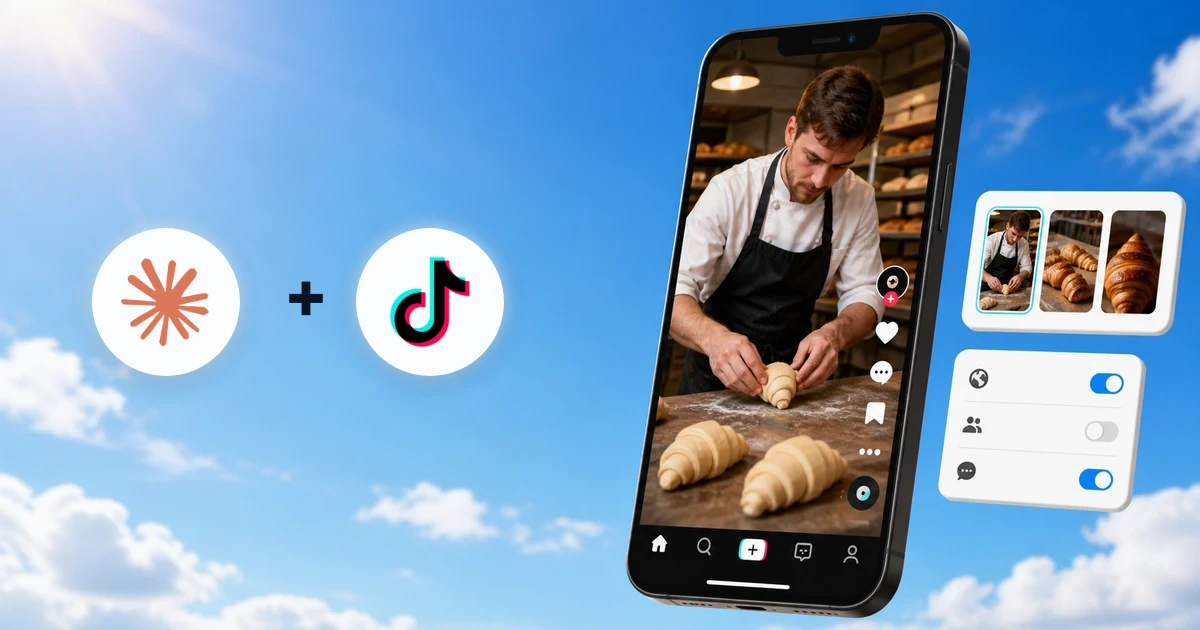
Yes, Claude can post to TikTok through a connector that gives it approval-gated publishing tools for an authorized organic TikTok account. Connect TikTok in Markifact, enable the Markifact connector in Claude, then Claude can prepare a video or photo post, show the exact account and settings, and wait for your approval before anything is uploaded or published. This guide covers direct publishing, TikTok inbox drafts, commercial disclosures, scheduling, and performance analysis.
What Claude can actually do with TikTok
The current TikTok MCP covers the useful organic workflow around a post:
- Check the connected creator and the privacy levels TikTok currently allows
- Publish one video directly to the account
- Publish a photo post with 1 to 35 images
- Send video or photo media to the creator's TikTok inbox as a draft
- Control comments, Duet, Stitch, video cover frame, photo title, and supported disclosures
- List existing posts and their available lifetime metrics
- Report on account, video, audience, retention, and traffic-source performance
These are examples from the current TikTok operation surface, not an exhaustive description of every cross-platform workflow Markifact can run.
TikTok Ads is separate. Organic videos and photo posts use /tiktok-mcp; paid campaigns, ad groups, Spark Ads, targeting, budgets, and ads use the TikTok Ads MCP.
1. Add Markifact from Claude's directory
Markifact is available in Claude's connector directory. Open the Markifact listing directly, or find it inside Claude:
- Open Customize, then Connectors.
- Click the + button and browse the directory.
- Search for Markifact.
- Open the listing and select Connect or Install.
- Sign in to Markifact and authorize the intended workspace.
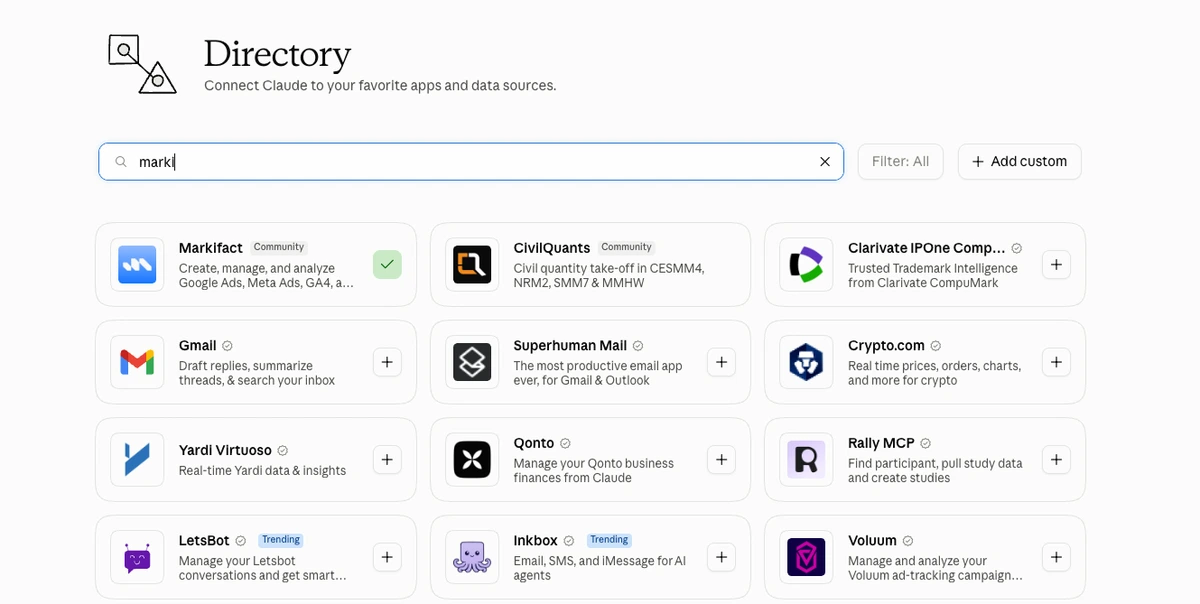
Claude's current connector guide notes that workspace controls can affect connector availability on Team and Enterprise accounts. If the listing is unavailable, ask the workspace owner to enable it.
If you want the relationship in plain English, read Claude Connectors for Marketers. The word "connector" is Claude's interface language; an MCP server is the tool plumbing underneath it.
2. Connect the organic TikTok account
In Markifact, open Connections, choose TikTok Organic, and complete TikTok's authorization flow. This connection is for the creator or brand account that owns the organic posts. It is not the TikTok Ads advertiser connection.
Give agency connections precise names, for example:
TikTok Organic - Northstar Kitchen - Main
Then begin with a read-only identity check:
Use Markifact to check the creator information for the connected TikTok account.
Return the username, nickname, allowed privacy levels, maximum video duration,
and whether comments, Duet, or Stitch are disabled.
Do not publish anything.
Claude should use tiktok_get_creator_info. TikTok requires this check before a direct post because the permitted privacy and interaction options depend on the connected creator. The requirement also appears in TikTok's official Content Posting API guide.
3. Prepare a direct TikTok video post
Start with an approved video available through a reachable HTTP(S) URL. A Google Drive share link set to Anyone with the link also works because Markifact resolves and transfers the media.
Use a prompt that separates drafting from publishing:
Use the connected Northstar Kitchen TikTok account.

First run tiktok_get_creator_info and confirm the current posting options.
Then prepare a direct video post using:
[PUBLIC VIDEO URL]

Caption:
Three ways we keep croissants crisp after the morning bake.
#BakingTips #BehindTheScenes

Privacy: PUBLIC_TO_EVERYONE, only if the creator check allows it.
Keep comments and Duet enabled. Disable Stitch.
Use the frame at 2,000 milliseconds as the cover.
Mark this as promotional content for our own business, not a paid partnership.

Show the exact account, media, caption, privacy, interaction settings,
cover timestamp, and disclosure. Wait for approval before publishing.
Claude prepares tiktok_publish_post, but the external write stays paused for approval.
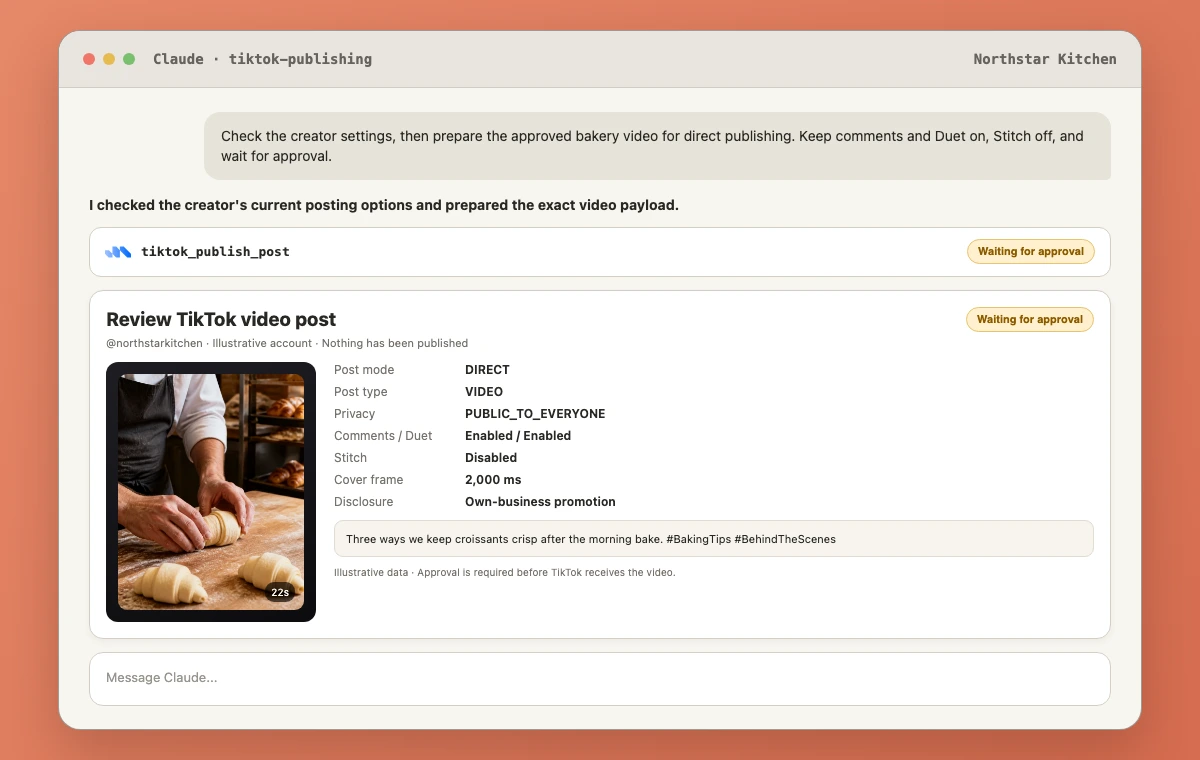
Check all of the following before approving:
- Creator username and nickname
- Direct versus draft mode
- Video URL and cover-frame timestamp
- Full caption and hashtags
- Privacy level
- Comments, Duet, and Stitch settings
- Promotional-content or paid-partnership disclosure
TikTok processes publishing asynchronously. Markifact waits for TikTok to return a final status. The publishing response contains a publish ID, but TikTok does not return the final post ID through this step, so use tiktok_list_posts afterward to locate the new post.
4. Publish a TikTok photo post
Photo mode supports 1 to 35 images. TikTok displays multiple images as a swipeable photo post. The current Markifact input accepts JPEG and WebP files up to 20 MB each, plus a photo title of up to 90 characters and a caption of up to 2,200 characters.
Prepare a direct TikTok photo post for Northstar Kitchen.
Use these five image URLs in this exact order:
1. [URL]
2. [URL]
3. [URL]
4. [URL]
5. [URL]

Title: Five details behind our weekend bake
Caption: Swipe through the small decisions behind Saturday's pastry counter.
#BakeryLife #FoodProcess

Use PUBLIC_TO_EVERYONE only if tiktok_get_creator_info allows it.
Keep comments enabled and let TikTok add recommended music.
Mark it as promotional content for our own business.
Show the complete ordered payload and wait for approval.
Order matters. Review the first image as the hook, the final image as the close, and every URL between them. TikTok's official photo-post reference confirms that photo posts can be sent directly or uploaded for completion in TikTok.
5. Send a draft to the TikTok inbox
Direct mode is best when the media, caption, settings, and disclosure are already final. Draft mode is better when a creator wants to finish the post inside TikTok, add native edits, or make a final hands-on check.
Send this approved video to the connected creator's TikTok inbox as a draft:
[PUBLIC VIDEO URL]

Do not publish it directly.
Confirm the creator account and media, prepare post_mode draft,
and wait for approval before uploading anything.
After approval, the creator receives the media in TikTok and completes the posting flow there. Privacy and interaction settings are collected in TikTok's own editor for a draft. TikTok describes this distinction on its official Content Posting API page.
6. Handle commercial disclosures correctly
TikTok publishing exposes two different disclosure controls:
brand_organic_toggle: the post promotes the creator's own business and TikTok labels it promotional content.brand_content_toggle: the post is a paid partnership with another brand.
Do not treat these as interchangeable. Give Claude the commercial relationship in plain language and ask it to show the selected flags before approval.
This video promotes our own bakery and is not sponsored by another company.
Prepare the post with the own-business promotional disclosure enabled
and the paid-partnership disclosure disabled.
Show both disclosure values before approval.
A paid partnership cannot be combined with SELF_ONLY privacy in the current publishing validation.
7. Schedule a TikTok post with Claude
The tiktok_publish_post operation does not have a native publish_at field. To publish later, schedule a Markifact workflow to prepare or run the approved post at a specified date, time, and timezone. That is workflow scheduling, not a TikTok-native scheduled-post field.
Use a clear instruction:
Create a scheduled Markifact workflow for September 24, 2026 at 6:30 PM Asia/Dubai.
At that time, check the TikTok creator settings again and prepare the approved video post.
Use the exact media URL, caption, privacy, interactions, and disclosure in this brief.
Do not change the content. Preserve the approval requirement for tiktok_publish_post.
If the post must go live without someone present, test the workflow with SELF_ONLY on the same account first. TikTok can still reject media, permissions, or account settings at execution time.
8. Measure what happened after publishing
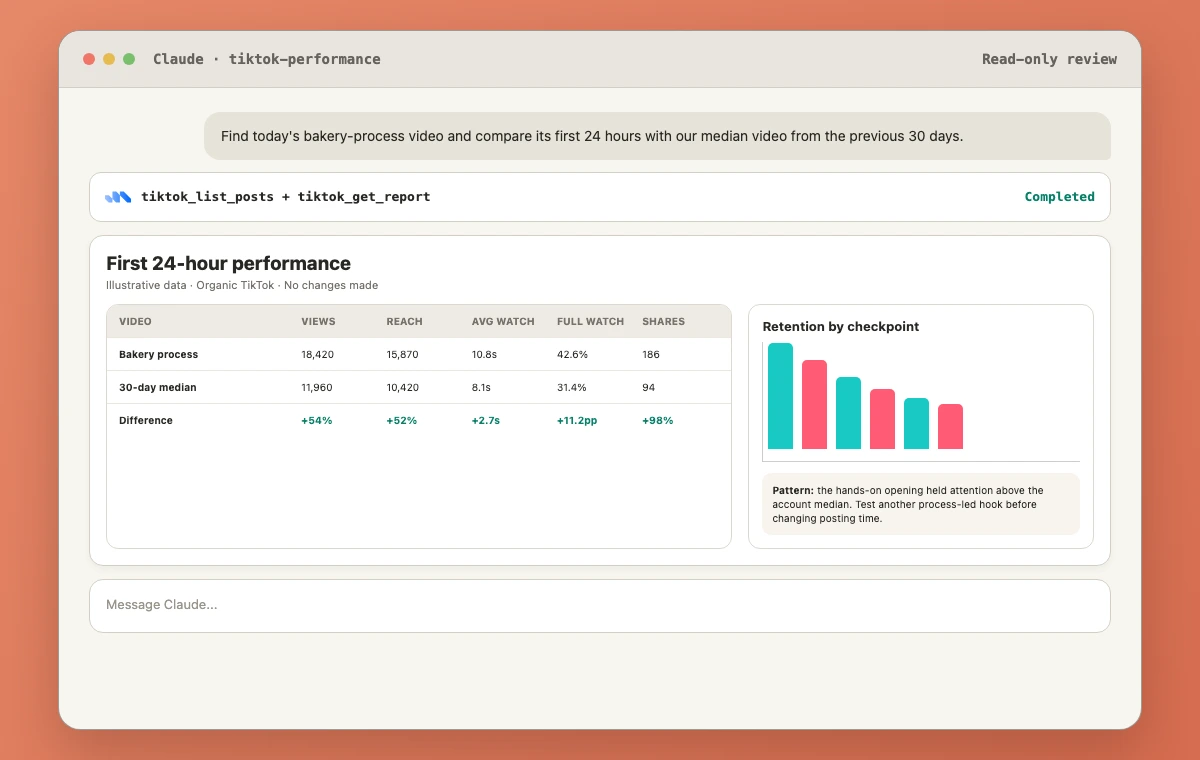
Publishing is only half the workflow. Use tiktok_list_posts to locate the new item, then run tiktok_get_report for deeper post-level analysis.
List the 20 newest TikTok posts and find the bakery-process video published today.
Return its post URL, duration, views, reach, likes, comments, shares,
favorites, average watch time, and full-video-watched rate.
Then compare it with our median video from the previous 30 days.
Do not publish or change anything.
For audience planning, use tiktok_get_audience:
Show the hours when our TikTok followers were most active during the last 30 days.
Return the best three two-hour publishing windows in Asia/Dubai.
Then summarize the available country, city, age, and gender breakdowns separately.
Do not mix unavailable fields or invent demographic data.
TikTok returns demographic breakdowns only when the account meets its availability threshold. Markifact currently notes a minimum of 100 followers for these audience breakdowns.
Important limits
The current workflow has clear boundaries:
- One video URL per video post
- One to 35 images per photo post
- No native
publish_atfield intiktok_publish_post - No API operation to edit or delete an already published TikTok post
- The direct-post privacy level must match the creator's current allowed options
- TikTok can reject media or publishing even after the payload passes local validation
- Organic TikTok and TikTok Ads use separate connections and operations
Claude can draft a corrected caption after a post goes live, but it cannot apply that correction to the published TikTok through the current API. Make the change manually in TikTok if the platform allows it, or remove and republish manually when appropriate.
FAQ
Can Claude post directly to TikTok?
Yes. With an authorized TikTok connection and the Markifact connector, Claude can prepare a direct video or photo post through tiktok_publish_post. The write waits for explicit approval.
Can Claude upload a TikTok draft instead of publishing?
Yes. Set post_mode to draft. After approval, Markifact sends the media to the creator's TikTok inbox so the creator can finish and post it in TikTok.
Can Claude post TikTok photo carousels?
Yes. Photo mode supports 1 to 35 images, which TikTok presents as a swipeable photo post. Review the media order, title, caption, privacy, music option, and disclosure before approval.
Can Claude schedule TikTok posts?
Claude can schedule a Markifact workflow that prepares or executes the publishing step later. The current TikTok publish operation itself does not contain a native scheduling field.
Can Claude edit or delete a published TikTok?
Not through the current TikTok API operations exposed by Markifact. It can list and analyze published posts, but editing or deletion must be handled in TikTok.
Can Claude analyze TikTok performance?
Yes. The read-only tools can list posts, report on account and video performance, inspect audience active times and demographics, and analyze supported retention or traffic-source breakdowns.
Is this the same as TikTok Ads management?
No. This guide covers organic TikTok content. Use TikTok Ads MCP for paid campaigns, targeting, budgets, ads, and Spark Ads.
Start with a private test
Connect the intended account, run the creator check, and publish a short test with SELF_ONLY privacy if the account allows it. Verify the resulting post in TikTok before moving to a public brand post. That small test confirms the connection, media transfer, privacy choice, and approval path without putting an untested workflow in front of your audience.