To connect Ahrefs to Claude, save your Ahrefs API key in Markifact and install the approved Markifact connector in Claude. Claude can then retrieve domain metrics, organic keywords, competitor data, and backlinks through your Ahrefs connection. This guide shows the setup, a real public-domain lookup, and the prompts I would use to turn SEO data into a specific content brief.
What you need before connecting
| Requirement | Why it matters |
|---|---|
| An Ahrefs workspace with API access | Claude installation does not supply an Ahrefs subscription or API allowance. |
| Permission to create an Ahrefs API key | Ahrefs controls which workspace users can create and manage keys. |
| A Markifact workspace | This stores the Ahrefs connection used by Claude. |
| Claude access that allows the Markifact connector | Managed organizations may require an administrator to allow the connector. |
Check Ahrefs' API key instructions for your workspace. Your available endpoints and API units depend on your Ahrefs access. Start with one domain and a small report instead of asking Claude to collect every keyword and backlink for ten competitors.
The Ahrefs MCP page is the reference for Markifact's supported SEO tools. This article focuses on research and reporting. It does not ask Claude to change your website or an Ahrefs project.
1. Save the Ahrefs connection in Markifact
In Ahrefs, open Account settings > API keys and create a key for the intended workspace. Then open Connections in Markifact, choose Ahrefs, and enter:
- A connection name you will recognize, such as
Ahrefs - Main Workspace. - The API key in the API Key field.
Select Save Connection. Markifact tests the key before saving it. Keep the key in the connection form; do not paste it into the Claude conversation or include it in a report.
If your team has several Ahrefs connections, choose the intended saved connection and use it consistently. The connection identifies the authenticated Ahrefs workspace. The domain you want to analyze is a separate report input.
2. Install the approved Markifact connector in Claude
Open the Markifact directory listing and click Connect. Complete Markifact sign-in and choose the workspace where you saved Ahrefs. Review the requested access; if the flow asks for an MCP server, choose the one that exposes the intended connection.
In a Claude conversation, open + > Connectors and enable Markifact. This directory route does not require a custom connector or a pasted MCP URL.
If you already installed Markifact for Google Ads or Search Console, use the same connector and connect Ahrefs in the authorized workspace. For a broader view of the available integrations, see Claude connectors for marketing.
3. Test one domain before starting a competitor audit
Use a narrow first request:
Use Markifact's Ahrefs connection to get a domain overview for markifact.com.
Include subdomains. Use the United States for search metrics.
Return only Domain Rating, backlinks, referring domains, and organic keywords.
State the domain scope and retrieval date. Do not request AI citation data.
Do not change any projects or settings.
I ran that public-domain lookup through Markifact on September 8, 2026. Ahrefs returned:
| Field | Result |
|---|---|
| Domain Rating | 57 |
| Backlinks | 25,255 |
| Referring domains | 1,053 |
| Organic keywords, United States | 29 |
This is a dated snapshot, not a promise that your next query will return identical values. The country restriction applies to search metrics; it does not turn the backlink count into a count of US backlinks. These figures are Ahrefs data, not Google Analytics sessions or Search Console clicks.
The underlying read operation for this example is ahrefs_get_domain_overview. It can accept several targets, but one target is enough to confirm the connection before collecting a larger dataset.
4. Find competitor keywords worth investigating
A domain score does not tell you what to write. Move from the domain overview to ranking keywords and the pages behind them:
For [COMPETITOR DOMAIN], use Ahrefs to retrieve organic keywords in [COUNTRY].
Start with 50 rows. Include keyword, current position, ranking URL, volume,
keyword difficulty, and estimated traffic where available.

Keep queries relevant to [OUR PRODUCT AND AUDIENCE]. Exclude competitor brand terms.
Group the remaining queries by search intent and ranking URL.
For each group, explain the buyer's task and whether it suggests a setup guide,
comparison, workflow article, or product page.
Label Ahrefs traffic and search volume as estimates. Do not write an article yet.
ahrefs_get_organic_keywords retrieves the keyword rows. ahrefs_get_organic_competitors can help identify search competitors when you do not already have a shortlist. These are examples from the available catalog, not a complete list of Ahrefs operations.
Review the returned URLs before choosing a topic. If several queries lead to one competing guide, you may need one strong article covering the shared task. Creating a separate page for every variation can fragment the same intent.
A useful output names the query, the relevant product capability, the proposed page, and the evidence. “Create more SEO content” is not a content brief.
5. Investigate backlinks to the page you want to compete with
Once you have a relevant competing article, inspect links to that exact URL:
Use Ahrefs to inspect live backlinks to [EXACT COMPETING ARTICLE URL].
Use exact-URL scope and start with 30 rows.
Return referring page URL, anchor, referring-domain rating, link attributes,
and the available discovery dates.

Group the links into editorial mentions, resource lists, integrations,
directories, and unclear cases. Label those categories as your interpretation.
Identify which part of the article appears worth citing after reading it.
Do not contact anyone or claim that a link caused a ranking.
ahrefs_get_backlinks supports a page-level investigation. Exact-URL scope matters here: links to the whole competitor domain do not explain why that particular guide attracts references.
Open the referring pages where access is available. A link from a navigation menu, a partner listing, and an editorial citation have different contexts. Use the evidence to decide whether your article needs an original example, useful template, or clearer reference material. A larger backlink count alone is not a writing instruction.
6. Combine Search Console and Ahrefs into an edit brief
If you also connect Google Search Console to Claude, you can start with pages that already have search visibility, then use Ahrefs for the competing-page investigation.
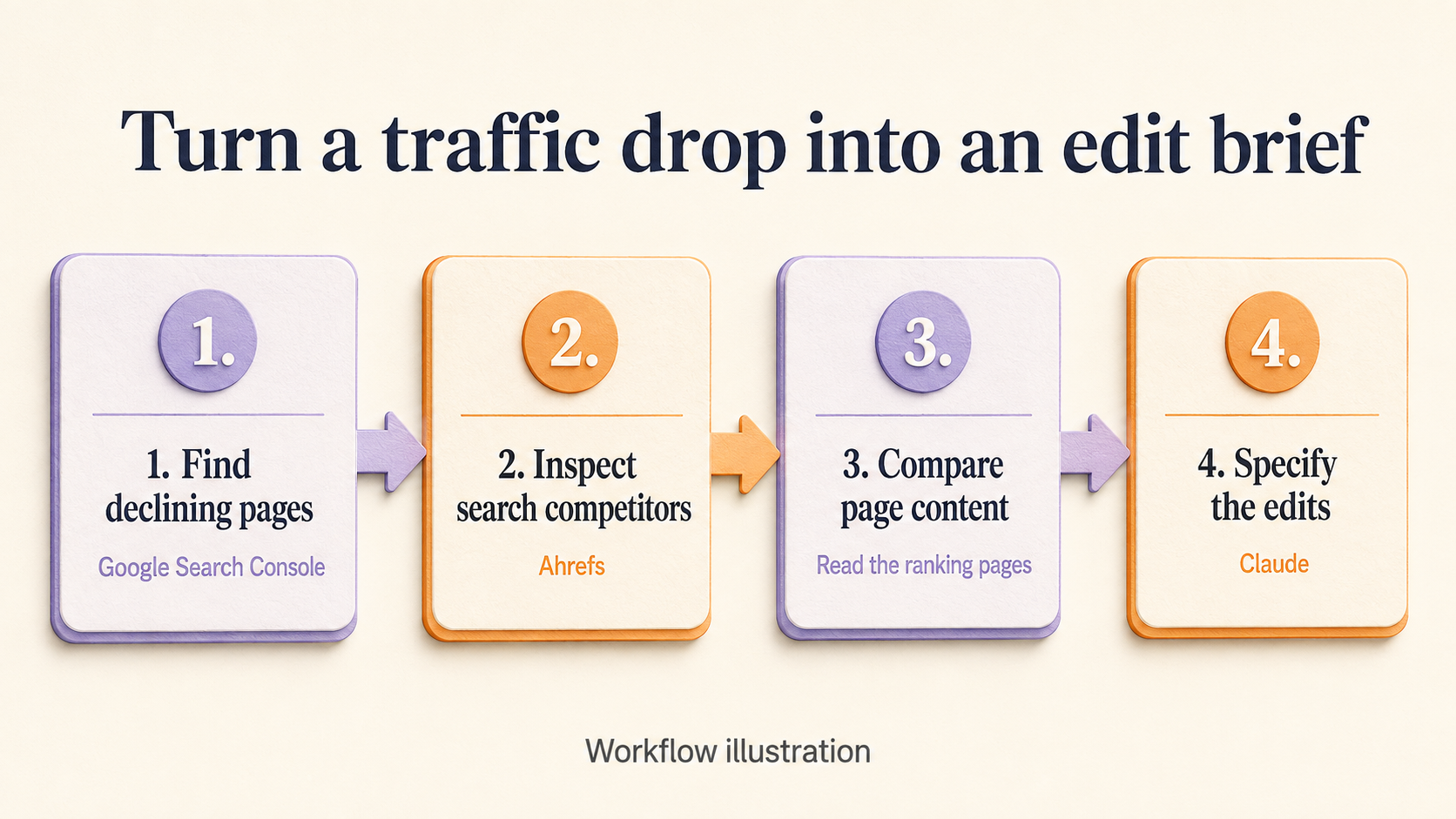
Workflow illustration. Search Console identifies your decline; Ahrefs adds competitor context; reading the pages supplies evidence for the actual edits.
Use Search Console for [PROPERTY]. Compare the last 28 complete days with the previous 28.
Find the five pages with the largest click loss and the queries responsible.
Keep country, device, and search type consistent between the periods.

For the relevant queries, use Ahrefs to investigate search competitors in [COUNTRY].
Read our page and the relevant competing pages using available browsing tools.
If you cannot read a page, identify that limitation.

For each proposed edit, give me:
- our URL and target query
- the evidence from Search Console and Ahrefs
- the current heading or passage that needs attention
- the exact replacement heading or text
- a missing example or section, if the evidence supports one
- one relevant internal link
- why this serves the searcher's task

Separate measured data from estimates and interpretation.
Do not modify our content or publish anything.
I would prioritize a brief that fixes an obsolete installation route or fills a missing step over a vague instruction to add length. The decision should follow the page and searcher's task, not an arbitrary word count.
Troubleshooting
| Symptom | Check this first |
|---|---|
| Markifact works but Ahrefs is unavailable | Ahrefs must be connected in the same Markifact workspace authorized in Claude. Check any server-level connection restrictions. |
| The API key fails | Confirm the key is valid for the intended Ahrefs workspace and that its access permits the requested endpoint. |
| An API allowance error appears | Review Ahrefs units and access. Reduce selected fields and rows before requesting a larger export. |
| A domain returns little data | Check target spelling, country, and whether scope is domain, subdomains, prefix, or exact URL. |
| Ahrefs differs from Search Console | Match the scope and dates, but retain the distinction between Ahrefs estimates and Google's first-party search reporting. |
Frequently asked questions
Can I connect Ahrefs to Claude without building an MCP server?
Yes. Save an Ahrefs API connection in Markifact, install the approved Markifact connector in Claude, and sign in to the same workspace. Markifact hosts the connection.
Do I need an Ahrefs API key?
Yes, for the Markifact route described here. Save it in Markifact's Ahrefs connection form. The Claude connector does not include an Ahrefs subscription or API allowance.
Can Claude analyze competitor keywords and backlinks?
Yes. Markifact exposes read operations for organic keywords, organic competitors, domain overviews, and backlinks. The results depend on your Ahrefs access, target scope, country, and available data.
Can I combine Ahrefs with Google Search Console?
Yes. Connect both in the same Markifact workspace. Use Search Console for your own search performance and Ahrefs for competitor and backlink context. Keep their metrics labeled separately.
Will this edit my website automatically?
No. The reporting prompts in this guide retrieve and analyze data. Changing your website would require a separate editing action and authorization.