These Search Console prompts turn a connected Google Search Console property into 15 read-only SEO reporting workflows inside Claude. You need a property connected through the Google Search Console MCP, then you can copy any prompt below to find opportunities, investigate declines, compare pages, and prepare recurring summaries. This is a Search Analytics audit of queries, pages, countries, devices, clicks, impressions, CTR, and position, not an indexing or technical-crawl audit.
If the connector is not ready, follow the Google Search Console to Claude setup guide first. Once connected, start with the prompt that matches the decision you need to make rather than running all 15 in sequence.
What Claude can analyze in Search Console
Markifact's current reporting operations include gsc_get_report, gsc_list_report_fields, and gsc_select_accounts. These are current examples from the catalog, and every prompt in this guide is executable with their verified reporting fields and filters.
Claude can work with:
- Queries and pages
- Countries and devices
- Dates, weeks, months, and years
- Clicks, impressions, CTR, and average position
- Exact, contains, list, and regular-expression filters
- Equal-length period comparisons
- Sorting and row limits
- One or several Search Console properties
It cannot use this connection to inspect URL indexing, submit a sitemap, request crawling, or run URL Inspection. The prompts are read-only, so they produce findings and action lists without changing Search Console or your website.
Google says Search Console data is normally available after a delay of 2-3 days. Use complete windows ending on the latest stable day available, and keep comparison windows equal in length. Google also omits some rare or sensitive queries for privacy and reporting limits, so a query table is never a complete list of every search.
Group 1: Find the opportunities already within reach
Prompt 1: Find striking-distance keywords
Use gsc_get_report for the confirmed Search Console property.

Date range: the last 28 complete days, ending on the latest stable day.
Fields: query, page, clicks, impressions, CTR, and position.
Filters:
- position greater than 7
- position less than 16
- impressions greater than 100
Sort by impressions descending and return the top 30 rows.

Group repeated query-page rows carefully. Return a table with Query, Page,
Clicks, Impressions, CTR, Position, and Opportunity note. Do not call a
keyword easy or recommend a rewrite until you inspect the current ranking page.
What comes back: Claude returns queries sitting roughly in positions 8-15, ordered by the demand already visible in Search Console. The page column shows which URL currently earns the impressions, while clicks and CTR prevent a high-impression row from looking stronger than it is.
Action: Review the first five pages for intent match, missing subtopics, internal-link opportunities, and weak titles before editing anything.

Illustrative data. The prompt uses the real gsc_get_report operation, but the property, queries, and metrics are fictional.
Prompt 2: Build a CTR-gap shortlist
Use gsc_get_report for the last 28 complete days.

Retrieve query, page, clicks, impressions, CTR, and position. Keep rows with
at least 300 impressions and average position better than 8. Return the top
50 by impressions.

Within the returned data, flag rows whose CTR is materially below other rows
at a similar position. Return Query, Page, Clicks, Impressions, CTR, Position,
peer-position CTR range, and CTR-gap reason. Label title or description changes
as hypotheses, not confirmed fixes.
What comes back: The result is a title-rewrite shortlist based on high visibility, useful rankings, and unusually weak CTR for that position range. Claude compares like with like instead of applying one universal CTR benchmark across every SERP.
Action: Inspect the live results for the highest-impression outliers and rewrite only when the page, query intent, and visible snippet support the change.
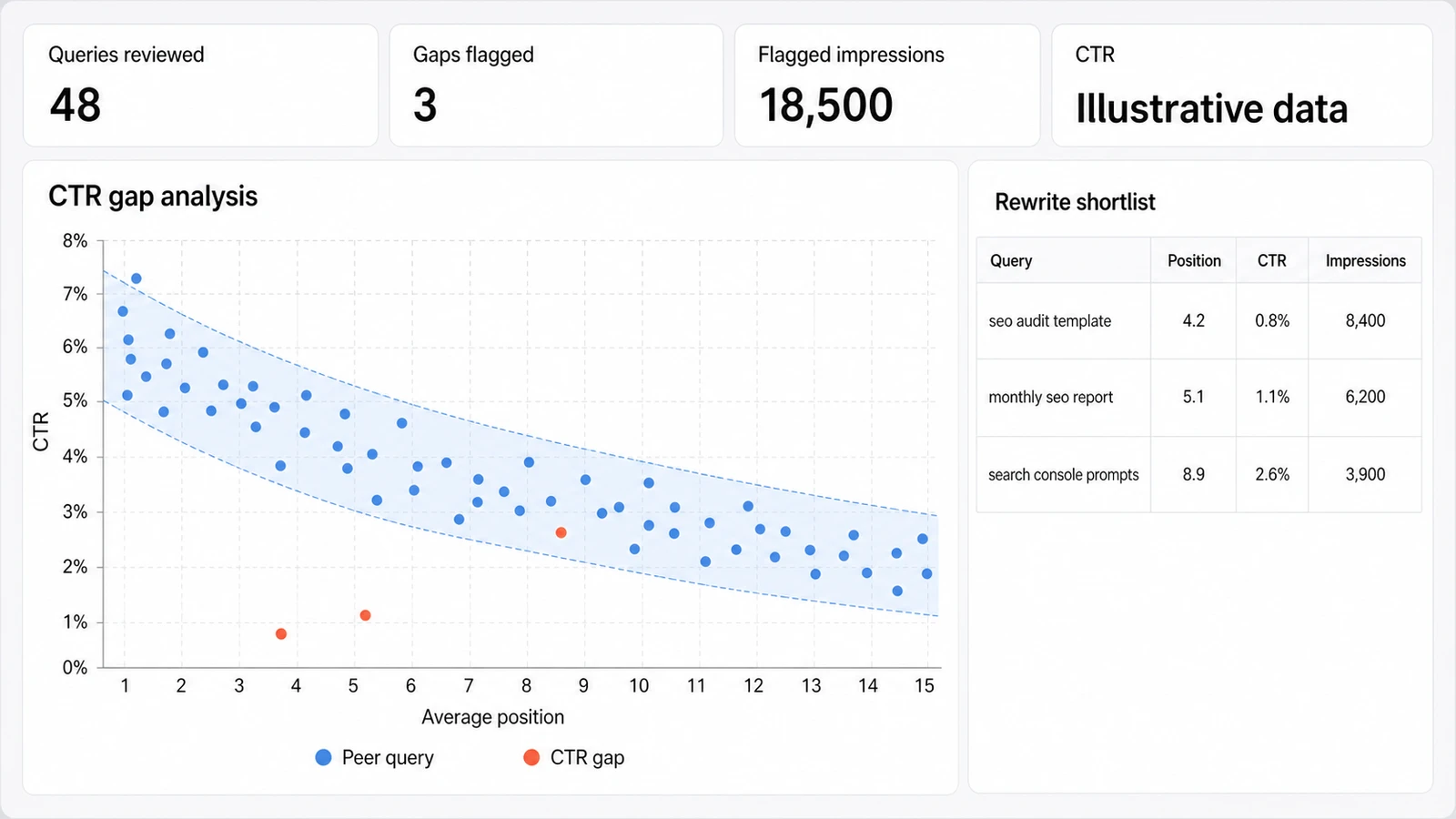
Illustrative data. Position and CTR are directional reporting metrics, and live SERP review is still required.
Prompt 3: Find the biggest declining queries
Use one gsc_get_report call with the built-in comparison setting.

Current window: the last 28 complete days.
Comparison: previous_period, equal length.
Comparison format: columns.
Comparison value: percentage.
Fields: query, page, clicks, impressions, CTR, and position.
Minimum current or previous impressions: 100.

Rank the returned rows by absolute click loss, then show percentage change.
Return the 20 biggest losers with changes in clicks, impressions, CTR, and
position. Classify each pattern as demand loss, ranking loss, CTR loss, mixed,
or insufficient evidence.
What comes back: Claude returns the queries responsible for the largest click losses and separates falling demand from weaker rankings or CTR. The classification is based on the combination of four metrics, not clicks alone.
Action: Investigate the largest absolute losers first, then check seasonality, SERP changes, competitors, and page changes before choosing a remedy.
Prompt 4: Surface rising queries you have not noticed
Use gsc_get_report with the last 28 complete days compared with the previous
28 complete days. Request query, page, clicks, impressions, CTR, and position
with comparison output in columns.

Exclude queries with fewer than 50 current impressions. Rank by absolute
impression gain, then use click growth as a second signal. Return the top 25
with Current Impressions, Impression Change, Click Change, CTR Change,
Position Change, Ranking Page, and Recommended review.

Do not describe growth as durable when it appears in only one period.
What comes back: The table surfaces queries gaining visibility before they become obvious in topline traffic. Position, CTR, and page context show whether the gain comes from better ranking, higher demand, or a new query-page match.
Action: Strengthen pages with relevant, repeatable growth and monitor one-period spikes before committing a major content update.
Group 2: Diagnose query coverage and SERP fit
Prompt 5: Find keyword cannibalization candidates
Use gsc_get_report for the last 90 complete days.

Fields: query, page, clicks, impressions, CTR, and position.
Filter to queries with meaningful visibility, then return query-page rows.
Group the returned rows by query and keep queries associated with two or more
pages. For each candidate, show every page, its clicks, impressions, CTR,
position, and share of query clicks.

Label these as possible cannibalization candidates. Do not call multiple pages
a problem when one clearly dominates or the URLs serve different intent.
What comes back: Claude creates a query-to-page map and highlights terms appearing with several URLs. The metric split helps distinguish a harmful overlap candidate from normal canonical aggregation, sitelinks, or pages serving different needs.
Action: Review search intent and the live pages before consolidating, redirecting, re-linking, or changing any URL.
Prompt 6: Split branded and non-branded demand
My brand regex is: [INSERT CASE-INSENSITIVE BRAND REGEX]

Run two gsc_get_report calls for the same last 28 complete days and property.
Use query, clicks, impressions, CTR, and position.

Call 1: query REGEXP_MATCH the supplied brand regex.
Call 2: query NOT_REGEXP_MATCH the same regex.

Return a Brand vs Non-brand table with clicks, impressions, CTR, position,
click share, and impression share. Then list the top 15 non-brand queries by
clicks and the top 15 by impressions. Show the regex in the response so I can
audit the classification.
What comes back: Claude produces a reproducible split based on your own brand-name, product-name, and misspelling regex. It also exposes the non-brand queries that drive discovery rather than mixing them with navigational demand.
Action: Fix the regex when obvious brand variants land in the non-brand group, then use the stable definition in every recurring report.
Prompt 7: Detect possible snippet losses
Use gsc_get_report for the last 28 complete days compared with the previous
28 complete days. Request query, page, clicks, impressions, CTR, and position
with comparison output in columns.

Find rows where:
- impressions are stable or higher
- average position changed by less than 1 position
- CTR declined by at least 20%
- the query has at least 200 impressions

Return the top 20 by lost clicks. Label each row "possible snippet loss",
not "snippet changed". Include Query, Page, both-period CTR, position change,
impression change, estimated lost clicks, and live-SERP check required.
What comes back: The shortlist isolates CTR declines that are not easily explained by a large ranking drop or disappearing demand. Search Console cannot prove what snippet Google displayed, so every row remains a candidate for live inspection.
Action: Compare the current SERP, title, description, rich-result treatment, and competing snippets before editing the page.
Prompt 8: Compare desktop and mobile gaps
Use gsc_get_report for the last 28 complete days.

Fields: query, device, clicks, impressions, CTR, and position.
Keep desktop and mobile rows with at least 100 impressions per device.
Pair rows by query and calculate:
- mobile minus desktop position
- mobile minus desktop CTR
- impression and click share by device

Return the 20 largest useful gaps with Query, Desktop metrics, Mobile metrics,
and likely investigation path. Do not diagnose page speed or mobile usability
from Search Console performance data alone.
What comes back: Claude pairs device rows for the same query and shows where performance differs materially. The result reveals reporting gaps, but it does not contain Core Web Vitals, rendering, or device-test evidence.
Action: Test the affected pages and SERPs on the weaker device before blaming rankings, templates, snippets, or usability.
Prompt 9: Find country opportunities
Use gsc_get_report for the last 90 complete days.

Fields: query, country, page, clicks, impressions, CTR, and position.
Exclude these primary markets: [INSERT COUNTRY LIST].
Keep rows with at least 100 impressions. Group by country, then show the top
queries and pages inside each unexpected market.

Return Country, Clicks, Impressions, CTR, Position, Top queries, Top pages,
and Local-market validation needed. Do not recommend localization from traffic
alone; flag language, commercial relevance, availability, and legal checks.
What comes back: The report identifies markets outside your normal focus where visibility or clicks are already emerging. Query and page detail separates a real local opportunity from irrelevant, accidental, or globally generic impressions.
Action: Validate business fit and native-language intent before creating country pages, translations, or market-specific offers.
Group 3: Decide which pages and topics deserve work
Prompt 10: Rank page-level winners and losers week over week
Use gsc_get_report for the last complete Monday-Sunday week compared with the
previous complete Monday-Sunday week.

Fields: page, clicks, impressions, CTR, and position.
Comparison format: columns.
Return two tables:
1. Top 15 winners by absolute click gain
2. Top 15 losers by absolute click loss

For each page, include both-period clicks, click change, impression change,
CTR change, position change, and dominant pattern. Keep equal weekday-aligned
windows and do not use partial current-week data.
What comes back: Claude returns a balanced view of pages adding and losing organic clicks across comparable weeks. The supporting metrics indicate whether each movement is driven mainly by demand, visibility, ranking, or CTR.
Action: Review the biggest absolute movers and annotate launches, migrations, promotions, and known seasonality before escalating a decline.
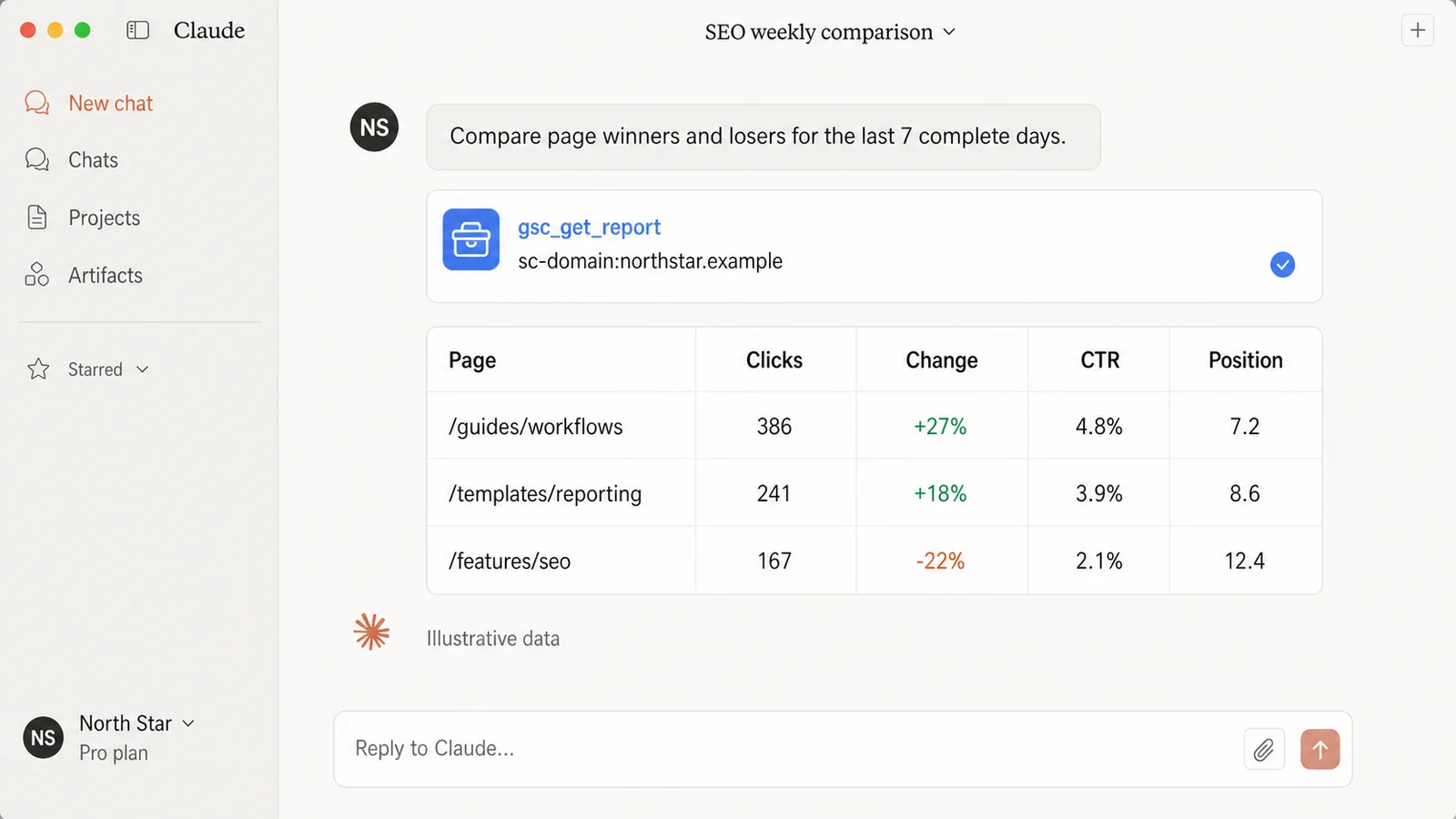
Illustrative data. The operation name is real, while the property, pages, and performance values are fictional.
Prompt 11: Build a content-refresh shortlist
Use gsc_get_report for the last 3 complete months compared with the previous
3 complete months. Request page, clicks, impressions, CTR, and position with
comparison output in columns.

Keep pages that had at least 300 impressions in either period. Rank by absolute
click loss, then prioritize pages where impressions remain meaningful and the
decline appears in position, CTR, or both.

Return Page, both-period metrics, decline pattern, current query review needed,
and Refresh priority: High, Medium, or Monitor. Exclude pages I mark as retired,
transactional, seasonal, or intentionally de-emphasized.
What comes back: The table turns quarter-over-quarter decay into a manageable refresh queue instead of a sitewide rewrite project. It keeps pages with meaningful remaining demand above pages that simply lost all relevance.
Action: Re-query the high-priority pages by query, confirm intent drift, and update only sections supported by current search demand and business value.
Prompt 12: Check how a new page is developing
Page URL: [INSERT EXACT CANONICAL URL]
Launch date: [YYYY-MM-DD]

Use gsc_get_report from the launch date through the latest complete day.
Filter page EQUALS the supplied URL. Request week, query, clicks, impressions,
CTR, and position.

Return:
1. weekly clicks and impressions
2. weekly weighted position and CTR
3. first-seen and latest-seen week for each meaningful query
4. rising, flat, and fading query groups
5. queries whose intent the page does not yet satisfy clearly

Do not treat a low-volume launch week as a failed page.
What comes back: Claude shows how discovery, visibility, and clicks develop over the page's actual lifetime. Query-level first-seen and trend groups reveal whether the page is gaining the intended topic or drifting into adjacent demand.
Action: Use the trajectory to decide whether the page needs patience, better internal links, clearer intent coverage, or a focused title and content revision.
Prompt 13: Mine question queries for FAQs and content ideas
Use gsc_get_report for the last 90 complete days.

Fields: query, page, clicks, impressions, CTR, and position.
Filter query with REGEXP_MATCH using:
^(who|what|when|where|why|how|can|does|do|is|are|should|which)\b

Return the top 100 by impressions. Cluster the rows by intent, then show:
- question
- current ranking page
- clicks, impressions, CTR, and position
- whether the page answers it directly
- best action: improve existing answer, add FAQ section, create new page, or ignore

Do not invent questions that are absent from the returned data.
What comes back: Claude converts real question-shaped queries into intent clusters tied to their current pages and performance. Low-volume or privacy-filtered questions may be missing, so the list is evidence-led rather than exhaustive.
Action: Improve an existing page when the intent matches, and create a separate page only when the question represents a distinct, valuable search task.
Group 4: Run repeatable SEO routines
Prompt 14: Run a Monday-morning 10-minute SEO triage
Run a read-only Monday SEO triage for the confirmed property.

Use the last complete Monday-Sunday week compared with the previous complete
Monday-Sunday week. Use gsc_get_report as needed for three modules:

1. Striking distance: queries at positions 8-15 with at least 100 impressions,
   sorted by impressions.
2. CTR gaps: queries with at least 200 impressions, useful positions, and CTR
   materially below similar-position peers.
3. Declines: queries and pages with the largest absolute click losses, including
   impression, CTR, and position changes.

Return no more than five rows per module. Finish with three actions for this week,
each tied to an exact query or page and labeled Evidence, Hypothesis, and Next check.
What comes back: Claude compresses the three highest-value checks into a short, weekday-aligned review rather than a generic dashboard recap. Each suggested action remains attached to the reporting evidence and an explicit next check.
Action: Assign only the three actions that survive a quick SERP and page review, then save the report as the baseline for next Monday.
Prompt 15: Write a monthly client-ready SEO summary
Prepare a client-ready Search Console summary for the last complete calendar
month compared with the previous complete calendar month.

Use gsc_get_report calls for:
1. property totals: clicks, impressions, CTR, and position
2. top query winners and losers
3. top page winners and losers
4. country mix
5. device mix

Use absolute changes and percentage changes. Explain the three most material
movements with Evidence, Interpretation, and Recommended next step. Include a
Data notes section covering the date windows, 2-3 day reporting delay, privacy-
omitted queries, and any incomplete evidence. Keep the executive summary under
150 words and do not claim causation from correlation.
What comes back: Claude produces a concise monthly narrative supported by query, page, country, and device tables from complete calendar windows. The data notes make reporting delay, hidden queries, and interpretation limits visible to the client.
Action: Review the evidence and wording, then use the monthly SEO report workflow to move the approved analysis into a reusable deck.
Three rules that make these prompts reliable
- Name the property and complete dates. Never let Claude choose the first familiar property or compare a partial week with a full week.
- Keep evidence separate from diagnosis. A CTR drop does not prove a bad title, and several ranking pages do not prove cannibalization.
- Save the exact filters. Country, device, regex, page, query, and minimum-impression rules determine what the result means.
Search Console explains acquisition before the visit. For the behavior and conversion side of the same investigation, use the GA4 audit prompts for Claude.
Frequently asked questions
Can Claude analyze Google Search Console data?
Yes. With a connected Search Console property, Claude can use reporting operations such as gsc_get_report to analyze queries, pages, countries, devices, dates, clicks, impressions, CTR, position, filters, and period comparisons.
Do I need coding to use these Search Console prompts?
No. The prompts are written for Claude Desktop and describe the report in plain language. You still need legitimate access to the Search Console property and a configured connector.
Do these Search Console prompts work in ChatGPT?
Yes. The reporting logic also works in ChatGPT when the same Markifact connection is available. Follow the Google Search Console to ChatGPT and Codex guide for that setup.
How current is Google Search Console data?
Google says collected data is normally available in 2-3 days, while the newest interface data can sometimes be preliminary. Use the latest complete day and avoid comparing a partial period with a complete one.
Can Claude fix SEO problems or only report them?
This Search Console connection is read-only and reports performance evidence. Claude can prioritize hypotheses and recommend checks, but a practitioner should inspect the SERP, page, technical implementation, and business context before making changes.