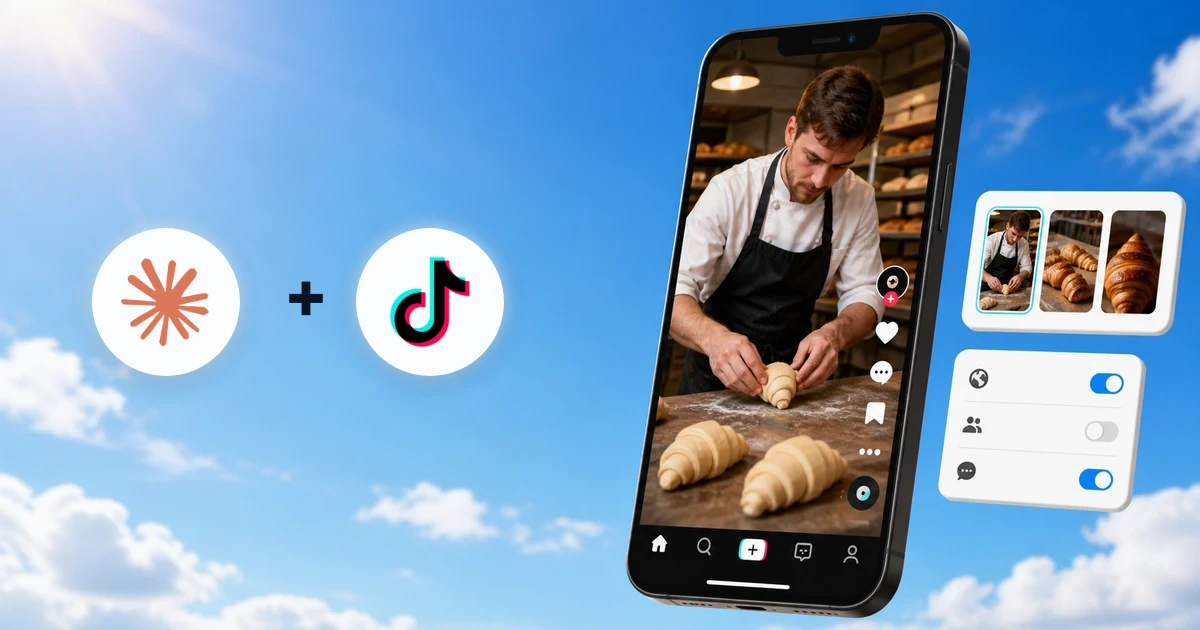
Yes, Claude can post to Pinterest through a connector that gives it approval-gated tools for an authorized organic Pinterest account. Connect Pinterest in Markifact, enable the Markifact connector in Claude, and Claude can prepare image, carousel, or video Pins, show the exact board and payload, and wait for your approval before publishing. This guide also covers board management, destination links, scheduling, post-publish updates, and organic analytics.
What Claude can actually do with Pinterest
The current Pinterest MCP covers the useful organic workflow around Pins and boards:
- List existing boards and create a new public or secret board
- Publish a single-image Pin
- Publish a carousel with 2 to 5 images in a defined order
- Publish a video Pin with an optional cover image
- Set a title, description, destination link, alt text, board, and board section
- Update Pin metadata or move a Pin after publishing
- Save an existing public Pin to one of your boards
- Delete Pins, and update or delete boards
- Report on organic impressions, saves, Pin clicks, outbound clicks, engagement, and available audience metrics
These are examples from the current Pinterest Organic operation surface, not an exhaustive description of every cross-platform workflow Markifact can run.
Pinterest Ads is separate. Organic Pins and boards use /pinterest-mcp; paid campaigns, ad groups, targeting, budgets, and promoted Pins use the Pinterest Ads MCP.
1. Add Markifact from Claude's directory
Open the Markifact listing in Claude, or find it in Claude's connector directory:
- Open Customize, then Connectors.
- Browse the directory and search for Markifact.
- Open the listing and choose Connect or Install.
- Sign in to Markifact.
- Authorize the workspace that contains the Pinterest connection.
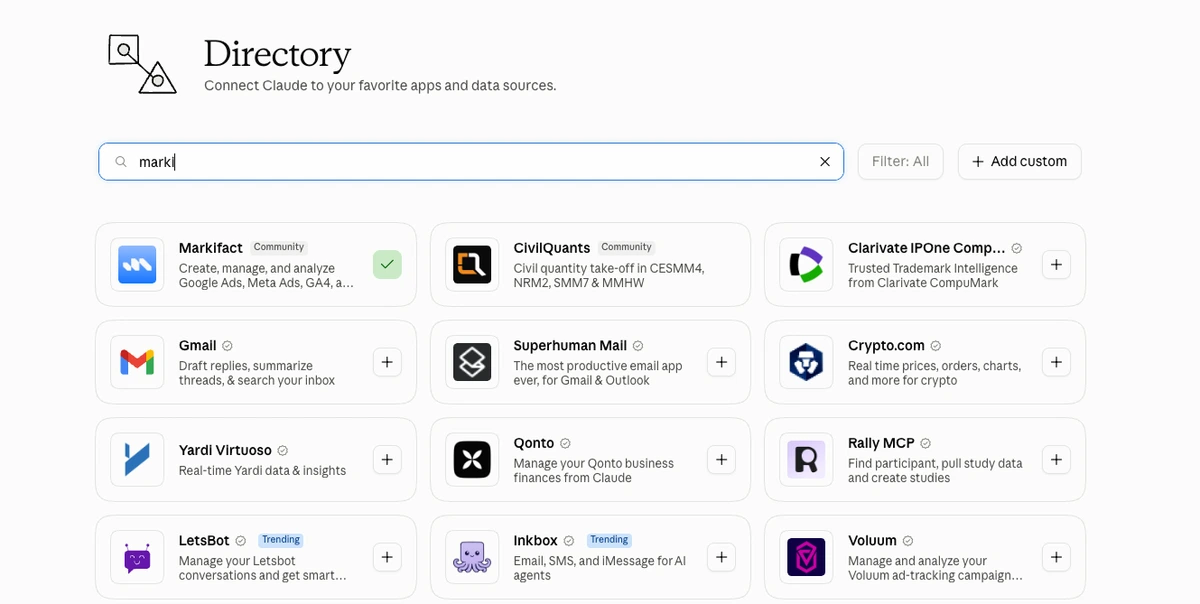
If you want the plumbing explained, read Claude Connectors for Marketers. A connector is Claude's interface term; the MCP server is the tool layer that exposes the approved operations underneath.
2. Connect the organic Pinterest account
In Markifact, open Connections, choose Pinterest Organic, and complete Pinterest's OAuth flow. This connection handles organic Pins, boards, and reporting. It is not the Pinterest Ads advertiser connection.
Name the connection so the account is unmistakable:
Pinterest Organic - Northstar Home - Main
Start with a read-only inventory:
Use Markifact to list the Pinterest boards for the connected account.
Return each board's name, board ID, privacy, Pin count, and follower count.
Do not create, update, or delete anything.
Claude should use pinterest_list_boards. The board ID matters because every new organic Pin must be assigned to a board.
3. Prepare the first image Pin
Use approved media at a reachable HTTP(S) URL. A vertical 2:3 image is a practical Pinterest creative starting point because it gives the idea more room in the feed, but the publishing workflow should still validate the actual asset before the write.
Use the connected Northstar Home Pinterest account.

First run pinterest_list_boards and select the board named Autumn Home Ideas.
Then prepare one image Pin using:
[PUBLIC IMAGE URL]

Title: A Calm Autumn Reading Corner
Description: Layer warm clay, soft linen, and natural branches to make a reading corner feel ready for autumn without replacing the whole room.
Destination link: https://northstar.example/journal/autumn-reading-corner
Alt text: Cream reading chair with a rust cushion, soft throw, and autumn branches in a ceramic vase.

Show the account, board name and ID, image, title, description,
destination link, and alt text. Wait for approval before publishing.
Claude prepares pinterest_publish_pin, but the external write stays paused for approval.
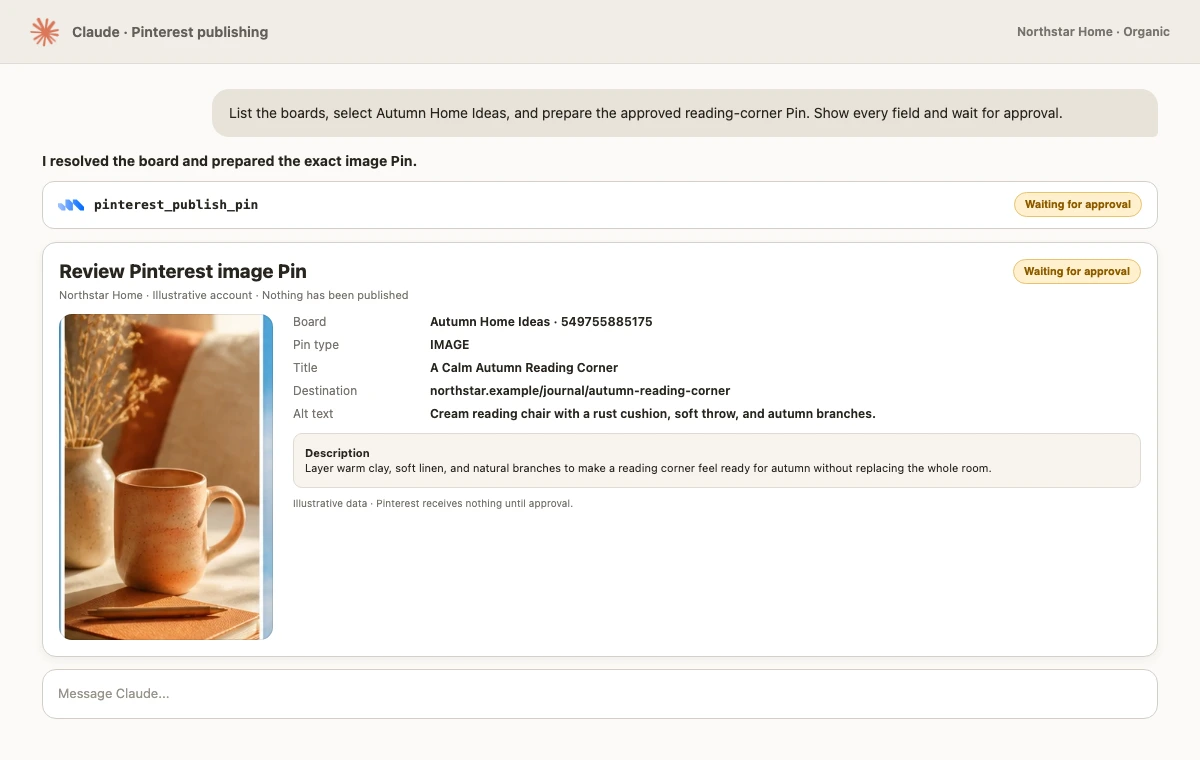
Before approving, verify:
- Pinterest account
- Board and optional board section
- Pin type and media order
- Title and description
- Destination URL
- Alt text
Pinterest's official Create Pin reference allows a title of up to 100 characters, a description of up to 800, and alt text of up to 500. Markifact applies the same boundaries before it sends the request.
4. Publish a Pinterest carousel
Carousel mode accepts 2 to 5 images. Order is part of the payload, so tell Claude exactly which frame opens the story and which one closes it.
Prepare a Pinterest carousel for the board Autumn Home Ideas.
Use these four image URLs in this exact order:
1. [ROOM OVERVIEW URL]
2. [TEXTURE DETAIL URL]
3. [LIGHTING DETAIL URL]
4. [FINAL STYLED CORNER URL]

Title: Four Layers for a Warmer Reading Corner
Description: Start with one neutral anchor, add a warm textile, bring in natural texture, and finish with softer light. Save this sequence for your next room refresh.
Destination link: https://northstar.example/guides/autumn-reading-corner
Alt text: Four-image sequence showing a reading corner styled with neutral furniture, rust textiles, dried branches, and warm light.

Show a numbered media manifest, the selected board, and every text field.
Wait for approval before pinterest_publish_pin.
Do not approve from filenames alone. Open every image, check the sequence, and confirm that the destination page matches the promise in the Pin.
5. Publish a video Pin
For a video Pin, Markifact transfers the video to Pinterest and waits for processing before the Pin is created. You can provide a cover image, or let Pinterest select a frame.
Prepare a video Pin for Northstar Home.
Board: Small Space Ideas
Video: [PUBLIC VIDEO URL]
Cover image: [PUBLIC COVER IMAGE URL]
Title: Style a Small Entryway in 30 Seconds
Description: Three practical layers for a useful entryway: closed storage, one landing surface, and a mirror that returns light.
Destination link: https://northstar.example/guides/small-entryway

Confirm the video and cover are reachable, show the complete payload,
and wait for approval before publishing.
Pinterest documents the upload and processing sequence in its official boards and Pins guide. A video write can take longer than an image Pin because the media must finish processing first.
6. Create or organize boards with Claude
Board changes are separate writes. Ask Claude to inventory first, then request one precise mutation.
List all current Pinterest boards and check whether a public board named Small Space Ideas already exists.
If it exists, return its ID and do nothing else.
If it does not exist, prepare a public board with that exact name and this description:
Practical storage, layout, and styling ideas for compact homes.
Show the proposed board and wait for approval before pinterest_create_board.
The current board tools include pinterest_create_board, pinterest_update_board, and pinterest_delete_board. Deleting a board also removes the Pins saved to it, so treat that operation as destructive and inspect the board ID, name, privacy, and Pin count before approval.
7. Schedule a Pinterest Pin with Claude
pinterest_publish_pin does not contain a native publish_at field. To publish later, schedule a Markifact workflow for a specific date, time, and timezone. The scheduled workflow should preserve the approval boundary around the final Pinterest write.
Create a scheduled Markifact workflow for September 28, 2026 at 7:30 PM Asia/Dubai.
At execution, list the boards again, select Autumn Home Ideas,
and prepare the approved image Pin from this brief.
Do not rewrite the title, description, destination link, or alt text.
Keep pinterest_publish_pin approval-gated.
This is workflow scheduling, not a Pinterest-native scheduling field in the publish operation. Test the workflow with a non-critical board and asset before relying on it for a campaign launch.
8. Update, move, save, or delete a Pin
Claude can change a published Pin's title, description, alt text, destination link, or board placement with pinterest_update_pin. Pinterest does not let this operation replace the published image or video.
List the 20 newest Pins and locate the Pin titled A Calm Autumn Reading Corner.
Prepare an update that changes only the destination link to:
https://northstar.example/journal/autumn-reading-corner-2026

Keep the title, description, alt text, media, and board unchanged.
Show the Pin ID and exact changed field. Wait for approval.
Use pinterest_save_pin to curate an existing public Pin onto a board. Use pinterest_delete_pin only when removal is intentional because deletion cannot be undone.
9. Measure organic Pinterest performance
Use pinterest_list_pins with metrics for a broad inventory, or pinterest_get_report for a defined date range and account-level or per-Pin analysis.
Use Pinterest Organic reporting for the last 30 complete days.
Return impressions, saves, Pin clicks, outbound clicks, and engagement
for the top image Pins by outbound clicks.
Compare the reading-corner Pin with the account median.
Do not mix account-level and Pin-level fields in one report.
Do not change anything.
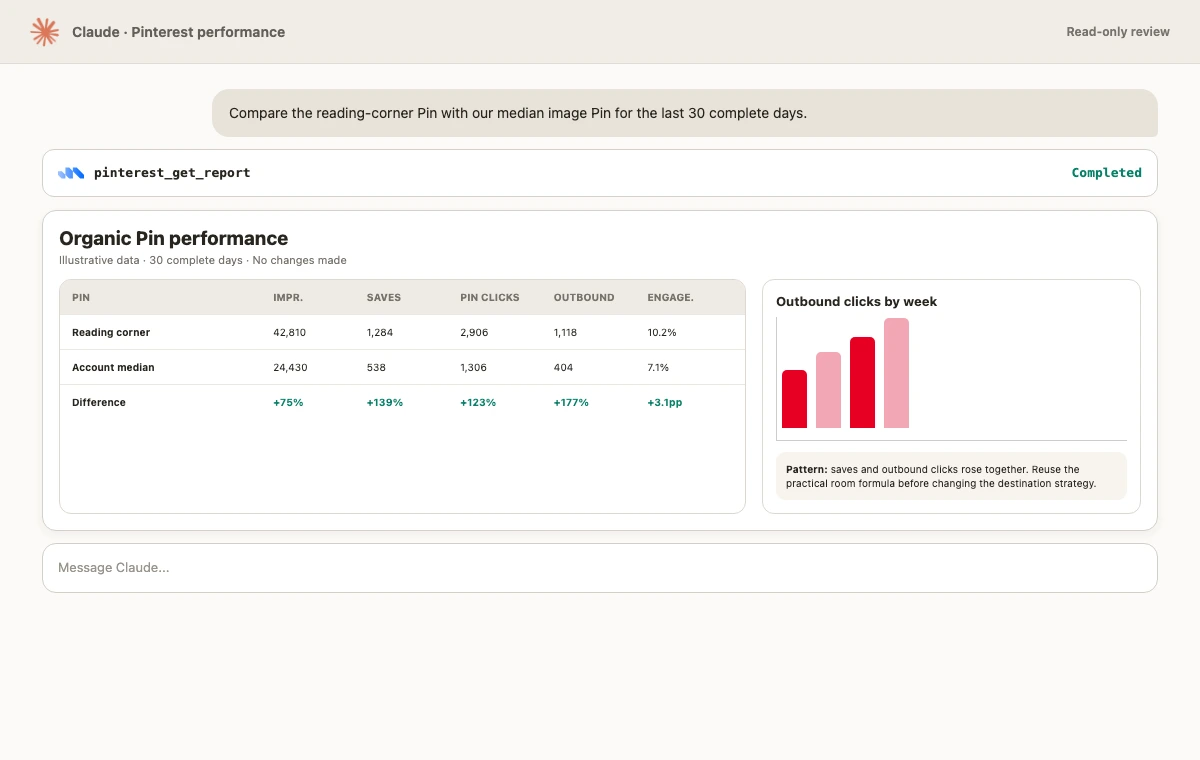
Pinterest's official organic reporting guide distinguishes account summaries, top-Pin analytics, detailed Pin analytics, and metrics returned with Pin metadata. Some analytics require a Pinterest business account.
Important limits
- A new Pin needs a valid board
- Carousel publishing supports 2 to 5 images
- The current title, description, and alt-text limits are 100, 800, and 500 characters
pinterest_publish_pinhas no nativepublish_atinput- A published Pin's media cannot be replaced through
pinterest_update_pin - Pinterest can still reject inaccessible media, invalid permissions, or a policy-violating request
- Organic Pinterest and Pinterest Ads use separate connections and operations
- Publishing, updating, saving, deleting, and board changes all wait for approval
FAQ
Can Claude post directly to Pinterest?
Yes. With an authorized Pinterest Organic connection and the Markifact connector, Claude can prepare and publish image, carousel, or video Pins through pinterest_publish_pin. The external write waits for explicit approval.
Can Claude create Pinterest boards?
Yes. Claude can list boards and prepare new public or secret boards, plus updates or deletion. Every board mutation is approval-gated.
Can Claude schedule Pinterest posts?
Claude can schedule a Markifact workflow to prepare or execute the publish step later. The current Pinterest publish operation itself has no native publish_at field.
Can Claude edit a Pin after publishing?
Yes, for metadata and placement. Claude can update the title, description, alt text, destination link, board, or board section, but it cannot replace the published image or video through the update operation.
Can Claude analyze Pinterest performance?
Yes. Read-only tools can list Pins with available metrics and report on organic account or per-Pin performance. Some analytics require a Pinterest business account.
Is this the same as Pinterest Ads management?
No. This guide covers organic Pins and boards. Use Pinterest Ads MCP for campaigns, ad groups, targeting, budgets, and promoted Pins.
Start with one controlled Pin
Connect the intended account, list the boards, and publish one low-risk image Pin with a reviewed destination URL and alt text. Verify it on Pinterest, then run a read-only listing to confirm the Pin ID, board, and link. Once that loop works, expand to carousels, video, scheduling, and board management without weakening the approval step.