You can audit a Facebook Ads account by checking campaign structure, tracking, targeting, budgets, delivery status, and creative health against one documented business scope. A reusable checklist makes the review consistent and keeps every finding tied to evidence instead of intuition. This guide shows how to run the automated Markifact Meta Ads audit, interpret its Google Sheets output, and turn the results into an approved remediation plan.
What a complete Facebook Ads audit should cover
A useful Facebook Ads audit needs more than a campaign performance export. It should answer five questions:
- Campaign structure: Are campaigns and ad sets organized around clear objectives, events, and naming conventions?
- Tracking and attribution: Are the Pixel, Conversions API, cookies, matching, and attribution settings producing usable evidence?
- Targeting and audience: Are locations, languages, custom audiences, exclusions, placements, and brand-safety controls intentional?
- Budget and bidding: Are budgets, learning status, cost goals, and campaign-level allocation aligned with the account strategy?
- Ads and creative: Are there enough active ads, valid destinations, consistent UTMs, approval issues, or signs of creative fatigue?
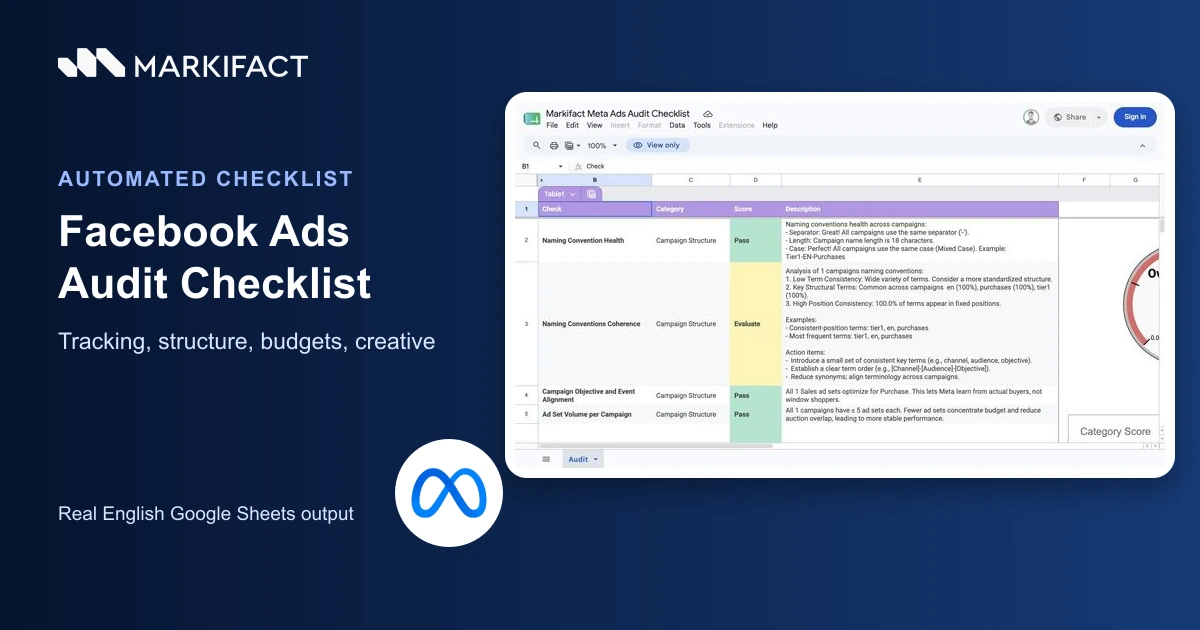
The Meta Ads Audit Checklist template automates this review. Its landing page describes more than 100 data points, while the current example output contains 23 populated top-level check rows. Those are different measures: one row can summarize several settings, entities, or performance values.
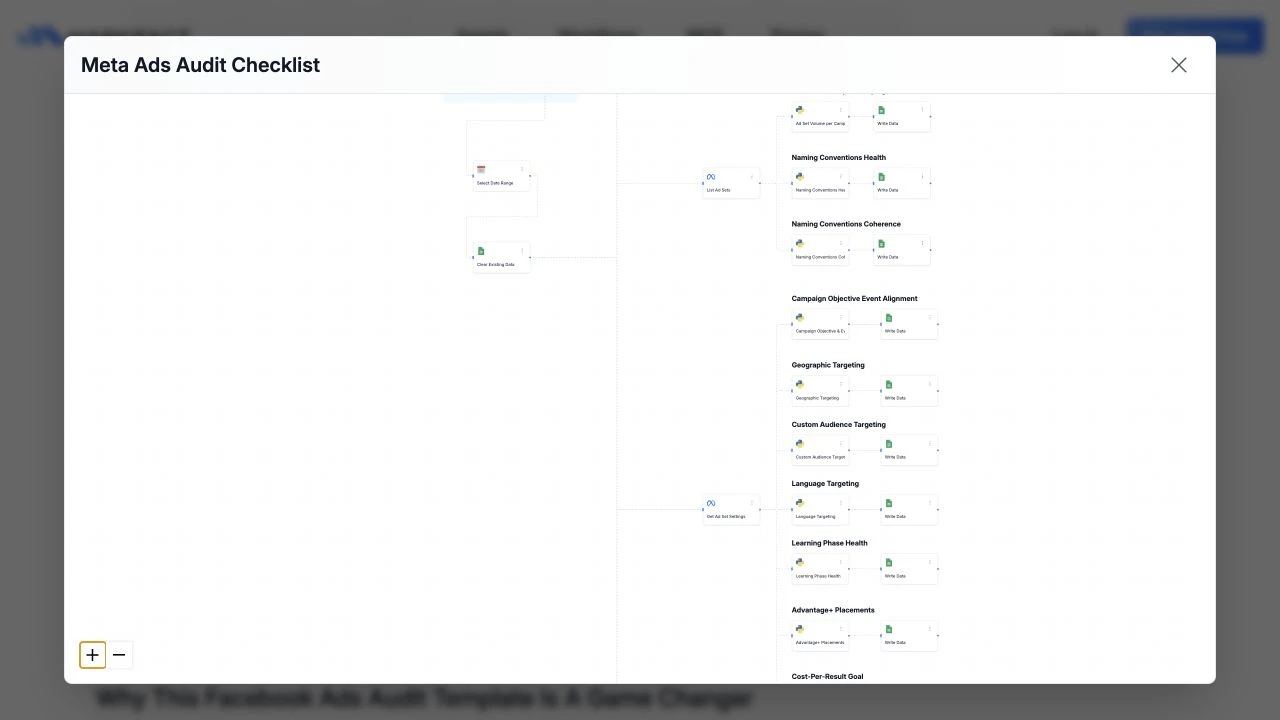
The workflow does not replace the account owner. It creates a consistent evidence layer that a marketer, analyst, or agency can validate before anyone changes a campaign.
How the automated Meta Ads audit works
The setup is intentionally short:
- Open the Meta Ads Audit Checklist workflow.
- Make a copy of the supplied Google Sheets template. Do not create a blank spreadsheet.
- Select the copied spreadsheet inside the workflow.
- Connect Meta Ads and select the correct ad account and Pixel.
- Select a complete audit date range.
- Run the workflow manually.
- Review every Pass, Fail, and Evaluate result.
- Validate material findings in Ads Manager, Events Manager, the website, and the approved measurement plan before changing anything.
The expanded workflow includes steps that retrieve campaign settings, ad-set settings, performance, Pixel evidence, server events, active ads, disapproved ads, publisher block lists, and other configuration. Code steps apply the named rules, and Google Sheets steps write the output.
Use the same copied sheet for a rerun only when preserving the previous version elsewhere. Agencies should normally keep a dated copy for every client review so the evidence and remediation history remain traceable.
How to read the audit sheet
The Google Sheets output has four columns:
- Check: the reviewer-friendly name
- Category: the part of the account being reviewed
- Score: Pass, Fail, or Evaluate
- Description: observed evidence, interpretation, and suggested follow-up
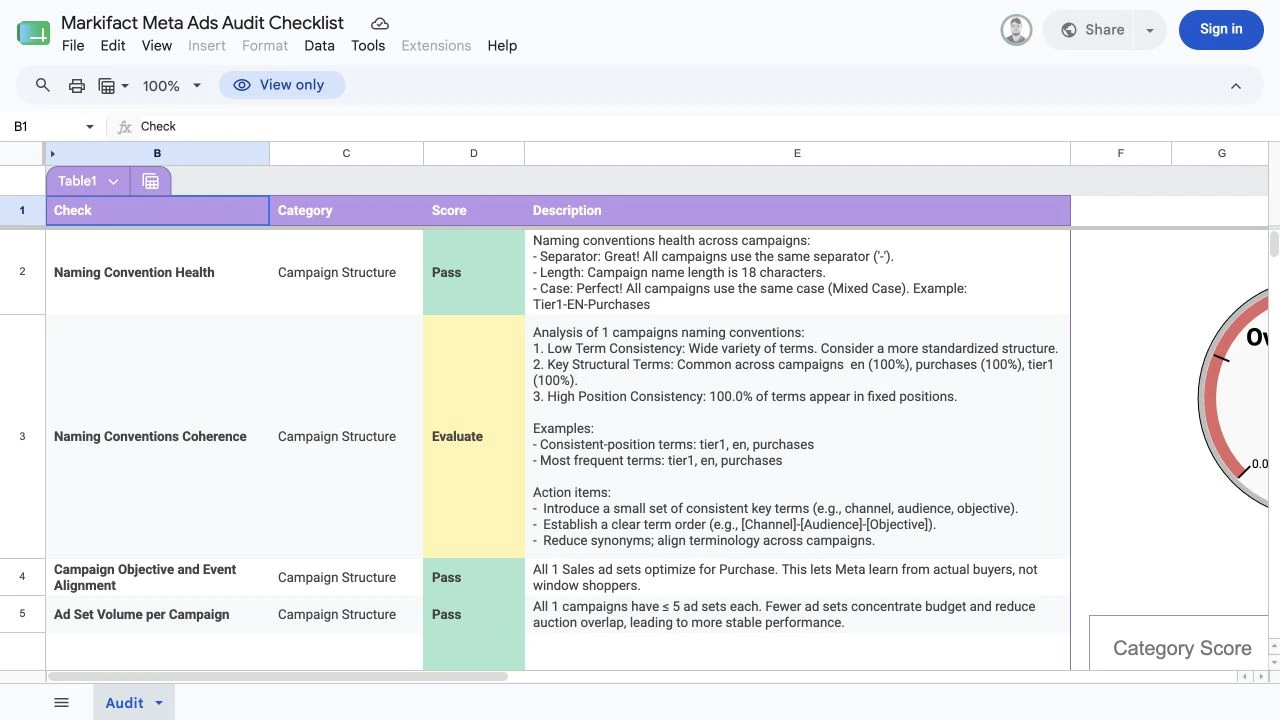
The five current categories are Campaign Structure, Tracking & Attribution, Targeting & Audience, Budget & Bidding, and Ads & Creative.
A Pass means the rule found evidence that met its configured condition. A Fail means the row needs investigation. Evaluate means the result depends heavily on business context or needs a person to judge it. None of these labels authorizes an account change.
Step 1: define the audit scope
Record the scope before running the workflow. Without it, a technically correct setting can be judged against the wrong objective, market, or measurement plan.
Copy this into the audit ticket:
Facebook Ads audit scope

Business:
Meta ad account:
Pixel or dataset:
Website or app:
Primary market(s):
Audit date range:
Primary campaign objective(s):
Approved optimization event(s):
Expected attribution setting:
Monthly spend range:
Expected audience strategy:
Expected placement strategy:
Required brand-safety controls:
Analytics owner:
Paid social owner:
Technical owner:
Privacy owner:
Final approver:

Rules:
- Missing evidence is not a pass.
- A failed check requires validation before a change.
- No campaign, ad set, ad, audience, budget, tracking, or account change is authorized by this audit.
Use a representative date range. Seven quiet days can make event volume, learning status, creative frequency, and budget adequacy look very different from a full month with active campaigns.
Step 2: audit campaign structure
Start with the decisions that shape delivery across the account.
Naming convention health
Consistent campaign and ad-set names help reviewers identify market, funnel stage, objective, audience, creative theme, and test variant. The checklist reviews separators, length, case, repeated terms, and term positions.
A naming failure is usually a governance issue, not a performance emergency. Preserve entity IDs and behavior, propose a standard, assign ownership, and approve renames separately.
Objective and event alignment
Confirm that each campaign objective and ad-set optimization event match the approved business outcome. A Sales campaign optimized for Purchase can be appropriate for an ecommerce account with enough purchase evidence. A lead-generation business may require a different objective and event.
Do not change an optimization event simply because another event has more volume. Record what the business wants, whether the event is reliable, and whether the destination can support the required learning.
Ad-set volume and fragmentation
Too many similar ad sets can fragment budget and learning. Too few can hide meaningful differences between markets, offers, products, or constraints.
Review:
- Number of ad sets per campaign
- Overlap in purpose and targeting
- Spend per ad set
- Optimization-event volume
- Geographic and language differences
- Required exclusions
- Test design
The checklist can flag structure, but the account owner must decide whether consolidation would remove a legitimate control.
Step 3: audit Pixel, Conversions API, and attribution
Tracking findings deserve careful validation because they affect optimization, measurement, and privacy.
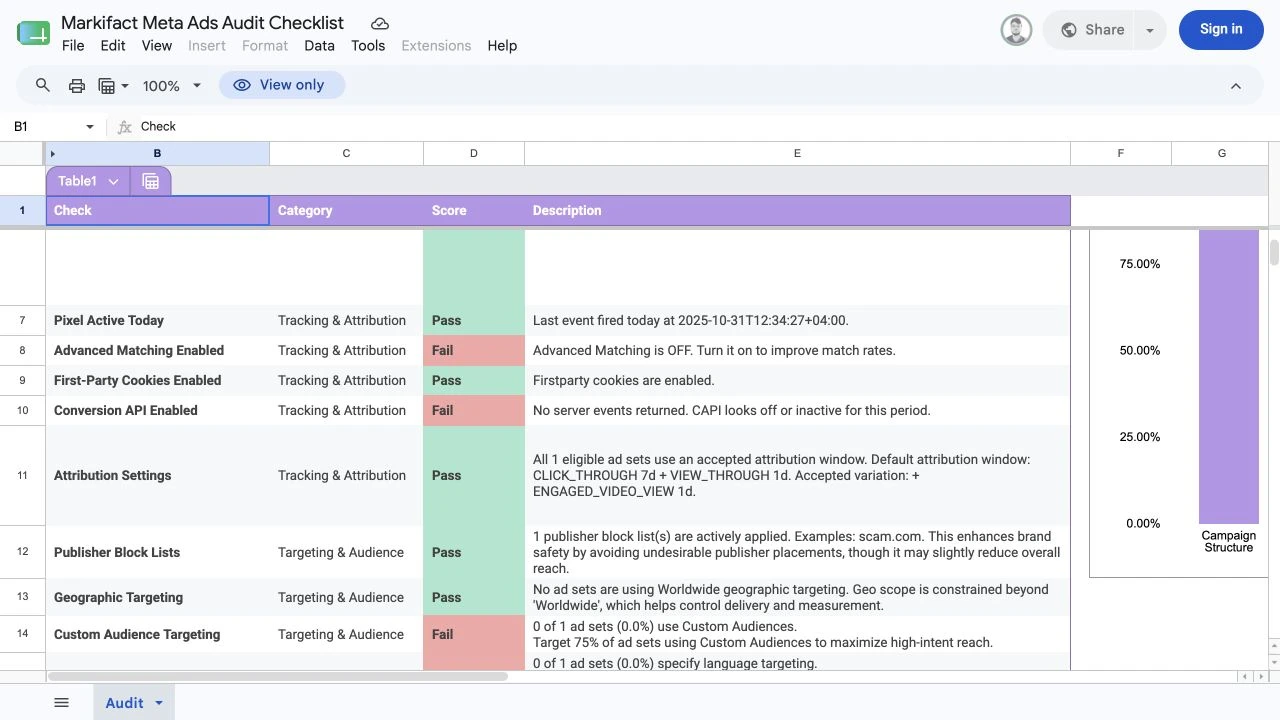
Pixel activity
Confirm that the selected Pixel or dataset belongs to the audited business and received expected events during the selected period. Recent activity is useful evidence, but it does not prove that every page, parameter, consent state, or conversion path is correct.
Test the most important journeys on the live site and compare browser events, server events, diagnostics, and final reporting.
Advanced matching and first-party cookies
These settings affect how available event data can be matched and measured. Treat a disabled setting as a review question, not an automatic defect. Confirm the organization's approved implementation, consent model, regional requirements, and technical ownership.
Conversions API
Meta describes Conversions API as a direct connection between marketing data and its optimization systems. For website events, Meta recommends considering it alongside the Pixel.
An enabled integration is not enough. Review:
- Expected browser and server events
- Event names and timestamps
- Event IDs used for deduplication
- Required customer-information parameters
- Test and production separation
- Diagnostics and recent activity
- Consent and data-use requirements
If the sheet reports no server events, verify the selected dataset, date range, traffic volume, integration status, and event path before calling the setup broken.
Attribution settings
Record the attribution settings used by eligible ad sets and compare them with stakeholder expectations. A consistent window can make reporting easier to understand, but the correct choice still depends on the business model, purchase cycle, and measurement approach.
Do not force a setting change merely to align Meta Ads with a different platform's reporting window.
Step 4: audit targeting, audience, and placements
Targeting checks should distinguish intentional constraints from accidental limitations.
Review:
- Geographic targeting
- Language targeting
- Custom-audience use
- Prospecting exclusions
- Existing-customer exclusions where required
- Publisher block lists
- Placement selection
- Audience fragmentation
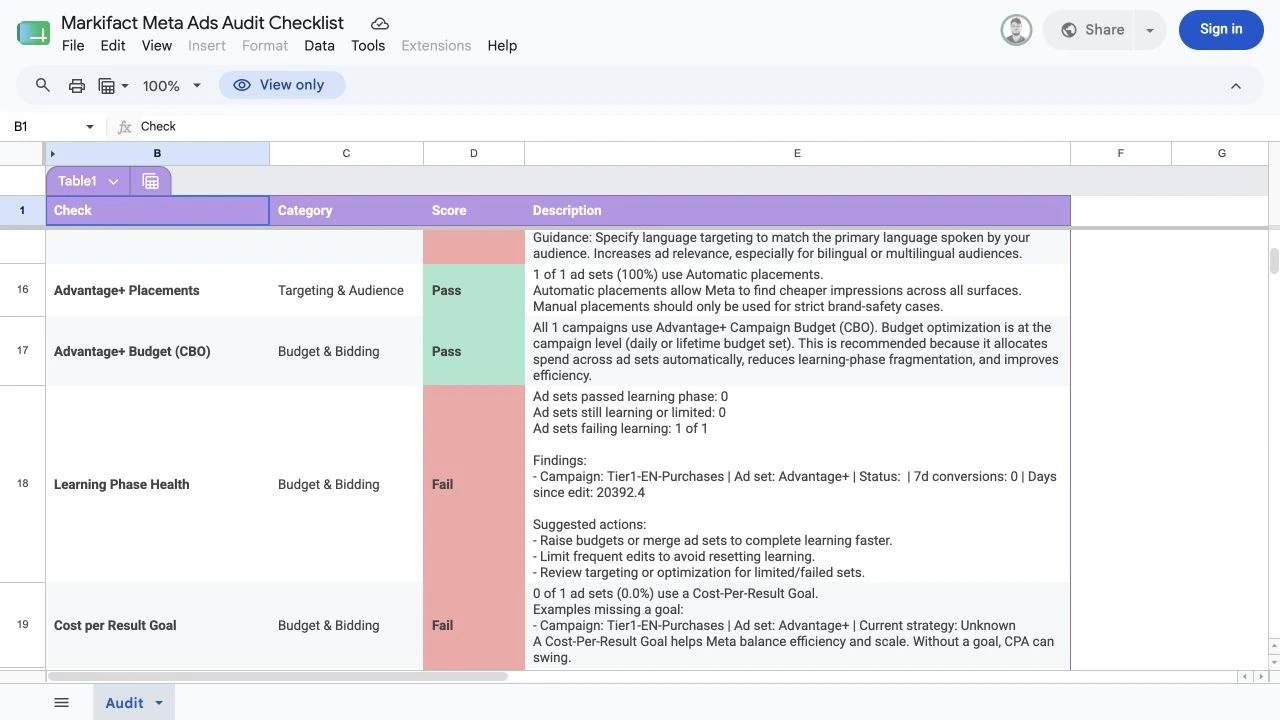
Geographic and language targeting
Confirm that every active ad set serves approved markets and languages. Worldwide targeting can be intentional for a global product and risky for a local service. Language targeting can be useful when creative and landing pages are language-specific, but it can also exclude multilingual users unnecessarily.
Custom audiences and exclusions
Check whether custom audiences support the actual funnel strategy. Prospecting campaigns may need existing-customer or recent-converter exclusions. Retargeting campaigns need a clear inclusion rule and suitable retention period.
Do not assume every ad set must use a custom audience. Broad and automated audience strategies can be intentional.
Publisher block lists and placements
Publisher block lists are brand-safety controls. Confirm that any list is current, owned, and aligned with the brand's policy.
Meta says Advantage+ placements can distribute ads across eligible placements and seek cost-effective opportunities. Manual placements can still be valid when creative, inventory, compliance, or experiment design requires tighter control. The audit should record the reason rather than label every manual selection as wrong.
Step 5: audit budgets, bidding, and learning
Budget checks need context from both configuration and observed performance.
Advantage+ campaign budget
Meta describes Advantage+ campaign budget, formerly campaign budget optimization, as one campaign budget distributed across ad sets in real time. It can simplify allocation, but account structure and testing goals still matter.
Confirm:
- Campaign or ad-set budget ownership
- Daily or lifetime budget type
- Bid strategy
- Cost-per-result goal when used
- Ad-set minimums or maximums
- Spend concentration
- Promotion or seasonality dates
- Recent material edits
Learning status
Meta's learning status means the delivery system is exploring and optimizing. Performance can be less stable during this period, and significant edits can reset delivery behavior.
Review how many ad sets are learning, learning limited, active, or failing to deliver. Then inspect event volume, spend, edit history, audience size, creative availability, and objective.
Do not merge ad sets solely to clear a status label. First confirm that the ad sets serve the same business purpose and can share a budget, audience, creative strategy, and reporting requirement.
Budget adequacy and cost goals
Compare budget with recent cost per result and the volume required by the business. A low budget relative to observed cost can limit results, while an aggressive cost goal can restrict delivery.
Any proposed budget increase is a separate financial decision. State the current amount, proposed amount, expected period, owner, approver, and stop condition.
Step 6: audit ads, destinations, and creative health
The final category checks whether campaigns have usable, approved ads with traceable destinations.
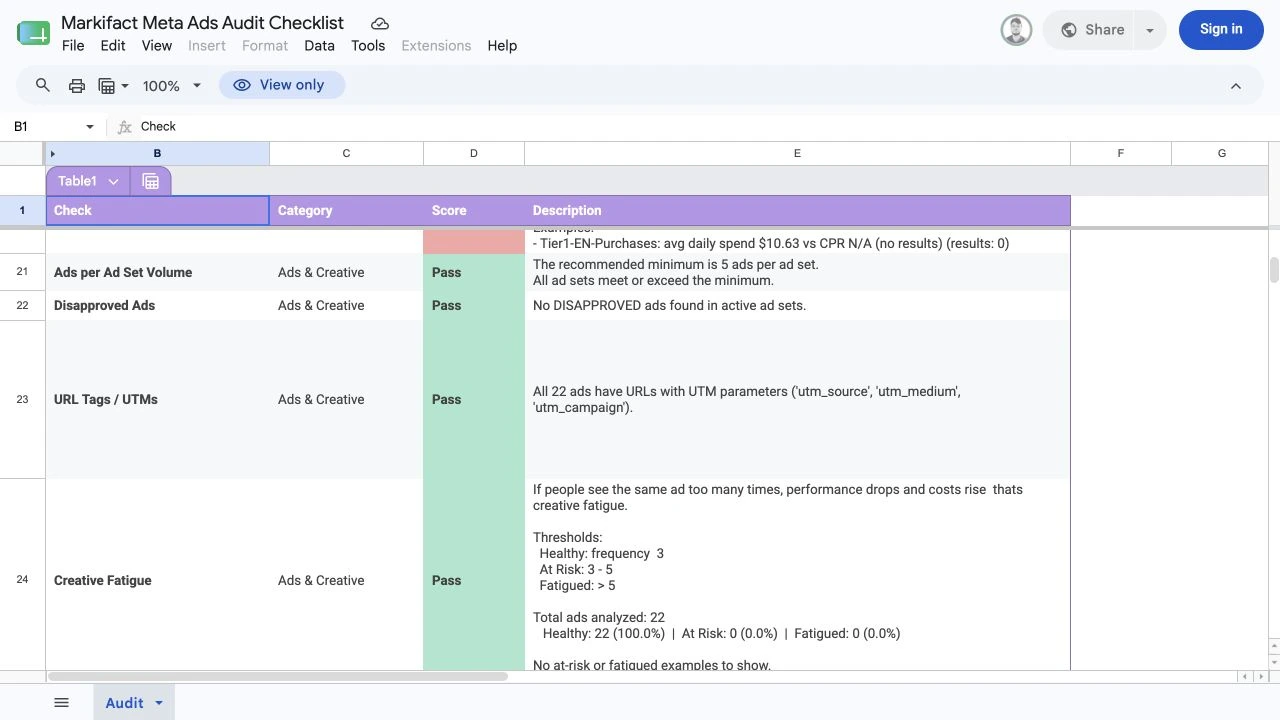
Ads per ad set
Review whether each active ad set has enough eligible ads to support the intended test. The correct number depends on spend, audience size, format, offer, production capacity, and experiment design.
Do not add low-quality variations simply to hit a count.
Disapproved ads
Separate rejected ads from ads that are in review, processing, scheduled, paused, completed, or affected by an upstream campaign status. Each state requires a different action.
For rejected ads, record:
- Ad ID and name
- Rejection reason
- Creative and destination involved
- Account owner
- Appeal or replacement decision
- Revenue or launch impact
URL tags and UTMs
Confirm that landing-page URLs use the approved tracking convention and do not expose personal or sensitive information. Test final URLs after redirects and compare the parameters with analytics and reporting requirements.
Missing UTMs can weaken cross-platform reporting. Incorrect UTMs can be worse because they create confident but misleading channel labels.
Creative fatigue
Frequency, cost movement, click behavior, conversion rate, audience size, and time in market should be reviewed together. A single universal frequency threshold cannot describe every campaign.
Flag creative for review when the evidence shows deterioration, then compare it with audience saturation, placement mix, offer changes, landing-page performance, and seasonality. Preserve a control creative when testing replacements.
Step 7: prioritize findings without changing the account
Sort findings by impact, evidence, confidence, and ownership:
| Priority | Definition | Examples |
|---|---|---|
| P0 | Active severe data, privacy, or delivery risk | Wrong Pixel, prohibited data, widespread broken destination |
| P1 | Material performance or measurement issue | Missing purchase events, major budget misallocation, critical rejected ads |
| P2 | Structural, targeting, or optimization limitation | Fragmented ad sets, unclear exclusions, inconsistent UTMs |
| P3 | Governance or documentation opportunity | Naming cleanup, ownership, non-critical organization |
Use this remediation ticket:
Meta Ads audit finding

Check:
Category:
Current score:
Entity names and IDs:
Observed evidence:
Business impact:
Confidence:
Manual validation:
Proposed change:
Owner:
Privacy review:
Budget impact:
Approver:
Rollback plan:
Verification date:
Post-change result:
The checklist is read-only evidence for the review. Any change to campaigns, ad sets, ads, audiences, budgets, tracking, or account settings should be proposed and approved separately.
Optional prompt for summarizing the exported checklist
Use this only with a redacted copy that contains no customer data, tokens, personal information, or confidential commercial details:
Review this exported Facebook Ads audit checklist.

Rules:
- Treat every row as evidence to validate, not permission to change Meta Ads.
- Separate Pass, Fail, and Evaluate results.
- Do not invent missing account context.
- Do not recommend budget changes without stating the current evidence and approval required.
- Do not expose identifiers or sensitive values.

Return:
1. Three highest-confidence findings
2. Evidence missing for each finding
3. P0 to P3 priority
4. Manual validation required
5. Proposed owner and approver
6. Safe next step
7. Rerun criteria
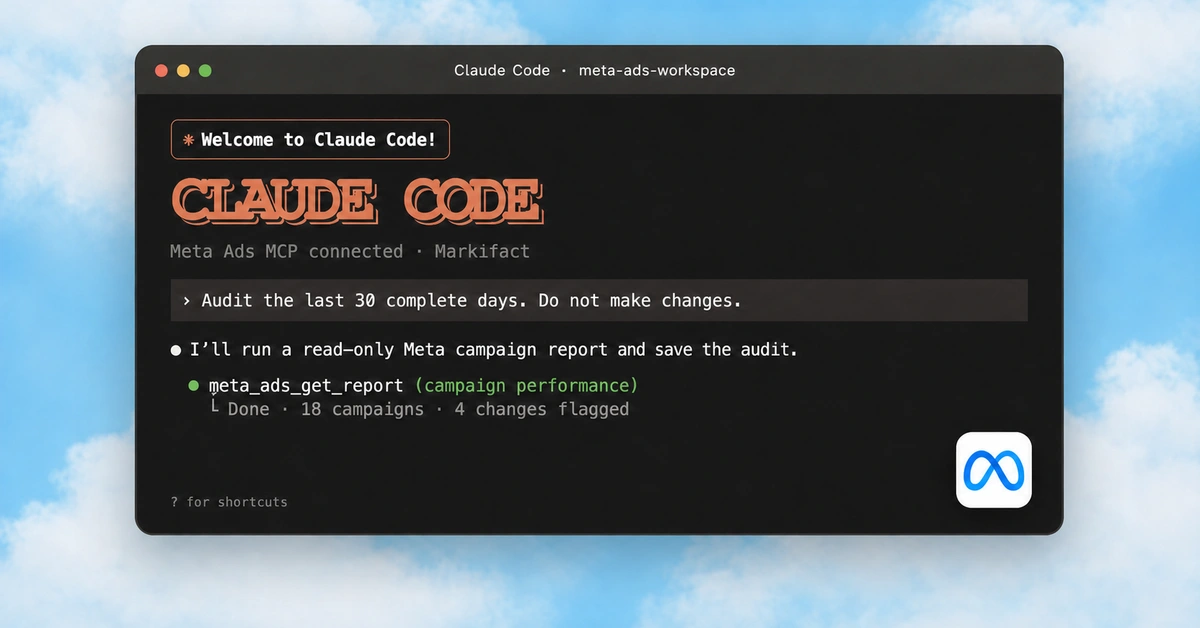
For live account analysis through a connected assistant, first follow the Meta Ads to Claude setup guide. Keep every write behind explicit approval.
Step 8: approve, fix, and rerun
Use this sequence:
- Review the generated result.
- Validate it against the business scope and source evidence.
- Reproduce the issue where possible.
- Define the proposed change and rollback plan.
- Obtain technical, privacy, budget, or campaign approval as required.
- Implement through the correct owner.
- Wait for an appropriate evidence window.
- Run the same checklist again.
- Record the new score and remaining limitations.
Keep the original sheet. The before-and-after record helps an agency explain what changed and prevents teams from closing a finding without verification.
Markifact's Meta Ads MCP can support deeper read-only reporting and approval-gated account work. The Meta Ads MCP comparison explains how the available approaches differ.
Ready to run the audit? Open the Meta Ads Audit Checklist template, copy the supplied English sheet, select the correct account and Pixel, and generate the review-ready output.
Frequently asked questions
What is a Facebook Ads audit?
A Facebook Ads audit is a structured review of account tracking, campaign structure, objectives, targeting, budgets, delivery, ads, destinations, and creative health. It should produce traceable findings and an approved remediation plan.
What should a Facebook Ads audit checklist include?
It should include campaign naming, objective alignment, ad-set structure, Pixel activity, Conversions API, attribution, audience controls, placements, budgets, bidding, learning status, ad approvals, UTMs, and creative fatigue.
Is Meta Ads the same as Facebook Ads?
Meta Ads is the current platform name covering advertising across eligible Meta technologies, including Facebook and Instagram. Many practitioners still search for Facebook Ads audit checklists, so this guide uses both terms naturally.
Does a failed checklist result mean the account is broken?
No. A failed result is a review signal. The correct decision depends on the business model, strategy, selected dates, account scale, market, privacy requirements, and the evidence behind the rule.
Can the template change my Meta Ads account?
The workflow described here retrieves audit evidence and writes results to Google Sheets. Treat every campaign, budget, targeting, tracking, or creative change as a separate action requiring an owner, approval, and verification.
How often should you audit a Facebook Ads account?
Run a full audit when onboarding an account, after major tracking or strategy changes, before scaling, or when performance changes materially. A quarterly review plus focused checks after important releases is a practical starting cadence for a stable account.
Is there a Facebook Ads audit template?
Yes. Markifact provides a reusable Meta Ads Audit Checklist workflow with an English Google Sheets output that can be copied and rerun for selected ad accounts and Pixels.