To connect Google Merchant Center to Claude, connect Google Merchant Center in Markifact, install the approved Markifact connector, and sign in to your workspace. The result is a full-management connection for reports, product diagnostics, data sources, ProductInput creation and updates, local and regional inventory, promotions, and controlled catalog changes. This guide starts with a read-only check, then shows how to prepare writes without confusing Markifact approval with Google's later processing and policy review.
The quick version
- In Markifact, open Connections and connect Google Merchant Center with your authorized account.
- Open the approved Markifact connector in Claude and click Connect.
- Sign in to the same Markifact workspace and review the connection access.
- Enable Markifact in the Claude conversation.
- Ask Claude to confirm the exact account or property, then run a read-only report before requesting changes.
That sequence separates access from action. A successful connector test proves that Claude can reach the selected account; it does not authorize an unspecified catalog change.
What Claude can manage in Merchant Center
The Google Merchant Center MCP exposes 37 current registry-backed operations through Markifact. It is not limited to product-performance reporting.
The operations below are examples from a broader catalog, not an exhaustive list.
| Area | Example operations | Control |
|---|---|---|
| Accounts and reports | gmc_select_accounts, gmc_list_report_fields, gmc_get_report |
Read-only |
| Catalog diagnostics | gmc_list_products, gmc_get_product, gmc_get_product_status, gmc_list_account_issues, gmc_list_aggregate_product_statuses |
Read-only |
| Market intelligence | gmc_get_best_selling_products, gmc_get_price_benchmarks, gmc_get_price_suggestions, gmc_get_competitive_visibility_competitors |
Read-only |
| Data sources | gmc_list_data_sources, gmc_get_data_source, gmc_create_data_source, gmc_update_data_source, gmc_fetch_data_source |
Reads are read-only; writes require approval |
| Products | gmc_insert_product_input, gmc_update_product_input, gmc_delete_product_input |
Approval required |
| Promotions | gmc_list_promotions, gmc_get_promotion, gmc_insert_promotion |
Reads are read-only; insert or replace requires approval |
| Local inventory | gmc_list_local_inventories, gmc_insert_local_inventory, gmc_delete_local_inventory |
Reads are read-only; writes require approval |
| Regional inventory | gmc_list_regions, gmc_list_regional_inventories, gmc_create_region, gmc_insert_regional_inventory |
Reads are read-only; writes require approval |
Markifact shows the exact merchant account, resource, data source, product identifier, fields, and values before it sends an external write. The connected Google user still needs the appropriate Merchant Center role.
Google's official Merchant API MCP and the Markifact route
Google now provides an official Merchant API MCP Access Service. It is an experimental alpha with authorized Merchant Center data, reporting, product diagnostics, data-source tools, and a deliberate focus on read-only and low-risk writes.
That official route is a sensible choice when its current toolset fits the job and your team is comfortable configuring a service account and local MCP process. Google recommends test or non-live accounts, restrictive credentials, and explicit tool filtering.
The Markifact route is different. It uses hosted OAuth and a broader full-management catalog for ProductInputs, promotions, inventory, regions, data sources, reports, and diagnostics. Writes remain approval-gated. This article uses Markifact because the goal is controlled catalog management from Claude, not only Merchant Center analysis.
Understand ProductInput before asking Claude to change a product
Google's current Merchant API separates submitted product data from the final catalog object:
- ProductInput is the data sent to a specific primary or supplemental data source. Create, patch, and delete operations act on ProductInputs.
- Product is Google's final processed, read-only representation after data-source rules, supplemental inputs, and processing are applied.
This distinction prevents a common mistake. A successful gmc_update_product_input response confirms that Google accepted the submitted input. It does not prove that the processed Product is already updated, approved, or eligible to show.
Product writes also require an API data source. Claude should list data sources first and use the exact source that owns the ProductInput. File, Autofeed, and UI sources are not interchangeable with an API source for product insert and patch operations.
What you need before connecting
You need:
- A Google user with access to the intended Merchant Center account
- A Markifact workspace
- A Merchant Center OAuth connection in that workspace
- Access to the Markifact directory connector in Claude
- An API data source before creating or patching ProductInputs
For Team and Enterprise Claude organizations, an owner may need to add the Markifact connector first. Members then authenticate their own Markifact access. Claude inherits the permissions of the connected services; it cannot expand a Google user's Merchant Center role.
1. Connect Google Merchant Center in Markifact
Open Connections in Markifact, find Google Merchant Center, and select Connect.

Complete the Google authorization, then:
- Confirm that the connection is active.
- Check the merchant accounts it can list.
- Save a clear connection name such as
Northstar Store - Merchant Center. - Confirm the user's Merchant Center role before attempting writes.
If several Google users have access to overlapping merchants, precise connection names make later approval cards easier to verify.
2. Check workspace access and optional server scope
The directory install is the default route. The settings below are useful if your workspace uses a dedicated MCP server to limit connection or tool access; creating a new server is not a prerequisite for every reader.
Open MCP in Markifact and create a server for Claude. A useful name is:
Claude - Merchant Center - Northstar
Select only the Merchant Center connection needed for this workflow. Agency workspaces should normally expose one client or tightly related merchant group per server rather than every saved Google connection.
The hosted endpoint is:
https://api.markifact.com/mcp
The endpoint is shared. Your Markifact authentication and MCP-server scope determine which connections and operations Claude can access.
3. Install Markifact from the Claude directory
Markifact is approved in Claude's connector directory. Open the Markifact listing and click Connect. Complete the Markifact sign-in, choose the intended workspace, and review the requested access. If prompted to choose an MCP server, select the one with the connections you want to use.
In a Claude conversation, open + > Connectors and enable Markifact. You do not need to add a custom connector or paste a server URL for this setup. If your organization manages connector access, an administrator may need to allow Markifact first.
4. Run a read-only product report first
Start with a prompt that names the merchant, complete dates, dimensions, and no-change boundary:
Use Markifact and the selected Google Merchant Center account.

Report product performance for the last 30 complete days. Include product ID,
title, impressions, clicks, CTR, conversions, and conversion value. Sort by
clicks, flag products with declining traffic, and do not make changes.
Claude can use gmc_get_report for product-performance metrics and dimensions. It can use gmc_list_report_fields first when the requested field names need confirmation.
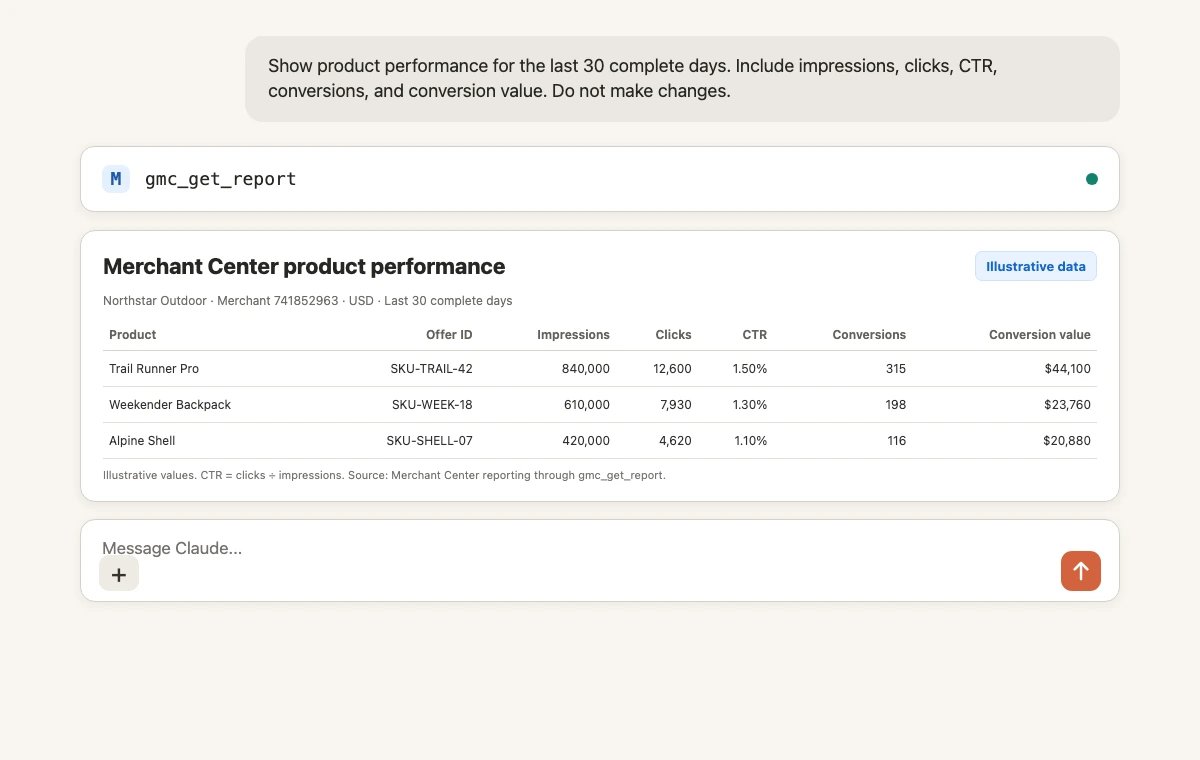
Before accepting the interpretation, verify:
- Merchant name and ID
- Feed label and content language
- Complete reporting dates
- Product IDs and titles
- Conversion and conversion-value definitions
Merchant Center performance can identify a weak product, but the cause may sit in product data, account configuration, site behavior, Shopping campaign settings, or policy review. Use the diagnostics operations before proposing a write.
5. Diagnose catalog and account issues
A practical diagnostic sequence is:
gmc_list_account_issuesfor account-wide setup, policy, or suspension problems.gmc_list_aggregate_product_statusesfor recurring issue types across the catalog.gmc_get_product_statusfor one specific offer and its destination status.gmc_get_productfor the final processed attributes and issues.gmc_list_data_sourcesto identify which source owns the submitted product data.
Use this prompt:
Inspect Merchant Center account health without changing anything.

List account issues and aggregate product issues. For the ten issue groups
affecting the most products, show severity, affected count, destination, and
the next field or source I should verify. Do not propose a bulk write yet.
Do not ask Claude to “fix every disapproval” in one step. A missing GTIN, price mismatch, landing-page problem, policy restriction, and expired product need different evidence and different owners.
6. Create a data source or product safely
Before inserting products, list the available data sources and confirm which are API sources. If none exists, gmc_create_data_source can prepare a primary or supplemental API data source for approval.
Then gmc_insert_product_input can insert or replace one ProductInput or up to 200 in the current bulk implementation. For larger catalogs, use a managed feed rather than turning a chat into a bulk catalog loader.
Example prompt:
Use Markifact to prepare one new Merchant Center ProductInput.

First list API data sources and choose the approved US English primary source.
Show the merchant ID, data-source ID, offerId, contentLanguage, feedLabel,
title, description, link, imageLink, availability, condition, GTIN, and price.
Wait for approval before gmc_insert_product_input. After submission, do not
claim the processed Product is approved. Retrieve it later with gmc_get_product.
Claude should use Google's current REST camelCase fields. It should never invent a GTIN, destination URL, currency, feed label, or data-source ID.
7. Patch price or availability with an update mask
For frequent product changes, gmc_update_product_input patches the ProductInput in its API data source. The update mask is important because a masked field omitted from the request body is deleted, while fields outside the mask remain unchanged.
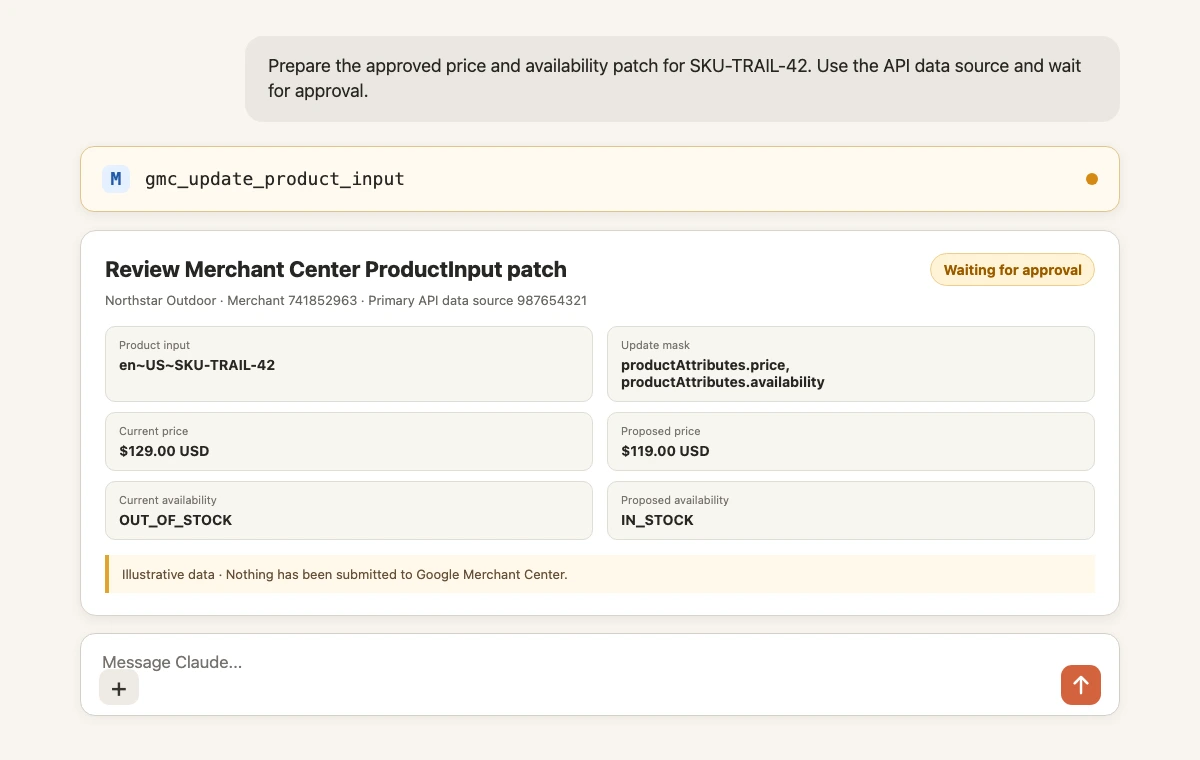
Review these fields before approving:
- Merchant account
- API data-source ID
- Product input ID, usually
contentLanguage~feedLabel~offerId - Exact update mask
- Current and proposed price
- Currency
- Current and proposed availability
- Whether the source system agrees with the proposed values
After approval, wait for processing and retrieve the final Product. Markifact approval authorizes the submitted API change; Google still applies its own processing, destination eligibility, and policy checks.
8. Manage promotions and store inventory
Full management extends beyond the base product feed:
gmc_insert_promotioninserts or replaces a promotion in a promotion API data source.gmc_insert_local_inventorysets store-level price, availability, and quantity.gmc_insert_regional_inventorysets regional price and availability overrides.gmc_create_regioncreates a region from postal codes or geotarget IDs and requires admin access.- Delete operations remove local or regional overrides so the base product data applies again.
Promotions still go through Google's policy and SKU review. Inventory identifiers must match the product and store or region used by Merchant Center. A syntactically valid operation is not enough when the underlying identifiers or business data are wrong.
Copy-paste prompts for Merchant Center management
Catalog health check
List account issues, aggregate product issues, and the final status of the
highest-click products. Group issues by cause, destination, and affected count.
Use complete data and do not make changes.
Price benchmark review
Retrieve price benchmarks and price suggestions for the selected Merchant
Center account. Join them to product performance by product ID. Show current
price, benchmark price, suggested price, clicks, conversions, and conversion
value. Do not update prices.
Create a supplemental source
List current data sources and confirm the primary source. Prepare a US English
supplemental API data source named "Merchandising overrides". Show the exact
Merchant API body and wait for approval before gmc_create_data_source.
Patch selected products
For the approved list of product input IDs, prepare price and availability
patches in the named API data source. Use explicit update masks and show old
and new values per SKU. Wait for approval before gmc_update_product_input.
Create a promotion
List promotion data sources and existing promotions. Prepare the approved
online promotion with promotion ID, title, country, language, redemption
channel, applicability, offer type, coupon value, code, and effective dates.
Wait for approval before gmc_insert_promotion.
Update local inventory
List local inventory for the approved products and store codes. Compare it with
the supplied stock file, show every difference, and prepare only the confirmed
price, quantity, and availability changes. Wait for approval before writing.
Keep diagnosis, submission, and verification separate
A reliable workflow has three checkpoints:
- Diagnose: retrieve reports, issues, products, sources, and inventory without changes.
- Submit: show the exact ProductInput, promotion, inventory, region, or data-source payload and approve that operation only.
- Verify: wait for processing, retrieve the final resource, and check destination status and issues.
This matters most for bulk updates. One approval should correspond to one understandable change set, not an open-ended instruction to “optimize the feed.”
Troubleshooting
Claude cannot see Markifact
Confirm that the Markifact connector is added, authenticated, and enabled in the current conversation. Start a new conversation after changing connector access.
Markifact is visible but Merchant Center is missing
Check that the Google Merchant Center connection is active in the same Markifact workspace and exposed by the selected MCP server.
The merchant account is missing
The authorized Google user may not have access to that account, or an advanced-account sub-account may need to be selected explicitly. Verify access in Merchant Center, then reconnect.
Reports work but product writes fail
Confirm the Merchant Center role, API data-source type, data-source ID, ProductInput identifier, field names, update mask, and product update limits.
The update succeeded but the product still looks unchanged
ProductInput processing is asynchronous. Wait several minutes, then use gmc_get_product for the final processed Product instead of treating the write response as the final catalog state.
The promotion was inserted but does not show
Google reviews promotions for policy and SKU eligibility. Confirm the promotion source, country, language, dates, code, product mapping, program eligibility, and review status.
Frequently asked questions
Can Claude connect to Google Merchant Center?
Yes. Connect Google Merchant Center in Markifact, install the approved Markifact connector in Claude, and sign in to the workspace containing your connection.
Can Claude update Google Merchant Center products?
Yes. Markifact exposes approval-gated ProductInput insert, patch, and delete operations for API data sources. Google processes the submitted input afterward.
Can Claude create Merchant Center promotions?
Yes. Claude can prepare gmc_insert_promotion through Markifact after listing the correct promotion data source. The promotion still undergoes Google's review.
Can Claude manage local and regional inventory?
Yes. Markifact can list, insert, and delete local or regional inventory and create regions where the connected user has the required access.
Is there an official Google Merchant Center MCP server?
Yes. Google's Merchant API MCP Access Service is an experimental alpha focused on authorized data, insights, read-only tools, and selected low-risk writes. Markifact provides a separate hosted full-management route with explicit approvals.
Can I connect Google Merchant Center to Claude Code?
Yes. Anthropic documents connectors across Claude and Claude Code. Use Claude Code's MCP configuration flow for the hosted Markifact endpoint, authenticate it, and retain the same account and write-approval boundaries described here.
Does an approved update go live immediately?
Not necessarily. Approval submits the exact operation to Merchant Center. Product inputs process asynchronously, and products or promotions can still be pending, limited, or disapproved by Google.
Do I need my own Google Cloud project or service-account key?
Not for the hosted Markifact connection. Markifact uses its managed OAuth route. Self-hosting Google's official MCP or another Merchant API integration has its own Google Cloud and credential requirements.
The same full-management catalog can also be used from ChatGPT and Codex. For the wider connector landscape, see the MCP directory and Claude connectors guide for marketers.