Yes, ChatGPT and Codex can post to Pinterest through the Markifact plugin and an authorized Pinterest Organic account. ChatGPT can prepare image, carousel, or video Pins in a conversation, while Codex can resolve an approved content brief and media manifest from a project. In both clients, every Pinterest write stays paused until you approve the exact account, board, media, text, and destination.
The quick setup
- Connect the Pinterest Organic account in Markifact.
- Open the Markifact listing in ChatGPT.
- Connect the Markifact workspace that contains the Pinterest authorization.
- Enable Markifact for the ChatGPT conversation or Codex task.
- List boards before preparing a new Pin.
- Review the media, order, title, description, link, alt text, and board.
- Approve the write only when every field is exact.
- Use read-only listing and reporting tools to verify the result.
The Pinterest MCP page is the current capability reference for organic publishing, board management, and reporting. Paid campaigns remain in the separate Pinterest Ads MCP.
What the Pinterest connection supports
| Workflow | Current support | Approval boundary |
|---|---|---|
| Image Pin | One reachable image URL | Approval required |
| Carousel Pin | 2 to 5 images in an explicit order | Approval required |
| Video Pin | Video plus optional cover image | Approval required |
| Board management | Create, update, or delete | Approval required |
| Pin management | Update metadata, move, save, or delete | Approval required |
| Pin and board inventory | IDs, media, text, privacy, counts | Read-only |
| Organic analytics | Account or per-Pin reports | Read-only |
| Native publish scheduling | No publish_at field |
Use a scheduled workflow |
These are examples from the current Pinterest Organic catalog. They are not Pinterest Ads campaign operations.
Understand the two authorization layers
There are two separate authorizations:
- Pinterest authorizes Markifact to access the selected organic account.
- You authorize ChatGPT or Codex to use the selected Markifact workspace.
Connecting the plugin does not expose every Pinterest profile you have ever managed. The available account comes from the Pinterest connection inside that workspace.
Give agency connections unambiguous names:
Pinterest Organic - Northstar Travel - Main
Keep the paid connection separate:
Pinterest Ads - Northstar Travel - CA
Connect Markifact in ChatGPT
Open the direct Markifact listing, choose Connect, complete authentication, and select the intended workspace.
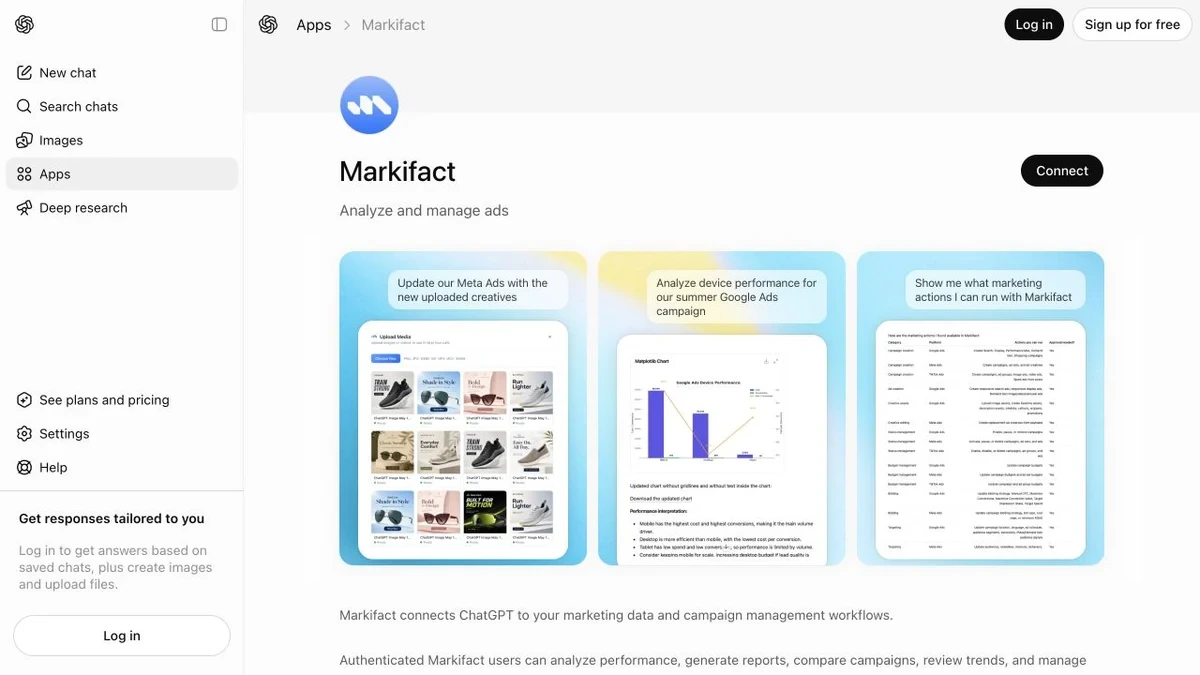
OpenAI's current Skills and Plugins documentation groups reusable capabilities and external integrations under plugins. Availability can depend on the plan, workspace controls, role, region, and enabled permissions.
Attach Markifact to a fresh conversation and run a read-only board check:
Use Markifact to list the Pinterest boards for the connected account.
Return board name, board ID, privacy, Pin count, and follower count.
Sort public boards by Pin count. Do not change anything.
The expected tool is pinterest_list_boards. Do this before drafting the write so ChatGPT resolves a real board rather than guessing from a name.
Publish the first image Pin from ChatGPT
First, draft and approve the creative without calling a publishing tool:
Draft five Pinterest titles and descriptions for a coastal weekend guide.
The audience is couples planning a two-day trip.
The Pin should earn saves and qualified clicks to the full itinerary.
Keep titles under 80 characters and descriptions under 500.
Do not call any Pinterest tool yet.
Once the copy is approved, prepare the write:
Use the connected Northstar Travel Pinterest account.
Run pinterest_list_boards and select Weekend Getaways.

Prepare an image Pin with:
Image: [PUBLIC COASTAL IMAGE URL]
Title: A Two-Day Coastal Escape
Description: Save this route for sea views, a quiet lunch stop, and one sunset walk that fits into a simple weekend itinerary.
Destination link: https://northstar.example/guides/two-day-coastal-escape
Alt text: Coastal road above a blue ocean with rocky cliffs and spring wildflowers.

Show the account, resolved board name and ID, image preview,
title, description, destination link, and alt text.
Wait for approval before pinterest_publish_pin.
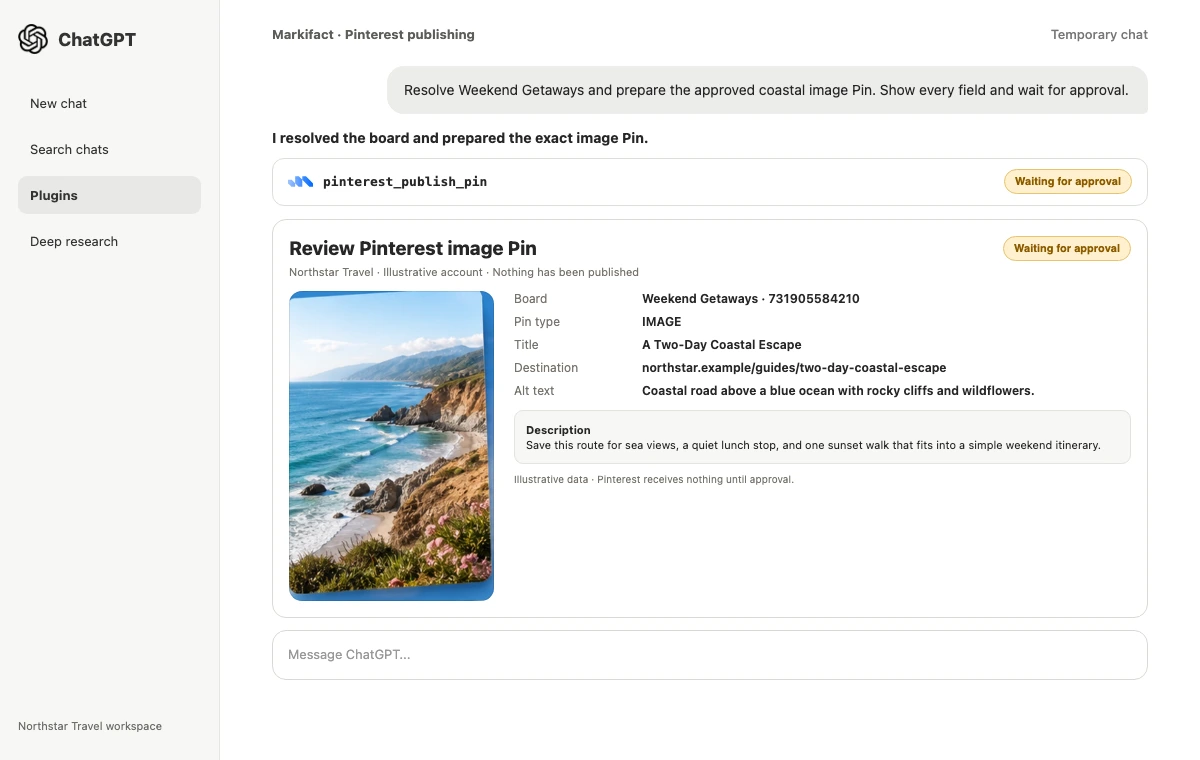
Review the destination carefully. A polished Pin that points to the wrong itinerary is still a bad publish. Pinterest's official Create Pin reference allows a title of up to 100 characters, a description of up to 800, and alt text of up to 500.
Use Markifact from Codex
Codex is useful when the copy brief, media list, destination map, and approval notes already live in a project. Enable the Markifact plugin for the task, then start with reads:
Use @Markifact to list the Pinterest boards and the 50 newest Pins.
Return board IDs, Pin titles, destination links, and available lifetime metrics.
Do not publish, update, move, save, or delete anything.
For a controlled write, point Codex to reviewed files:
Read content/pinterest/week-40-pin.md and media/pinterest/week-40.json.
Use @Markifact to resolve the approved Pinterest board.
Prepare the exact image Pin from those files.
Show the resolved image URL, title, description, destination link,
alt text, board name, and board ID.
Wait for approval before pinterest_publish_pin.
Editing a Markdown file in the project is not the same as publishing to Pinterest. Codex can revise local files within the task's permissions, but the external Pinterest write is a separate Markifact operation and still requires approval.
Publish a carousel without losing the sequence
Carousel mode supports 2 to 5 images. Put the sequence in a manifest instead of relying on alphabetical filenames.
{
  "board": "Weekend Getaways",
  "images": [
    "https://cdn.example/coast/01-route.webp",
    "https://cdn.example/coast/02-lunch.webp",
    "https://cdn.example/coast/03-trail.webp",
    "https://cdn.example/coast/04-sunset.webp"
  ],
  "title": "Four Stops for a Coastal Weekend",
  "link": "https://northstar.example/guides/two-day-coastal-escape"
}
Codex prompt:
Read media/pinterest/coastal-carousel.json.
Use @Markifact to prepare a Pinterest carousel with the images in the exact array order.
Do not sort filenames. Resolve Weekend Getaways to its board ID.
Show a numbered media preview and every text field. Wait for approval.
The first frame should carry the hook, while the final frame should close the idea or make the click useful. Inspect all 2 to 5 images before approving.
Publish a video Pin
Video mode accepts a reachable video plus an optional cover image. Markifact transfers the video and waits for Pinterest processing.
Use Markifact to prepare a video Pin for Weekend Getaways.
Video: [PUBLIC VIDEO URL]
Cover: [PUBLIC COVER IMAGE URL]
Title: The Coastal Route in 30 Seconds
Description: Preview the four stops, then open the full two-day itinerary for timing and map links.
Destination link: https://northstar.example/guides/two-day-coastal-escape

Confirm the video and cover are reachable. Show the complete payload
and wait for approval before publishing.
Pinterest documents the media upload and creation sequence in its official boards and Pins guide.
Create and maintain boards
Use a read-first pattern for board work:
List all Pinterest boards and check whether Weekend Getaways already exists.
If it exists, return its ID, privacy, Pin count, and description, then stop.
If it does not exist, prepare a PUBLIC board with that exact name and this description:
Practical two-day routes, stays, food stops, and scenic walks.
Wait for approval before pinterest_create_board.
The current catalog also includes pinterest_update_board and pinterest_delete_board. Board deletion removes the board and every Pin saved to it, so require the exact board ID and a fresh Pin count before approving that destructive action.
Update, move, save, or delete a Pin
After publishing, pinterest_update_pin can change title, description, alt text, destination link, board, or board section. It cannot replace the published image or video.
Use @Markifact to find the Pin titled A Two-Day Coastal Escape.
Prepare an update that moves it from Weekend Getaways to Coastal Routes.
Keep its media, title, description, link, and alt text unchanged.
Show the Pin ID and both board IDs. Wait for approval.
Use pinterest_save_pin for deliberate curation of an existing public Pin. Use pinterest_delete_pin only when removal is intended because the operation cannot be undone.
Schedule a Pinterest workflow
The current publish input has no publish_at field. To publish later, schedule a Markifact workflow with an exact date, time, and timezone.
Schedule a Markifact workflow for October 2, 2026 at 8:00 PM Asia/Dubai.
At execution, read content/pinterest/week-40-pin.md,
resolve the Weekend Getaways board again, and prepare that exact Pin.
Do not rewrite the copy or change the media.
Keep pinterest_publish_pin approval-gated.
This is workflow scheduling, not a native Pinterest scheduling value inside the tool. Test it with a low-risk Pin before using it for a launch.
Review organic performance in Codex
Use pinterest_list_pins with metrics for a larger content inventory, or pinterest_get_report for a defined account-level or per-Pin window.
Use @Markifact to report on the last 30 complete days of Pinterest Organic data.
Rank image Pins by outbound clicks and include impressions, saves,
Pin clicks, outbound clicks, and engagement.
Compare the coastal Pin with the account median and the top quartile.
Save a concise Markdown review to reports/pinterest/week-40.md.
Do not change anything on Pinterest.
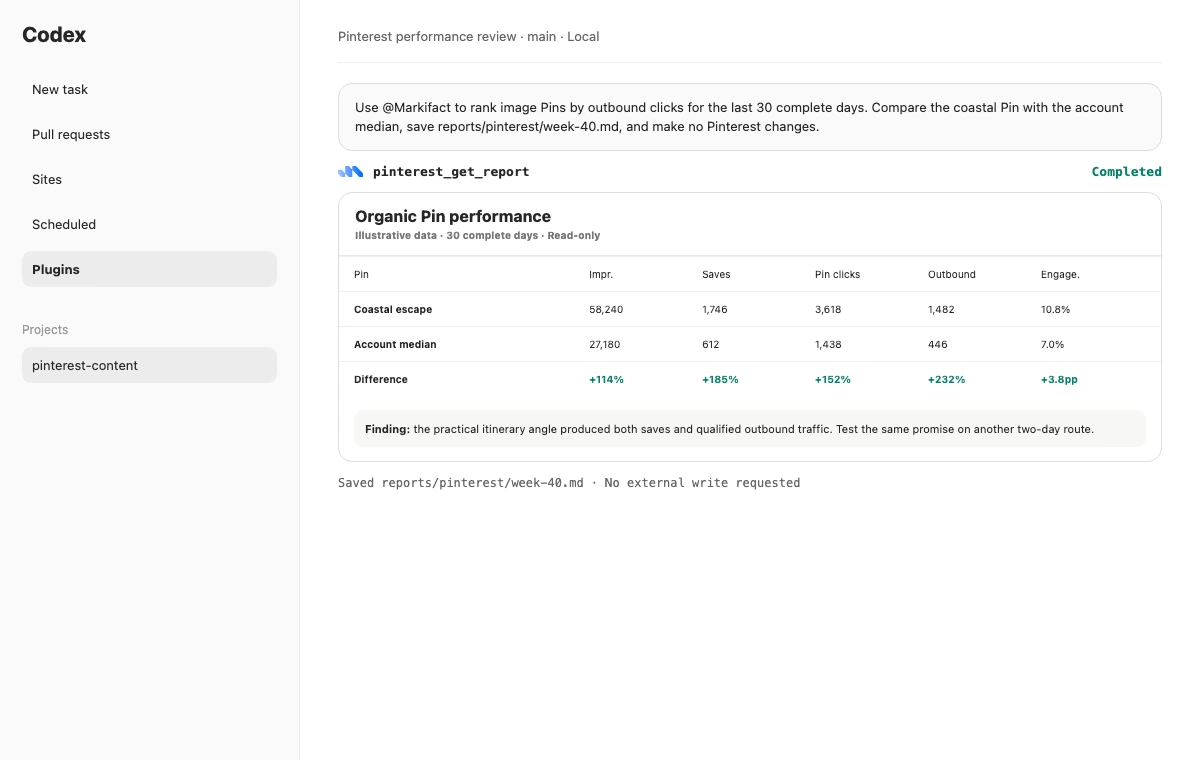
Pinterest's official organic reporting guide separates account summaries, top-Pin analytics, detailed Pin analytics, and metrics returned alongside Pin metadata. Some analytics require a business account.
What ChatGPT and Codex cannot bypass
- Pinterest still controls final media, permission, and policy validation
- Every new Pin needs a valid board
- Carousels are limited to 2 to 5 images in the current operation
- The publish tool has no native
publish_atfield - Published media cannot be swapped through the update tool
- Organic Pinterest and Pinterest Ads remain separate connections
- Local project edits do not authorize an external platform write
FAQ
Can ChatGPT post directly to Pinterest?
Yes. With the Markifact plugin and an authorized Pinterest Organic account, ChatGPT can prepare and publish image, carousel, or video Pins. The write waits for explicit approval.
Can Codex publish Pinterest Pins from project files?
Yes. Codex can read an approved brief and media manifest, resolve the board through Markifact, and prepare the exact Pin. The external write still requires approval.
Can ChatGPT create Pinterest boards?
Yes. It can list boards and prepare board creation, updates, or deletion through Markifact. Every mutation is approval-gated.
Can ChatGPT schedule Pinterest posts?
ChatGPT can schedule a Markifact workflow for a future date, time, and timezone. The Pinterest publish operation itself has no native publish_at field.
Can ChatGPT edit an existing Pin?
Yes, for the title, description, alt text, destination link, board, or board section. It cannot replace the published media through the current update operation.
Can ChatGPT analyze Pinterest performance?
Yes. Read-only tools can list Pins with available metrics and report on organic account or per-Pin performance. Some analytics require a Pinterest business account.
Is Pinterest Organic the same as Pinterest Ads?
No. Organic tools manage Pins and boards. Pinterest Ads MCP manages paid campaigns, ad groups, targeting, budgets, and promoted Pins through a separate connection.
Run a controlled first workflow
Connect the intended account, list the boards, and publish one reviewed image Pin with a real destination and useful alt text. Verify it on Pinterest, then use a read-only operation to confirm the ID, board, and link. That creates a trustworthy base before you add carousel manifests, video processing, scheduled workflows, or multi-board management.
For the Claude version of this workflow, read How to Post to Pinterest with Claude. For a similar organic content pattern on another platform, see How to Post to Instagram with ChatGPT & Codex.