
AI Brand Mention Tracker (AEO / GEO)
Automatically track whether ChatGPT, Claude, Gemini, and Google AI experiences mention your brand (and include your link) for any keyword prompt, then log results to Google Sheets over time.
Built with
 Google Search
 AI
AI Code
Code Google Sheets
 Scheduler
Search isn’t just “10 blue links” anymore. A big chunk of discovery is moving to AI answers: people type a question, the model replies with a shortlist of tools, and that shortlist quietly becomes the market map.
If someone asks “best reporting tools” or “best marketing automation platform” and your product doesn’t appear, you won’t even get considered. And the annoying part is that you can’t easily tell if you’re showing up unless you manually test dozens of prompts across multiple models, then repeat it every week because answers change all the time.
AI Brand Mention Tracker (AEO / GEO) solves that. It runs your keyword prompts on a schedule, checks multiple AI models, and logs the results to Google Sheets so you can track visibility over time — the same way you’d track rankings in Google Search Console, but for AI answers.
What the template actually does
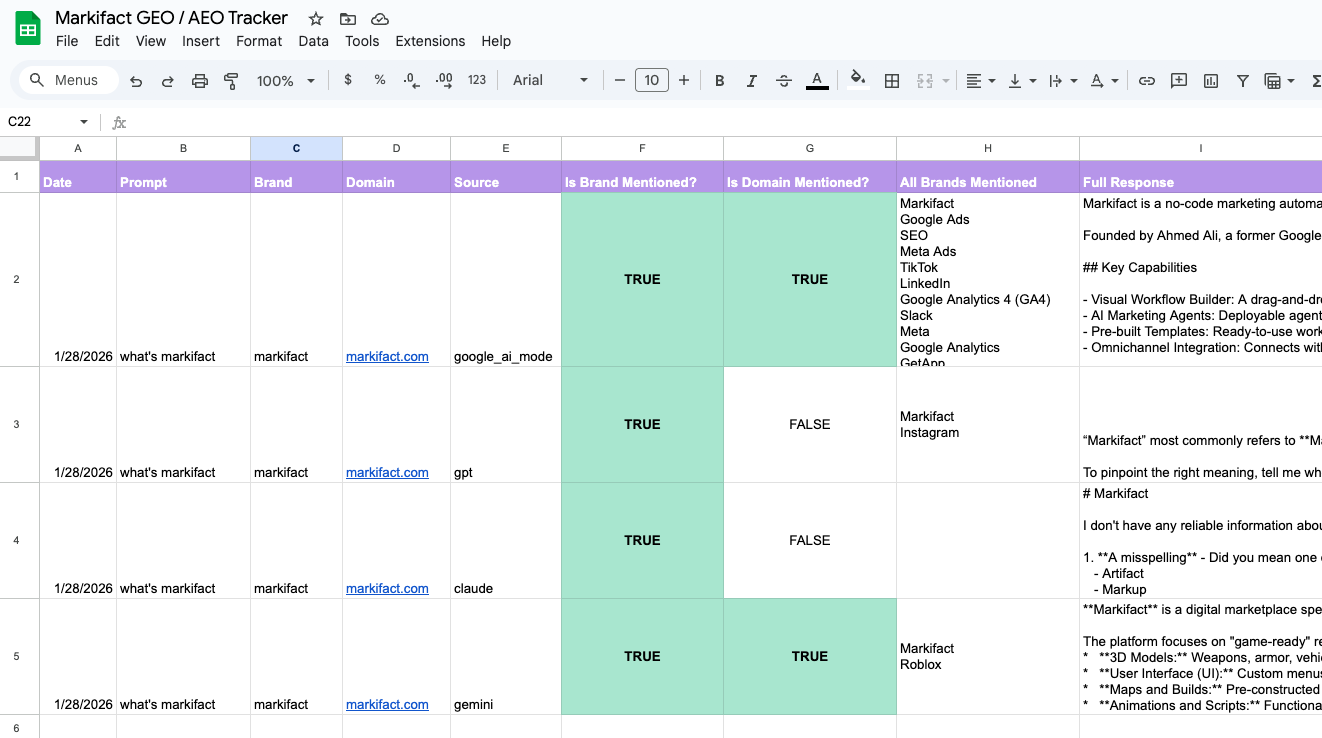
You add a list of prompts (keywords) in a Google Sheet. These should be things your customers would realistically ask AI in your category. For each prompt, you also enter the brand you want to track and the domain you want to detect, because a mention plus an official domain is often the strongest “citation” signal.
When you run the workflow, it will:
- read each prompt from the sheet
- query your selected AI model(s)
- capture the raw response
- detect whether your brand name appears in the response (including simple variations like spacing/case)
- detect whether your domain/link appears in the response
- append a clean result row back into Google Sheets
The output becomes your baseline: which prompts you appear for, which models mention you, and whether you’re getting linked.
Why this matters for AEO and GEO
AEO (Answer Engine Optimization) and GEO (Generative Engine Optimization) are basically the same idea: instead of ranking as a web page, you’re trying to become the brand the “answer engine” recommends.
This tracker gives you a way to measure that without guessing:
- Are we being mentioned for the prompts we care about?
- Are we being recommended consistently, or only sometimes?
- Do we get an actual domain mention, or only a name-drop?
- Which prompts are “wins” vs “blind spots” we need content for?
What you’ll see in the Results tab
Each run logs one row per prompt × model, typically including:
- prompt / keyword
- model name
- brand mentioned (yes/no)
- domain/link present (yes/no)
- timestamp
- response text (optional, but useful for verification and debugging)
Once you have a week or two of runs, you can start charting simple metrics like “% of prompts where we’re mentioned” or “link rate,” and you’ll quickly spot patterns — certain categories where you show up, and certain query types where competitors dominate.
Common ways people use this
- Track AI visibility weekly the same way you track SEO rankings.
- Compare competitors by adding multiple brands per prompt and watching share-of-voice.
- Validate content launches: publish a page or a comparison post, then see if mentions improve over the next weeks.
- Catch model shifts: AI answers change frequently; this helps you detect drops before you notice it in pipeline.
- Build an agency deliverable: an “AI Visibility Audit” report is basically this data + insights.
Prompts that usually work best (high-intent patterns)
If you want signal (brand/tool lists), these are the patterns that most often trigger recommendations:
- “best [category] tools”
- “top [category] software”
- “[category] reporting tools”
- “[brand] alternatives”
- “[brand] vs [competitor]”
- “what tool should I use for [task]”
- “how to [task] + recommended tools”
- “checklist for [task]” / “template for [task]”
Start with 10–30 prompts, verify the output quality, then scale up once you’re confident the tracker is giving you stable, comparable results.
Who this template is for
SaaS founders, SEO/growth teams, and agencies who want a simple, repeatable way to answer: “Do AI answers recommend us?” — and to track that as a real metric over time, not a one-off anecdote.
Related Templates
Discover more marketing workflow templates to automate your tasks



Google & Meta Ads Consolidated Monthly Slides
Generate consolidated Google & Meta Ads performance reports in Google Slides with AI-enhanced insights and visualizations.
Meta Ads Bulk Uploader via Google Sheets
Create dozens of Meta ads in minutes by uploading your entire campaign structure from a single Google Sheet, eliminating tedious manual ad creation.
Google Ads Audit Checklist
Say goodbye to manual Google Ads audits. Run a full account check in minutes with over 40 automated checks.


Monthly SEO Performance Slides
Generate comprehensive monthly SEO reports in Google Slides using data from Google Search Console and Google Analytics with AI insights.


Competitor Ads Spy
Export competitor ads from Google, Meta, LinkedIn, and TikTok into Google Sheets for instant analysis and research.
Meta Ads Audit Checklist
Say goodbye to manual Meta Ads audits. Run a full account check in minutes with over 100 data points
Cross-Channel Monthly PPC Report
Automatically generate a cross-channel monthly PPC report in Google Slides using Google Ads, Meta Ads, and TikTok Ads data, complete with blended KPIs, charts, and AI-written insights in minutes.

GMC Price Benchmarks Labelizer
Turn Google Merchant Center’s price benchmarks into daily custom labels you can use in Google Ads to scale campaigns by competitiveness.

Google Ads Offline Conversion Uploader
Bulk upload offline conversions to Google Ads from Google Sheets. Import CRM sales and leads matched by click ID, email, or phone, hashed automatically and pushed through Google's new Data Manager API with Markifact.


10,000+ marketers scaling with AI.
Can't find what you're looking for?
Describe your marketing automation needs and let our AI build a custom workflow for you.
Ready to automate your marketing?
Sign up now and let Markifact handle the busy work so you can focus on growth.