You can automate Google Ads budget pacing in Claude by using Markifact to pull daily spend, compare it with a period target, project the run rate, flag accounts that need attention, and prepare budget changes for approval. This replaces the repetitive parts of a pacing spreadsheet without handing control of the account to an unsupervised agent. The workflow below starts with Google Ads, then extends the same model to Meta Ads and multiple client accounts.
What Google Ads budget pacing actually measures
Budget pacing compares actual spend with the amount you planned to spend by this point in a month, quarter, promotion, or other fixed period. It answers three practical questions:
- Are we ahead of or behind the plan today?
- Where will we finish if the current run rate continues?
- What average daily spend is required for the rest of the period?
Pacing is not the same as performance. A campaign can be behind plan and have a poor CPA, which is a reason to investigate rather than spend faster. Another campaign can be ahead of plan with excellent marginal ROAS, which may justify changing the plan instead of cutting the budget.
It is also important to separate the business target from the budget setting inside Google Ads. A monthly target such as $31,000 is your pacing input. Most Google Ads campaigns use an average daily budget, while some use a campaign total budget for a defined period.
As of July 20, 2026, Google says most campaigns can spend up to twice their average daily budget on a given day, while the monthly spending limit is 30.4 times that average daily budget. Daily variation is normal. Google's spending-limit documentation explains the exceptions and the separate behavior for campaign total budgets.
The exact budget pacing formulas
Use complete days in the advertising account's timezone. If it is 10:00 AM on July 16, calculate through July 15 unless you explicitly want an intraday view.
Define these inputs:
| Input | Meaning |
|---|---|
B |
Budget target for the full pacing period |
D |
Total number of days in the period |
E |
Complete days elapsed in the account timezone |
S |
Spend through the last complete day |
Then calculate:
| Metric | Formula |
|---|---|
| Planned spend to date | B × E ÷ D |
| Variance in currency | S - planned spend to date |
| Variance percentage | (S ÷ planned spend to date - 1) × 100 |
| Simple end-of-period projection | S ÷ E × D |
| Remaining budget | max(B - S, 0) |
| Required average daily spend | remaining budget ÷ (D - E) |
The simple projection is a run rate, not a forecast. It assumes the future looks like the average day so far. If weekends, promotions, product launches, seasonality, or known demand changes make a straight line unrealistic, use a weighted plan:
planned spend to date =
period budget × cumulative elapsed weights ÷ total period weights
For example, an ecommerce brand can give Black Friday and Cyber Monday more weight than ordinary November days. The arithmetic stays transparent, but the plan now reflects how the business expects demand to arrive.
A worked Google Ads pacing example
Assume the July target is $31,000, the account has completed 15 of 31 days, and Google Ads has spent $14,200 through the end of day 15.
- Planned spend through day 15:
$31,000 × 15 ÷ 31 = $15,000 - Variance:
$14,200 - $15,000 = -$800 - Variance percentage:
$14,200 ÷ $15,000 - 1 = -5.3% - Run-rate projection:
$14,200 ÷ 15 × 31 = $29,346.67 - Remaining budget:
$31,000 - $14,200 = $16,800 - Required average daily spend:
$16,800 ÷ 16 = $1,050
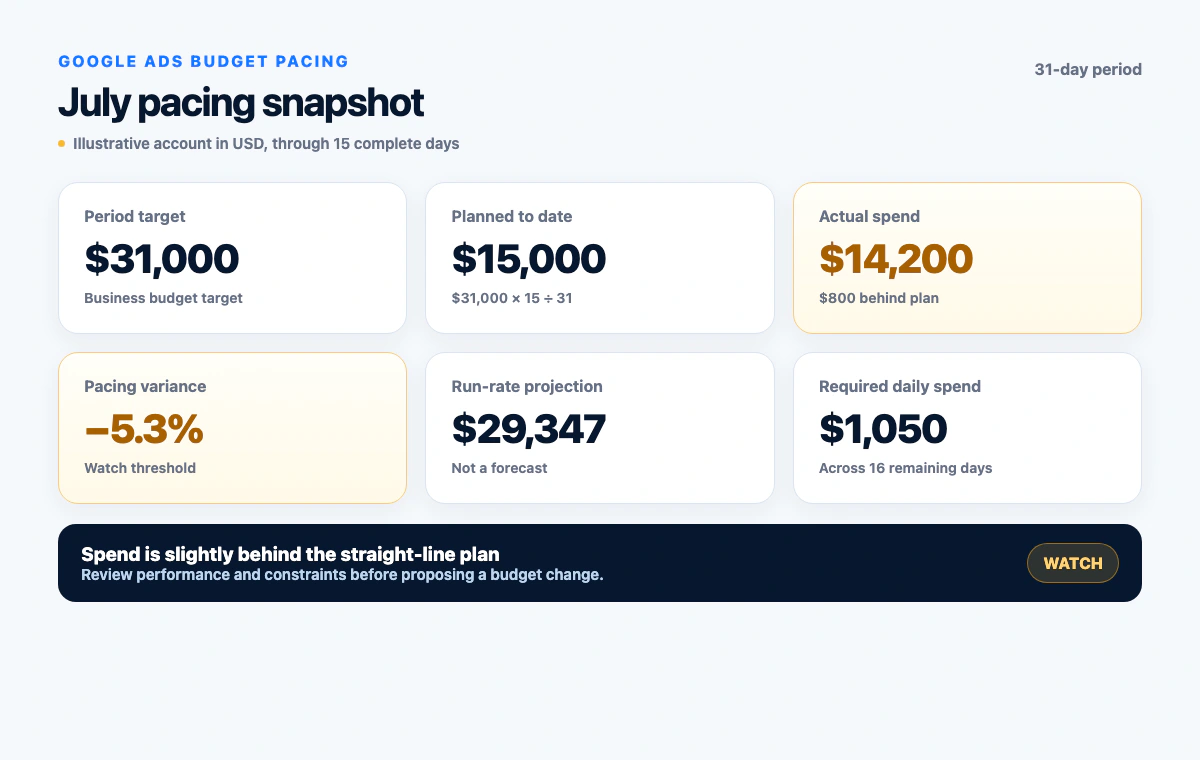
This account is 5.3% behind the straight-line plan. That is a useful alert, but not enough evidence to increase a campaign budget. First check performance, available demand, campaign status, conversion lag, and any account-level spending limit.
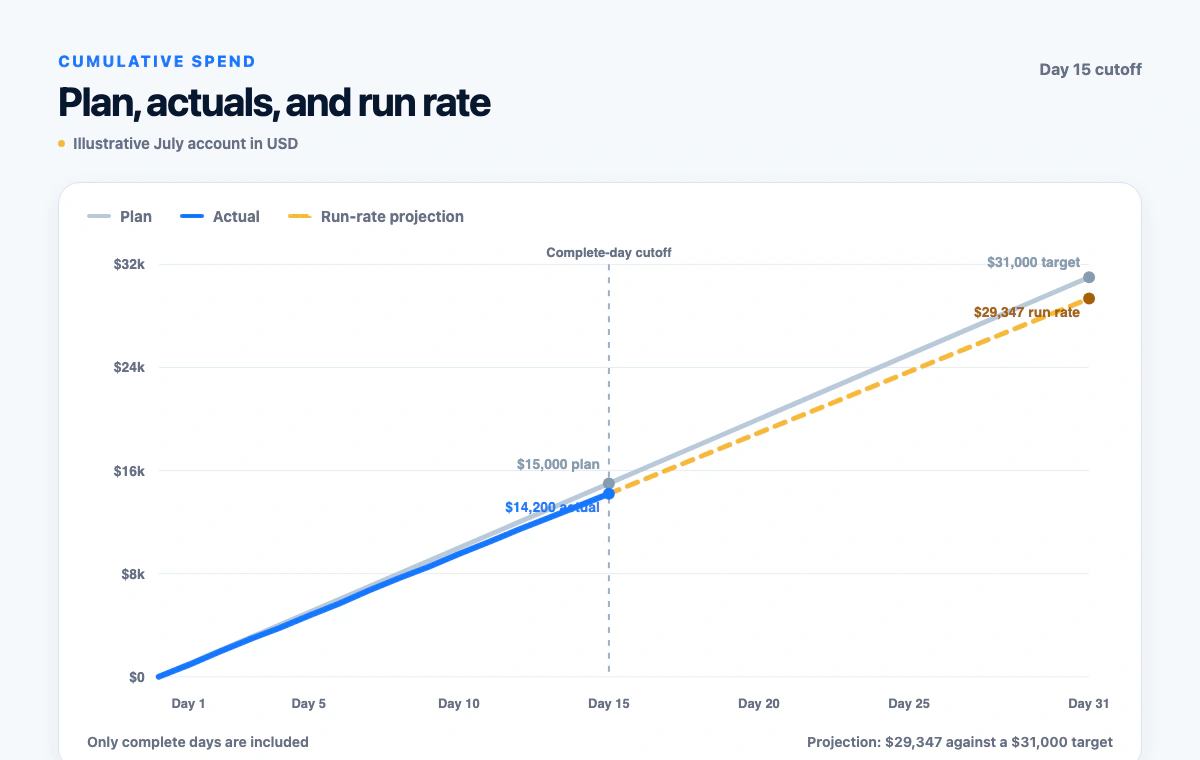
The cumulative view makes the same point visually. Actual spend is below the straight-line plan through day 15, and the current run rate finishes about $1,653 below the target.
Connect Google Ads to Claude with Markifact
To run this workflow, connect Google Ads through the Markifact Google Ads MCP and make Markifact available as a connector in Claude. Markifact exposes Google Ads reporting and write operations through one approval-controlled connection. If you have not configured it yet, follow the Google Ads MCP and Claude setup guide.
For normal pacing reports, gads_get_report is one relevant read operation. It can return daily cost and performance metrics for one or multiple selected Google Ads accounts. This operation name is an example, not an exhaustive list of Markifact's Google Ads capabilities.
Before running the report, have these inputs ready:
- Google Ads customer name and customer ID
- Account currency and timezone
- Pacing period start and end dates
- Business budget target for that period
- Whether the plan is straight-line or weighted
- Primary conversion definition and target CPA or ROAS
- Any intentionally paused days, launch dates, or promotions
Do not let Claude guess the target from current campaign settings. The target is a business decision, while platform budgets describe how campaigns are allowed to deliver.
Copy-paste prompt for an automated Google Ads pacing report
Use this prompt for one account:
Use Markifact to build a Google Ads budget pacing report.

Account: [customer name and ID]
Period: [start date] through [end date]
Period budget target: [amount and currency]
Pacing model: straight-line

First confirm the customer ID, currency, account timezone, period dates,
number of complete days, and the last complete date. Do not include the
current incomplete day.

Use gads_get_report to pull daily cost through the last complete day.
Also include campaign name, campaign ID, cost, primary conversions,
conversion value, CPA, and ROAS for the same period where available.

Calculate planned spend to date, actual spend, currency variance,
percentage variance, simple end-of-period run rate, remaining budget,
and required average daily spend for the remaining days.

Return one account summary followed by a campaign table. Separate the
pacing facts from performance interpretation. Flag missing or delayed
data instead of estimating it. Do not change any budgets.
Claude should show the formula behind every number. If the totals do not reconcile with the daily rows, stop and investigate the date range, timezone, filters, currency, or data freshness before using the output.
Add Google Ads budget pacing alerts
Alerts are most useful when they are boring and consistent. Start with simple triage bands:
- On pace: within 5% of the plan
- Watch: 5% to 10% ahead of or behind the plan
- Action review: more than 10% away from the plan
These are editorial defaults, not rules from Google. A high-spend account may need tighter thresholds, while a small or volatile account may need wider bands. You can also add a currency threshold so a 12% variance on a tiny campaign does not outrank a 4% variance worth tens of thousands of dollars.
Ask Claude to combine pacing and performance signals:
Apply these pacing alert rules to the completed-day report:

On pace: absolute variance below 5%
Watch: absolute variance from 5% through 10%
Action review: absolute variance above 10%

Within each status, rank accounts and campaigns by absolute currency
variance. Add CPA, ROAS, conversion count, remaining budget, and required
daily spend as context. Do not describe an increase or decrease as safe
unless the performance evidence supports it.
Google also provides budget pacing insights with statuses such as on track, budget remaining, and limited by budget. Those platform signals can strengthen an investigation, but they do not replace the business pacing plan. A campaign marked limited by budget may still have unattractive marginal economics.
Prepare a budget correction without automatic execution
If the account is behind plan and performance supports additional spend, Claude can prepare a focused change through Markifact. gads_update_campaign_budget is one example. It accepts a readable amount in the account currency, not micros, and every write requires approval.
Use this review prompt:
Prepare one Google Ads budget change for review based on the pacing report.
Do not execute it.

Show the account name and customer ID, campaign name and campaign ID,
current average daily budget, proposed average daily budget, currency,
pacing evidence, CPA or ROAS evidence, expected period impact, and
rollback value.

Confirm whether an account-level spending limit, shared budget, campaign
total budget, conversion lag, or limited eligible demand affects the
proposal. Then prepare gads_update_campaign_budget and wait for approval.
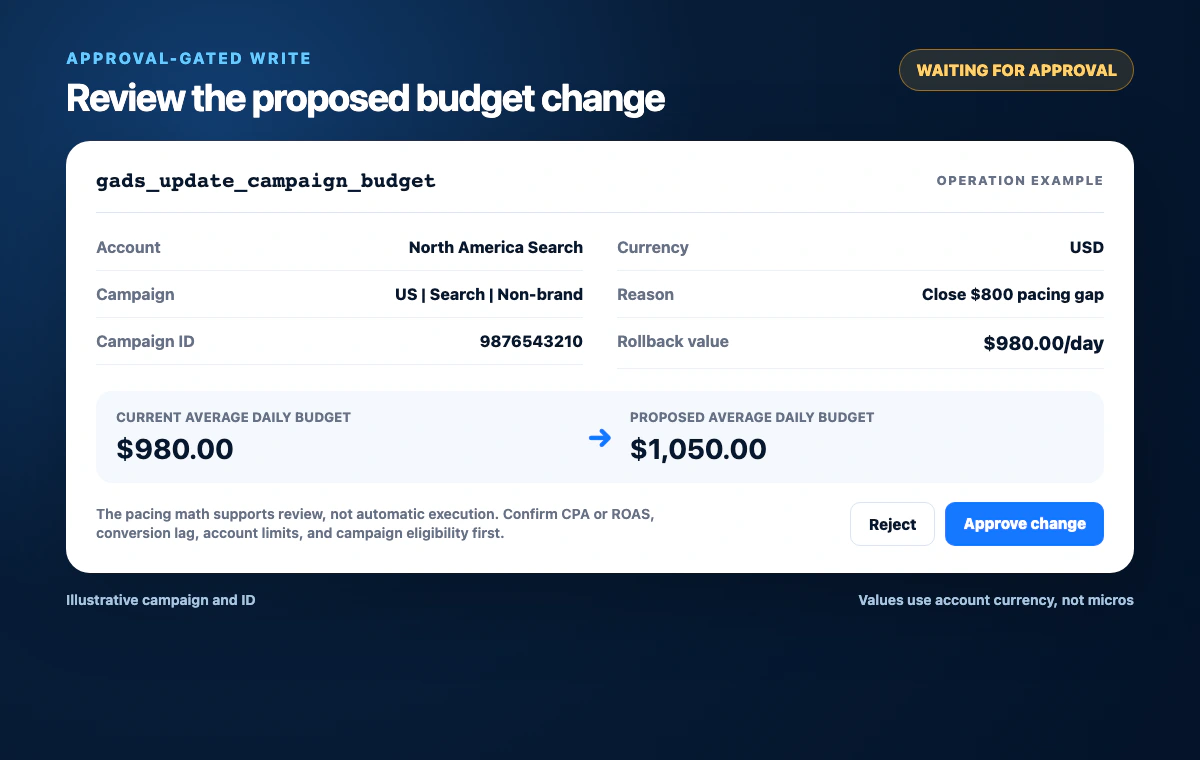
If a Google Ads API field contains _micros, divide it by 1,000,000 before displaying it. The focused Markifact budget write uses a normal currency amount. Mixing the two units can turn a sensible change into a catastrophic one, so the current and proposed values must always be shown in human-readable currency before approval.
Budget edits can also change spending-limit calculations during the month. Google says the remaining monthly limit reflects the new average daily budget for the remaining calendar days, and the highest selected budget on the edit day can affect that day's limit. Review Google's budget-change guidance when changing budgets mid-period.
Meta Ads budget pacing uses the same model with different controls
The same pacing formulas work for Facebook and Instagram advertising, but the budget can live at campaign or ad-set level. Before proposing a change, identify whether the account uses a campaign budget, an ad-set budget, a daily budget, a lifetime budget, or Advantage+ campaign budget.
As of July 20, 2026, Meta describes a daily budget as an average. Meta may spend up to 75% over the daily budget on a given day, while keeping spend within seven times the daily budget over a week. A lifetime budget can fluctuate by day while total cost remains within the amount set for the full run. See Meta's budget and scheduling guidance for the current rules.
Markifact read examples include meta_ads_get_report, meta_ads_get_campaign_settings, and meta_ads_get_adset_settings. Approval-gated write examples include meta_ads_update_campaign_budget and meta_ads_update_adset_budget. These names are examples, not the full Meta Ads operation catalog.
Meta settings reads can return monetary fields in minor currency units. For USD, divide those values by 100 before comparing them with a proposed update. The Markifact budget writes accept readable account-currency amounts, not cents.
The Meta Ads MCP covers the broader reporting and management surface.
Compare budget pacing across accounts safely
Agencies often get more value from one cross-account pacing report than from dozens of individual dashboards. The table should keep each account's target, currency, timezone, actual spend, planned spend, variance, projection, and efficiency context visible.
Use this prompt:
Build a cross-account advertising budget pacing report with Markifact.

Use the supplied target, period, currency, timezone, and pacing model for
each account. Pull Google Ads data with gads_get_report and Meta Ads data
with meta_ads_get_report where selected.

Return one row per account with platform, account name, account ID,
currency, timezone, period target, complete days, planned spend, actual
spend, currency variance, percentage variance, run-rate projection,
remaining budget, required daily spend, CPA, and ROAS where available.

Do not sum unlike currencies. Do not convert currencies unless I provide
an approved exchange-rate source and timestamp. Rank by alert status and
then absolute variance within each currency.
Keep campaign-level recommendations beneath the account summary. Otherwise a dashboard with hundreds of rows recreates the spreadsheet problem without improving the decision.
Common budget pacing mistakes
Including an incomplete day
Intraday spend is almost always behind a full-day plan. Use complete days unless you have an hour-by-hour model.
Treating a run rate as a forecast
Spend ÷ elapsed days × total days ignores future seasonality, promotions, weekday patterns, and changes in eligible demand. Label it clearly and use weights when the expected curve is uneven.
Raising budgets because an account is behind
Behind pace can mean constrained budget, weak demand, disapprovals, billing limits, paused campaigns, narrow targeting, broken tracking, or poor performance. Find the cause before changing the number.
Cutting strong campaigns because they are ahead
If the campaign is producing profitable incremental conversions, the better decision may be to revise the allocation or period target. Pacing should expose the tradeoff, not force a mechanical cut.
Mixing platform budget types
An average daily budget, campaign total budget, Meta lifetime budget, and business monthly target are not interchangeable. Label every number with its level, period, and currency.
Mixing micros, cents, and account currency
Inspect the operation schema and normalize read values before preparing a write. Never copy a raw API value directly into an approval request.
A practical operating cadence
Run the account-level report daily using complete-day data. Review watch accounts two or three times per week, and reserve budget proposals for the action-review queue. Once a week, connect the pacing picture with search terms, conversion quality, account history, and delivery constraints in a broader account review.
This cadence keeps the reporting automatic and the decisions human. Claude handles collection, arithmetic, sorting, and first-pass diagnosis. You still own the target, commercial judgment, and approval.
Frequently asked questions
What is Google Ads budget pacing?
Google Ads budget pacing compares actual spend with a business budget plan for a defined period. It shows whether spend is ahead or behind, the current run-rate projection, the remaining budget, and the average daily spend required to reach the target.
Can Claude automate a Google Ads budget pacing report?
Yes. With Google Ads connected through Markifact, Claude can pull daily spend with operations such as gads_get_report, calculate pacing metrics, compare accounts, and flag exceptions. Named operations are examples rather than the limit of the integration.
Can Claude automatically change Google Ads budgets?
Claude can prepare a change through Markifact, but it cannot bypass approval. A write such as gads_update_campaign_budget waits for the user to review the exact account, campaign, currency, current value, proposed value, evidence, and rollback value.
Is a budget pacing spreadsheet still useful?
Yes. A spreadsheet is useful when the target plan needs manual adjustments, weighted days, notes, or stakeholder sign-off. Claude can replace repetitive data pulls and calculations while the spreadsheet remains the approved planning source.
What is a good budget pacing alert threshold?
A practical starting point is within 5% for on pace, 5% to 10% for watch, and more than 10% for action review. These are editorial defaults, not Google or Meta rules, and should be adjusted for account size and volatility.
How does Meta Ads budget pacing differ from Google Ads pacing?
The arithmetic is the same, but Meta budgets can sit at campaign or ad-set level and can be daily or lifetime budgets. Identify the budget owner and type before calculating a recommendation or preparing an approval-gated change.
Should I include today's Google Ads spend in pacing?
Usually no. Use spend through the last complete day in the Google Ads account timezone. Include the current day only when you have an intentional intraday pacing model.
Does limited by budget mean I should increase the Google Ads budget?
No. Limited by budget indicates constrained eligible traffic, not profitable additional demand. Review CPA or ROAS, conversion quality, conversion lag, search terms, and account constraints before proposing an increase.