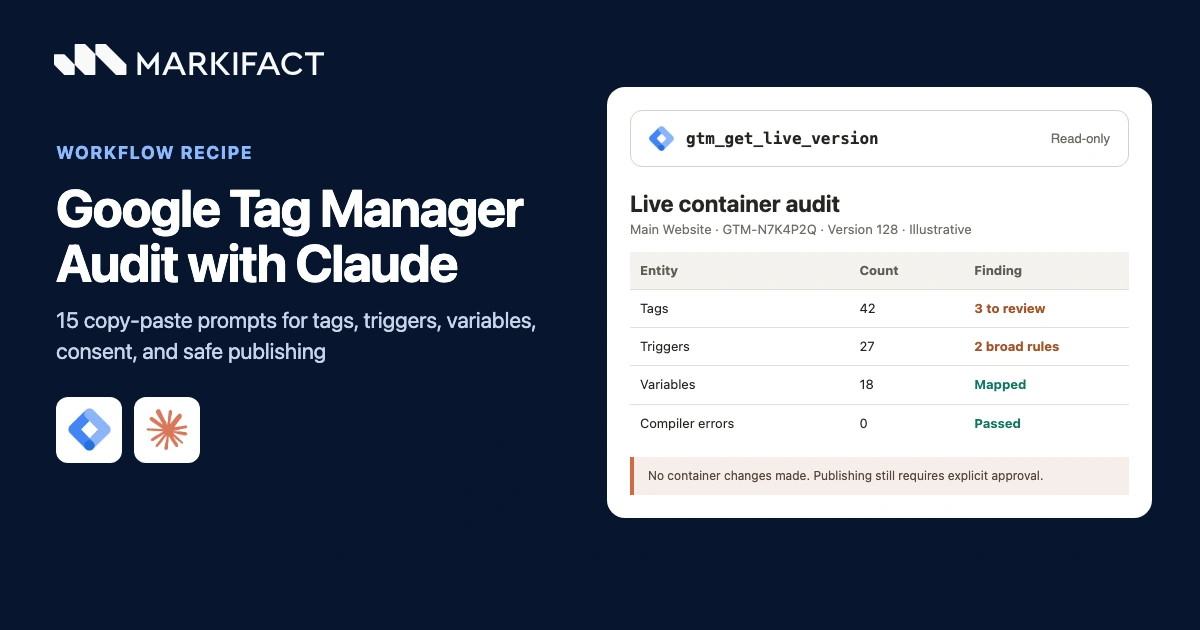
You can audit Google Tag Manager with Claude by reading the published container, inspecting a named workspace, and turning the configuration into a structured list of risks and validation steps. The audit should remain read-only, and Claude must separate what GTM is configured to do from what a browser actually does. This guide gives you 15 copy-paste prompts for tags, triggers, variables, consent, workspaces, preview checks, remediation, and approval-gated publishing.
What Claude can and cannot audit in GTM
Claude can inspect GTM configuration through the Google Tag Manager MCP. Current read operations can retrieve the live container version, workspaces, tags, triggers, variables, folders, versions, pending changes, merge conflicts, and compiler errors.
That is enough to find problems such as:
- Duplicate or inconsistent tag configurations
- Paused tags that still need a disposition
- Triggers with unexpectedly broad conditions
- Tags that reference the wrong firing or blocking triggers
- User-defined variables with unclear ownership or risky logic
- Custom HTML and third-party tags that need manual review
- Unpublished workspace changes
- Merge conflicts and compiler errors
- Missing governance, naming, and rollback information
Configuration data cannot prove that a tag fired on a real page, that the data layer contained the expected values, that consent state changed at the right moment, or that GA4 and advertising platforms received the request. Google Tag Assistant and destination-side checks provide that runtime evidence.
The safest contract is simple: retrieve, cite, assess, propose, and stop. Do not create, update, delete, version, or publish anything during the audit.
Before the prompts: connect the correct container
If Markifact is not connected to Claude yet, follow the GTM-to-Claude setup guide. Use the Google account that already has legitimate access to the required GTM account and container.
Before asking for an audit, identify:
- GTM account name and ID
- Container name, container ID, and public ID such as
GTM-XXXXXX - Container usage context, such as web or server
- Currently published version
- Workspace to inspect, if unpublished changes are in scope
- Website or app environments to test
- Analytics owner, implementation owner, privacy owner, and final approver
Do not let Claude choose the first container with a familiar name. Agencies often have production, staging, client, and archived containers in the same connected account.
Use four evidence layers
Every GTM audit finding should be placed in one of four layers:
| Layer | What it proves | Example |
|---|---|---|
| Published configuration | What the live GTM version contains | A Google Ads conversion tag references trigger 18 |
| Workspace configuration | What an unpublished workspace would change | Trigger 18 has a modified URL condition |
| Runtime evidence | What happened in a real browser session | The tag did not fire after a valid form submission |
| Proposed action | What a person should validate or approve | Test the form path, then correct the trigger if confirmed |
A container audit becomes unreliable when Claude collapses these layers. A tag can look correct in the API and fail in the browser. A tag can also look duplicated while two versions serve different destinations or consent conditions.
Prompt 1: establish the GTM audit contract
Begin with scope, ownership, and a no-write boundary.
Prepare the contract for a Google Tag Manager audit.

Before calling a tool, state:
1. GTM account name and ID
2. container name, container ID, and public ID
3. container usage context: web, server, AMP, Android, or iOS
4. live version ID and name, if already known
5. workspace name and ID, if workspace changes are in scope
6. websites, apps, and environments included
7. approved business outcomes and destination platforms
8. consent and privacy requirements supplied by the owner
9. analytics owner, implementation owner, privacy owner, and final approver

Rules:
- Do not select an account, container, version, or workspace by guessing.
- Do not create, update, delete, version, publish, or combine anything.
- Treat publishing as a separate future approval.
- Stop and ask for confirmation before reading the container.
Prompt 2: read the live container first
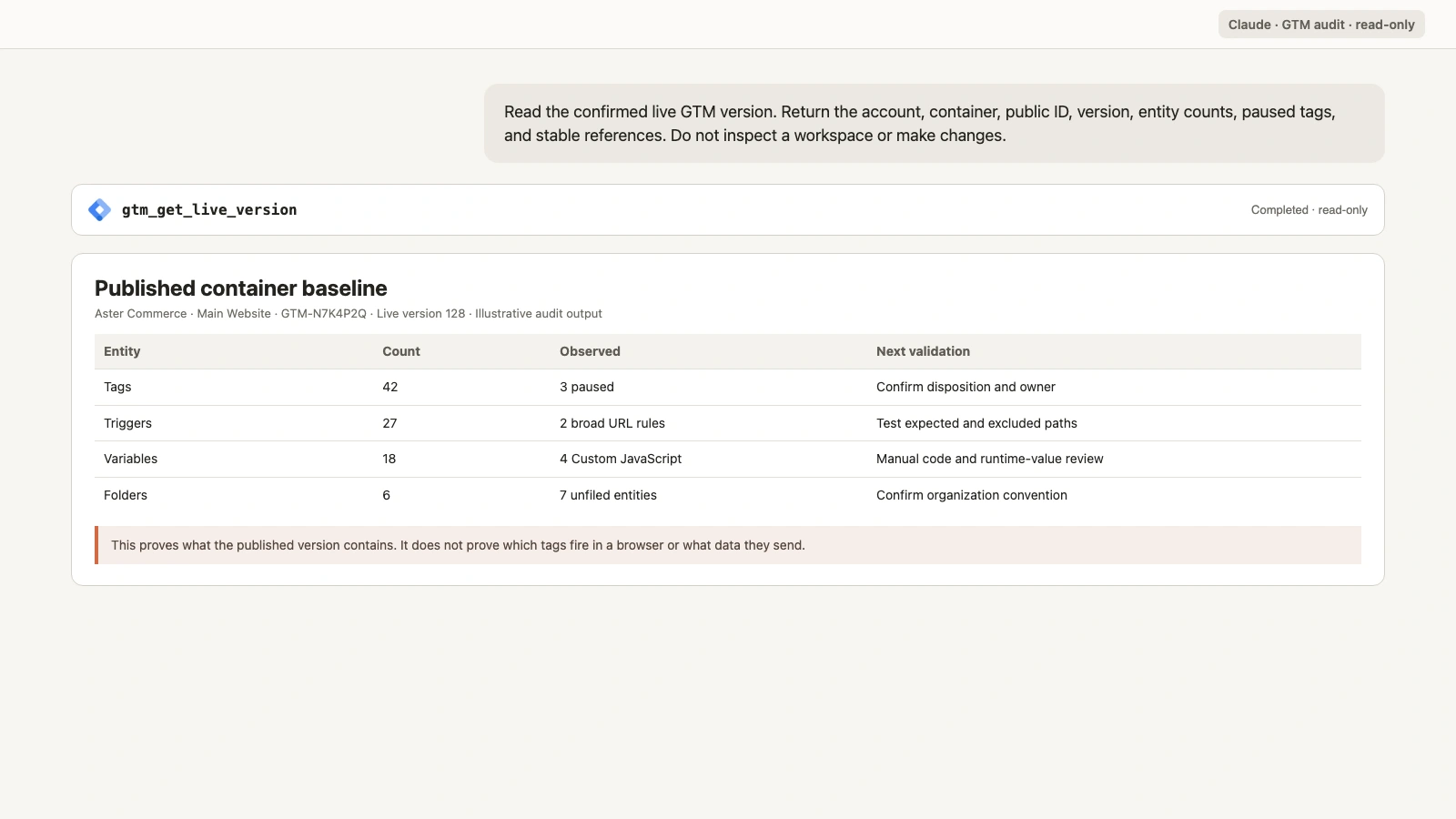
gtm_get_live_version returns the currently published container configuration. This is the correct baseline for what GTM is configured to run in production.
Use gtm_get_live_version for the confirmed account and container.

Return:
1. account, container, public ID, and usage context
2. live version ID, name, and notes
3. tag, trigger, and variable counts
4. paused-tag count
5. folders and custom templates present when available
6. a stable reference for every entity returned

Do not analyze a workspace yet.
Do not call a live configuration a verified browser implementation.
Do not make any change.
Prompt 3: inventory workspaces and pending changes
The live version and a workspace answer different questions. A workspace contains drafts that may never have been published.
List the workspaces in the confirmed GTM container.

For each workspace, return:
- workspace name and ID
- description
- base container version
- owner or purpose if it can be verified
- whether pending changes exist
- whether merge conflicts exist

If a workspace is selected for deeper review, use
gtm_get_workspace_status and cite the added, modified, deleted, and
conflicting entities.

Keep live-version evidence and workspace evidence in separate tables.
Do not synchronize, resolve a conflict, create a version, or publish.
Prompt 4: audit the tag inventory
Tags should be reviewed with their type, parameters, triggers, exceptions, paused state, and destination.
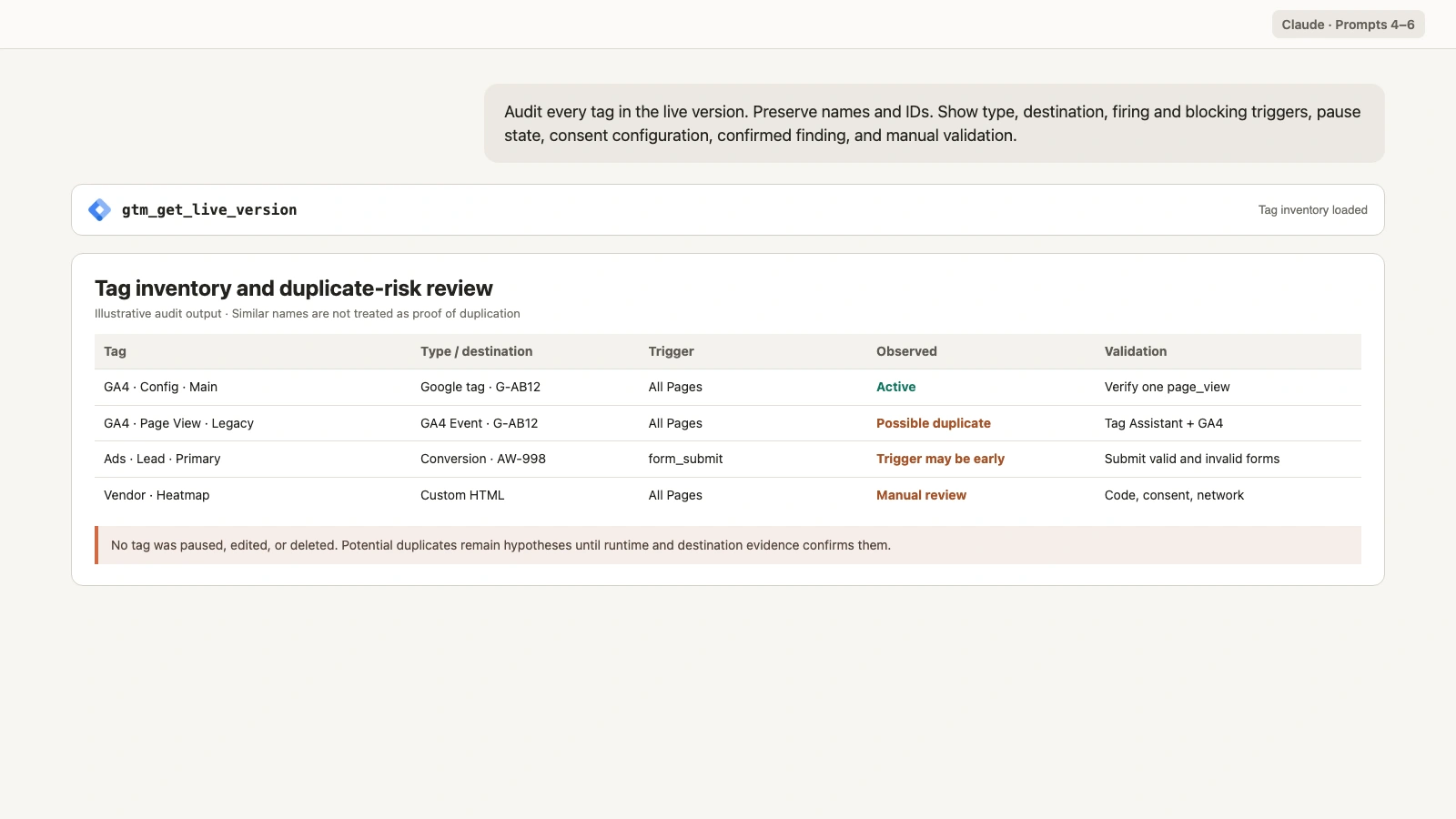
Audit every tag in the confirmed live GTM version.

Return a table with:
- exact tag name and ID
- tag type
- destination or measurement ID when present
- firing trigger IDs
- blocking trigger IDs
- paused state
- consent configuration when present
- folder when present
- confirmed configuration finding
- manual validation required

Flag potential duplicates, legacy tags, unclear destinations, broad
Custom HTML, and inconsistent naming.

Do not call two tags duplicates based only on similar names.
Do not expose secrets or copy full Custom HTML into the response.
Do not change a tag.
Prompt 5: find duplicate analytics and advertising signals
Duplicate tags can inflate page views, events, conversions, or remarketing activity. Similar names are not sufficient evidence.
Review Google tags, GA4 event tags, Google Ads conversion tags,
Floodlight tags, Meta Pixel tags, and Custom HTML that may send
analytics or advertising signals.

Group possible duplicates by:
- destination ID
- event or conversion name
- firing trigger
- sequencing
- consent condition
- page or environment scope

Return:
1. exact configuration evidence
2. why the pair may be intentional
3. runtime test needed
4. destination-side check needed
5. confidence: High, Medium, or Low

Do not recommend deleting or pausing a tag until runtime and destination
evidence confirms the duplicate.
Prompt 6: review Custom HTML and third-party tags
Custom HTML deserves extra scrutiny because its behavior is not fully described by the tag type alone.
Inventory all Custom HTML, custom-template, and third-party tags.

For each tag, return:
- exact name and ID
- firing and blocking triggers
- paused state
- domains or endpoints visible in configuration
- variables referenced
- owner or business purpose if verified
- security, privacy, and performance questions
- manual code-review requirement
- runtime validation path

Summarize code behavior without reproducing secrets, personal data,
tokens, or complete scripts.
Do not declare code safe from configuration metadata alone.
Do not edit, pause, or delete anything.
Prompt 7: audit trigger logic and dependencies
A trigger name such as “Lead Form” does not prove that it fires after a successful lead.
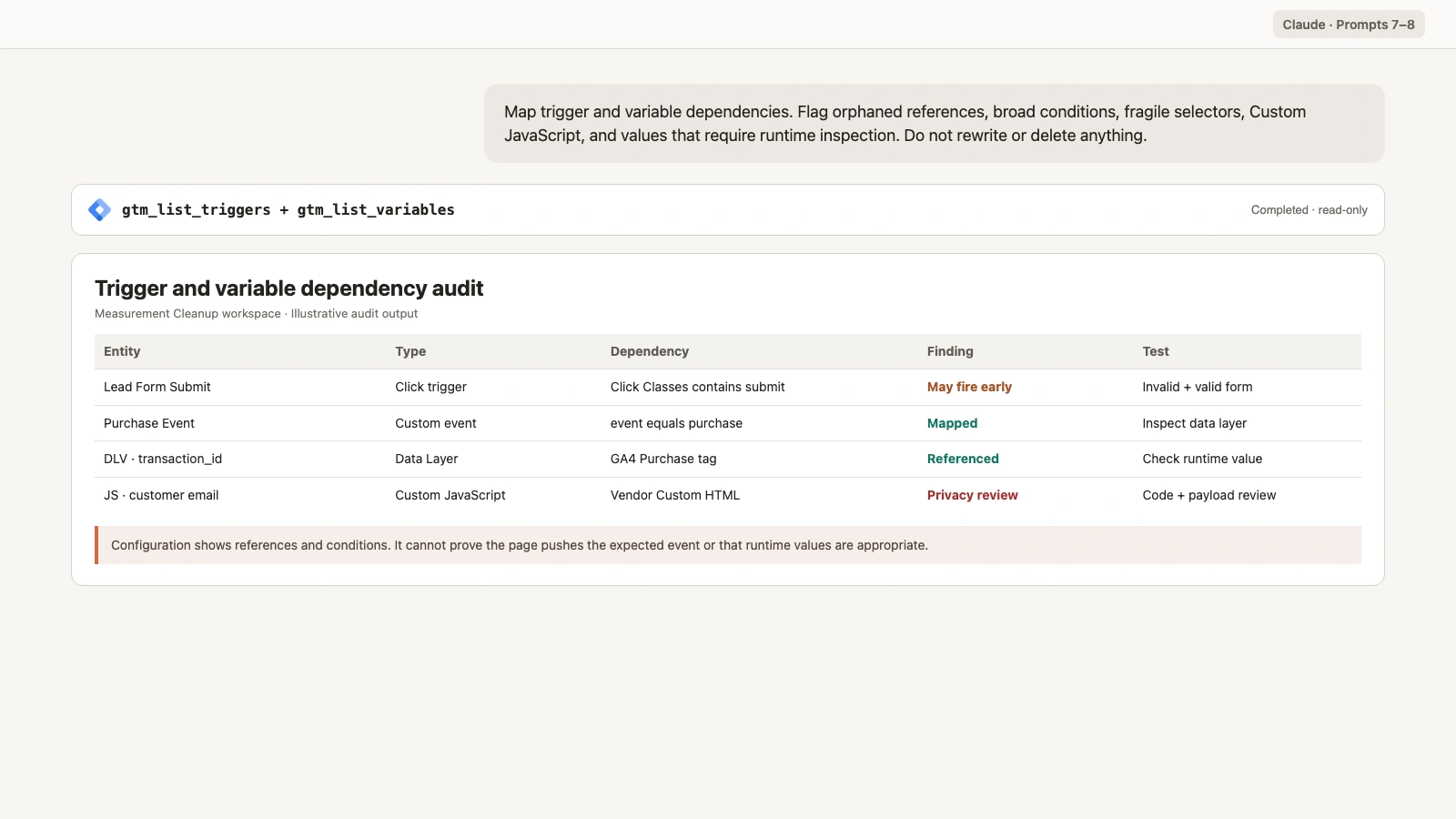
Audit every trigger in the confirmed live version.

Return:
- exact trigger name and ID
- trigger type
- firing conditions
- filters and regex conditions
- referenced variables
- tags that use it for firing
- tags that use it for blocking
- trigger with no tag references
- unusually broad or fragile condition
- browser path required to test it

Flag click triggers that may fire before form validation, page-view
triggers with overly broad URL rules, and custom-event triggers whose
expected data-layer event is not documented.

Do not rewrite a regex or trigger condition.
Do not assume an unreferenced trigger is safe to delete.
Prompt 8: audit variables and sensitive-data risk
Variables connect page state, data-layer values, cookies, URLs, and JavaScript to tags and triggers.
Audit user-defined and enabled built-in variables in the confirmed
container.

For each variable, return:
- exact name and ID
- variable type
- parameters or key name
- tags and triggers that reference it
- likely purpose, labeled as an inference when not documented
- unused or unresolved status
- personal-data or secret-handling question
- runtime value that must be inspected in Tag Assistant

Flag Custom JavaScript for manual review.
Flag URL, cookie, DOM, and data-layer variables that may collect personal
or sensitive values.

Do not print observed personal data, tokens, or full custom code.
Do not remove or rename a variable.
Prompt 9: review naming, folders, and ownership
Clear names and ownership reduce mistakes when several teams share a container.
Review names and organization for accounts, containers, workspaces,
folders, tags, triggers, and variables.

Return:
1. the dominant naming patterns
2. inconsistent separators, casing, prefixes, and abbreviations
3. entities with names that do not reveal platform, event, or scope
4. unfiled entities
5. folders with unclear ownership
6. a proposed naming convention
7. a rename plan that preserves IDs and behavior

Do not rename or move anything.
Do not treat naming cleanup as a production defect.
Require the implementation owner to approve the convention.
Prompt 10: audit consent configuration
Google Tag Manager includes Consent Initialization, built-in consent checks, additional consent checks, and Consent Overview. The container configuration can show intended behavior, but Tag Assistant is needed to observe consent state during a session.
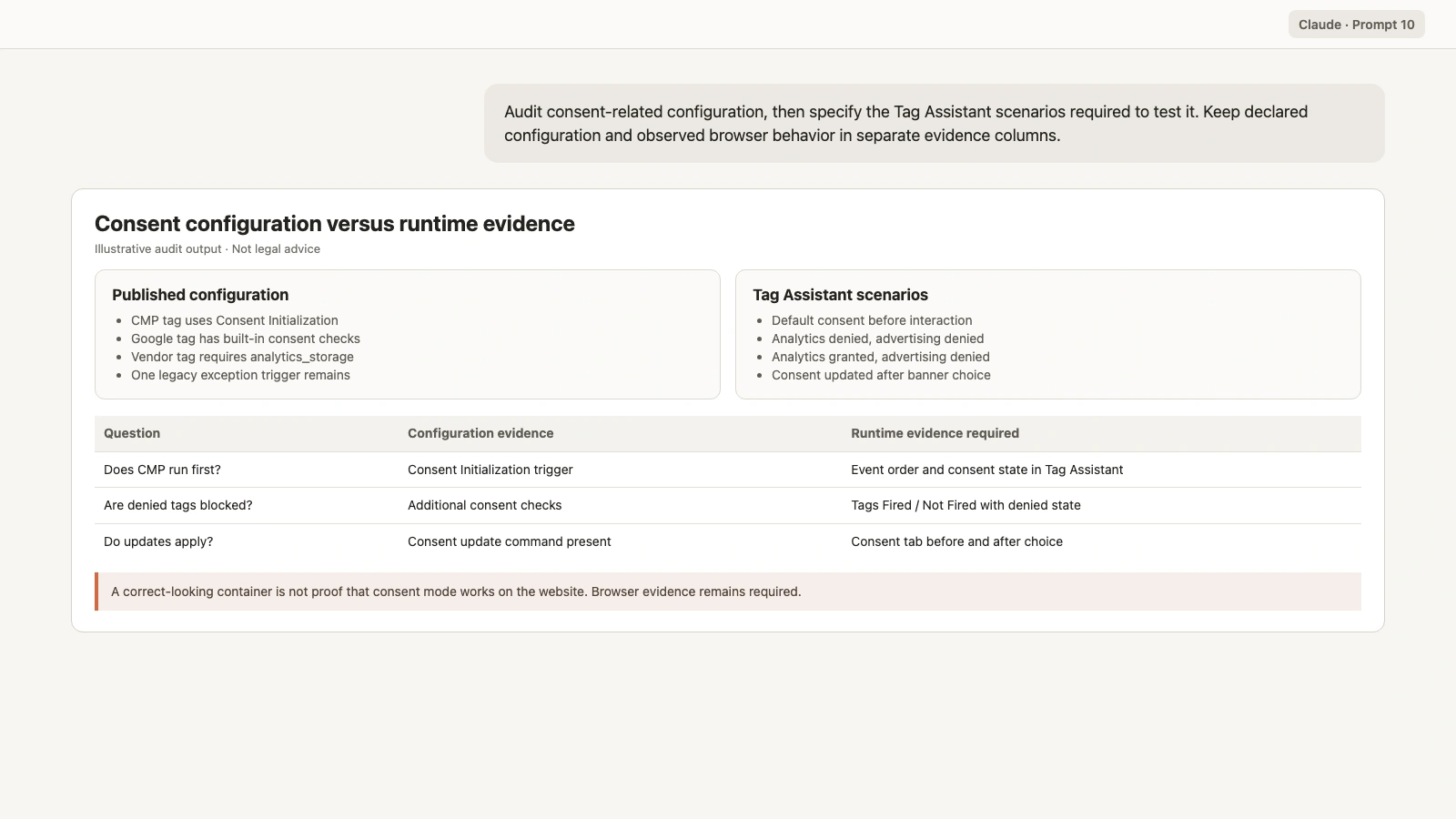
Audit consent-related configuration in the confirmed live GTM version.

Review:
- Consent Initialization triggers
- Initialization triggers
- tags that set or update consent state
- built-in consent checks
- additional consent checks
- exception triggers connected to Google tags
- consent-related variables and custom templates

Return:
1. observed container configuration
2. privacy-owner question
3. browser scenarios to test before and after consent choices
4. Tag Assistant evidence required
5. unresolved limitation

Do not provide legal advice.
Do not state that consent mode works from configuration alone.
Do not change consent settings or triggers.
Prompt 11: map the data layer to tags and destinations
The container can reference a data-layer event or variable even when the website never pushes it.
Build a measurement dependency map for the approved business outcomes.

For each outcome show:
- expected data-layer event
- required data-layer keys
- GTM variables
- trigger
- tag
- destination and event or conversion name
- consent requirements
- configuration evidence
- Tag Assistant test
- destination-side verification

Use Unknown when the website contract or runtime value is unavailable.
Do not invent data-layer keys.
Do not claim that a data-layer event exists because a trigger references
its name.
Prompt 12: compare a workspace against live
Review unpublished changes before anyone creates a version.
Compare the confirmed workspace with the current live container version.
Use gtm_get_workspace_status and the relevant read operations.

Return separate tables for:
- added entities
- modified entities
- deleted entities
- merge conflicts

For every change show:
- entity name, ID, and type
- live behavior
- proposed workspace behavior
- dependencies
- consent impact
- runtime regression test
- owner and approval required

Do not synchronize the workspace.
Do not resolve conflicts.
Do not create a version or publish.
Prompt 13: run a configuration preview
gtm_quick_preview_workspace creates a temporary preview version and reports compiler errors without creating a real version. It does not replace browser testing.
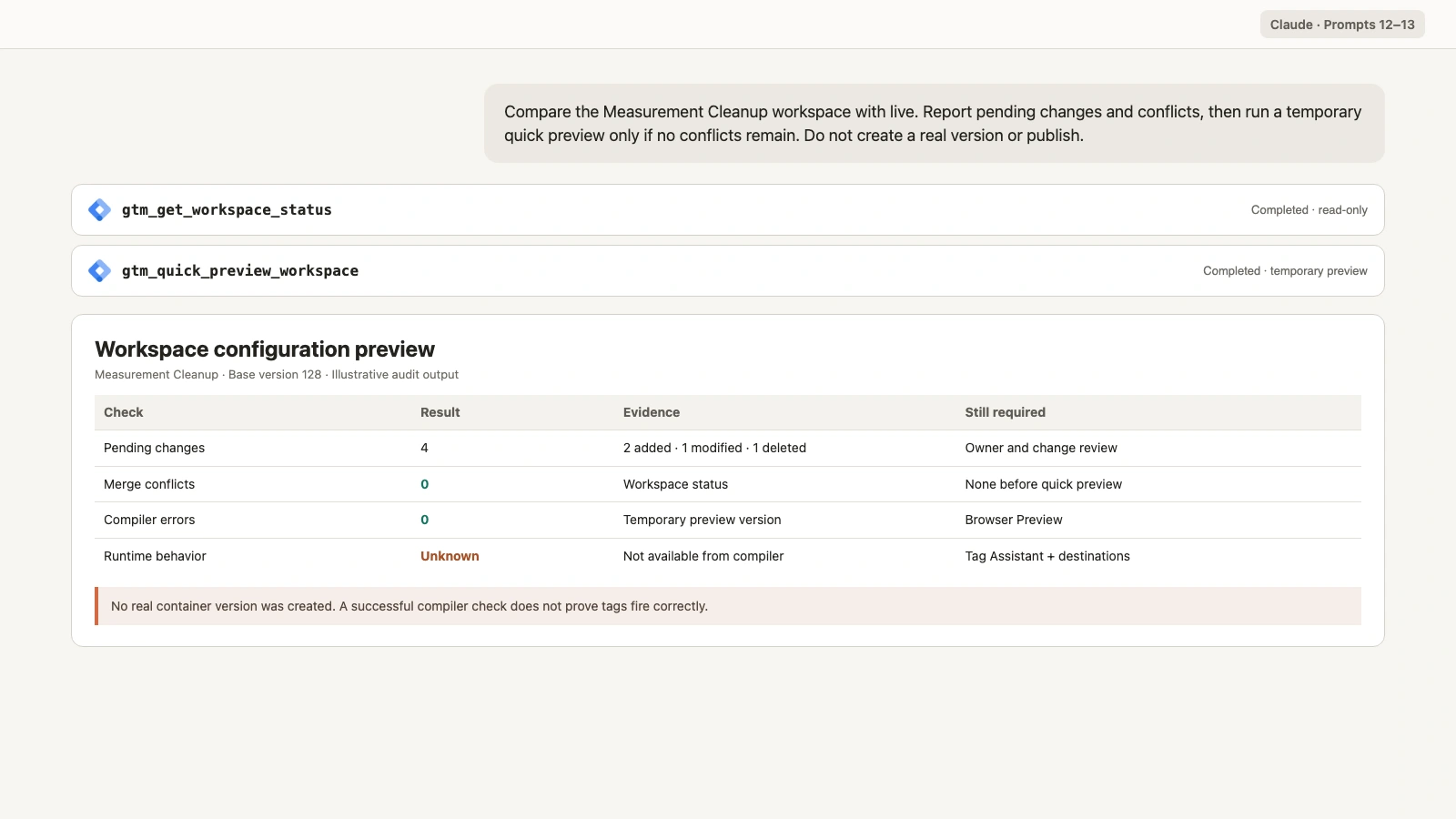
Run gtm_get_workspace_status for the confirmed workspace.
If there are no unresolved merge conflicts, run
gtm_quick_preview_workspace.

Return:
- pending change count
- merge conflicts
- temporary preview result
- compiler errors with exact entity references
- configuration checks that passed
- browser Preview scenarios still required
- owners responsible for each validation

Do not create a real container version.
Do not publish.
Do not describe a successful quick preview as proof that tags fire.
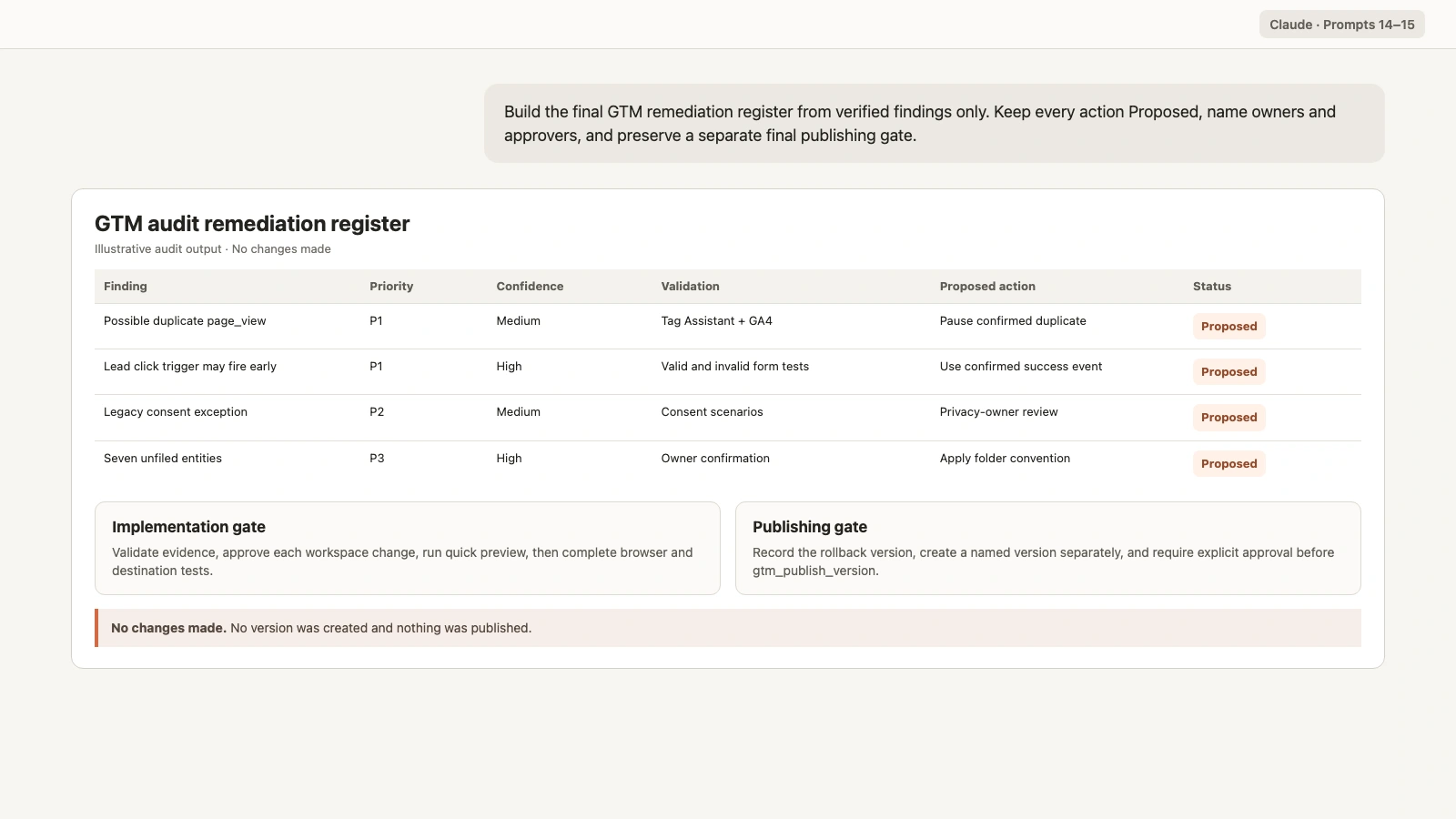
Prompt 14: build the severity and remediation register
Prioritize only findings supported by evidence.
Build a GTM remediation register from the verified audit findings.

For every finding include:
- entity and stable reference
- evidence layer
- observed evidence
- affected business outcome or destination
- confidence: High, Medium, or Low
- severity: P0, P1, P2, or P3
- validation step
- proposed remediation
- owner
- privacy review when relevant
- approver
- rollback plan
- verification method
- status: Proposed

Severity definitions:
P0 = active data corruption, severe privacy risk, or critical outage
P1 = material conversion, revenue, or attribution error
P2 = incomplete coverage, fragile implementation, or governance risk
P3 = documentation, naming, organization, or optimization opportunity

Do not include an unverified hypothesis as a confirmed defect.
Do not mark any remediation Approved or Completed.
Prompt 15: write the final GTM audit summary
The final report should be useful to stakeholders and traceable to configuration and runtime evidence.
Write the final Google Tag Manager audit summary from the evidence
register.

Structure:
1. account, container, public ID, live version, workspace, and scope
2. configuration sources and runtime sources
3. three highest-confidence findings
4. material evidence limitations
5. P0 and P1 proposed actions
6. P2 and P3 backlog
7. owners and approvals still required
8. GTM Preview and Tag Assistant test plan
9. versioning and rollback plan
10. final publishing gate

For every finding, cite the live version, workspace entity, compiler
result, Tag Assistant session, or destination report that supports it.
Separate facts, interpretations, and proposed actions.
Do not create a version.
Do not call gtm_publish_version.
Do not describe any proposed change as approved.
QA the GTM audit before sharing it
Use this human checklist:
- Correct GTM account, container ID, and public ID
- Correct live version
- Workspace changes kept separate from the live configuration
- Tag, trigger, and variable IDs preserved
- Paused tags identified without assuming they should be deleted
- Duplicate findings supported by destination and trigger evidence
- Custom HTML sent for manual code review
- Sensitive values omitted from the report
- Consent configuration separated from runtime consent behavior
- Data-layer requirements marked Unknown when unavailable
- Compiler success not treated as runtime success
- Tag Assistant scenarios cover granted and denied consent
- Destination platforms checked for received events
- Every remediation has an owner, approver, rollback, and verification step
- No GTM entity was changed
- No version was created or published
After approved changes are implemented in a workspace, repeat Prompt 12 and Prompt 13. Then run GTM Preview and Tag Assistant before creating a version. Publishing should remain a separate final approval with the previous live version recorded as the rollback point.
For downstream measurement checks, use the companion GA4 audit with Claude. GTM tells you how the tracking is configured. GA4 and advertising platforms show what data arrived.
Frequently asked questions
Can Claude audit Google Tag Manager?
Yes. Claude can use connected GTM operations to inspect the live version, workspaces, tags, triggers, variables, versions, pending changes, merge conflicts, and compiler errors. Browser behavior still requires GTM Preview, Tag Assistant, and destination-side checks.
Can Claude tell whether a GTM tag fired?
Not from configuration data alone. Claude can see how a tag is configured, but Tag Assistant or another browser test must show whether it fired, what triggered it, and what data it sent.
Should I audit the live version or the workspace?
Start with the live version because it represents the published configuration. Review workspaces separately because they contain unpublished changes and may differ from production.
Can Claude find duplicate GTM tags?
Claude can identify potential duplicates by destination, event name, trigger, sequencing, and consent configuration. Confirm them with browser and destination evidence before pausing or deleting anything.
Can Claude audit GTM consent mode?
Claude can review Consent Initialization, tag consent settings, additional checks, exception triggers, and related variables. Use Tag Assistant to verify consent state and tag behavior during real granted and denied scenarios.
Can Claude preview a GTM workspace?
Yes. A read-only operation such as gtm_quick_preview_workspace can create a temporary preview version and report compiler errors. You still need browser Preview and Tag Assistant for runtime validation.
Can Claude publish GTM changes?
Markifact supports approval-gated GTM versioning and publishing. The audit in this guide performs no writes. Creating a version and calling gtm_publish_version should happen only after explicit review, runtime testing, rollback planning, and final approval.