You can audit Google Analytics 4 by checking the property configuration, validating the data being collected, and confirming that the resulting reports support real business decisions. A reusable checklist makes that process faster and more consistent than clicking through GA4 Admin from memory. This guide shows what to review, how to run the automated Markifact audit, and how to turn its Pass and Fail results into an approved remediation plan.
What a complete Google Analytics audit should cover
A GA4 audit needs three layers:
- Configuration: Is the property set up for the correct business, market, and measurement plan?
- Data integrity: Are events, traffic sources, key events, and ecommerce data arriving in a usable form?
- Activation: Can the team use the data through integrations, audiences, and custom definitions?
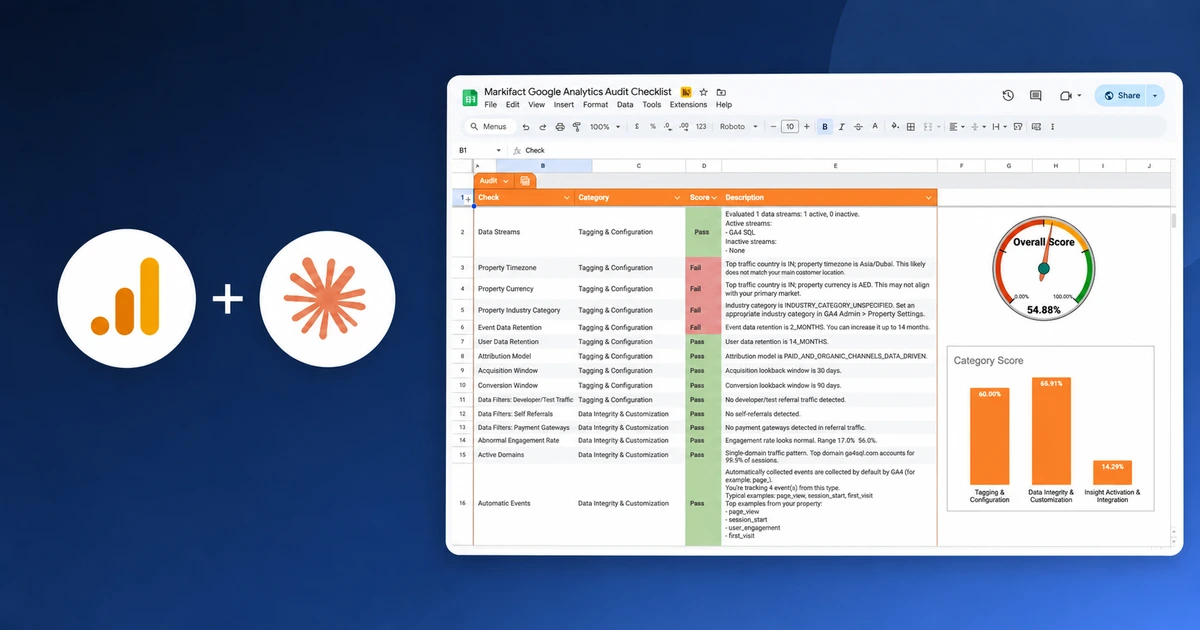
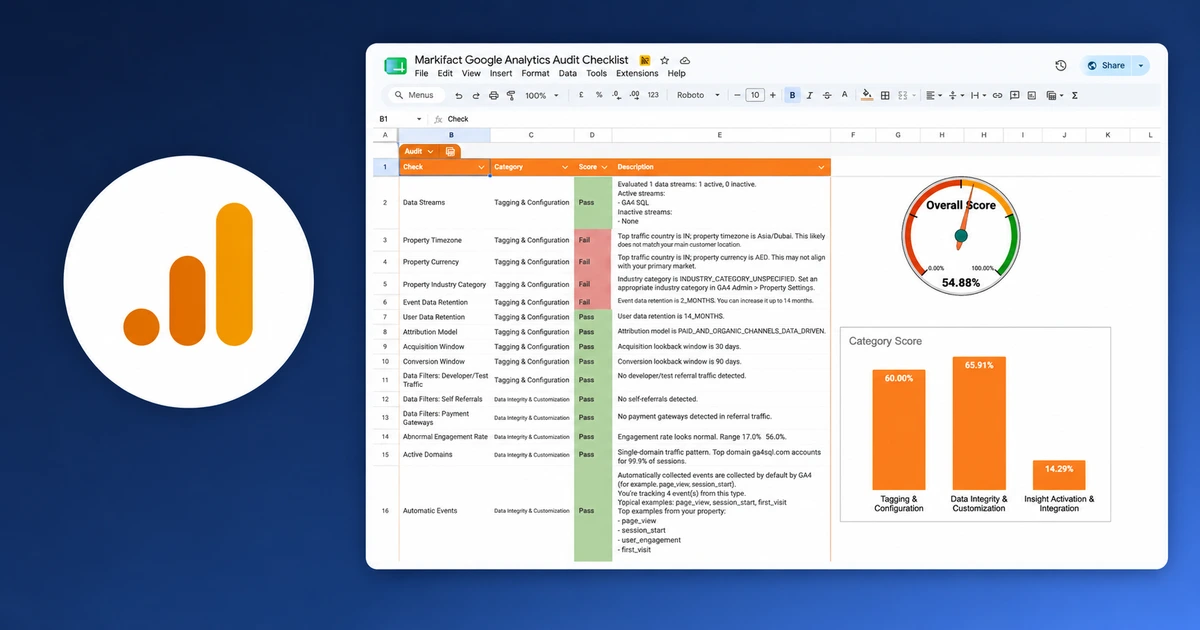
The Google Analytics Audit Checklist template automates those layers. Its landing page describes more than 50 automated checks. The current public example sheet contains 39 populated result rows across three categories, with several checks combining multiple pieces of evidence.
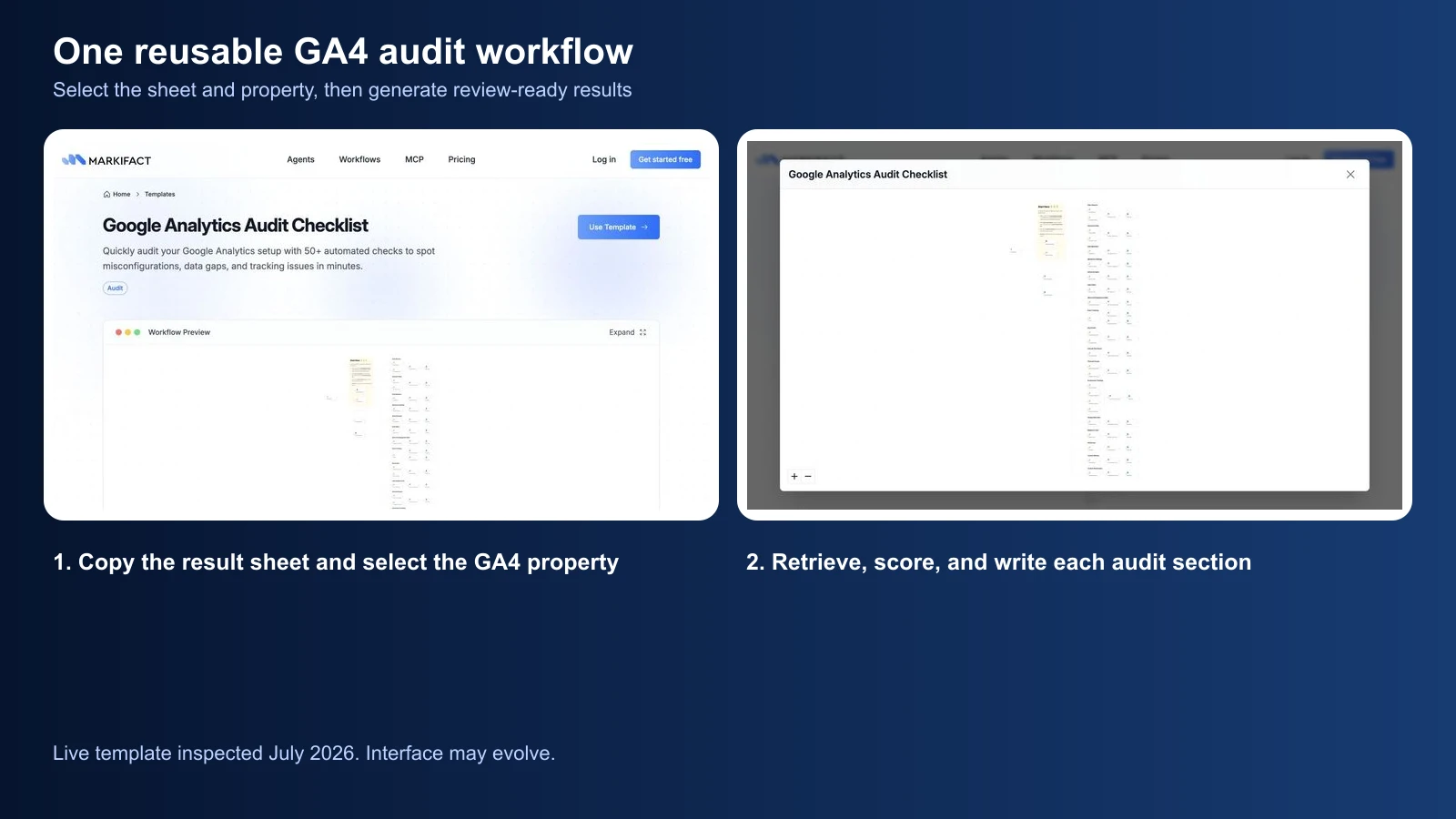
The workflow uses Google Analytics, Google Sheets, code, utilities, and flow-control steps. It clears the previous output, selects a date range, collects the audit evidence, calculates the scores, and writes a new result sheet.
How the GA4 audit checklist is organized
The output is designed to be reviewed, not merely generated. Every result includes:
- Feature: a stable machine-readable identifier
- Check: the reviewer-friendly name
- Category: the audit layer
- Score: Pass or Fail
- Description: the evidence, interpretation, and suggested follow-up
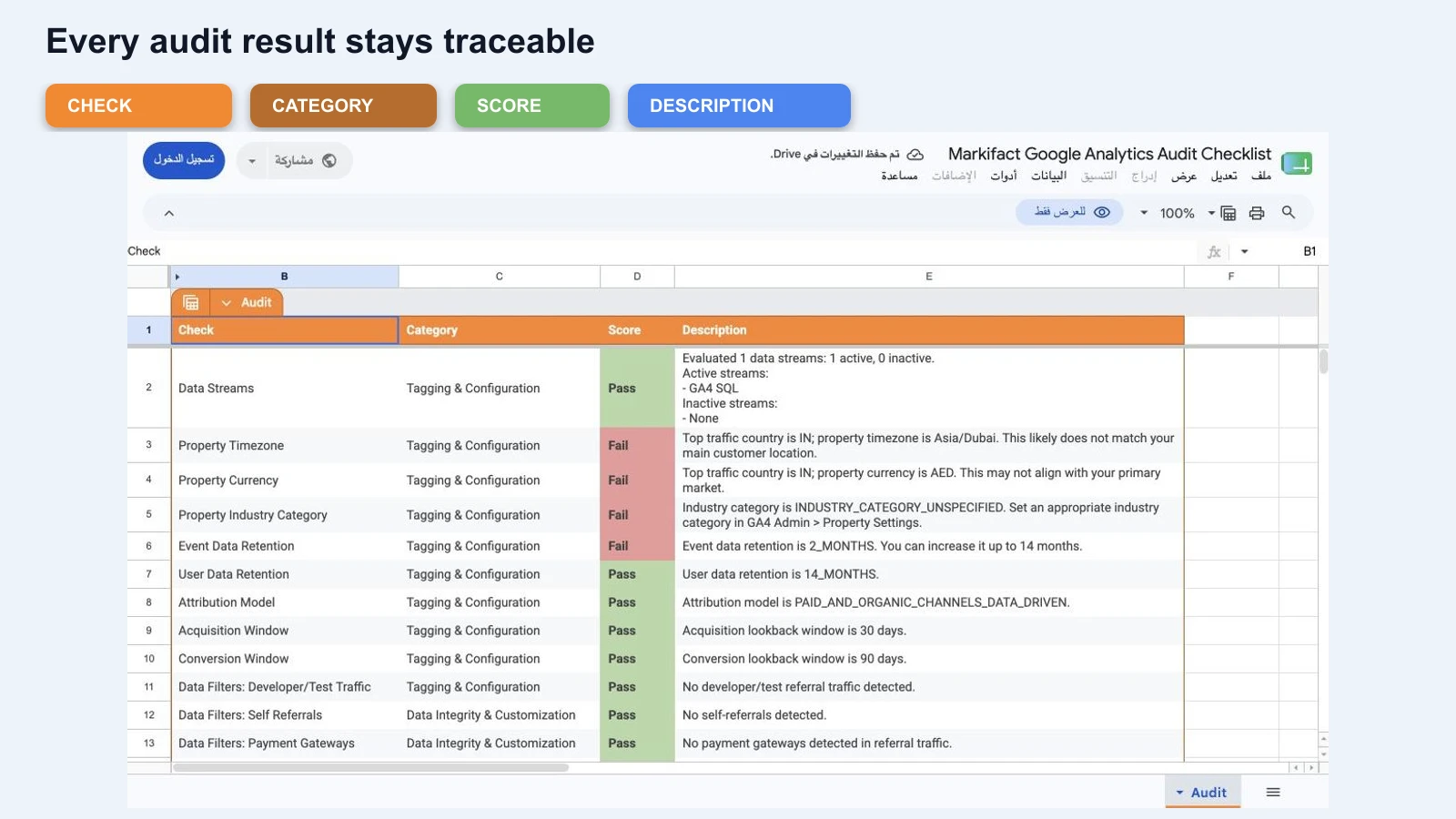
The three current categories are:
| Category | Purpose | Example checks |
|---|---|---|
| Tagging & Configuration | Confirm the property is aligned with the business | Streams, timezone, currency, retention, attribution |
| Data Integrity & Customization | Confirm collected data is coherent and useful | Referrals, events, key events, channels, ecommerce |
| Insight Activation & Integration | Confirm the data can support activation and deeper analysis | Google Ads, BigQuery, audiences, custom definitions |
A Pass means the configured rule found acceptable evidence. A Fail means the row needs review. It does not automatically mean the workflow is authorized to change the property.
Step 1: define the audit scope
Before running the checklist, record the scope that will control the review:
- GA4 account and property
- Website or app being audited
- Primary markets
- Reporting timezone and currency expected by the business
- Complete audit date range
- Business outcomes that should be configured as key events
- Whether ecommerce applies
- Expected Google Ads and BigQuery integrations
- People responsible for analytics, development, marketing, and approval
Copy this into the audit ticket:
GA4 audit scope

Property:
Data stream(s):
Website or app:
Primary market(s):
Expected reporting timezone:
Expected currency:
Audit date range:
Primary business outcomes:
Ecommerce required: Yes / No
Google Ads link required: Yes / No
BigQuery link required: Yes / No
Analytics owner:
Technical owner:
Final approver:

Rules:
- Missing evidence is not a pass.
- A failed check requires validation before a configuration change.
- No GA4, GTM, website, or advertising change is authorized by this audit.
This scope prevents a technically valid setting from being judged against the wrong business context. A Dubai timezone can be correct for one property and wrong for another. A missing ecommerce event can be critical for a retailer and irrelevant for a lead-generation site.
Step 2: run the automated GA4 audit
The template setup is intentionally short:
- Open the Google Analytics Audit Checklist workflow.
- Make a copy of the supplied Google Sheets template. Do not start with a blank sheet.
- In the workflow, select the copied spreadsheet.
- Connect Google Analytics and select the correct property.
- Confirm the audit date range.
- Run the workflow.
- Review the generated Pass and Fail rows before changing anything.
The date range matters because several checks use observed activity. A key event with no activity during an unusually short or quiet period is not the same as a broken key event. Use a complete and representative range, then document it in the audit scope.
Step 3: audit property and collection settings
Start with the settings that shape every downstream report.
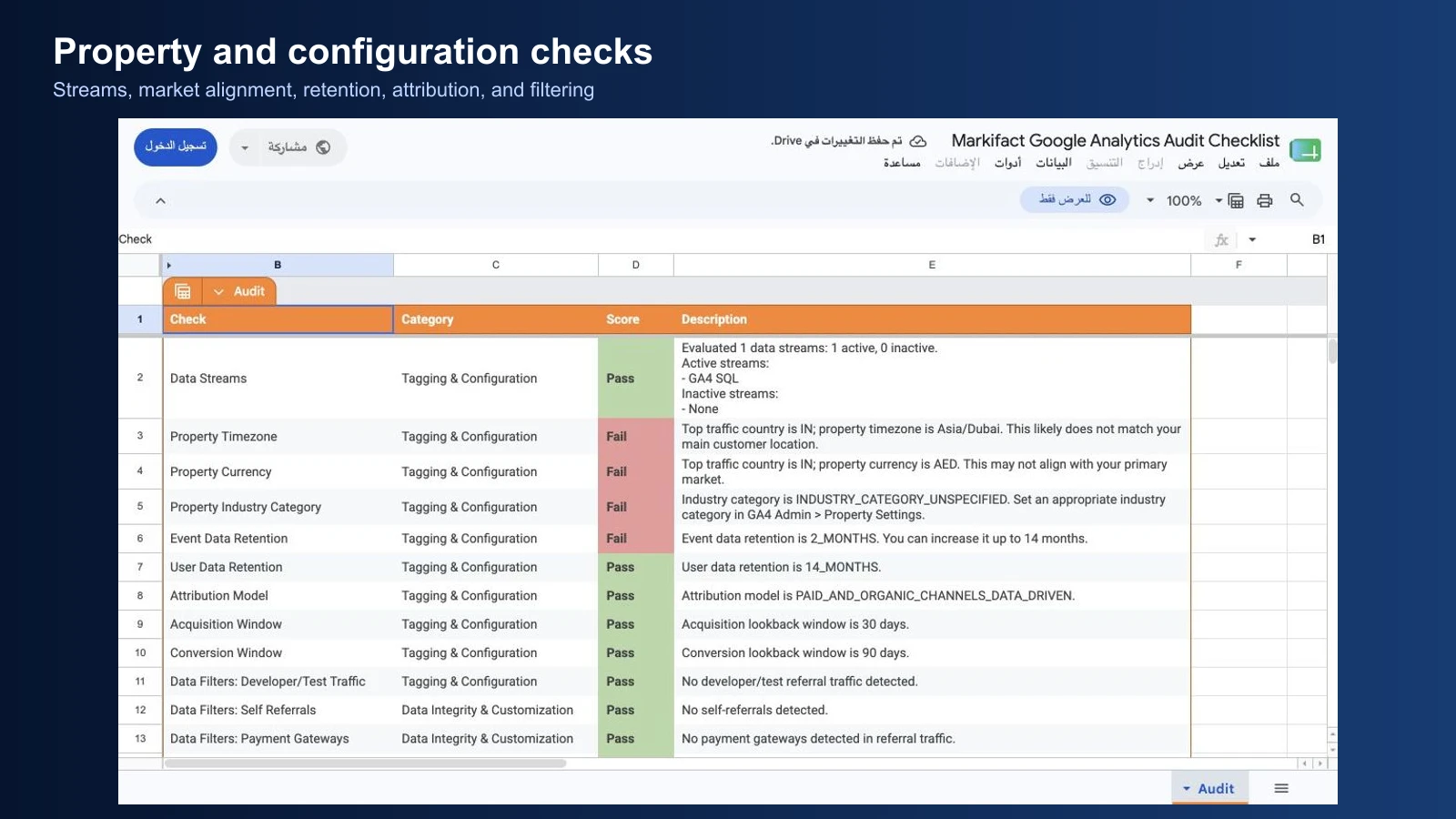
Data streams
Confirm that the expected web and app streams exist, are active, and correspond to the correct production properties. An active stream proves that data is arriving. It does not prove that every page, event, consent state, or app version is measured correctly.
Reporting timezone and currency
GA4 property details include reporting timezone, currency, and industry category. Check them against the business, not simply the country with the most traffic.
Timezone errors can move events across reporting days and distort daily comparisons. Currency errors can make revenue reporting difficult to interpret. Changing either setting should be reviewed because it affects future reporting behavior.
Data retention
Standard GA4 properties support 2-month or 14-month event-data retention settings. Retention affects user-level and event-level data used in explorations. It does not erase standard aggregated reports in the same way.
A 2-month setting may be too short for teams that need longer exploratory analysis, but increasing retention is still a governance decision. Confirm the organization's privacy, contractual, and regional requirements first.
Attribution and lookback windows
Record the selected attribution model and acquisition or key-event lookback windows. The goal is not to force one setting onto every property. The goal is to ensure the settings are intentional, documented, and consistent with stakeholder expectations.
Step 4: audit referrals, domains, and traffic classification
Traffic-source problems can make acquisition reports look precise while assigning credit incorrectly.
Review:
- Developer and test traffic
- Self-referrals
- Payment gateways
- Active domains
- Direct traffic
- Unassigned traffic
- Custom channel groups
GA4 can identify domains that should not receive referral credit. This is useful for payment processors and other domains that are part of the user journey rather than the acquisition source.
High Direct traffic needs investigation, not a one-line diagnosis. GA4 uses Direct when it does not have a clear referral source. Possible causes include untagged links, redirects, offline documents, blockers, and genuine direct visits.
Use this review sequence:
- List the largest Direct landing pages.
- Check campaign URLs and UTM conventions.
- Test redirect chains.
- Review cross-domain and unwanted-referral configuration.
- Compare the change with release, consent, and campaign dates.
- Document the confirmed cause or mark it unresolved.
Do not rewrite channel rules merely to make an unattractive number disappear.
Step 5: audit events and key events
GA4 is event-based, so the event layer deserves more than a count of event names.

Event coverage
Review four groups:
- Automatically collected events
- Enhanced-measurement events
- Google's recommended events
- Business-specific custom events
Recommended event names and parameters make reporting and integrations easier to maintain. Custom events remain useful when a business action does not fit a standard event.
Event naming
Check:
- Lowercase consistency
- Snake-case naming
- Length and clarity
- Accidental duplicates caused by case differences
- Names that encode unstable implementation details
Good naming makes the implementation easier to debug and keeps reports consistent across teams and tools.
Key-event health
For every key event, confirm:
- It represents an approved business outcome.
- It has recent activity when activity is expected.
- Its parameters are present.
- Its value is meaningful when value is required.
- It is not duplicated through several tags or event-creation rules.
- Stakeholders understand the definition.
Do not add key events simply to reach a target count. The example checklist can flag a small set or inactive configuration, but the final decision depends on the measurement plan.
Step 6: audit internal search and engagement
Internal site search can reveal what visitors cannot find through navigation. If the site has a search function, confirm that view_search_results is collected with a useful search-term parameter.
Engagement-rate checks should look for unusual movement, not enforce one universal “good” rate. Segment by device, landing page, market, and channel before deciding that an outlier is a tracking problem.
Validate unusual engagement with:
- Daily trends
- Page and landing-page breakdowns
- Device and browser segments
- Release dates
- Consent changes
- Known traffic campaigns
- Tagging tests
An anomaly is a reason to inspect the implementation. It is not proof of a defect.
Step 7: audit ecommerce integrity
For ecommerce properties, confirm that the full journey is measured and that transaction data can be trusted.
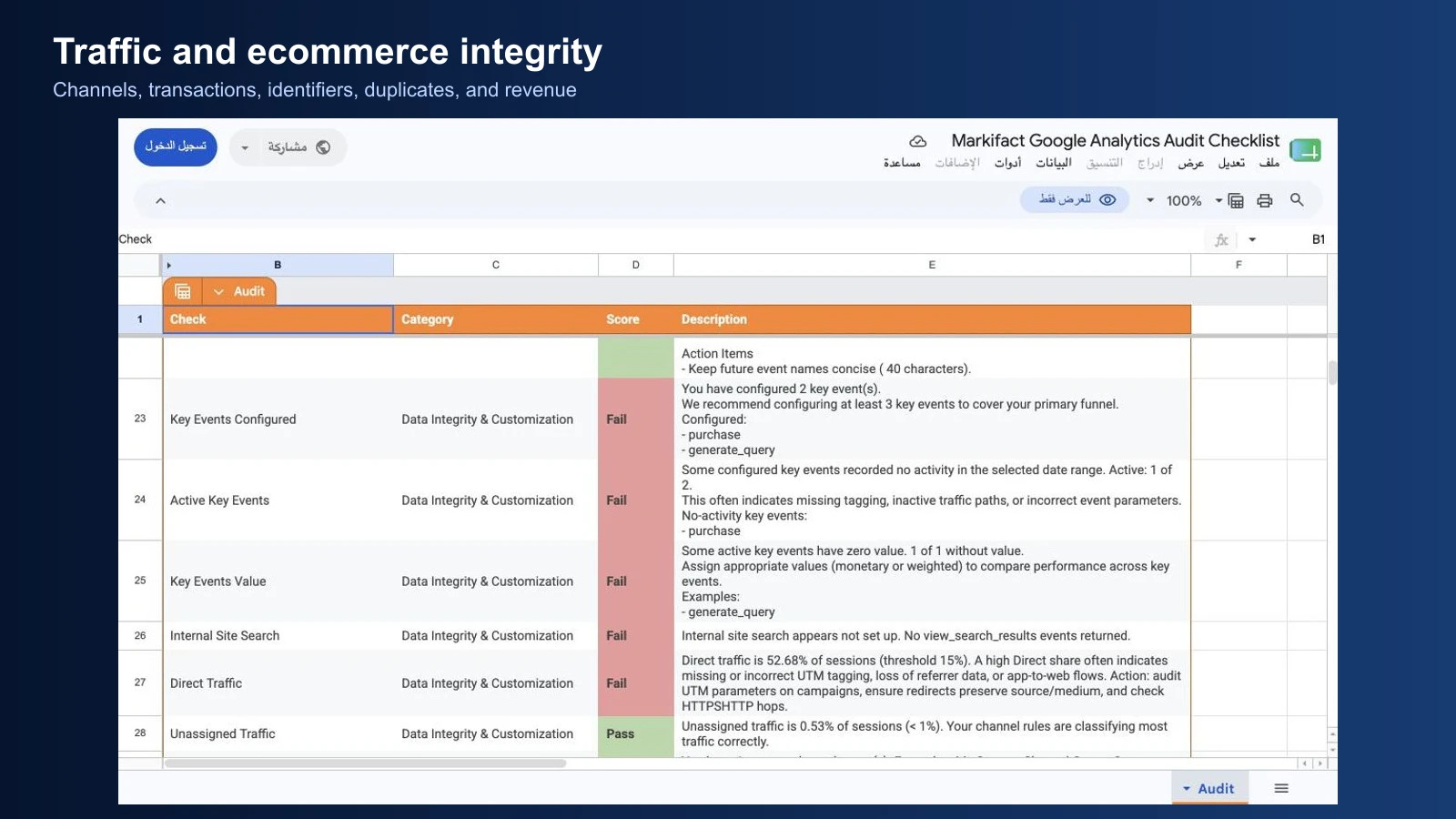
Review:
- Purchase events
- Transaction IDs
- Duplicate transaction IDs
- Purchase value
- Currency
- Item arrays and relevant item parameters
- Refunds when applicable
- Agreement with the commerce platform
A property with no transactions during the selected period cannot be fully tested for missing or duplicate transaction IDs. Mark those checks as not verifiable for the period rather than treating the absence as a clean pass.
When ecommerce does not apply, document that decision in the scope. Do not leave the reviewer wondering whether zero revenue is a broken implementation.
Step 8: audit integrations, audiences, and custom definitions
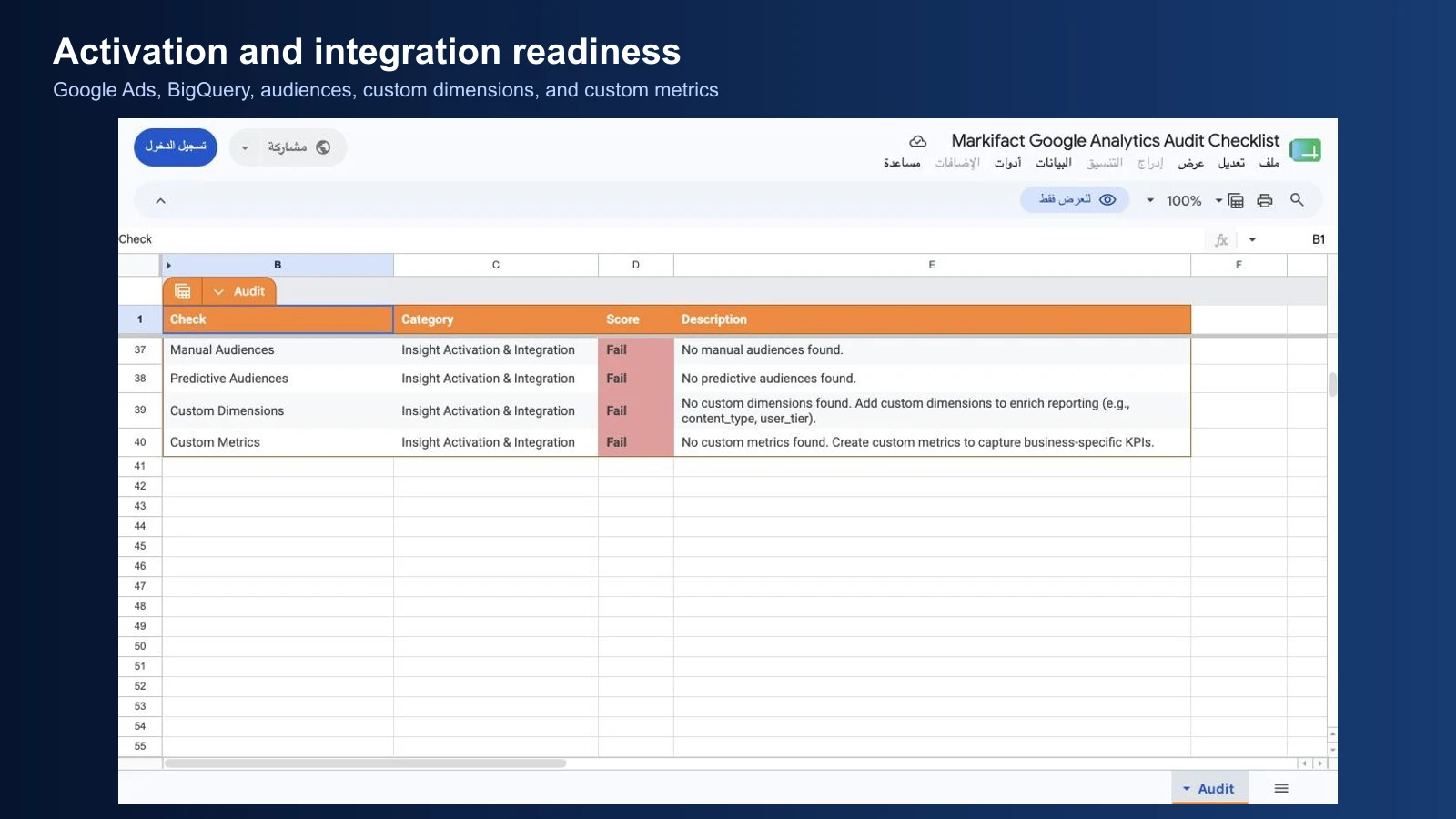
The final layer asks whether GA4 is ready to support analysis and activation.
Google Ads
Confirm whether a Google Ads link is required, which property and account are linked, and whether the team intends to share audiences or key events. Avoid linking multiple property types in a way that can create duplicate activation.
BigQuery
BigQuery export provides raw event-level data for advanced analysis and data integration. It is valuable when the team has a defined use case, ownership, budget, and governance process. Its absence is not automatically an error for a small property that does not need it.
Audiences
Review automatic, manual, and predictive audiences against actual activation needs. A property can be healthy without every audience type. The useful question is whether the audiences required by the marketing and product strategy exist and collect eligible users.
Custom dimensions and metrics
Custom definitions make collected event parameters and user properties available for reporting. Confirm that each definition:
- Maps to data the implementation actually sends
- Has the correct scope
- Uses a stable name
- Supports a real reporting use case
- Avoids unnecessary high cardinality
- Does not duplicate a standard GA4 field
Creating custom definitions without a reporting plan consumes quota and adds maintenance.
Step 9: prioritize failed checks
Not every Fail has the same urgency. Prioritize using impact, confidence, effort, and ownership.

| Priority | Definition | Examples |
|---|---|---|
| P0 | Active data corruption or severe business risk | Duplicate purchases, wrong production stream, consent breach |
| P1 | Material reporting or attribution problem | Missing key event, broken purchase value, widespread self-referrals |
| P2 | Analysis limitation or incomplete activation | Short retention, missing custom definition, absent useful integration |
| P3 | Documentation or optimization opportunity | Naming cleanup, unused audience, non-critical category setting |
Use this remediation ticket:
GA4 audit finding

Check:
Current score:
Evidence:
Business impact:
Confidence:
Proposed validation:
Proposed change:
Owner:
Approver:
Rollback plan:
Verification date:
Post-change result:
A proposed fix should name the implementation owner and verification method. “Fix tracking” is not an actionable ticket.
Step 10: approve, fix, and rerun
The safe sequence is:
- Review the generated finding.
- Confirm it against the measurement plan and source evidence.
- Reproduce the issue where possible.
- Define the proposed change and rollback plan.
- Obtain approval.
- Make the change through the correct owner.
- Wait for an appropriate validation window.
- Re-run the same checklist.
- Record the result and close or reopen the ticket.
Keep the original output. A dated audit trail shows what changed, who approved it, and whether the remediation worked.
If your next recurring deliverable is stakeholder reporting, the automated monthly SEO reporting workflow shows how to keep GA4 engagement metrics separate from Search Console visibility.
Ready to run the checklist? Open the Google Analytics Audit Checklist template, copy the supplied sheet, select your GA4 property, and generate the review-ready output.
Frequently asked questions
What is a Google Analytics audit?
A Google Analytics audit is a structured review of the property configuration, collected data, reporting quality, integrations, and business-use readiness. It should produce traceable findings and an approved remediation plan.
How often should you audit GA4?
Run a full audit after a new implementation, migration, redesign, consent change, ecommerce change, or major tracking release. For a stable property, a quarterly full audit plus focused checks after releases is a practical starting cadence.
What should a GA4 audit checklist include?
It should include streams, property settings, retention, attribution, referrals, domains, events, key events, channels, internal search, ecommerce, integrations, audiences, and custom definitions.
Does a failed audit check mean GA4 is broken?
No. A failed check is a review signal. The correct decision depends on the business model, measurement plan, selected dates, property type, implementation, and intended use.
Can the checklist change my GA4 property?
The workflow described here reads audit evidence and writes the results to Google Sheets. Treat every remediation as a separate action requiring an owner, approval, implementation plan, and verification.
Is there a Google Analytics audit template?
Yes. Markifact provides a reusable Google Analytics Audit Checklist workflow and Google Sheets output that can be copied and rerun for selected GA4 properties.