You can manage ChatGPT ads from Claude by connecting your OpenAI Ads account to Markifact and installing the approved Markifact connector. It is a slightly unusual combination, one AI company's ad platform managed from another AI company's assistant, but the workflow itself is straightforward. ChatGPT Ads is still a fast-moving beta, so the platform details in this guide were verified on July 16, 2026. You will connect the account, run a first report, improve context hints, and keep every live change behind approval.
ChatGPT advertising in 2026: the five-minute primer
OpenAI began rolling out its self-serve Ads Manager beta on May 5, 2026. Access is still opening gradually, so not every advertiser will see the same options at the same time. The current product is also changing quickly, which makes the date on any guide important.
Today, a ChatGPT ad appears below a relevant conversation rather than inside the assistant's answer. The unit includes an advertiser name, favicon, title, copy, landing page, and image. OpenAI says ads are clearly labeled and do not influence ChatGPT's answers. You can see the current format and rollout details in OpenAI's self-serve ads announcement and Ads in ChatGPT overview.
There are two current buying options:
- Views, bought on a CPM basis
- Clicks, bought on a CPC basis
OpenAI describes the auction as relevance-weighted and second-price. Matching considers the conversation's context and intent together with your ad group's context hints, landing page, title, and copy.
Context hints are not traditional exact-match keywords. They describe the conversations, topics, problems, or needs where an ad may be relevant. A hint can guide matching, but it does not guarantee that your ad will appear for a specific phrase.
OpenAI's campaign setup guide, updated July 16, currently states a $25 minimum daily spend per campaign. Current targeting includes countries and, where supported, states or regions, cities, DMAs, and postal codes. Reporting includes impressions, clicks, spend, CTR, average CPC, average CPM, and conversions, with pixel and Conversions API options for measurement.
Custom audiences are also available for campaign inclusion or exclusion and ad-group bid multipliers. OpenAI currently requires at least 25,000 matched users for a usable audience and recommends at least 100,000. These thresholds and capabilities can change while the platform is in beta, so check the current custom audience documentation before planning a launch.
Is there an official OpenAI Ads MCP server?
As of July 16, 2026, OpenAI has not published an official MCP server for its advertising product. OpenAI currently documents Ads Manager, its Advertiser API, and technology partners, but not an ads-specific MCP endpoint.
Markifact is a third-party managed MCP layer. It connects your OpenAI Ads account to Claude and exposes reporting and campaign-management operations without making you build and host your own server. For the broader platform comparison, see The State of Advertising MCPs in 2026.
The video may show the earlier manual connector setup. Follow the directory installation steps in this article for the current connection route.
What you can manage from Claude
Markifact supports full read and write management across the OpenAI Ads campaign surface it integrates. That includes reporting, campaigns, ad groups, ads, bids, budgets, statuses, context hints, locations, and conversion events.
The following are examples, not an exhaustive operation list:
- Read examples:
openai_ads_get_report,openai_ads_list_campaigns,openai_ads_list_ad_groups,openai_ads_list_ads,openai_ads_search_geo, andopenai_ads_list_conversion_events - Focused write examples:
openai_ads_create_campaign,openai_ads_create_ad_group,openai_ads_create_ad,openai_ads_update_campaign_budget,openai_ads_update_ad_group_bid,openai_ads_update_ad_group_context_hints, and status updates - Low-level update examples:
openai_ads_update_campaign,openai_ads_update_ad_group, andopenai_ads_update_ad
The lower-level operations accept raw partial updates and support dry-run inspection. They are useful when you need a field that does not have a focused helper, but a focused operation is easier to review when one exists.
Every Markifact operation that creates or changes an OpenAI Ads entity requires approval. Read operations do not require Markifact approval, although Claude may still ask for permission before calling a connector tool, depending on your Claude settings.
1. Connect OpenAI Ads to Markifact
Start in OpenAI Ads Manager. If self-serve access has reached your account, complete the advertiser setup and make sure the correct ad account is selected.
Then:
- Open OpenAI Ads settings and create or copy the API key for the ad account.
- In Markifact, open Connections and choose OpenAI Ads.
- Paste the API key and save the connection.
- Confirm the account name, currency, and timezone returned by the connection test.
The API key maps to one OpenAI Ads account, so the saved Markifact connection determines which account Claude can use. Treat the key like a production credential. Do not paste it into a Claude conversation, document, or screenshot. Rotate it if you think it has been exposed.
You can review the supported setup and management surface on the OpenAI Ads MCP page.
2. Install Markifact from the Claude directory
Markifact is approved in Claude's connector directory. Open the Markifact listing and click Connect. Complete the Markifact sign-in, choose the intended workspace, and review the requested access. If prompted to choose an MCP server, select the one with the connections you want to use.
In a Claude conversation, open + > Connectors and enable Markifact. You do not need to add a custom connector or paste a server URL for this setup. If your organization manages connector access, an administrator may need to allow Markifact first.
3. Run your first ChatGPT Ads report
Start with a read-only request. Name the date range, aggregation, metrics, account details, and change boundary.
Copy this prompt:
Use Markifact and my connected OpenAI Ads account.

Call openai_ads_get_report for the last 30 complete days and show
performance by campaign. Include spend, impressions, clicks, CTR,
average CPC, average CPM, and conversions where those fields are
available. Sort by spend from highest to lowest.

State the account, currency, timezone, exact date range, and any
requested metric that is unavailable. Do not make any changes.
openai_ads_get_report supports custom metrics, dimensions, filters, date ranges, comparisons, sorting, and account, campaign, ad-group, or ad aggregation. If a metric or dimension is unclear, ask Claude to call openai_ads_list_report_fields first instead of guessing the field name.
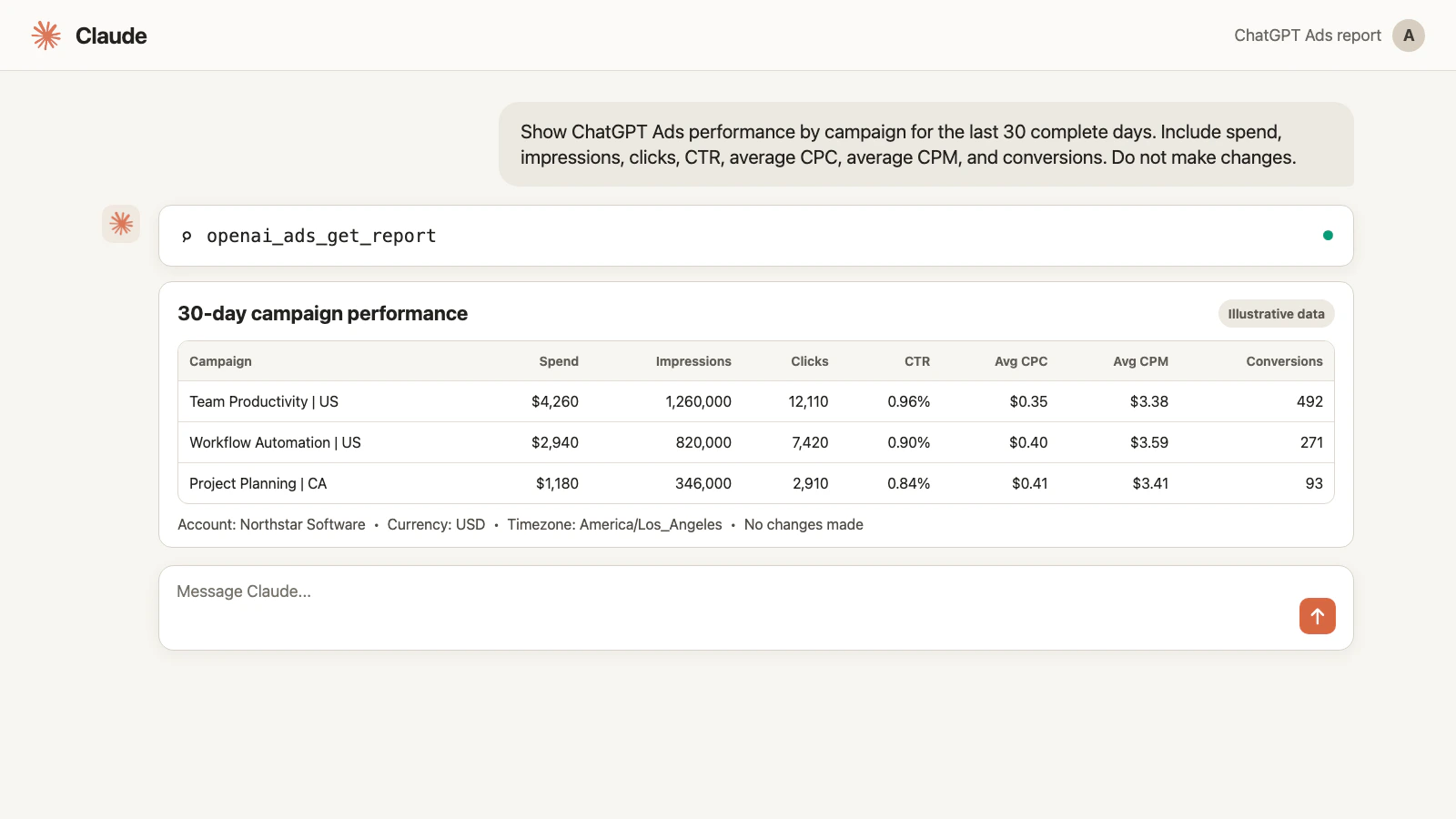
The figures in the image are illustrative. Your report will use the data available from the connected OpenAI Ads account.
Before asking Claude for recommendations, verify:
- The ad account is correct.
- The currency and timezone are correct.
- The report covers complete dates.
- The requested conversion event exists and is the one your team uses.
- The totals are plausible compared with Ads Manager.
A useful next prompt is:
Compare those 30 complete days with the previous 30 complete days.
Show the absolute and percentage change for spend, clicks, CTR,
average CPC, conversions, and conversion rate where available.

Identify the three campaign changes that deserve investigation.
Support every conclusion with figures. Do not make any changes.
4. Improve context hints without making a blind edit
Context hints are one of the most important differences between ChatGPT advertising and conventional search advertising. They describe the user situations where your ad may be helpful, so a good update needs both performance evidence and a clear description of the intended conversation.
Do not begin with “improve my targeting.” First ask Claude to retrieve the ad group, its current hints, and its performance. Then request a current-versus-proposed comparison.
Copy this prompt:
Use Markifact to review the ad group named Team Collaboration.

Show its ad group ID, current context hints, spend, impressions,
clicks, CTR, average CPC, and conversions for the last 30 complete days.
Then propose a tighter set of context hints for people evaluating
software to coordinate projects, deadlines, and cross-team work.

Show the current and proposed hints side by side and explain each change.
Only after that, prepare openai_ads_update_ad_group_context_hints.
Do not apply the update until I approve the exact ad group ID and list.
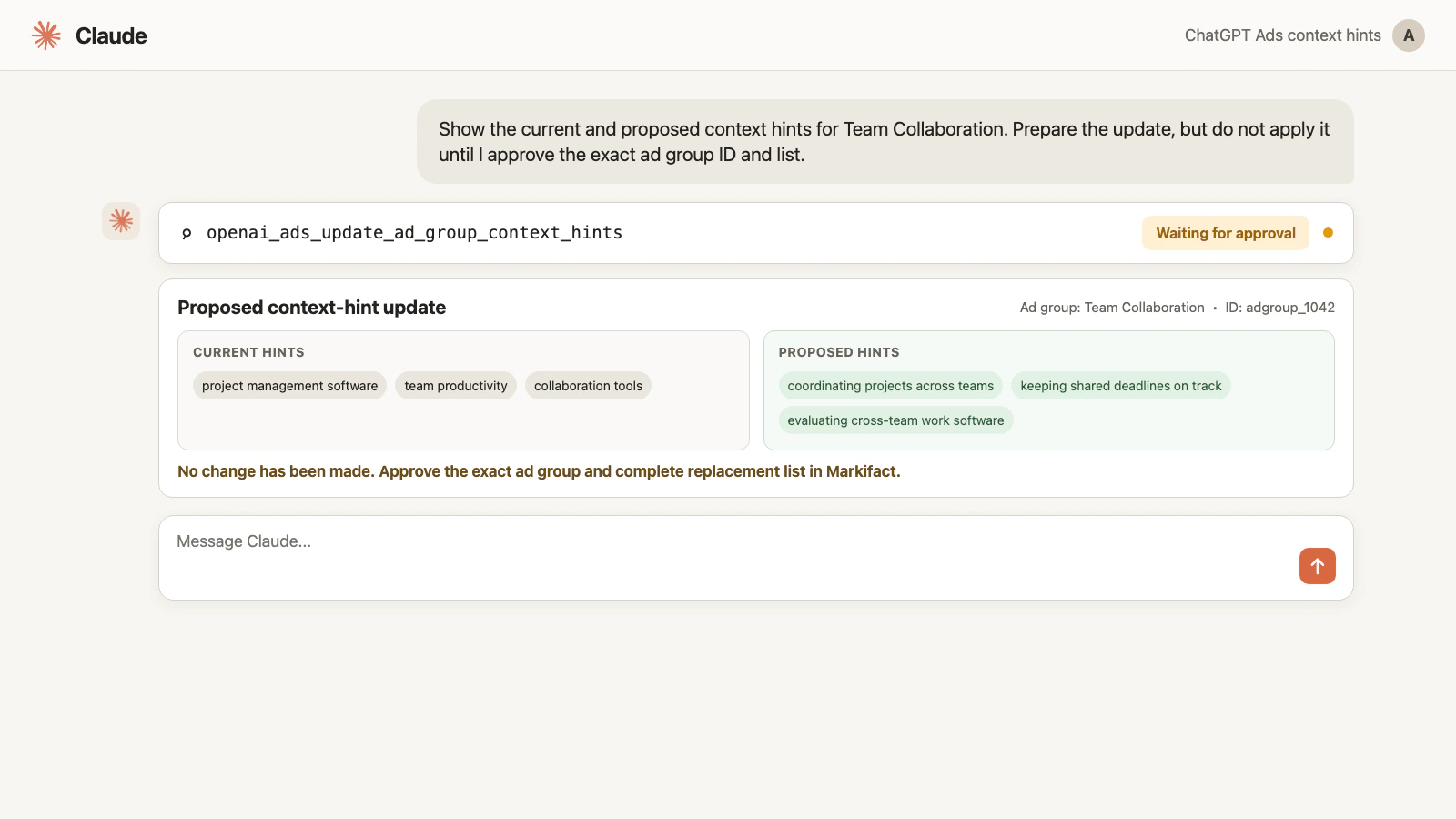
openai_ads_update_ad_group_context_hints requires an ad group ID and a string or list of context hints. Waiting for approval means the change has not been applied. Review the complete list because the update may replace the existing set rather than append one phrase.
Other useful Claude workflows
Build a paused campaign for review
Ask Claude to find the required location IDs with openai_ads_search_geo, list the available conversion events, then prepare a campaign, ad group, and ad in a paused state. openai_ads_create_campaign, openai_ads_create_ad_group, and openai_ads_create_ad are examples of the available write operations, not the complete set.
Use explicit inputs for bidding type, daily or lifetime budget, dates, locations, context hints, landing page, and conversion events. Review every entity ID and amount before approval. The campaign will still be subject to OpenAI's account eligibility, billing, policy, and ad review requirements.
Adjust a bid or budget
Ask for the current value and supporting performance first. Then have Claude prepare one focused change with openai_ads_update_ad_group_bid or openai_ads_update_campaign_budget. Confirm that the amount is expressed in the account currency and that the correct campaign or ad-group ID is shown.
Pause an underperforming ad
Have Claude show the ad ID, status, spend, clicks, and conversions before it prepares openai_ads_update_ad_status. Avoid broad requests such as “pause the bad ads” because the decision rule and entity scope are not reviewable.
Use low-level updates for uncommon fields
When a focused operation does not cover the required field, Markifact also exposes low-level examples such as openai_ads_update_campaign, openai_ads_update_ad_group, and openai_ads_update_ad. Ask for a dry run and inspect the raw partial update before approving it.
These named operations illustrate the range. They are not an inclusive list of everything Markifact can do with OpenAI Ads.
Claude permission and Markifact approval are separate
Claude controls whether a connector tool may be invoked. Markifact separately controls whether a write may reach the ad platform.
For a report, Claude may ask to call Markifact, then Markifact returns the account data. For a write, Claude may ask to call the tool, and Markifact then creates a separate approval step for the proposed change. Reducing prompts in Claude does not remove Markifact's write approval.
Before approving any live action, verify:
- The Markifact workspace and OpenAI Ads account
- The entity name and ID
- The account currency and timezone
- The current value
- The proposed value
- Whether the change is a create, update, pause, or activation
Approval does not expand your OpenAI permissions or bypass billing, policy, ad review, or account eligibility. It only authorizes the exact Markifact operation shown.
What changed recently in ChatGPT Ads
This guide is current as of July 16, 2026. The most important recent details are:
- OpenAI's campaign documentation now states a $25 minimum daily spend per campaign.
- Granular location targeting includes supported regions, cities, DMAs, and postal codes.
- Custom audiences can be used for inclusion, exclusion, and ad-group bid multipliers, subject to current match-size thresholds.
- Pixel and Conversions API measurement are available alongside Ads Manager reporting.
The current format remains the image-based chat ad shown below relevant conversations. No newer official format was found in this research pass. OpenAI says formats, objectives, and capabilities will continue to evolve, so recheck its Ads Help Center guidance before a major launch.
Frequently asked questions
What is a ChatGPT Ads MCP?
A ChatGPT Ads MCP connects an AI client to OpenAI's advertising data and management operations through the Model Context Protocol. Markifact provides a managed third-party MCP connection so Claude can report on and manage a connected OpenAI Ads account.
Can Claude really manage ads shown in ChatGPT?
Yes. Through Markifact, Claude can read OpenAI Ads data and prepare approval-gated changes across campaigns, ad groups, and ads. The exact capabilities available still depend on your OpenAI Ads account, API access, permissions, and current beta eligibility.
Does OpenAI have an official Ads MCP server?
As of July 16, 2026, OpenAI has not published an official MCP server for its advertising product. Markifact is a third-party managed MCP layer that uses the OpenAI Ads connection associated with your Markifact workspace.
What are context hints in ChatGPT advertising?
Context hints describe the conversations, topics, needs, or keywords where an ad may be relevant. They guide matching, but they are not exact-match search keywords and do not guarantee placement for a phrase.
Can Claude create and edit ChatGPT Ads campaigns?
Yes. Markifact supports full read and write management for the integrated OpenAI Ads campaign surface. Named tools in this guide are examples, not an exhaustive list, and every create or update operation requires Markifact approval.
What is the minimum ChatGPT Ads budget?
OpenAI's campaign guide, updated July 16, 2026, states a current minimum daily spend of $25 per campaign. Because the platform is in beta, verify the amount in Ads Manager before launch.
Does Markifact require my OpenAI Ads API key?
Yes. The current connection uses the API key available from OpenAI Ads settings. Save it in Markifact and never paste it into a Claude conversation or share it in a screenshot.
Are account changes automatic?
No. Markifact operations that create or change OpenAI Ads entities require approval. A proposal marked Waiting for approval has not changed the ad account.