
Google Ads Offline Conversion Uploader
Bulk upload offline conversions to Google Ads from Google Sheets. Import CRM sales and leads matched by click ID, email, or phone, hashed automatically and pushed through Google's new Data Manager API with Markifact.
Built with
 Google Data Manager
 Google Sheets
 Google Ads
 Flow Control
 Manual Run
Use this Google Ads offline conversion uploader to import offline sales and leads from a Google Sheet into your Google Ads conversion actions. Instead of formatting Google's strict upload files or wiring up the API yourself, you fill out a simple spreadsheet, run the workflow, and your conversions are on their way to Google Ads in a few clicks.
It is built on Google's new Data Manager API, the replacement for the legacy offline conversion import, so it works for new integrations that can no longer upload through the old Google Ads API method. It supports both click-based matching with gclid and enhanced conversions for leads matching with hashed emails and phone numbers.
What This Google Ads Offline Conversion Uploader Does
This template works like a lightweight offline conversion importer that runs from Google Sheets. It lets you:
- Upload offline conversions in bulk instead of one at a time
- Match conversions by Google click ID (gclid), email, or phone number
- Send conversion value, currency, order ID, and conversion time with every row
- Upload into multiple Google Ads accounts and conversion actions from one sheet
- Keep a clean, reviewable record of everything you imported
Behind the scenes, the workflow:
- Reads your conversion rows from the Google Sheet
- Normalizes and SHA-256 hashes emails and phone numbers inside Markifact before anything is sent to Google
- Validates every row and reports exactly which row has a problem
- Sends the conversions to Google through the Data Manager API and returns a request ID you can use to check processing status
Key Benefits
1. Import CRM Conversions Without Engineering Work
Offline conversion tracking usually means exports, hashing scripts, and API work. With this template you:
- Paste your CRM sales or qualified leads into a sheet
- Run one workflow
- Let Markifact handle hashing, formatting, timezones, and batching
2. Works With Google's New Data Manager API
Google now requires new integrations to use the Data Manager API for offline conversion imports. This template is built on it natively, so you are not depending on legacy upload methods that are being phased out.
3. Enhanced Conversions For Leads
No gclid stored in your CRM? Rows can be matched by email or phone number instead. Values are normalized and hashed automatically, so you never paste raw customer data into Google's interface.
4. Multi-Account And Agency Friendly
Each row can carry its own account ID, manager (MCC) account ID, and conversion action ID. One sheet can feed conversions into several client accounts in a single run.
5. Clear Errors And Status Tracking
Row validation happens before upload, with row numbers in every error message. After upload, the workflow returns Google's request ID, and the status branch shows per-destination processing results, including error and warning counts.
How It Works
Copy The Google Sheet
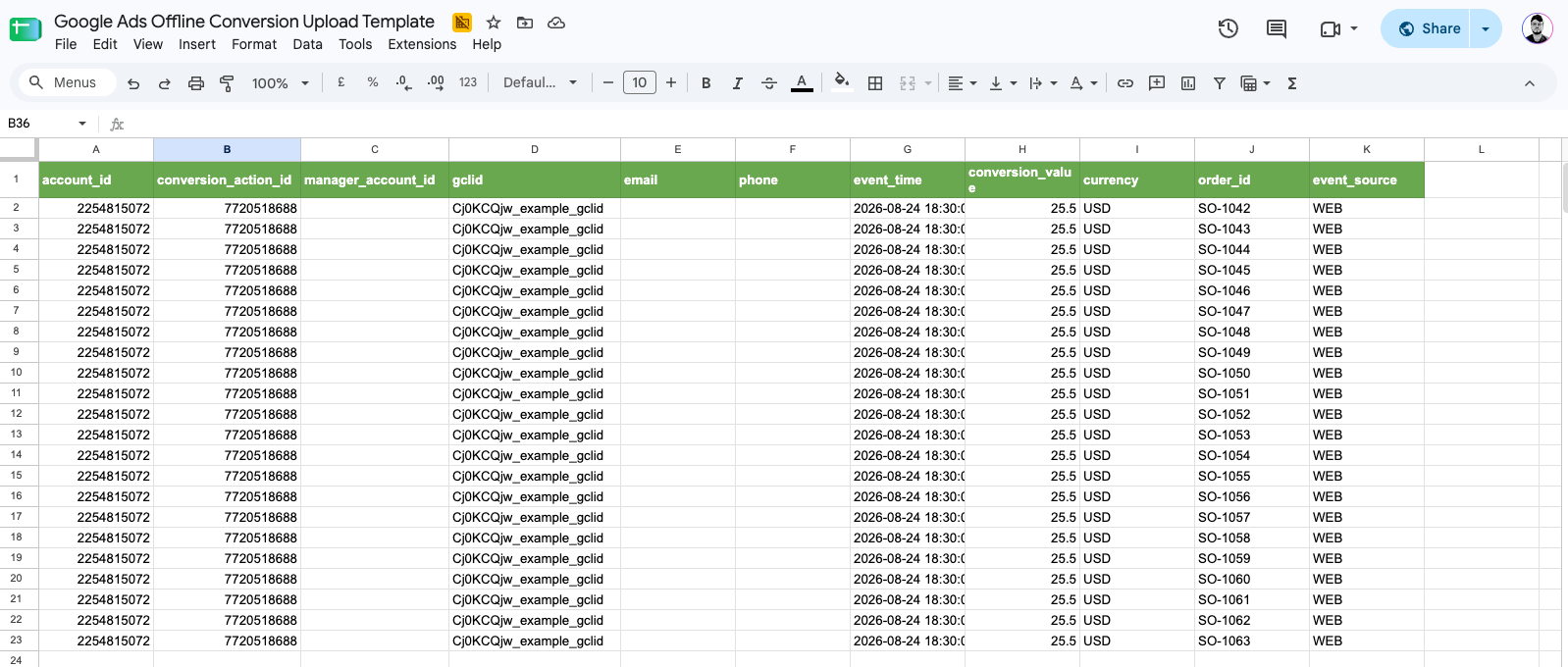
The sheet has one row per conversion with columns for account ID, conversion action ID, gclid, email, phone, conversion time, value, currency, and order ID. Instruction cells tell you exactly what each column expects.Find Your Conversion Action
Run the fetch branch to pull your Google Ads conversion actions and pick the upload-type conversion action ID to import into. You can also create a new one directly from Markifact.Fill In Your Conversions
One row per conversion. Each row needs a conversion time with timezone and at least one identifier: gclid, email, or phone.Run The Upload
The workflow validates the rows, hashes identifiers, groups rows by account and conversion action, and sends everything to Google. Use validate-only mode for a dry run first.Check Processing Status
Uploads are processed asynchronously by Google. Use the returned request ID with the status branch to confirm processing, and expect matched conversions to appear in Google Ads reporting within a few hours.
Setup Instructions
- Make a copy of the Google Sheet into your own Google Drive
- Connect Google Data Manager in Markifact and sign in with a Google account that has access to your Google Ads account
- Make sure you have an upload-type conversion action in Google Ads (the fetch branch lists them, or create one with Markifact)
- Fill in your conversion rows and delete the instruction row
- Run the workflow, review the summary, and re-run failed rows after fixing them
Who This Template Is For
- Lead gen businesses closing deals offline (calls, meetings, signed contracts) that want Google Ads to optimize toward real revenue
- Ecommerce and subscription teams importing refunds-adjusted or delayed conversion data
- Agencies importing offline conversions for multiple client accounts from one place
- Anyone hitting Google's new Data Manager API requirement who does not want to build an integration from scratch
FAQs
Related Templates
Discover more marketing workflow templates to automate your tasks


Google & Meta Ads Consolidated Monthly Slides
Generate consolidated Google & Meta Ads performance reports in Google Slides with AI-enhanced insights and visualizations.

Meta Ads Bulk Uploader via Google Sheets
Create dozens of Meta ads in minutes by uploading your entire campaign structure from a single Google Sheet, eliminating tedious manual ad creation.

Google Ads Audit Checklist
Say goodbye to manual Google Ads audits. Run a full account check in minutes with over 40 automated checks.


Monthly SEO Report Template (Google Slides, Auto-Filled from GSC & GA4)
A reusable monthly SEO report template in Google Slides, filled automatically from Search Console and GA4 by a Markifact workflow. Run it each month and get a client-ready deck.


Competitor Ads Spy
Export competitor ads from Google, Meta, LinkedIn, and TikTok into Google Sheets for instant analysis and research.
Meta Ads Audit Checklist
Say goodbye to manual Meta Ads audits. Run a full account check in minutes with over 100 data points
Cross-Channel Monthly PPC Report
Automatically generate a cross-channel monthly PPC report in Google Slides using Google Ads, Meta Ads, and TikTok Ads data, complete with blended KPIs, charts, and AI-written insights in minutes.


GMC Price Benchmarks Labelizer
Turn Google Merchant Center’s price benchmarks into daily custom labels you can use in Google Ads to scale campaigns by competitiveness.


AI Brand Mention Tracker (AEO / GEO)
Automatically track whether ChatGPT, Claude, Gemini, and Google AI experiences mention your brand (and include your link) for any keyword prompt, then log results to Google Sheets over time.


10,000+ marketers scaling with AI.
Can't find what you're looking for?
Describe your marketing automation needs and let our AI build a custom workflow for you.
Ready to automate your marketing?
Sign up now and let Markifact handle the busy work so you can focus on growth.