
Google Ads Search Intent Classifier with Jev
Categorize your Google Ads search terms by user intent using AI and export the organized data to Google Sheets for optimized campaign management.
Built with
 Google Ads
 AI
AI Google Sheets
 Manual Run
 Flow Control
Put Jev to work on your paid search data. This Markifact workflow uses TypeSafe’s fast AI model to classify thousands of Google Ads search terms by search intent, with low credit usage, and exports the results to Google Sheets.
Turn a long search term report into an organized view of what people are looking for—and use it to support campaign analysis, negative keyword reviews, ad messaging, and landing page improvements.
What is Jev?
Jev is an AI model developed by TypeSafe for fast, focused decisions. It understands text and supports classification, scoring, and yes/no questions.
For this workflow, Jev evaluates each search term against the intent categories you define. It returns a classification and probabilities that help you identify uncertain results for review.
You control the categories and their descriptions, so the classification can reflect your products, services, audience, and advertising goals.
Understand the intent behind your ad traffic
Google Ads search terms show the searches that triggered your ads. Adding intent classifications helps you understand what people wanted to accomplish when they searched.
Were they researching a topic? Comparing products? Ready to purchase? Looking for a particular brand or website?
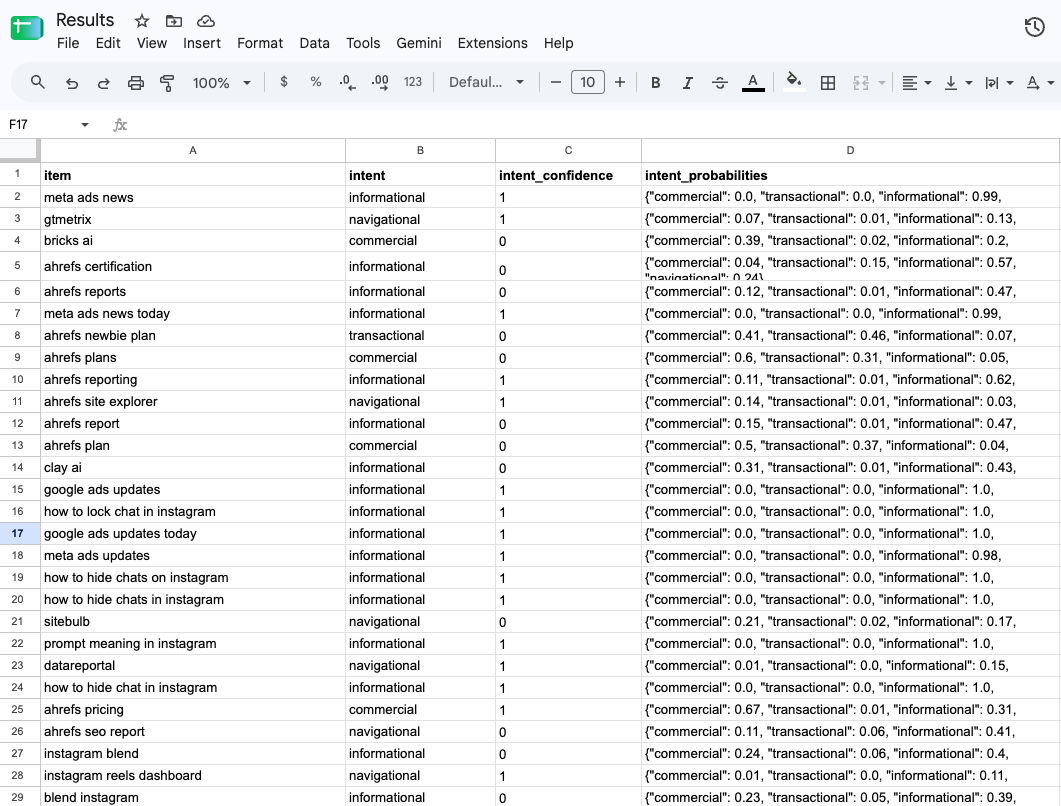
This workflow evaluates each search term against your chosen categories while preserving the original report data. You can then review intent alongside clicks, cost, conversions, and other metrics included in your report.
That additional context helps you investigate which types of searches attract traffic and how they contribute to your campaign goals.
Why use Jev for Google Ads search term analysis?
Search term reports can contain thousands of rows, making manual classification time-consuming. Jev applies the same set of criteria across your report, giving you a practical starting point for analysis.
- Fast bulk processing: Classify thousands of search terms in one workflow run, with automatic batching handled by Markifact.
- Low credit usage: Make large-scale classification affordable for recurring campaign reviews.
- Customizable categories: Start with search intent or define categories around your business, products, and services.
- Structured results: Export organized classifications to Google Sheets for filtering, grouping, and analysis.
- Probabilities for review: Identify ambiguous search terms before using their classifications to guide campaign decisions.
How the workflow works
- Pull your search terms. Connect Google Ads and choose the search term data you want to analyze.
- Define your categories. Configure the categories and instructions Jev should apply.
- Classify each search term. Jev evaluates the terms individually, and Markifact handles processing the list in batches.
- Export to Google Sheets. Keep your original report data alongside the classification results for further analysis.
The resulting spreadsheet gives your team a shared place to review search intent, compare performance, and identify terms that need attention.
Choose categories that fit your campaign strategy
Start with informational and transactional intent to keep the analysis simple, or expand your classification to cover all four common intent categories:
| Category | What the user wants | Example search term |
|---|---|---|
| Informational | Information, instructions, or answers | “how to choose running shoes” |
| Commercial | Comparisons and research before choosing a solution | “best running shoes for beginners” |
| Transactional | To purchase, book, sign up, or complete an action | “buy running shoes online” |
| Navigational | A particular website or page | “Nike official website” |
Write descriptions that reflect your industry and campaign goals. Some searches can suggest more than one intent, so use the returned probabilities when reviewing borderline cases.
You can also add separate classification questions for themes such as product category, service type, or brand relevance.
Turn search term data into campaign insights
Once your search terms are organized by intent, you can explore patterns that are harder to see in an unclassified report.
Review where your budget is going
Group search terms by intent and compare the cost, clicks, and conversions included in your report. See how much activity comes from research-oriented searches, purchase-oriented searches, and other categories.
Build a more focused negative keyword review
Identify terms that may be unrelated to your offering or poorly aligned with a campaign’s goals. Use the classifications to prioritize manual review before deciding whether to exclude them.
An informational search is not automatically a bad search. Its value depends on your campaign objectives, offer, and observed performance.
Explore ad group and messaging themes
Look for recurring needs across your search terms. Queries about comparisons, specific features, pricing, or availability can suggest themes to investigate when reviewing ad groups and ad copy.
Review landing page relevance
Use search intent to guide a closer look at the pages receiving your ad traffic. Check whether each page provides the information, offer, or next step that searchers appear to expect.
Identify valuable research-stage traffic
Commercial and informational searches may contribute to your goals even when they do not express an immediate intention to buy. Compare their classifications with performance data before deciding how to treat them.
Keep your decisions grounded in performance
Intent classification adds context to your Google Ads report. Combine that context with conversion performance, business priorities, and your knowledge of the customer journey.
Use probabilities to flag uncertain classifications, and review important terms before making campaign changes. This workflow organizes your data for analysis; campaign decisions remain under your control.
Make search intent part of your campaign review
Use the workflow when reviewing search traffic, auditing an account, exploring new campaign themes, or preparing a report for your team or clients.
Customize the instructions, refine your categories, and revisit the analysis as new search terms appear. Jev handles the repetitive classification work, giving your team more time to investigate performance and improve campaign relevance.
Related Templates
Discover more marketing workflow templates to automate your tasks


Google & Meta Ads Consolidated Monthly Slides
Generate consolidated Google & Meta Ads performance reports in Google Slides with AI-enhanced insights and visualizations.

Meta Ads Bulk Uploader via Google Sheets
Create dozens of Meta ads in minutes by uploading your entire campaign structure from a single Google Sheet, eliminating tedious manual ad creation.

Google Ads Audit Checklist
Say goodbye to manual Google Ads audits. Run a full account check in minutes with over 40 automated checks.


Monthly SEO Report Template (Google Slides, Auto-Filled from GSC & GA4)
A reusable monthly SEO report template in Google Slides, filled automatically from Search Console and GA4 by a Markifact workflow. Run it each month and get a client-ready deck.


Competitor Ads Spy
Export competitor ads from Google, Meta, LinkedIn, and TikTok into Google Sheets for instant analysis and research.
Meta Ads Audit Checklist
Say goodbye to manual Meta Ads audits. Run a full account check in minutes with over 100 data points
Cross-Channel Monthly PPC Report
Automatically generate a cross-channel monthly PPC report in Google Slides using Google Ads, Meta Ads, and TikTok Ads data, complete with blended KPIs, charts, and AI-written insights in minutes.


GMC Price Benchmarks Labelizer
Turn Google Merchant Center’s price benchmarks into daily custom labels you can use in Google Ads to scale campaigns by competitiveness.

AI Brand Mention Tracker (AEO / GEO)
Automatically track whether ChatGPT, Claude, Gemini, and Google AI experiences mention your brand (and include your link) for any keyword prompt, then log results to Google Sheets over time.


10,000+ marketers scaling with AI.
Can't find what you're looking for?
Describe your marketing automation needs and let our AI build a custom workflow for you.
Ready to automate your marketing?
Sign up now and let Markifact handle the busy work so you can focus on growth.