
TikTok Ads Bulk Uploader via Google Sheets
Bulk upload TikTok ads from Google Sheets. Create Spark Ads, video ads, image ads, carousel ads, catalog ads, and lead ads in one sheet, then upload them to TikTok Ads with Markifact.
Built with
 TikTok Ads
 Google Sheets
 Google Drive
 Flow Control
 Manual Run
Use this TikTok ads bulk upload template to create and publish dozens of TikTok ads from a single Google Sheet. Instead of building ads one by one in TikTok Ads Manager, you fill out a spreadsheet, run the workflow, and push everything live in a few clicks.
It is designed for teams that want a reliable TikTok ads bulk upload flow powered by Google Sheets, so you can scale campaigns faster, keep structure consistent, and avoid manual copy paste mistakes.
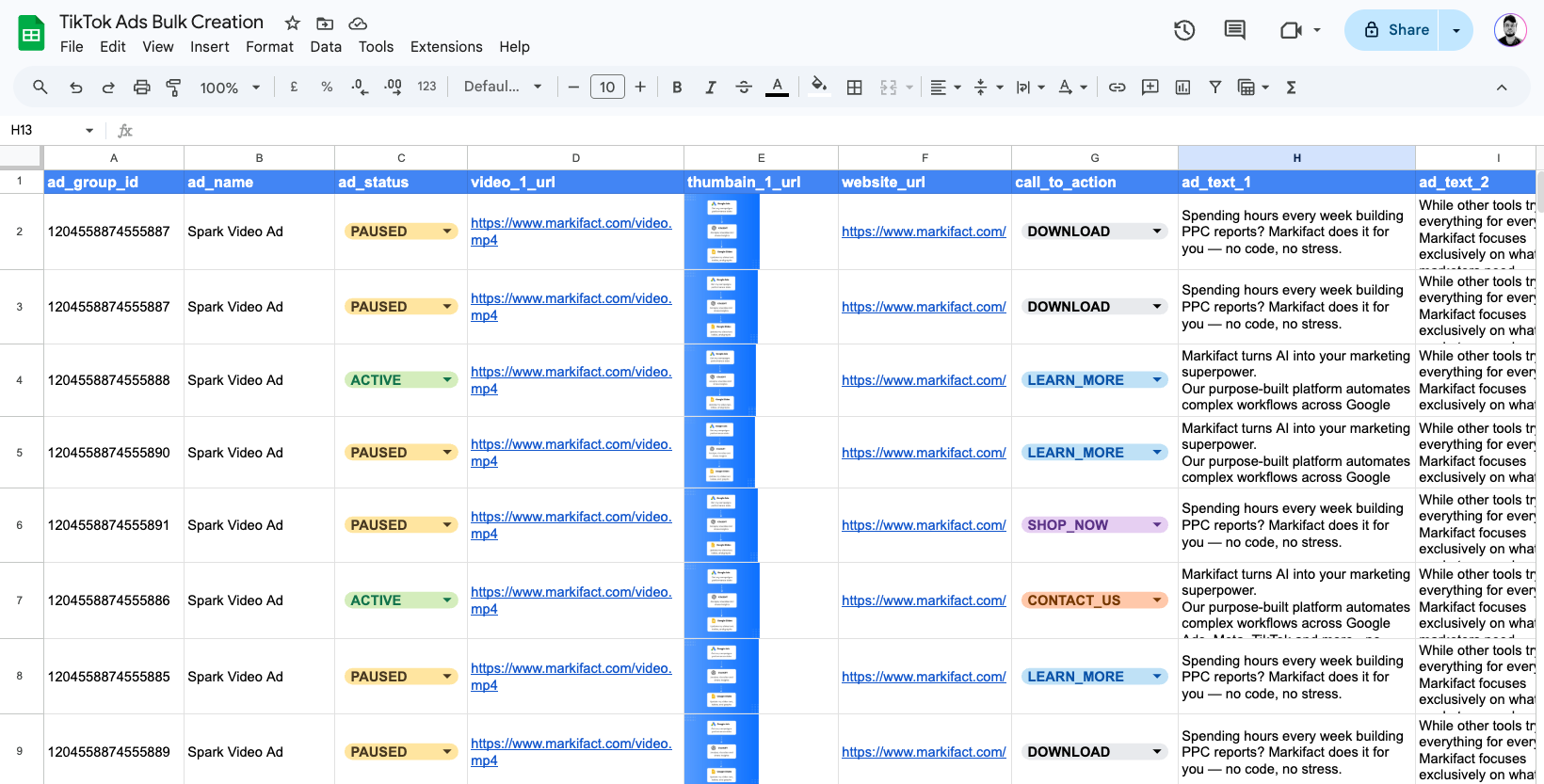
What This TikTok Ads Bulk Upload Template Does
This template works like a lightweight TikTok ads bulk uploader that runs from Google Sheets. It lets you:
- Prepare ads in a structured sheet
- Bulk upload TikTok ads instead of creating them one at a time
- Support all major TikTok ad formats, including Spark Ads, image ads, video ads, carousel ads, catalog ads, and lead ads
- Keep naming conventions, UTMs, and settings consistent at scale
Behind the scenes, it behaves like a TikTok ads bulk editor that:
- Reads your ad rows from a Google Sheet
- Maps each row to the correct TikTok Ads fields
- Creates ads in bulk with the right targeting, placements, budgets, creatives, URLs, and tracking settings
The result is a repeatable TikTok ads bulk upload process that lets you launch complex TikTok account builds in a fraction of the normal time.
TikTok Ads Bulk Upload – Key Benefits
1. Bulk Upload TikTok Ads From Google Sheets
Instead of clicking through TikTok Ads Manager for every new ad, you can:
- Add dozens of ad variations into a single sheet
- Run one workflow to upload everything at once
- Use the same process every time you launch or refresh campaigns
This is ideal if you often build large campaigns, refresh creatives frequently, or need a cleaner way to manage TikTok ad production.
2. Support All Major TikTok Ad Types
This template supports TikTok ad creation across different campaign and creative types, including:
- Spark Video Ads
- Spark Image Ads
- Single Image Ads
- Carousel Ads
- Video Ads
- Catalog Ads
- Search Ads
- App Ads
- Lead Ads
- Smart+ Creative
- Manual Creative
You can use it for both Smart+ campaigns and manual campaigns, depending on your campaign setup.
3. Scale Creatives And Tests Quickly
With this TikTok ads bulk upload template you can:
- Create 50 plus image, video, Spark, or carousel ads in the time it normally takes to build a few manually
- Test multiple ad texts, videos, images, posts, and destination URLs in one go
- Standardize CTAs, URLs, UTMs, tracking settings, and naming conventions across all ads
You set up the framework once and then let the sheet handle the variations.
4. Consistent Structure Across Campaigns
By planning everything in Google Sheets, you can:
- Apply clear naming conventions for campaigns, ad groups, and ads
- Keep targeting, budgets, placements, and creative settings aligned with your account structure
- Avoid small manual errors that cause reporting or launch issues later
It feels like using a custom TikTok ads Google Sheets editor that fits your own naming and QA rules.
5. Better Workflow For Teams And Agencies
Because everything lives in a sheet, it is easy to:
- Collaborate on ad copy, Spark posts, videos, images, and catalog setup with teammates or clients
- Review and approve campaigns before upload
- Keep a clear record of what was launched and when
This makes the template useful not only for building TikTok ads, but also for documentation, QA, and sign off.
How The TikTok Ads Bulk Uploader Works
Template Setup
Start with a ready made Google Sheets template that includes all the required fields for campaigns, ad groups, and ads. Columns cover things like campaign names, ad group settings, ad names, ad text, URLs, creatives, Spark post IDs, music IDs, catalog products, budgets, and more.Batch Entry In Google Sheets
Enter or paste all of your ads into the sheet. Each row represents one ad or one configuration you want to upload. This is where you define ad text, URLs, UTM parameters, videos, images, carousel assets, Spark post IDs, catalog products, lead forms, CTAs, and tracking settings.One Click Bulk Upload To TikTok Ads
Run the workflow to trigger a bulk upload TikTok ads operation. The workflow reads each row, validates required fields, and sends the corresponding requests to TikTok Ads.Status And Error Reporting
Once the run is complete, you receive a status report indicating which ads were created successfully and where any issues occurred. That makes it easy to fix data in the sheet and rerun if needed.
Setup Instructions For The TikTok Ads Google Sheets Template
Make A Copy Of The Google Sheets Template
Open and copy the provided TikTok ads bulk upload Google Sheet into your own Google Drive.Fill In The Required Fields
For each ad you want to create, complete the required columns in the sheet such as campaign name, ad group, ad name, ad text, destination URL, creative asset, CTA, Spark post ID, catalog products, or lead form settings depending on the ad type.Upload Or Reference Your Creative Assets
Add your video URLs, image URLs, Spark post IDs, music IDs, or catalog product details in the relevant columns. For files, you can upload assets to Google Drive and use public share links where supported.Grant Edit Access To The Sheet
Give the Markifact service account edit permissions on your sheet so the workflow can read data and write back any status updates.Run The Workflow To Bulk Upload TikTok Ads
Trigger the workflow to read the Google Sheet and create all of your ads at once in TikTok Ads Manager.Review Status And Fix Errors If Needed
Check the result columns after the workflow runs. If a row fails, fix the issue in the sheet and rerun the workflow.
Who This TikTok Ads Bulk Upload Template Is For
This template is a good fit for:
- Media buyers managing large TikTok Ads accounts
- Agencies building complex client campaigns or frequent creative refreshes
- Performance teams that prefer building in Google Sheets instead of clicking around TikTok Ads Manager
- Teams running high-volume creative testing across Spark Ads, video ads, image ads, carousel ads, catalog ads, and lead ads
If you regularly launch or update many TikTok ads at once, this TikTok ads bulk upload workflow gives you a faster and cleaner way to manage production.
FAQs
Related Templates
Discover more marketing workflow templates to automate your tasks


Google & Meta Ads Consolidated Monthly Slides
Generate consolidated Google & Meta Ads performance reports in Google Slides with AI-enhanced insights and visualizations.
Meta Ads Bulk Uploader via Google Sheets
Create dozens of Meta ads in minutes by uploading your entire campaign structure from a single Google Sheet, eliminating tedious manual ad creation.

Google Ads Audit Checklist
Say goodbye to manual Google Ads audits. Run a full account check in minutes with over 40 automated checks.


Monthly SEO Report Template (Google Slides, Auto-Filled from GSC & GA4)
A reusable monthly SEO report template in Google Slides, filled automatically from Search Console and GA4 by a Markifact workflow. Run it each month and get a client-ready deck.

Competitor Ads Spy
Export competitor ads from Google, Meta, LinkedIn, and TikTok into Google Sheets for instant analysis and research.
Meta Ads Audit Checklist
Say goodbye to manual Meta Ads audits. Run a full account check in minutes with over 100 data points
Cross-Channel Monthly PPC Report
Automatically generate a cross-channel monthly PPC report in Google Slides using Google Ads, Meta Ads, and TikTok Ads data, complete with blended KPIs, charts, and AI-written insights in minutes.


GMC Price Benchmarks Labelizer
Turn Google Merchant Center’s price benchmarks into daily custom labels you can use in Google Ads to scale campaigns by competitiveness.

Google Ads Offline Conversion Uploader
Bulk upload offline conversions to Google Ads from Google Sheets. Import CRM sales and leads matched by click ID, email, or phone, hashed automatically and pushed through Google's new Data Manager API with Markifact.


10,000+ marketers scaling with AI.
Can't find what you're looking for?
Describe your marketing automation needs and let our AI build a custom workflow for you.
Ready to automate your marketing?
Sign up now and let Markifact handle the busy work so you can focus on growth.